2004 Hyundai Santa Fe brake light
[x] Cancel search: brake lightPage 84 of 253

1FEATURES OF YOUR HYUNDAI
71REMOTE FUEL-FILLER LID RELEASEAUTO FUEL CUT SWITCHHIGH-MOUNTED REAR STOP LIGHT
B550A01A-AAT
(If installed)
In addition to the lower-mounted rear stoplights
on either side of the car, the high mounted rear
stoplight in the center of the rear window also
lights when the brakes are applied.
B550A01O
!
B560B01O-AAT
The auto fuel cut switch is located on the driver's
side of the engine compartment.
In the event of a collision or sudden impact, the
auto fuel cut device cuts off the fuel supply. If this
device is activated, it must be reset by pressing
in on the top of the switch before the engine can
be restarted.
WARNING:Before resetting the auto fuel cut switch,
the fuel line should be checked for fuel
leaks.
B560B01O
B560A02S-AAT
The fuel-filler lid may be opened from inside the
vehicle by pulling up on the fuel-filler lid opener
located on the front floor area on the left side of
the car.
NOTE:If the fuel-filler lid will not open because ice
has formed around it, tap lightly or push on
the lid to break the ice and release the lid. Do
not pry on the lid. If necessary, spray around
the lid with an approved de-icer fluid (do
not use radiator anti-freeze) or move the
vehicle to a warm place and allow the ice to
melt.
B560A01O
Page 89 of 253
1FEATURES OF YOUR HYUNDAI
76
B660B03O-AAT
To Set the Cruise Speed
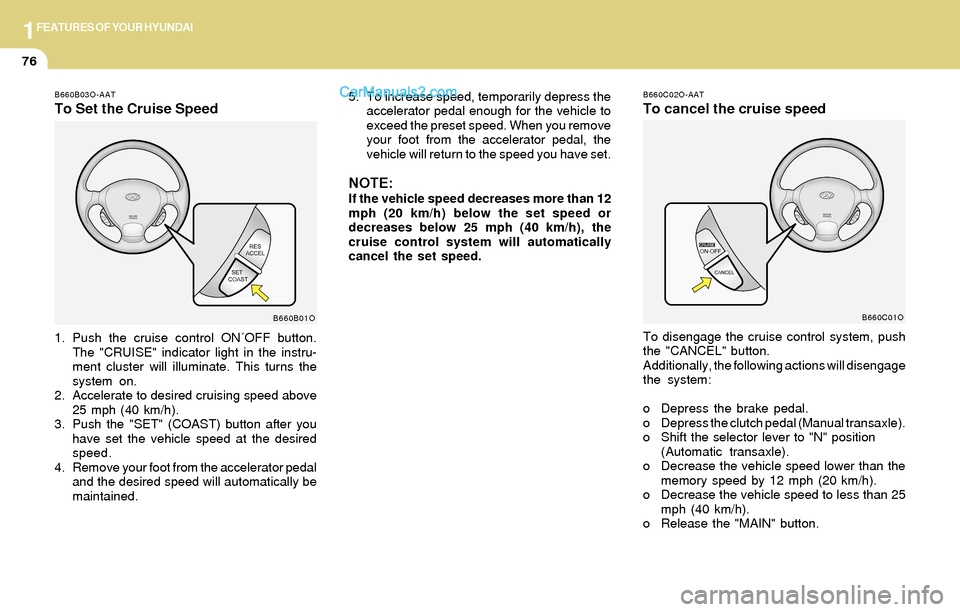
1. Push the cruise control ON´OFF button.
The "CRUISE" indicator light in the instru-
ment cluster will illuminate. This turns the
system on.
2. Accelerate to desired cruising speed above
25 mph (40 km/h).
3. Push the "SET" (COAST) button after you
have set the vehicle speed at the desired
speed.
4. Remove your foot from the accelerator pedal
and the desired speed will automatically be
maintained.
B660B01O
B660C02O-AAT
To cancel the cruise speed
To disengage the cruise control system, push
the "CANCEL" button.
Additionally, the following actions will disengage
the system:
o Depress the brake pedal.
o Depress the clutch pedal (Manual transaxle).
o Shift the selector lever to "N" position
(Automatic transaxle).
o Decrease the vehicle speed lower than the
memory speed by 12 mph (20 km/h).
o Decrease the vehicle speed to less than 25
mph (40 km/h).
o Release the "MAIN" button.
B660C01O
5. To increase speed, temporarily depress the
accelerator pedal enough for the vehicle to
exceed the preset speed. When you remove
your foot from the accelerator pedal, the
vehicle will return to the speed you have set.
NOTE:If the vehicle speed decreases more than 12
mph (20 km/h) below the set speed or
decreases below 25 mph (40 km/h), the
cruise control system will automatically
cancel the set speed.
Page 140 of 253
2DRIVING YOUR HYUNDAI
3BEFORE STARTING THE ENGINE
!!WARNING:o The 2WD Santa Fe is not designed for
off-road use. The 4WD Santa Fe is de-
signed primarily for use on paved roads.
However, occasional use in off-highway
conditions such as established unpaved
roads and non-challenging off-road
trails is allowed. The 4WD Santa Fe is not
designed for blazing new trails, chal-
lenging off-road conditions, or unpaved
hill climbing. Exceeding the conditions
that were intended for the vehicle's pri-
mary design may result in injury or death.
o Utility vehicle has a significantly higher
collision rate than other type of vehicles.
C020A01A-AAT
Before you start the engine, you should always:
1. Look around the vehicle to be sure there are
no flat tires, puddles of oil, water or other
indications of possible trouble.
2. After entering the car, check to be sure the
parking brake is engaged.
3. Check that all windows, and lights are clean.
4. Check that the interior and exterior mirrors
are clean and in position.
5. Check your seat, seatback and headrest to
be sure they are in their proper positions.
6. Lock all the doors.
7. Fasten your seat belt and be sure that all
other occupants have fastened theirs.
8. Turn off all lights and accessories that are
not needed.
9. When you turn the ignition switch to "ON",
check that all appropriate warning lights are
operating and that you have sufficient fuel.
10.Check the operation of warning lights and all
bulbs when key is in the "ON" position. o Utility vehicle have higher ground clear-
ance and a narrower track to make them
capable of performing in a wide variety
of off-road applications. Specific design
characteristics give them a higher center
of gravitiy than ordinary cars. An advan-
tage of the higher ground clearance is a
better view of the road allowing you to
anticipate problem. They are not de-
signed for cornering at the same speeds
as conventional 2-wheel drive vehicles
any more than low-slung sports cars are
designed to perform satisfactorily un-
der off-road conditions. If at all possible,
avoid sharp turns or abrupt maneuvers.
As with other vehicles of this type, fail-
ure to operate this vehicle correctly may
result in loss of control or vehicle rollover.
o In a collision crash, an unbelted person
is significantly more likely to die than a
person wearing a seatbelt.WARNING:
Page 146 of 253
2DRIVING YOUR HYUNDAI
9
!
C090E01O-AAT
o D(Drive):
Use for normal driving. The transaxle will auto-
matically shift through a four gear sequence.
C090F01O-GAT
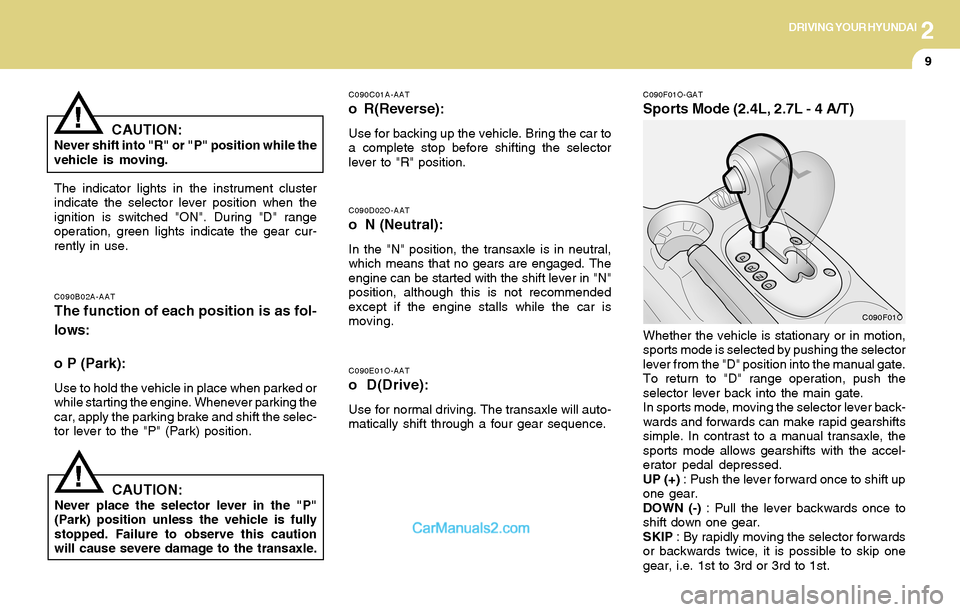
Sports Mode (2.4L, 2.7L - 4 A/T)
C090D02O-AAT
o N (Neutral):
In the "N" position, the transaxle is in neutral,
which means that no gears are engaged. The
engine can be started with the shift lever in "N"
position, although this is not recommended
except if the engine stalls while the car is
moving.
C090B02A-AATThe function of each position is as fol-
lows:
o P (Park):
Use to hold the vehicle in place when parked or
while starting the engine. Whenever parking the
car, apply the parking brake and shift the selec-
tor lever to the "P" (Park) position.
C090C01A-AAT
o R(Reverse):
Use for backing up the vehicle. Bring the car to
a complete stop before shifting the selector
lever to "R" position.
The indicator lights in the instrument cluster
indicate the selector lever position when the
ignition is switched "ON". During "D" range
operation, green lights indicate the gear cur-
rently in use.
CAUTION:Never place the selector lever in the "P"
(Park) position unless the vehicle is fully
stopped. Failure to observe this caution
will cause severe damage to the transaxle.Whether the vehicle is stationary or in motion,
sports mode is selected by pushing the selector
lever from the "D" position into the manual gate.
To return to "D" range operation, push the
selector lever back into the main gate.
In sports mode, moving the selector lever back-
wards and forwards can make rapid gearshifts
simple. In contrast to a manual transaxle, the
sports mode allows gearshifts with the accel-
erator pedal depressed.
UP (+) : Push the lever forward once to shift up
one gear.
DOWN (-) : Pull the lever backwards once to
shift down one gear.
SKIP : By rapidly moving the selector forwards
or backwards twice, it is possible to skip one
gear, i.e. 1st to 3rd or 3rd to 1st.
CAUTION:Never shift into "R" or "P" position while the
vehicle is moving.
!
C090F01O
Page 148 of 253

2DRIVING YOUR HYUNDAI
11OPERATING THE AUTOMATIC
TRANSAXLE (3.5L - 5 A/T)
C090A02L-AAT
C090A01O
The highly efficient Hyundai automatic transaxle
has five forward speeds and one reverse speed.
The individual speeds are selected automati-
cally, depending on the position of the speed
selector lever. The selector lever has 2 gates;
the main gate and the manual gate.
NOTE:For information on manual gate operation,
refer to "Sports Mode".
In the main gate, the selector lever has 5
positions, and is equipped with a button to avoid
inadvertent wrong selection.
NOTE:Depress the brake pedal and push the
button when shifting.
Push the button when shifting.
The selector lever can be shifted freely.
The first few shifts on a new vehicle, or if the
battery has been disconnected may be
somewhat abrupt. This is a normal condi-
tion, and the shifting sequence will adjust
after shifts are cycled a few times by the
T.C.M (Transaxle Control Module).
The indicator lights in the instrument cluster
indicate the selector lever position when the
ignition is switched "ON". During sports mode
operation, green lights indicate the gear cur-
rently in use.
C090A02L
CAUTION:Never shift into "R" or "P" position while the
vehicle is moving.
!
Page 152 of 253
2DRIVING YOUR HYUNDAI
15TRACTION CONTROL SYSTEMANTI-LOCK BRAKE SYSTEM (ABS)
!
C120A02A-AAT
(If installed)
The Anti-Lock Brake System (ABS) is designed
to prevent wheel lock-up during sudden braking
or on hazardous road surfaces. The ABS con-
trol module monitors the wheel speed and con-
trols the pressure applied to each brake. Thus,
in emergency situations or on slick roads, ABS
will increase vehicle control during braking.
NOTE:During ABS operation, a slight pulsation
may be felt in the brake pedal when the
brakes are applied. Also, a noise may be
heard in the engine compartment while
braking. These conditions are normal and
indicate that the anti-lock brake system is
functioning properly.
WARNING:ABS will not prevent accidents due to im-
proper or dangerous driving maneuvers.
Even though vehicle control is improved
during emergency braking, always main-
tain a safe distance between you and ob-
jects ahead. Vehicle speeds should always
be reduced during extreme road condi-
tions.
The braking distance for cars equipped
with an anti-lock braking system may be
longer than for those without it in the
following road conditions.
During these conditions the vehicle should
be driven at reduced speeds:
o Rough, gravel or snow-covered roads.
o With tire chains installed.
o On roads where the road surface is pit-
ted or has different surface height.
The safety features of an ABS equipped
vehicle should not be tested by high speed
driving or cornering. This could endanger
the safety of yourself or others.
C300A02O-AAT
BRAKE TRACTION CONTROL SYSTEM
(BTCS) (If installed)
On slippery road surfaces, the traction control
system (TCS) limits the drive wheels from
spinning excessively, thus helping the car to
accelerate. It also provides sufficient driving
force and steering performance as the car turns
at accelerated speeds.
SLIP Control
Limits the drive wheels from spinning exces-
sively during starting or while making acceler-
ated turns on slippery roads to avoid losing the
driving force of the driven wheels.
Driving hints
TCS does not actively apply brakes. Be sure to
decelerate the car sufficiently before entering
curves.
Page 153 of 253

2DRIVING YOUR HYUNDAI
16
C300D02O-AAT
Indicator and Warning
The TCS indicator should illuminate when the
ignition key is turned to ON or START but should
go out after three seconds.
If the indicator does not illuminate, have it checked
by an authorized dealer.
Should there be any unusual conditions in the
device while driving, TCS illuminates as a warn-
ing.
If TCS illuminates, pull your car to a safe place
and stop the engine. Then, start the engine
again to check if the TCS indicator goes out.
If the indicator remains lit even after the engine
has been started, have your car checked by an
authorized Hyundai dealer.
NOTE:When the TCS indicator illuminates, trac-
tion control is automatically deactivated
for safety.
C300B01O-AAT
TCS ON Mode
When the TCS is running, the TCS indicator in
the instrument cluster will blink.
NOTE:1) The TCS mode will automatically be
turned ON after the engine is turned off
and restarted.
2) When the traction control system is op-
erating properly, you can feel a slight
pulsation in the vehicle. This is only the
effect of brake control and indicates
nothing unusual.
3) When the engine starts, a click is heard
from the engine compartment; however,
this is only the sound of traction control
being checked.
4) When moving out of the mud or fresh
snow, pressing the accelerator pedal
may not cause the engine speed to in-
crease due to TCS operation.
!
!CAUTION:When the TCS indicator blinks, SLIP func-
tion has been activated. It also means that
the road is slippery or your car is accelerat-
ing excessively. In this situation, gently
release foot pressure from the accelerator
pedal and maintain moderate speed.
WARNING:Traction control is only a driving aid; all
normal precautions for driving in inclement
weather and on slippery road surfaces
should be observed.
Page 154 of 253

2DRIVING YOUR HYUNDAI
17
!
C310A01O-AAT
FULL TRACTION CONTROL SYSTEM
(FTCS) (3.5 L only) (If installed)
On slippery road surfaces, the traction control
system (TCS) limits the drive wheels from
spinning excessively, thus helping the car to
accelerate. It also provides sufficient driving
force and steering performance as the car turns
at accelerated speeds.
HSM434
SLIP Control
Limits the drive wheels from spinning exces-
sively during starting or while making acceler-
ated turns on slippery roads to avoid losing the
driving force of the front wheels.
Driving hints
TCS does not actively apply brakes. Be sure to
decelerate the car sufficiently before entering
curves.
CAUTION:When the TCS indicator blinks, SLIP control
has been activated. It also means that the
road is slippery or your car is accelerating
excessively. In this situation, release foot
pressure from the accelerator pedal and
maintain moderate speed.
WARNING:Traction control is only a driving aid; all
normal precautions for driving in inclement
weather and on slippery road surfaces
should be observed.
!
C310B01O-AAT
TCS ON/OFF Mode
When the TCS is running, the TCS indicator in
the instrument cluster will blink.
If you turn the system off by pressing the TCS
switch, the TCS-OFF indicator will come on and
stay on. In the TCS-OFF mode, the SLIP control
will be deactivated. Adjust you driving accord-
ingly. To turn the system back on, press the
switch again. The TCS-OFF indicator should go
off.
NOTE:1) The TCS mode will automatically be
turned ON after the engine is turned off
and restarted.
2) When the traction control system is op-
erating properly, you can feel a slight
pulsation in the vehicle. This is only the
effect of brake control and indicates
nothing unusual.
3) When the engine starts, a click is heard
from the engine compartment; however,
this is only the sound of traction control
being checked.
4) When moving out of the mud or fresh
snow, pressing the accelerator pedal
may not cause the engine speed to in-
crease due to TCS operation.