2004 Hyundai Getz heating
[x] Cancel search: heatingPage 92 of 445
FEATURES OF YOUR HYUNDAI 1- 79
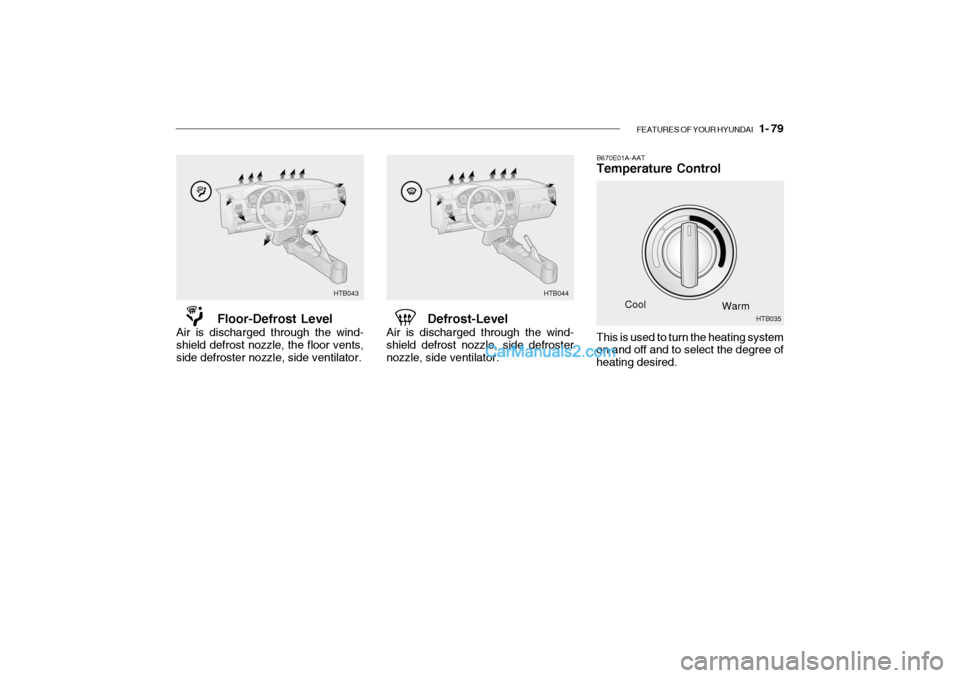
B670E01A-AAT Temperature Control
Cool Warm
Floor-Defrost Level
Air is discharged through the wind- shield defrost nozzle, the floor vents,side defroster nozzle, side ventilator. Defrost-Level
Air is discharged through the wind-shield defrost nozzle, side defrosternozzle, side ventilator.
HTB043 HTB044
This is used to turn the heating system on and off and to select the degree of heating desired. HTB035
Page 93 of 445

1- 80 FEATURES OF YOUR HYUNDAI
B670B01A-AAT BI-LEVEL HEATING Your Hyundai is equipped with bi-level heating controls. This makes it pos-sible to have cooler air from the dash- board vents and warmer air from the floor outlets at the same time. To usethis feature:
o Set the air intake control to the fresh
air ( ) position.
o Set the air flow control at the bi-level ( ) position.
o Set the temperature control between "Cool" and "Warm".
B690A01A-AAT HEATING CONTROLS For normal heating operation, set the air intake control to the fresh air ( )position and the air flow control to the floor ( ) position. For faster heating, the air intake con-trol should be set in the recirculate ( ) position. If the windows fog up, set the air flowcontrol to the defrost ( ) position and the air intake control to the fresh air ( ) position.For maximum heat, move the tem- perature control to "Warm". B720A01TB-GAT DEFROSTING/DEFOGGING
HTB045
Use the heating/ventilation system to defrost or defog the windshield: To remove interior fog on the windshield:
o Set the air intake control to the fresh air ( ) position.
o Set the air flow control to the defrost
( ) position.
o For more rapid action, turn on the air conditioning.
o Set the temperature control to the
desired position.
o Set the fan speed control between
"1" and "4" position.
Page 94 of 445
FEATURES OF YOUR HYUNDAI 1- 81
B740A01A-AAT AIR CONDITIONING SWITCH (If Installed)
B730A01FC-GAT Operation Tips
o To keep dust or unpleasant fumes
from entering the car through the ventilation system, temporarily set the air intake control at "Recircula- tion". Be sure to return the control to"Fresh" when the irritation has passed to keep fresh air in the ve- hicle. This will help keep the driveralert and comfortable.
o Air for the heating/cooling system is
drawn in through the grilles justahead of the windshield. Care should be taken that these are not blocked by leaves, snow, ice or other ob-structions.
o To prevent interior fog on the wind-
shield, set the air intake control tothe fresh air ( ) position and fan speed to the desired position.
To remove the frost or exterior fog on the windshield:
o Set the air intake control to the fresh
( ) position.
o Set the air flow control to the defrost ( ) position
o Set the temperature control to warm.
o Set the fan speed control to position
"3" or "4".
NOTE: When the A/C is operated continu- ously on the floor-defrost level ( ) or defrost level ( ), it may cause fog to form on the exterior wind-shield. If this occurs, set the air flow control to the face level posi- tion ( ) and fan speed control tothe low position. The air conditioning is turned on by pushing the A/C button on the heating/ air conditioning control panel.
HTB037
Page 95 of 445

1- 82 FEATURES OF YOUR HYUNDAI
B740B02A-AAT AIR CONDITIONING OPERA- TION (Cooling)
B740C01A-AAT De-Humidified Heating
To use the air conditioning to cool the interior:
o Turn on the fan control switch (2).
o Turn on the air conditioning switch(4) by pushing in on the switch.The air conditioning indicator lightshould come on at the same time.
o Set the air intake control to the
position (5).
o Set the temperature control (1) to "Cool". ("Cool" provides maximumcooling. The temperature may bemoderated by moving the control toward "Warm".) HTB046
o Adjust the fan control (2) to the
desired speed. For greater cooling, turn the fan control to one of thehigher speeds or temporarily select
the position on the air intake control. For dehumidified heating:
o Turn on the fan control switch (2).
o Turn on the air conditioning switch
(4). The air conditioning indicator light should come on at the same time.
o Set the air intake control (5) to the fresh air ( ) position.
o Set the air flow control (3) to the face ( ) position.
o Adjust the fan control (2) to the
desired speed.
o For more rapid action, set the fan at one of the higher speeds.
o Adjust the temperature control (1)
to provide the desired amount of warmth.
(1)
(2)
(3)
(4) (5)
HTB046
(1)
(2)
(3)
(4) (5)
Page 96 of 445

FEATURES OF YOUR HYUNDAI 1- 83
!
B760A01Y-1
The air conditioner filter is located in front of the evaporator unit behind the glove box.It operates to decrease the amount of pollutants from entering the car. To replace the air conditioner filter, referto the page 6-23.
B760A02TB-GAT AIR CONDITIONER FILTER
(In Front of evaporator unit)(If Installed)
B740D01A-AAT Operation Tips
o If the interior of the car is hot when
you first get in, open the windows for a few minutes to expel the hot air.
o When you are using the air condi-
tioning system, keep all windowsclosed to keep hot air out.
o When moving slowly, as in heavy
traffic, shift to a lower gear. Thisincreases engine speed, which in turn increases the speed of the air conditioning compressor.
o On steep grades, turn the air condi- tioning off to avoid the possibility ofthe engine over-heating.
o During winter months or in periods when the air conditioning is not usedregularly, run the air conditioningonce every month for a few min- utes. This will help circulate the lubricants and keep your system inpeak operating condition. Inside of a vehicle
Evaporator core
Filter
BlowerOutside air
Inside air CAUTION:
o Replace the filter every 20,000 km (12,000 miles) or once a year. If the car is being driven in severe con- ditions such as dusty, roughroads, more frequent air condi- tioner filter inspections and changes are required.
o When the air flow rate is suddenly decreased, it must be checked atan authorized dealer.
Page 115 of 445

1- 102 FEATURES OF YOUR HYUNDAI
H290F01O-GAT
1. CD Select Button
o Insert the CD with the label facing
upward.
o Insert the CD to start CD playback, during radio operation or cassette tape playing.
o When a disc is in the CD deck, if you press the play button the CD playerwill begin playing even if the radio orcassette player is being used.
o The CD player can be used when
the ignition switch is in either the"ON" or "ACC" position.
2. FF/REW ( / ) If you want to fast forward or reverse through the compact disc track, push and hold in the FF ( ) or REW ( ) button.When you release the button, the com- pact disc player will resume playing. 3. TRACK UP/DOWN
o The desired track on the disc cur-
rently being played can be selected using the track number.
o Press button once to skip forwa-
rd to the beginning of the next track.Press button once to skip back to the beginning of the track.
4. REPEAT
o To repeat the music you are listen- ing to, press the RPT button. To cancel, press again.
o If you do not release RPT operation when the track ends, it will automati-cally be replayed.This process will be continued until you push the button again.
5. EQUALIZER Button Press the EQ button to select the CLASSIC, JAZZ, ROCK and DEFEATMODE for the desired tone quality. Each press of the button changes the display as follows; 6. CD EJECT Button When the button is pressed with the CD loaded, the CD is ejected.
7. SCAN Button (If installed)
o Press the SCAN button to playback
the first 10 seconds of each track.
o Press the SCAN button again within 10 sec. for the desired track.
NOTE:
o To assure proper operation of the unit, keep the vehicle interior temperature within a normalrange by using the vehicle's air conditioning or heating system.
o When replacing the fuse, replace
it with a fuse having the correctcapacity.
o The preset station frequencies
are all erased when the car bat-tery is disconnected. Therefore, all data will have to be set againif this should occur.
o Do not add any oil to the rotating
parts. Keep magnets, screwdriv-ers and other metallic objects away from the tape mechanism and head.
CLASSIC JAZZ ROCK DEFEAT
Page 122 of 445

FEATURES OF YOUR HYUNDAI 1- 109
H290D01O-GAT
1. FF/REW
o Fast forward tape winding starts
when the FF ( ) button is pressed during PLAY or REW mode.
o Tape PLAY starts when the FF ( )
button is pressed again during FFmode.
o Tape rewinding starts when the REW
( ) button is pressed during PLAYor FF mode.
o Tape PLAY starts when the REW
( ) button pressed again duringREW mode.
2. AUTO MUSIC Select Press the button to find the starting point of each song in a prerecorded music tape. The quiet space between songs (must have at least 4 sec. gap)can be accepted by the AUTO MUSIC Select button.
o Pressing the button will play the beginning of the next music seg- ment.
o Pressing the button will start replay at the beginning of the musicjust listened to.3. TAPE PROGRAM Button
o This allows you to play the reverse
side of the tape by merely depress- ing the program button. An arrow will appear in the display to show tape direction.
o Push the TAPE button to turn on that function without pushing powerON ˆ
OFF control knob.
4. REPEAT
o To repeat the track you are currently listening to, press the RPT button. To cancel, press again.
o If you do not release RPT operation
when the track ends, it will automati-cally be replayed. This process will be continued until you push the button again.
5. Equalizer (EQ) Press the EQ button to select the CLAS- SIC, JAZZ, ROCK and DEFEAT MODE for the desired tone quality. Each press of the button changes the display asfollows; 6. DOLBY If you get background noise during tape PLAY, you can reduce this consider-ably by merely pressing the DOLBY button. If you want to cancel the DOLBY feature, press the button again.
7. TAPE EJECT
o When the button is pressed with
a cassette loaded, the cassette will eject.
o When the button is pressed during
FF/REW mode, the cassette willeject.
NOTE:
o To assure proper operation of the unit, keep the vehicle interior tem- perature within a normal range by using the vehicle's air condition-ing or heating system.
o When replacing the fuse, replace
it with a fuse having the correctcapacity.
o The preset station frequencies are
all erased when the car battery isdisconnected. Therefore, all data will have to be set again if this should occur.
CLASSIC JAZZ ROCK DEFEAT
Page 126 of 445

FEATURES OF YOUR HYUNDAI 1- 113
7. CD EJECT When the button is pressed with a CD loaded, the CD will eject.
8. SCAN
o Press the SCAN button to playback
the first 10 seconds of each track.
o To playback the first 10 seconds of each track in the selected folder, press the SCAN button for 2 sec-onds or longer. (MP3 CD only)
o Press the SCAN button again within
10 sec. When you have reached thedesired track.
9. BOOKMARK (MARK) When the CD player unit is operating, the desired track on the disc can be bookmarked by using the MARK but-ton.
o Press the MARK button to bookmark the desired track for more than 2 seconds. This will display the " " symbol on
the LCD with beep sound. To play the bookmarked tracks, press the MARK button within a sec-ond. o Press the MARK button to erase the
bookmarked tracks for more than 2seconds.This will erase the bookmark and " "
symbol on the LCD with beep sound.
10. JOY STICK (ENT)
o You can skip the track by pushing the JOY STICK to the left or right. After selecting the desired track, press the JOY STICK to playback the track.If you do not press the JOY STICK within 5 seconds, the previous track will playback again.
o You can move through the folder by pushing the JOYSTICK to up anddown.After moving the desired folder, press the JOYSTICK to playback the se- lected track.If you do not press the JOYSTICK within 5 seconds, the previous track will playback again. (MP3 CD only) NOTE:
o To assure proper operation of the
unit, keep the vehicle interior tem- perature within a normal range byusing the vehicle's air condition- ing or heating system.
o When replacing the fuse, replace
it with a fuse having the correctcapacity.
o The bookmarks are all erased when the car battery is disconnected orpower off. Therefore, all data will have to be set again if this shouldoccur.
o This equipment is designed to be
used only in a 12 volt DC batterysystem with negative ground.
o This unit is made of precision
parts. Do not attempt to disas-semble or adjust any parts.
o When driving your vehicle, be sure
to keep the volume of the unit setlow enough to allow you to hear sounds coming from the outside.
o Do not expose this equipment (in- cluding the speakers and tape) towater or excessive moisture.