Page 134 of 296
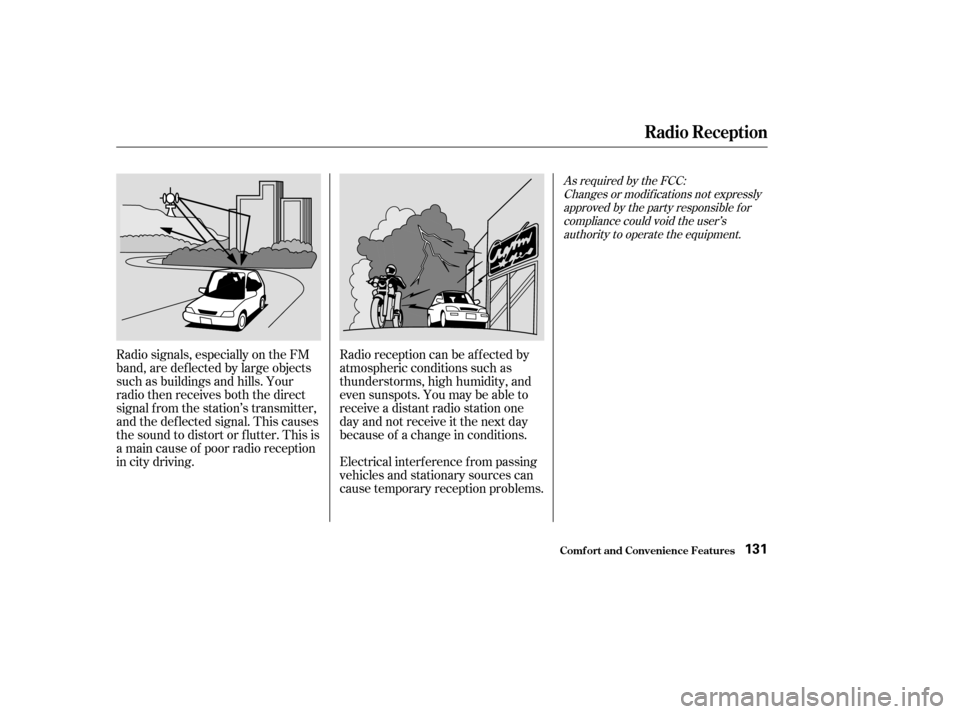
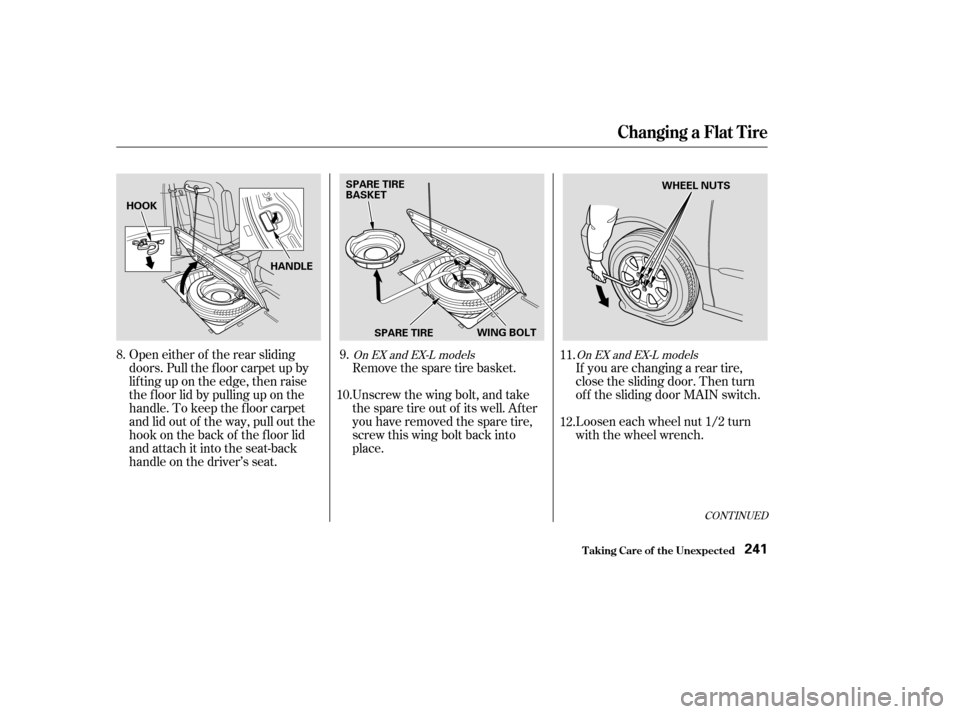
Radio signals, especially on the FM
band, are def lected by large objects
such as buildings and hills. Your
radio then receives both the direct
signal f rom the station’s transmitter,
and the def lected signal. This causes
the sound to distort or flutter. This is
a main cause of poor radio reception
in city driving.Radio reception can be af f ected by
atmospheric conditions such as
thunderstorms, high humidity, and
even sunspots. You may be able to
receive a distant radio station one
day and not receive it the next day
because of a change in conditions.
Electrical interf erence f rom passing
vehicles and stationary sources can
cause temporary reception problems.
As required by the FCC:
Changes or modif ications not expresslyapproved by the party responsible f orcompliance could void the user’sauthority to operate the equipment.
Radio Reception
Comf ort and Convenience Feat ures131
Page 156 of 296
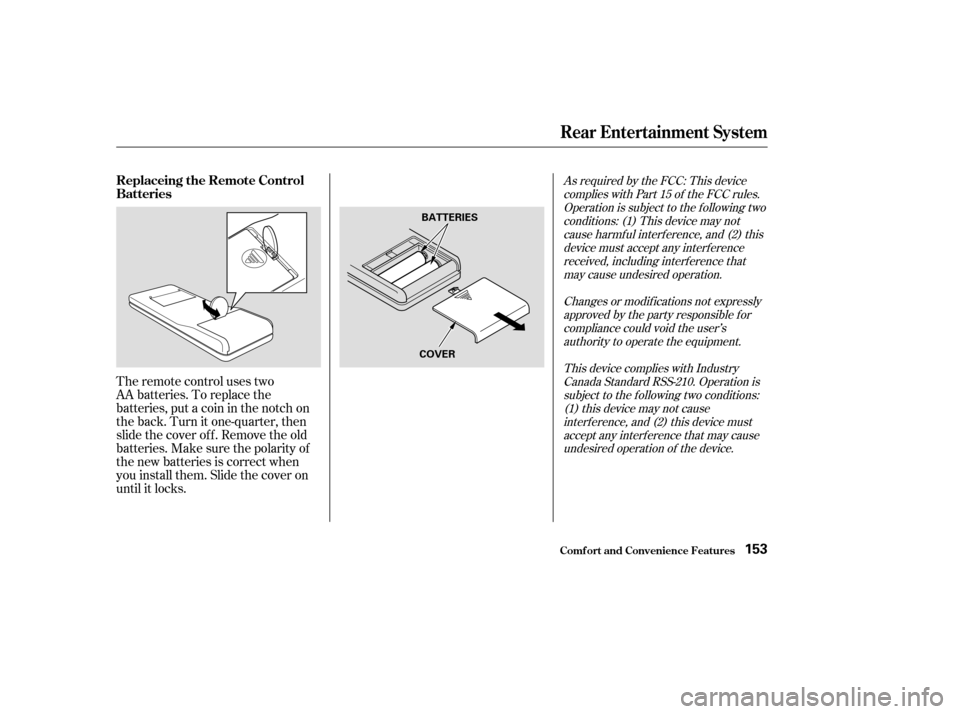
The remote control uses two
AA batteries. To replace the
batteries, put a coin in the notch on
the back. Turn it one-quarter, then
slide the cover of f . Remove the old
batteries.Makesurethepolarityof
the new batteries is correct when
you install them. Slide the cover on
until it locks.
As required by the FCC: This devicecomplies with Part 15 of the FCC rules.Operation is subject to the f ollowing twoconditions: (1) This device may notcause harmf ul interf erence, and (2) thisdevice must accept any interf erencereceived, including interf erence thatmay cause undesired operation.
Changes or modif ications not expresslyapproved by the party responsible f orcompliance could void the user’sauthority to operate the equipment.
This device complies with IndustryCanada Standard RSS-210. Operation issubject to the f ollowing two conditions:(1) this device may not causeinterf erence, and (2) this device mustaccept any interf erence that may causeundesired operation of the device.
Rear Entertainment System
Comf ort and Convenience Feat ures
Replaceing the Remote Control
Batteries
153
BATTERIES
COVER
Page 169 of 296

Toerasethecodesstoredinallthree
buttons, press and hold the two
outside buttons until the red light
begins to f lash, then release the
buttons.
Youshoulderaseallthreecodes
bef ore selling the vehicle.
Totrainanalreadyprogrammed
transceiver button with a new device,
you do not have to erase all the
memory. Train the selected button
over the existing memory code
f ollowing the steps under. If you have problems with training
the HomeLink Universal Transceiver,
or would like inf ormation on home
products that can be operated by the
transmitter, call (800) 355-3515. On
the Internet, go to www.homelink.
com.
As required by the FCC:
This device complies with Part 15 of theFCC rules. Operation is subject to thef ollowing two conditions: (1) This devicemay not cause harmf ul interf erence, and(2) this device must accept anyinterf erence received, includinginterf erence that may cause undesiredoperation.
Changes or modif ications not expresslyapproved by the party responsible f orcompliance could void the user’sauthority to operate the equipment.
This device complies with IndustryCanada Standard RSS-210.Operation is subject to the f ollowing twoconditions: (1) this device may not causeinterf erence, and (2) this device mustaccept any interf erence that may causeundesired operation of the device.
HomeL ink Universal T ransceiver
Comf ort and Convenience Feat ures
Erasing Codes
Retraining a Button
T raining
HomeL ink Customer Assistance
166
Page 195 of 296

Your Honda is equipped with a
Traction Control System (TCS) to
assist you in maintaining traction
while driving slowly on loose or
slippery surf aces. The TCS assists
only in low-speed, low-traction
conditions; up to approximately 18
mph (30 km/h).
TCS monitors the speed of all f our
wheels. When it senses a f ront wheel
losing traction, it applies braking to
that wheel. The TCS indicator
f lashes when this occurs.
Driving with TCS requires no special
skills or technique. The TCS does
not control your vehicle’s whole
braking system and cannot prevent
skidding if you enter a corner too
f ast. It is still your responsibility to
drive at reasonable speeds and to
leave a sufficient margin of safety.You should still install winter tires on
your vehicle during the winter. Make
sure to use the same size originally
supplied with vehicle. Exercise the
samecautioninwinterdrivingasyou
would if your vehicle was not
equipped with TCS.
Driving with the compact spare tire
installed (see page ) may
activate the TCS. You should turn of f
the system.
When starting out or driving at low
speeds on a loose or slippery road
surface, you may notice that the
vehicle does not respond to the
accelerator in the same way it does
at other times. This is a sign TCS is
activating. You will see the TCS
indicator f lash. If the brakes overheat while TCS is
activating, the TCS indicator will
stop flashing and stay on temporarily.
This indicates that TCS has turned
off. After the brakes have cooled
down (usually f or about 10 minutes),
TCSwillturnbackonandthe
indicator will turn of f .238
Driving
Traction Control System (TCS)
192
TRACTION CONTROL
SYSTEM INDICATOR
Page 199 of 296

The best way to conf irm that vehicle
and trailer weights are within limits
is to have them checked at public
scale.
Using a suitable scale or a special
tongue load gauge, check the tongue
load the f irst time you set up a
towing combination (a f ully-loaded
vehicle and trailer), then recheck the
tongue load whenever the conditions
change.Towing generally requires a variety
of supplemental equipment. To
ensure the best quality, we
recommend that you purchase
Honda equipment whenever possible.
Always use saf ety chains. Make sure
they are secured to both the trailer
and hitch, and that they cross under
the tongue so they can catch the
trailer if it becomes unhitched.
Leave enough slack to allow the
trailer to turn corners easily, but do
not let chains drag on the ground. Any hitch used on your vehicle must
be properly bolted to the underbody,
using the six threaded holes
provided. A hitch and the required
f luid coolers designed especially f or
your Odyssey can be obtained f rom
your Honda dealer.If the total trailer weight is more
than 1,850 lbs (840 kg), you must
also use a weight distributing hitch.
This device transf ers weight f rom
the vehicle’s rear wheels to the f ront
wheels, and to the trailer’s wheels.
Caref ully f ollow the hitch maker’s
instructions f or proper installation
and adjustment.
If the total trailer weight exceeds
2,000 lbs (900 kg), you should install
a sway control device to minimize
swaying that can occur in crosswinds
and in normal and emergency
driving maneuvers. Your trailer
maker can tell you what kind of sway
control you need and how to install it.
Discuss any additional needs with
your trailer sales or rental agency,
and make sure all equipment is
properly installed, maintained, and
also meets state and province
regulations.
Towing a Trailer
Driving
Checking L oadsT owing Equipment and
A ccessories
Saf et y Chains
HitchesWeight Distributing Hitch
Sway Cont rol
196
Page 244 of 296
CONT INUED
Remove the spare tire basket.
Unscrew the wing bolt, and take
the spare tire out of its well. After
you have removed the spare tire,
screw this wing bolt back into
place.If you are changing a rear tire,
close the sliding door. Then turn
of f the sliding door MAIN switch.
Loosen each wheel nut 1/2 turn
with the wheel wrench.
Open either of the rear sliding
doors. Pull the f loor carpet up by
lif ting up on the edge, then raise
the f loor lid by pulling up on the
handle. To keep the f loor carpet
and lid out of the way, pull out the
hook on the back of the f loor lid
and attach it into the seat-back
handle on the driver’s seat.
8.
9.
11.
12.
10.
On EX and EX-L models
On EX and EX-L models
Changing a Flat T ire
T aking Care of t he Unexpect ed241
HOOK
HANDLESPARE TIRE
BASKET
SPARE TIRE WING BOLT WHEEL NUTS
Page 249 of 296
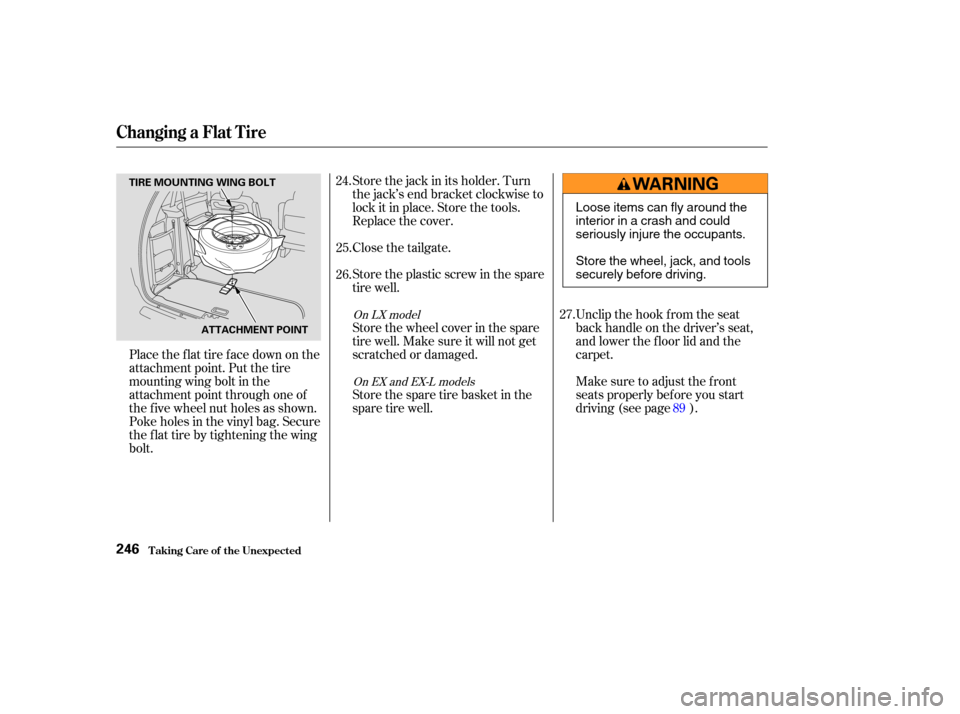
Place the flat tire face down on the
attachment point. Put the tire
mountingwingboltinthe
attachment point through one of
the f ive wheel nut holes as shown.
Poke holes in the vinyl bag. Secure
the f lat tire by tightening the wing
bolt.Store the jack in its holder. Turn
the jack’s end bracket clockwise to
lock it in place. Store the tools.
Replace the cover.
Close the tailgate.
Store the plastic screw in the spare
tire well.
Store the wheel cover in the spare
tire well. Make sure it will not get
scratched or damaged.
Storethesparetirebasketinthe
spare tire well.
Unclip the hook f rom the seat
back handle on the driver’s seat,
and lower the f loor lid and the
carpet.
Make sure to adjust the f ront
seats properly bef ore you start
driving (see page ).
24.
25.
26.
27.
89
On LX modelOn EX and EX-L models
Changing a Flat T ire
T aking Care of t he Unexpect ed246
TIRE MOUNTING WING BOLT
ATTACHMENT POINT
Loose items can fly around the
interiorinacrashandcould
seriously injure the occupants.
Store the wheel, jack, and tools
securely before driving.
Page 262 of 296

Look f or a burned wire inside the
f use. If it is burned, replace it with
oneof thesparefusesof thesame
rating or lower.If the replacement fuse of the
same rating blows in a short time,
there is probably a serious
electrical problem in your vehicle.
Leave the blown fuse in that
circuit, and have your vehicle
checked by a qualif ied mechanic.
If the driver’s power window f use is
removed, the AUTO feature of the
driver’s window will be disabled. You
should reset the AUTO f eature (see
page ).
If the radio f use is removed, the
audio system will disable itself . The
nexttimeyouturnontheradioyou
will see ‘‘ ’’ in the f requency
display. Use the preset buttons to
enter the f ive-digit code (see page ).
If you cannot drive the vehicle
without f ixing the problem, and you
do not have a spare fuse, take a fuse
of the same rating or a lower rating
f rom one of the other circuits. Make
sureyoucandowithoutthatcircuit
temporarily (such as the accessory
power socket or radio).
If you replace the blown f use with a
spare f use that has a lower rating, it
might blow out again. This does not
indicate anything wrong. Replace the
f use with one of the correct rating as
soon as you can.
5. 6.
101
144
On EX and EX-L models
Fuses
T aking Care of t he Unexpect ed259
NOTICE:
BLOWN
Replacing a f use with one
that has a higher rating greatly
increases the chances of damaging
the electrical system. If you do not
have a replacement f use with the
proper rating f or the circuit, install
one with a lower rating.