Page 68 of 218

�µ
Your vehicle’s windows are
electrically-powered. Turn the
ignition switch to ON (II) to raise or
lower either window.
There is a master power window
control panel on the dashboard. To
open the passenger’s window, push
down on the switch and hold it down
until the window reaches the desired
position. To close the window, push
up on the window switch. Release
the switch when the window gets to
the position you want. To open the driver’s
window f ully, push the window
switch f irmly down and release it.
The window automatically goes all
the way down. To stop the window
f rom going all the way down, push
up on the window switch brief ly. To
open the driver’s window only
partially, push the window switch
down lightly and hold it. The window
will stop as soon as you release the
switch. The AUTO f unction only works to
lower the driver’s window. To raise
the window, you must push the
window switch up and hold it until
the window reaches the desired
position.
The MAIN switch controls power to
the passenger’s window. With this
switch of f , the passenger’s window
cannot be raised or lowered. The
MAIN switch does not af f ect the
driver’s window. Keep the MAIN
switch of f when you have a child in
the vehicle so the child does not get
injured by operating the window
unintentionally.
Power Windows
Inst rument s and Cont rols
AUTO
65
MAIN SWITCH
DRIVER’S WINDOW SWITCH
Closing a power window on
someone’s hands or fingers can
cause serious injury.
Make sure your passenger is
away from the window before
closing it.
Page 69 of 218
Keeptheinsideandoutsidemirrors
clean and adjusted f or best visibility.
Be sure to adjust the mirrors bef ore
you start driving.
The inside mirror has day and night
positions. The night position reduces
glare f rom headlights behind you.
Flip the tab on the bottom edge of
the mirror to select the day or night
position.Turn the ignition switch to ON (II).
Move the selector switch to L
(driver’s side) or R (passenger’s
side).Push the appropriate edge of the
adjustment switch to move the
mirrorright,left,up,ordown.
When you f inish, move the
selector switch to the center (off)
position. This turns of f the
adjustment switch to keep your
settings.
1.
2. 3.
4.
Mirrors
Inst rument s and Cont rols
Adjusting the Power Mirrors
66
TAB
ADJUSTMENT
SWITCH
SELECTOR SWITCH
Page 72 of 218
To open the storage box, pull the
strap.Open the glove box by pulling the
bottom of the handle. Close it with a
f irm push. Lock or unlock the glove
box with the master key.To use the accessory power socket,
pull up the cover. The ignition switch
must be in ACCESSORY (I) or ON
(II).
This socket is intended to supply
power f or 12 volt DC accessories
that are rated 120 watts or less (10
amps).
It will not power an automotive type
cigarette lighter element.
Be caref ul when you are using the
beverage holders. A spilled liquid
that is very hot can scald you or your
passenger. Spilled liquids can also
damage the upholstery, carpeting,
and electrical components in the
interior.
Interior Convenience Items
Inst rument s and Cont rols
Storage Box
Beverage Holder Glove Box
A ccessory Power Socket
69
STRAP GLOVE BOX
An open glove box can cause
serious injury to your passenger
inacrash,evenifthe
passenger is wearing the seat
belt.
Always keep the glove box
closed while driving.
Page 82 of 218

�µ�µ
�µ
�µ
The ignition switch must be in the
ACCESSORY (I) or ON (II) position.
Turn the system on by pushing the
PWR/VOL knob or the AM/FM
button. Adjust the volume by turning
thesameknob.
The band and f requency that the
radio was last tuned to is displayed.
To change bands, press the AM/FM
button. On the FM band, ST will be
displayed if the station is broadcast-
ing in stereo. Stereo reproduction on
AM is not available.
You can use any of f ive methods to
f ind radio stations on the selected
band:
the
preset buttons, and .
Use the TUNE knob to
tune the radio to a desired f requency.
Turn the knob right to tune to a
higher f requency, or lef t to tune to a lower f requency.
The SEEK f unction
searches up and down from the
current f requency to f ind a station
with a strong signal. To activate it,
press the or side of the
bar, then release it. Each preset button can
store one f requency on AM, and two
f requencies on FM.
Select the desired band, AM or
FM. FM1 and FM2 let you store
two f requencies with each preset
button.
UsetheTUNE,SEEK,orSCAN
function to tune the radio to a
desired station.
Pick a preset button, and hold it
until you hear a beep.
Repeat steps 1 to 3 to store a total
of six stations on AM and twelve
stations on FM.
The preset f requencies will be lost if
your vehicle’s battery goes dead, is
disconnected, or the radio f use is
removed.
The SCAN f unction
samples all stations with strong
signals on the selected band. To
activate it, press the SCAN button,
then release it. You will see SCAN in
the display. The system will scan f or
a station with a strong signal. When
it f inds one, it will stop and play that
station for about 5 seconds.
If you do nothing, the system will
scan f or the next strong station and
play it f or 5 seconds. When it plays a
station you want to listen to, press
the SCAN button again. 1.
2.
3.
4.
CONT INUED
Playing the Radio
Comf ort and Convenience Feat ures
To Play the Radio
To Select a Station
TUNE,SEEK,SCAN, AUTO SELECT
TUNE SEEK
Preset
SCAN
79
Page 87 of 218

�µ�µ
You operate the CD player with the
same controls used f or the radio.
The number of the track playing is
shown in the display. The system will
continuously play a CD until you
change modes. With the ignition in the
ACCESSORY (I) or ON (II) position,
insert a CD into the CD slot. The
drive will pull the CD in the rest of
the way and begin to play it.
You can also play 3-inch (8-cm) discs
without using an adapter ring.
Each time you press and release
, the player skips f orward to
the beginning of the next track.
Press and release to skip
backward to the beginning of the
current track. Press it again to skip
to the beginning of the previous
track. To move rapidly within a track, press
and hold the or . You will
see CUE or REW in the display.
To continuously replay
a track, press and release the RPT
button. You will see RPT in the
display. Press the RPT button again
to turn it off.
This f eature plays the
tracks in random order. To activate
Random Play, press and release the
RDM button. You will see RDM in
the display. This continues until you
press the RDM button again.
Press the eject button ( ) to
remove the CD. If you eject the CD,
but do not remove it f rom the slot,
the system will automatically reload
the CD af ter 15 seconds and put it in
pause mode. To begin playing, press
the CD button. Press the AM/FM button to switch
to the radio while a CD is playing.
Press the CD button to play the CD.
If you turn the system of f while a CD
is playing, either with the PWR/VOL
knob or by turning off the ignition,
the CD will stay in the drive. When
youturnthesystembackon,theCD
will begin playing where it lef t of f .
A CD changer is available f or your
vehicle. It holds up to six CDs. You
operate the CD changer with the
same controls used f or the in-dash
CD player.
Load the desired CDs in the
magazine, and load the magazine in
the changer according to the
instructions that came with the unit.
Playing a CD, CD Changer
Comf ort and Convenience Feat ures
To Play a CD
To Change Tracks (SKIP)
REPEAT
RANDOM
To Stop Playing a CD
Operating the Optional CD
Changer
84
Page 110 of 218

Apply the parking brake.
In cold weather, turn of f all
electrical accessories to reduce
the drain on the battery.
Push the clutch pedal down all the
way. START (III) does not
f unction unless the clutch pedal is
pressed.
Make sure the shif t lever is in
Park. Press on the brake pedal.
Without touching the accelerator
pedal, turn the ignition key to the
START (III) position. Do not hold
the key in START for more than
15 seconds at a time. If the engine
does not start right away, pause
f or at least 10 seconds bef ore
trying again.If the engine does not start within
15 seconds, or starts but stalls
right away, repeat step 4 with the
accelerator pedal pressed halfway
down. If the engine starts, release
pressure on the accelerator pedal
so the engine does not race.
If the engine fails to start, press
the accelerator pedal all the way
downandholdittherewhile
starting to clear flooding. If the
engine still does not start, return
to step 5.
1.
2.
3.
4. 5.
6.
Manual Transmission:
Automatic Transmission (CVT):
Starting the Engine
Driving107
NOTICE: The engine is harder to start
in cold weather. Also, the thinner air
f ound at altitudes above 8,000 f eet
(2,400 meters) adds to this problem.
Page 113 of 218

There is adequate vacuum reserve
f or the power brakes.
The engine will start again
automatically when you shift to first
gear. There is no need to start the
engine with the ignition switch.
It is recommended that you shif t to
Neutral and release the clutch pedal
while stopped. Sitting with the clutch
pedal depressed and the shif t lever
in gear will cause the engine to
continue running, def eating the f uel
economy benef its of the Auto Idle
Stop f unction.
During Auto Idle Stop, the IMA
charge and power brake vacuum
reserve is monitored by the system.
If either drops below a desired level,
and the shif t lever is in Neutral, the
engine will restart so it can recharge
the IMA battery or replenish the
vacuum supply. Auto Idle Stop is not active.
Auto Idle Stop is active.
The clutch pedal is depressed.
The transmission is not in gear.Auto Idle Stop is active.
The clutch is not depressed.
You cannot restart the engine.
You will hear a chime if the door is
open.
When the indicator is of f :
When the indicator is on: When the indicator is blinking:
5-speed Manual T ransmission
Driving
A uto Idle Stop Indicator
110
AUTO IDEL STOP INDICATOR
Page 114 of 218
Honda’s Continuously Variable
Transmission’s unique design
provides a smooth, constant f low of
power. It is electronically controlled
f or more precise operation and
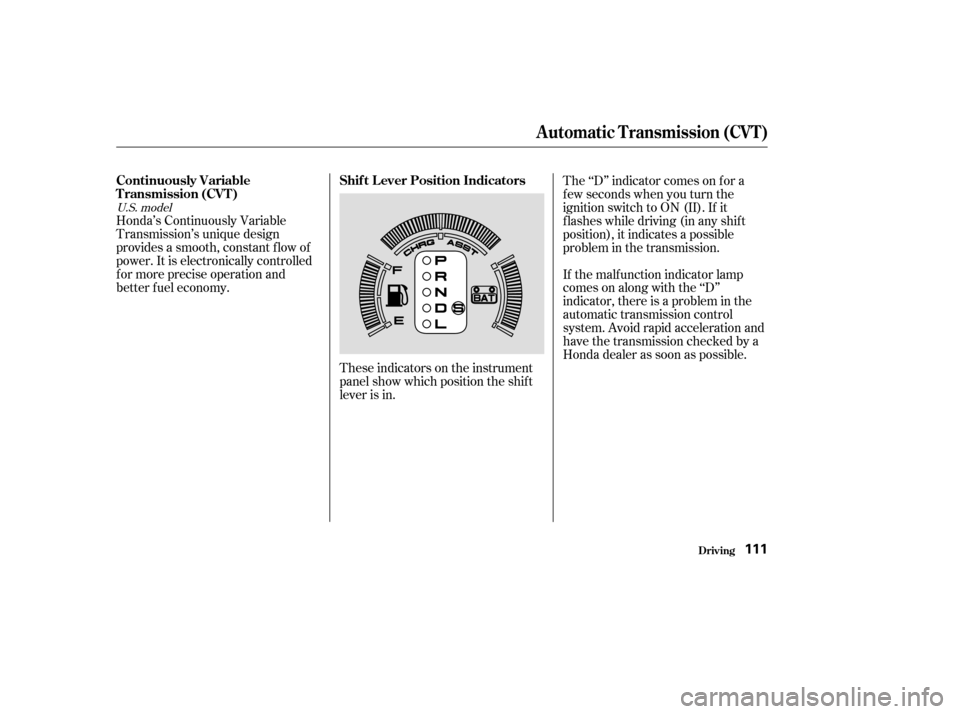
better f uel economy.These indicators on the instrument
panel show which position the shif t
lever is in.The ‘‘D’’ indicator comes on f or a
f ew seconds when you turn the
ignition switch to ON (II). If it
f lashes while driving (in any shif t
position), it indicates a possible
problem in the transmission.
If the malf unction indicator lamp
comes on along with the ‘‘D’’
indicator, there is a problem in the
automatic transmission control
system. Avoid rapid acceleration and
havethetransmissioncheckedbya
Honda dealer as soon as possible.
U.S. model
Automatic Transmission (CVT)
Continuously Variable
T ransmission (CVT )
Shif t L ever Position Indicators
Driving111