Page 65 of 215
�µ
�µ
�µ �µ
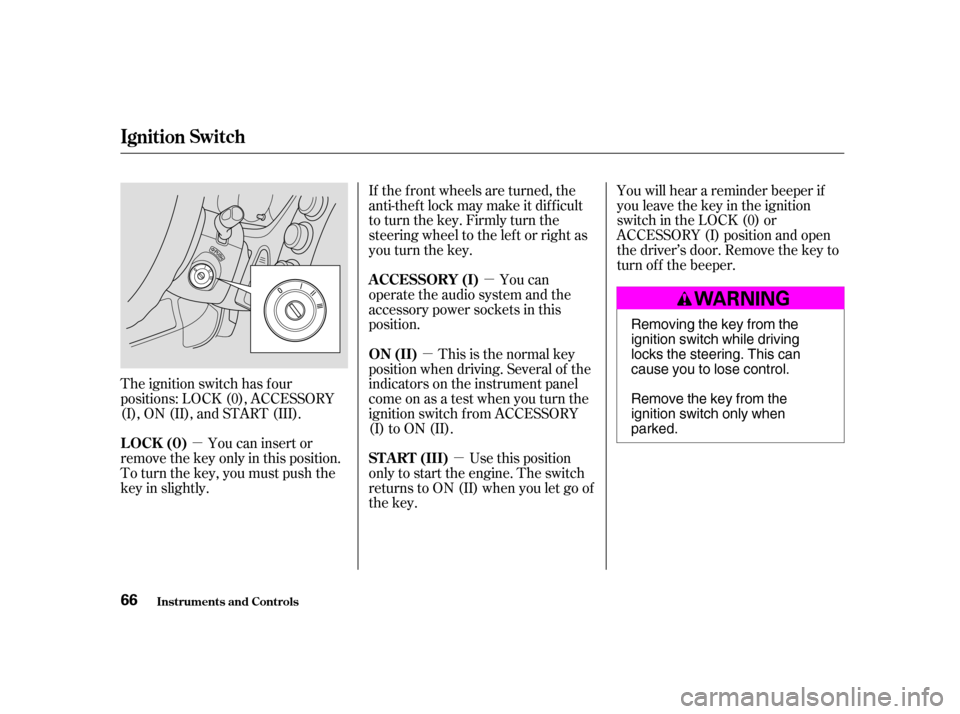
The ignition switch has f our
positions: LOCK (0), ACCESSORY
(I), ON (II), and START (III). If the f ront wheels are turned, the
anti-thef t lock may make it dif f icult
to turn the key. Firmly turn the
steering wheel to the lef t or right as
you turn the key.
You can
operate the audio system and the
accessory power sockets in this
position.
Use this position
only to start the engine. The switch
returns to ON (II) when you let go of
the key. You will hear a reminder beeper if
you leave the key in the ignition
switch in the LOCK (0) or
ACCESSORY (I) position and open
thedriver’sdoor.Removethekeyto
turn of f the beeper.
You can insert or
remove the key only in this position.
To turn the key, you must push the
key in slightly. This is the normal key
position when driving. Several of the
indicators on the instrument panel
come on as a test when you turn the
ignition switch f rom ACCESSORY
(I) to ON (II).
A CCESSORY (I)
ST A RT (III)
LOCK (0) ON (II)
Ignition Switch
Inst rument s and Cont rols
66 Removing the key from the
ignition switch while driving
locks the steering. This can
cause you to lose control.
Remove the key from the
ignition switch only whenparked.
�����—�����—�����y�
�������������y���
�(���)�������y���������y
Page 68 of 215

�µ
�µ
�µ Avoid dropping or throwing the
transmitter.
Protect the transmitter from
extreme temperature.
Do not immerse the transmitter in
any liquid.
If you lose a transmitter, the
replacement needs to be
reprogrammed by a Honda dealer.
Press this button once
to unlock the driver’s door. Push it
twice to unlock the other doors and
hatch. Some exterior and interior
lights f lash twice each time you
press this button. If you do not open
anydoorswithin30seconds,they
will automatically relock.
Pressthisbuttonfor
about one second to attract attention;
thehornwillsoundandtheexterior
lights will f lash f or about 30 seconds.
To cancel panic mode, press any
other button on the remote
transmitter or turn the ignition
switch to ON (II).
Press this button once to
lock both doors and hatch. Some
exterior lights will f lash. When you
push LOCK twice within 5 seconds,
you will hear a beep to verify that the
doors are locked. You cannot lock it
if any door is not f ully closed or the
key is in the ignition switch.Remote Transmitter CareUNL OCK
PA NIC
LOCK
Remote Transmitter
Inst rument s and Cont rols 69
UNLOCK
BUTTON
LED LOCK
BUTTON
PANIC
BUTTON
�����—�����—�����y�
�������������y���
�(���)�������y���������y
Page 75 of 215
Your vehicle’s windows are electri-
cally-powered. Turn the ignition
switch to ON (II) to raise or lower
any window.
Each door has a switch that controls
its window. To open the window,
push the switch down and hold it.
Release the switch when you want
the window to stop. Close the
window by pulling back on the
switch and holding it.The driver’s door armrest has a
master power window control panel.
To open the passenger’s window,
push down on the appropriate switch
and hold it until the window reaches
the desired position. To close the
window, pull back on the window
switch. Release the switch when the
window gets to the position you want.
Power Windows
Inst rument s and Cont rols
76 DRIVER’S WINDOW
SWITCH
MAIN SWITCH Closing a power window on
someone’s hands or fingers can
cause serious injury.
Make sure your passenger is
away from the window before
closing it.
�����—�����—�����y�
�������������y���
�(���)�������y���������y
Page 76 of 215

�µ�µ
The master control panel also con-
tains these extra features:
To open the driver’s
window f ully, push the window
switch f irmly down and release it.
The window automatically goes all
the way down. To stop the window
f rom going all the way down, pull
back on the window switch brief ly.
To open the driver’s window only
partially, push the window switch
down lightly and hold it. The window
will stop as soon as you release the
switch.
The AUTO f unction only works to
lower the driver’s window. To raise
the window, you must pull back on
the window switch and hold it until
the window reaches the desired
position. The light in the AUTO switch comes
on when you turn the ignition switch
to ON (II).
The MAIN switch controls power to
the passenger’s windows. With this
switch of f , the passenger’s windows
cannot be raised or lowered. The
MAIN switch does not af f ect the
driver’s window. To cancel this
feature, push on the switch again to
get it to pop out. Keep the MAIN
switch of f when you have children in
the vehicle so they do not injure
themselves by operating the
windows unintentionally.
If the driver’s
window runs into any obstacle while
it is closing automatically, it will
reverse direction and then stop. To
close the window, remove the
obstacle, then use the window switch
again.
Auto reverse stops sensing when the
window is almost closed. You should
always check that all passengers and
objects are away from the window
bef ore closing it.
Power Windows
Inst rument s and Cont rols
AUTO
AUTO REVERSE
77
�����—�����—�����y�
���������
���y���
�(���)�������y���������y
Page 77 of 215

There are two switches on the
ceiling near the f ront ceiling light.
The ignition switch must be ON (II)
to operate the moonrooof .To open the moonroof , pull the
OPEN/CLOSE switch backward and
hold it. Release the switch when the
moonroof gets to the desired
position.
To close the moonroof , push the
OPEN/CLOSE switch f orward and
hold it. The moonroof will not close
completely; it will stop about 5.1
inches (130 mm) away f rom being
closed. Make sure your passengers
are clear of the moonroof , then
release the switch and push it
f orward again to close the moonroof
completely.
When you push the TILT-UP button,
the rear of the moonroof will tilt up
f or ventilation. To close it, push the
OPEN/CLOSE switch f orward.
Make sure everyone’s hands are
away f rom the moonroof bef ore
opening or closing it.
Moonroof
Inst rument s and Cont rols
78 OPEN/CLOSE
SWITCH
TILT-UP BUTTON Opening or closing the
moonroof on someone’s hands
or fingers can cause seriousinjury.
Make sure all hands and fingers
are clear of the moonroof
before opening or closing it.
If you try to open the moonroof in
below-f reezing temperatures, or when
it is covered with snow or ice, you can
damage the moonroof panel or motor.
�����—�����—�����y�
�������������y���
�(���)�������y�������
�y
Page 79 of 215
The outside mirrors are heated to
remove fog and frost. With the
ignition switch in the ON (II)
position, turn on the heaters by
pressing the button. The light in the
button comes on as a reminder.
Press the button again to turn the
heaters off.To apply the parking brake, pull the
lever up f ully. To release it, pull up
slightly, push the button, and lower
the lever. The parking brake
indicator on the instrument panel
should go out when the parking
brake is f ully released (see page ).
53
Canadian model only
Mirrors, Parking Brake
Inst rument s and Cont rols
Power Mirror Heaters Parking Brake 80
NOTICE:
HEATED MIRROR BUTTON PARKING BRAKE LEVER Driving the vehicle with the
parking brake applied can damage the
rear brakes and axles.
�����—�����—�����y�
�������������y���
�(���)�������y���������y
Page 80 of 215
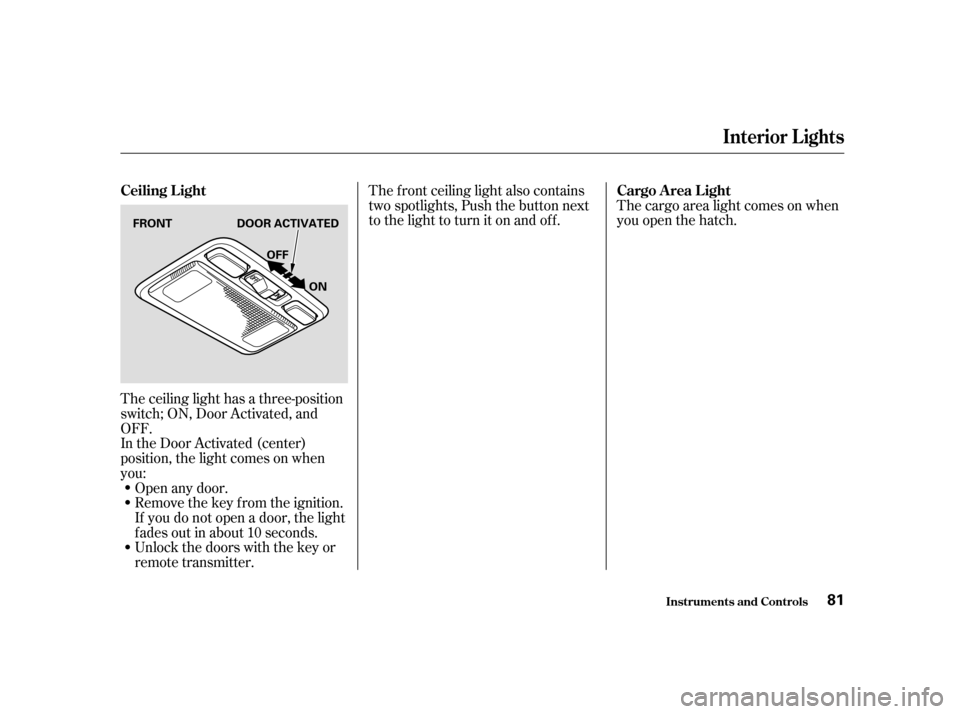
The ceiling light has a three-position
switch; ON, Door Activated, and
OFF.
In the Door Activated (center)
position, the light comes on when
you:Open any door.
Remove the key from the ignition.
If you do not open a door, the light
f ades out in about 10 seconds.
Unlock the doors with the key or
remote transmitter. The cargo area light comes on when
you open the hatch.
The f ront ceiling light also contains
two spotlights, Push the button next
to the light to turn it on and off.
Interior Lights
Inst rument s and Cont rols
Ceiling L ight
Cargo A rea L ight
81
FRONT DOOR ACTIVATED
ON
OFF
�����—�����—�����y�
�������������y���
�(���)�������y���������y
Page 90 of 215

�µ�µ
�µ �µ
The ignition switch must be in the
ACCESSORY (I) or ON (II) position.
Turn the system on by pushing the
PWR/VOL knob or the AM/FM
button. Adjust the volume by turning
thesameknob.
The band and f requency that the
radio was last tuned to is displayed.
To change bands, press the AM/FM
button. On the FM band, ST will be
displayed if the station is broadcast-
ing in stereo. Stereo reproduction on
AM is not available.
You can use any of f ive methods to
find radio stations on the selected
band: the
preset buttons, and .
Use the TUNE knob to
tune the radio to a desired f requency.
Turn the knob right to tune to a
higher f requency, or lef t to tune to a lower f requency.
The SEEK f unction
searches up and down f rom the
current f requency to f ind a station
with a strong signal. To activate it,
press the or side of the
bar, then release it.
The SCAN f unction
samples all stations with strong
signals on the selected band. To
activate it, press the SCAN button,
then release it. You will see SCAN in
the display. The system will scan f or
a station with a strong signal. When
it f inds one, it will stop and play that
station f or about f ive seconds.
If you do nothing, the system will
then scan f or the next strong station
and play it for five seconds. When it
plays a station you want to listen to,
press the SCAN button again. Each preset button can
store one f requency on AM, and two
f requencies on FM.
Select the desired band, AM or
FM. FM1 and FM2 let you store
two f requencies with each preset
button.
UsetheTUNE,SEEK,orSCAN
function to tune the radio to a
desired station.
Pickapresetbutton,andholdit
until you hear a beep.
Repeat steps 1 to 3 to store a total
of six stations on AM and twelve
stations on FM.
The preset f requencies will be lost if
your vehicle’s battery goes dead, is
disconnected, or the radio f use is
removed.
1. 2. 3. 4.
Playing the Radio
Comf ort and Convenience Feat ures
To Play the Radio
To Select a Station
TUNE,SEEK,SCAN, AUTO SELECT
TUNE SEEK
SCAN
Preset
91
�����—�����—�����y�
���������
���y���
�(���)�������y���������y