Page 154 of 301
Cruise control allows you to maintain
asetspeedabove25mph(40km/h)
without keeping your f oot on the
accelerator pedal. It should be used
f or cruising on straight, open
highways. It is not recommended f or
city driving, winding roads, slippery
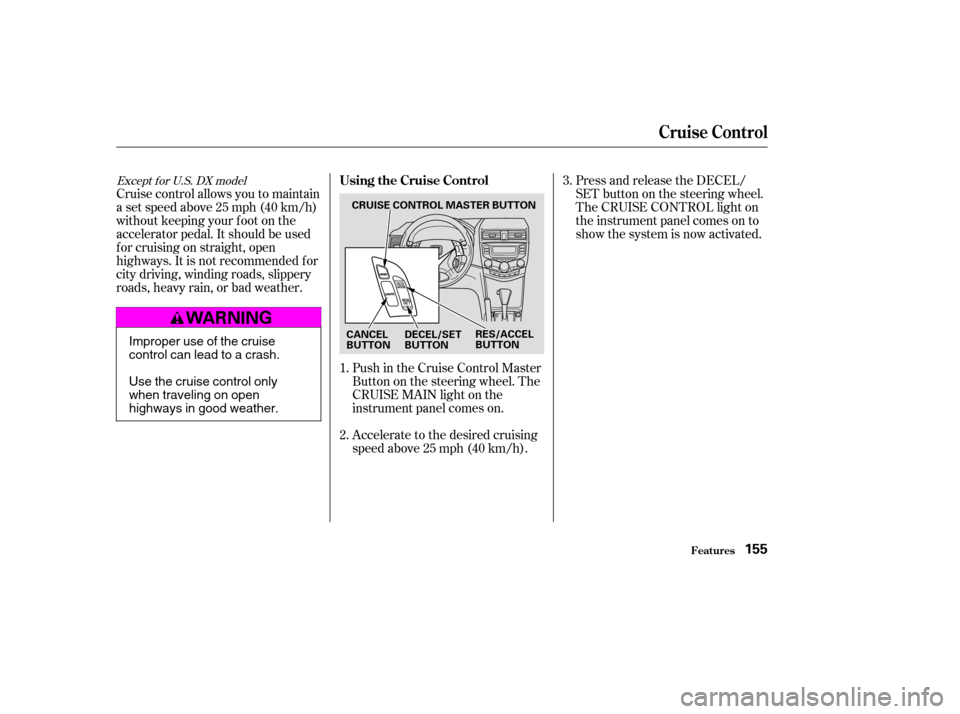
roads, heavy rain, or bad weather.Push in the Cruise Control Master
Buttononthesteeringwheel.The
CRUISE MAIN light on the
instrument panel comes on.
Accelerate to the desired cruising
speedabove25mph(40km/h).Press and release the DECEL/
SET button on the steering wheel.
The CRUISE CONTROL light on
the instrument panel comes on to
show the system is now activated.
1. 2. 3.
Except f or U.S. DX modelUsing the Cruise Control
Cruise Control
Features155
CRUISE CONTROL MASTER BUTTON
CANCEL
BUTTON RES/ACCEL
BUTTON
DECEL/SET
BUTTON
Improper use of the cruise
control can lead to a crash.
Use the cruise control only
when traveling on open
highways in good weather.
�����—�����—�����y�
�
�����������y���
�(�������
���y���
�����y
Page 156 of 301
When you push the CANCEL button,
or tap the brake or clutch pedal, the
system will remember the
previously-set cruising speed. To
return to that speed, accelerate to
above25mph(40km/h)thenpress
and release the RES/ACCEL button.
The CRUISE CONTROL light comes
on. The vehicle will accelerate to the
same cruising speed as bef ore.Pressing the Cruise Control Master
Switch turns the system of f and
erases the previous cruising speed.
Youcancancelthecruisecontrolin
any of these ways:
Tap the brake or clutch pedal.
Push the CANCEL button on the
steering wheel.
Press the Cruise Control Master
Switch.
Cancelling the Cruise Control Resuming the Set Speed
Cruise Control
Features157
�����—�����—�����y�
�
�����������y���
�(�������
���y���
�����y
Page 171 of 301

Removing parts f rom your vehicle,
or replacing components with non-
Honda (af termarket) components
could seriously af f ect your vehicle’s
handling, stability, and reliability.
Some examples are:Lowering the vehicle with an
aftermarket suspension kit that
signif icantly reduces ground
clearance can allow the
undercarriage to hit speed bumps
or other raised objects, which
could cause the airbags to deploy.
Raising your vehicle with an
af termarket suspension kit can
af f ect the handling and stability.
Af termarket wheels, because they
are a universal design, can cause
excessive stress on suspension
components. Larger or smaller wheels and tires
can interf ere with the operation of
your vehicle’s anti-lock brakes and
other systems.
Do not modif y your steering wheel
or any other part of your
Supplemental Restraint System.
Modif ications could make the
system inef f ective. See the saf ety
precautions on page .
If you plan to modif y your vehicle,
consult your Honda dealer.
Any object
attached to or placed on the covers
marked ‘‘SRS AIRBAG’’ in the
center of the steering wheel and
on top of the dashboard, could
interf ere with the proper operation
of the airbags. Or, if the airbags
inf late, the objects could be
propelled inside the vehicle and hurt someone.
If a side airbag
or a side curtain airbag inf lates, a
cupholderorotherhardobject
attached on or near the door could
be propelled inside the vehicle and
hurt someone.
This could prevent the
airbag from inflating properly.
6
On models equipped with side airbags or
side curtain airbags
Modif ications
Bef ore Driving
Modif ying Your Vehicle
Additional Saf ety Precautions
Do not at t ach or place object s onthe f ront airbag covers. Do not at t ach hard object s on or
near a f ront door.
Do not place any object s over orreplacetheoutsideedgeof afrontseat -back.
172
�����—�����—�����y�
�
�����������y���
�(�������
���y���
�����y
Page 177 of 301
Youshoulddothefollowingchecks
and adjustments bef ore you drive
your vehicle.Make sure all windows, mirrors,
and outside lights are clean and
unobstructed. Remove f rost, snow,
or ice.
Visually check the tires. If a tire
looks low, use a gauge to check its
pressure.
Check that any items you may be
carrying are stored properly or
f astened down securely. Check the adjustment of the
inside and outside mirrors (see
page ).
Make sure the doors are securely
closed and locked.
Fasten your seat belt. Check that
your passengers have f astened
their seat belts (see page ).When you start the engine, check
the gauges and indicator lights in
the instrument panel (see page
).
Check the steering wheel
adjustment (see page ).
Check the seat adjustment (see
pages and ).
3. 2.
1.
4. 5. 6. 7.8.
159.
61
98 92 93
78
Preparing to Drive
Driving178
�����—�����—�����y�
�
�����������y���
�(�������
���y���
���
�y
Page 183 of 301

�µ�µThis position locks
the transmission in second gear. It
does not downshif t to f irst gear
when you come to a stop.
Use Second gear:
For starting out on a slippery
surf ace or in deep snow.
To help reduce wheel spin.
When driving downhill with a
trailer. To shif t f rom Second to
First, press the release button on the
side of the shift lever. With the lever
in this position, the transmission
locks in First gear. By upshif ting and
downshif ting through 1, 2, D , and D,
you can operate this transmission
much like a manual transmission
without a clutch pedal. If you exceed the maximum speed
f or the gear you are in, the engine
speed will enter into the tachometer’s
red zone. If this occurs, you may f eel
the engine cut in and out. This is
caused by a limiter in the engine’s
computer controls. The engine will
run normally when you reduce the
RPM below the red zone.
For more power when climbing.
To increase engine braking when
going down steep hills.
3
Automatic Transmission
Driving
Second (2) First (1) Engine Speed L imiter
184
�����—�����—�����y�
�
�������
���y���
�(�������
���y���
�����y
Page 186 of 301

Always use the parking brake when
you park your vehicle. Make sure
the parking brake is set f irmly or
your vehicle may roll if it is parked
on an incline.
If your vehicle has an automatic
transmission, set the parking brake
bef ore you put the transmission in
Park. This keeps the vehicle f rom
moving and putting pressure on the
parking mechanism in the
transmission.Make sure the moonroof (if
equipped) and the windows are
closed.
Turn of f the lights.
Place any packages, valuables, etc.,
in the trunk or take them with you.
Lockthedoorswiththekeyorthe
remote transmitter.
Check the indicator on the
instrument panel to verif y that the
security system is set.
Never park over dry leaves, tall
grass, or other f lammable
materials. The hot three way
catalytic converter could cause
these materials to catch on fire.
If your vehicle has a manual
transmission, put it in f irst gear.
Make sure the parking brake is
f ully released bef ore driving away.
Driving with the parking brake
partially set can overheat or
damage the rear brakes.
If the vehicle is f acing uphill, turn
the f ront wheels away f rom the
curb. If your vehicle has a manual
transmission, put it in f irst gear.
If the vehicle is f acing downhill,
turn the front wheels toward the
curb. If your vehicle has a manual
transmission, put it in reverse gear.
On EX, LX-V6, and Canadian LX-G
models
Driving
Parking T ips
Parking
187
�����—�����—�����y�
�
�����������y���
�(�������
���y���
�����y
Page 187 of 301

Your Honda is equipped with disc
brakes. The brakes on the rear
wheels may be disc or drum,
depending on the model. A power
assist helps reduce the ef f ort needed
on the brake pedal. The ABS helps
you retain steering control when
braking very hard.Check the brakes after driving
through deep water. Apply the
brakes moderately to see if they f eel
normal. If not, apply them gently and
f requently until they do. Be extra
cautious in your driving.
The hydraulic system that operates
the brakes has two separate circuits.
Each circuit works diagonally across
the vehicle (the lef t-f ront brake is
connected with the right-rear brake,
etc.). If one circuit should develop a
problem, you will still have braking
at two wheels.
If the brake pads need replacing, you
will hear a distinctive, metallic
screeching sound when you apply
the brake pedal. If you do not have
the brake pads replaced, they will
screech all the time. It is normal f or
the brakes to occasionally squeal or
squeak when you apply them.
Resting your f oot on the pedal keeps
the brakes applied lightly, builds up
heat, and reduces their ef f ectiveness.
It also keeps your brake lights on all
the time, conf using drivers behind
you.
Constant application of the brakes
when going down a long hill builds
up heat and reduces their ef f ective-
ness. Use the engine to assist the
brakes by taking your f oot of f the
accelerator and downshif ting to a
lower gear.
Braking System
Driving
Braking System Design
Brake Wear Indicators
188
Front
�����—�����—�����y�
�
�����������y���
�(�������
���y���
���
�y
Page 189 of 301
Test your brakes as instructed on
page . If the brakes f eel normal,
drive slowly and have your vehicle
repaired by your Honda dealer as
soon as possible. Avoid sudden hard
braking which could cause the rear
wheels to lock up and possibly lead
to a loss of control.such as trying to take a
corner too f ast or making a sudden
lane change. Always drive at a safe
speed f or the road and weather
conditions.
It only helps with the steering control during braking.
Always steer moderately
when you are braking hard. Severe
or sharp steering wheel movement
can still cause your vehicle to veer
into oncoming traffic or off the road.
on loose or
uneven surf aces, such as gravel or
snow, than a vehicle without anti-
lock. Slow down and allow a greater
distance between vehicles under
those conditions. If the ABS indicator and the brake
system indicator come on together
and the parking brake is f ully
released, the front-to-rear braking
distribution system may also be shut
down.
The TCS indicator will come on
alongwiththeABSindicator.
Test your brakes as instructed on
page . If the brakes f eel normal,
drive slowly and have your vehicle
repaired by your Honda dealer as
soon as possible. Avoid sudden hard
braking which could cause the rear
wheels to lock up and possibly lead
to a loss of control.
262 262
On all V6 models
Anti-lock Brakes (ABS)
Driving
A BS will not prevent a skid that
results f rom changing direction
abruptly,
A BS does not reduce the time or
distance it takes to stop the
vehicle. A BS cannot prevent a loss of
stability.
A vehicle with A BS may require a
longer distance to stop
Import ant Saf et y Reminders
190
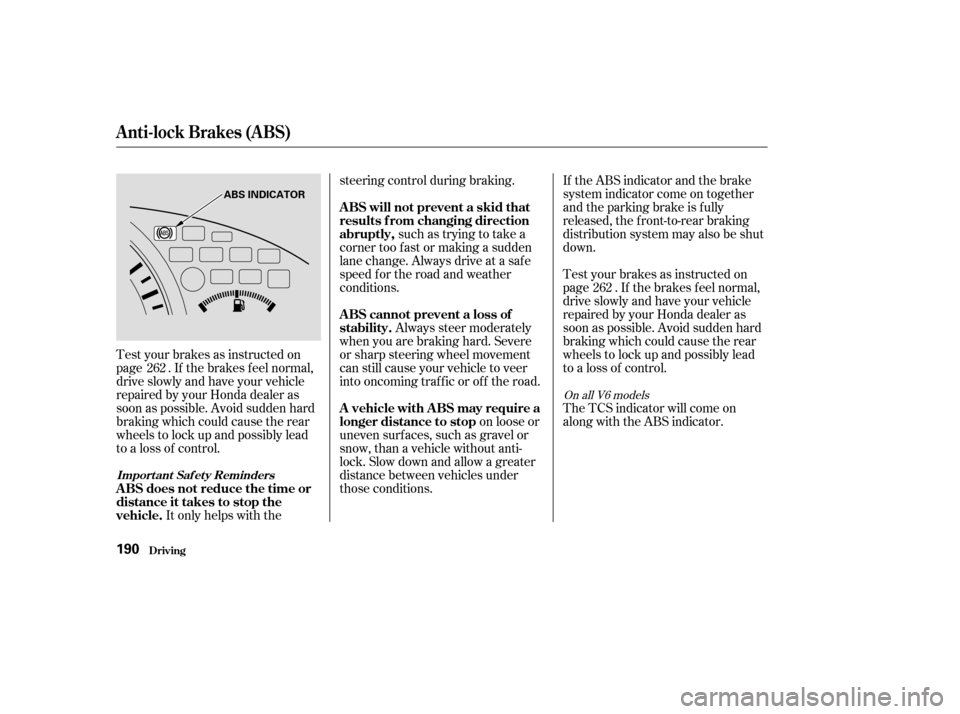
ABS INDICATOR
�����—�����—�����y�
�
�������
���y���
�(�������
���y���
�����y