Page 125 of 301

�µ
�µ If you are
traveling far from home and can no
longer receive your preset stations,
you can use the Auto Select f eature
to find stations in the local area.
Press the A. SEL button or touch the
Auto Select icon. A. SEL will f lash in
the display, and the system will go
into scan mode f or several seconds.
It stores the f requencies of six AM,
and twelve FM stations in the preset
bars (1 6) or icons. You will see a
‘‘0’’ displayed af ter pressing a preset
bar or icon if Auto Select cannot f ind
a strong station for every preset bar
or icon. press the A.
SEL button or icon. This restores the
presets you originally set.
If you do not like the stations Auto
Select has stored, you can store
other f requencies on the preset bars
or icons. Use the TUNE, SEEK, or
SCAN f unction to f ind stations, then
store them in the preset bars or
icons as described previously.
To turn of f Auto Select,
AUTO SELECT
Playing the Radio
Features126
�����—�����—�����y�
�
�����������y���
�(�������
���y���
�����y
Page 126 of 301

�µ
�µ Eachmodeisshowninthedisplayas
it changes. Turn the VOLUME knob
or touch the icon to adjust the
setting to your liking. When the level
reaches the center, you will see ‘‘C’’
in the display.
Touch the arrows next to the BAS or
TRE icons. The adjustment shows
you the current setting.
Touch the lef t or right bars on the
sound grid. Balance is equalized
when the vertical lines are centered
on the grid.
Touchthefrontorrearbarsonthe
sound grid. The f ader is equalized
when the horizontal lines are
centered on the grid. The system will automatically return
the display to the selected audio
mode about f ive seconds af ter you
stop adjusting a mode. On vehicles
with navigation system, touch the
RETURN icon to go back to the
audio screen.
Press the SOUND button or icon, or
press the TUNE knob repeatedly to
display the Bass (BAS), Treble
(TRE), Balance (BAL), and Fader
(FAD) settings. On vehicles with
navigation system, touch the
SOUND icon or press the TUNE
knob.
These two
modes adjusts the strength of the
sound coming f rom each speaker.
BAL adjusts the side-to-side strength,
while FAD adjusts the f ront-to-back
strength.
Use the TRE/BAS
modes to adjust the tone to your
liking.
If you want to adjust the sound while
the radio/CD is playing, push the
AUDIO DISPLAY button, then touch
the SOUND icon in the display.
For Vehicles without Navigation System
For Vehicles with Navigation System(U.S. vehicles only)
On Vehicles with Navigation SystemAdjusting the Sound
Balance/Fader
Treble/Bass
Playing the Radio
Features127
�����—�����—�����y�
���������
���y���
�(�������
���y���
�����y
Page 127 of 301
Your Honda’s radio can receive the
complete AM and FM bands.
Those bands cover these f requen-
cies:
AM band:
530 to 1,710 kilohertz
FM band:
87.7 to 107.9 megahertz
Radio stations on the AM band are
assigned f requencies at least ten
kilohertz apart (530, 540, 550).
Stations on the FM band are
assigned f requencies at least 0.2
megahertz apart (87.9, 88.1, 88.3).
Stations must use these exact
f requencies. It is f airly common f or
stations to round-of f the f requency in
their advertising, so your radio could
display a f requency of 100.9 even
though the announcer may identif y
the station as ‘‘FM101.’’How well your Honda’s radio
receives stations is dependent on
many f actors, such as the distance
from the station’s transmitter,
nearby large objects, and atmos-
pheric conditions.
A radio station’s signal gets weaker
as you get f arther away f rom its
transmitter. If you are listening to an
AM station, you will notice the sound
volume becoming weaker, and the
stationdriftinginandout.If youare
listening to an FM station, you will
see the stereo indicator f lickering of f
and on as the signal weakens.
Eventually, the stereo indicator will
go of f and the sound will f ade
completely as you get out of range of
the station’s signal.
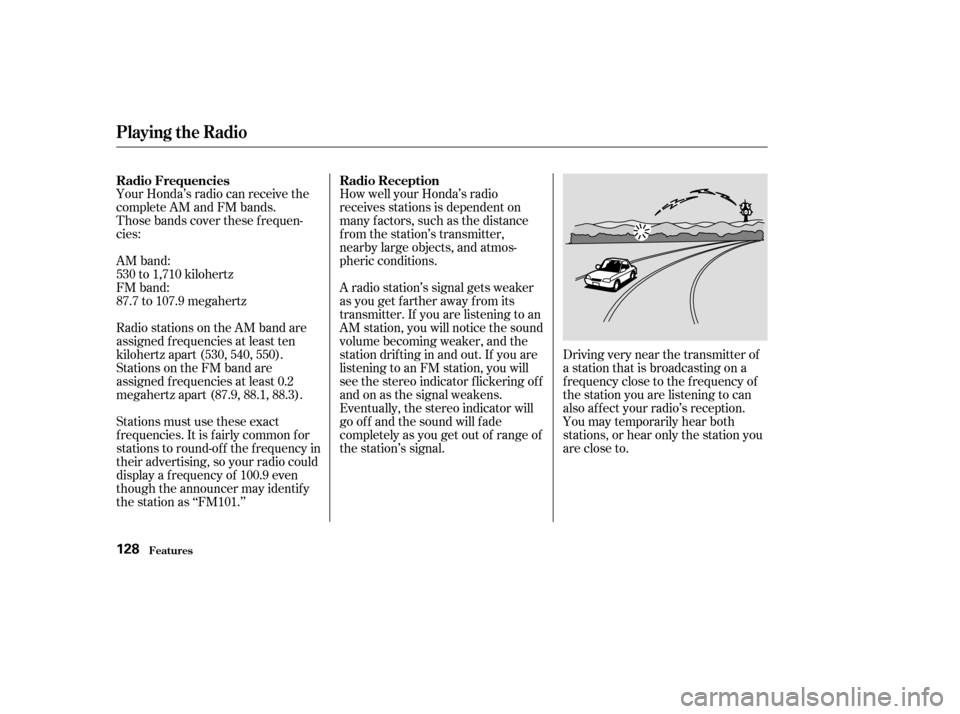
Driving very near the transmitter of
a station that is broadcasting on a
f requency close to the f requency of
the station you are listening to can
also af f ect your radio’s reception.
You may temporarily hear both
stations,orhearonlythestationyou
are close to.
Radio Frequencies Radio Reception
Playing the Radio
Features128
�����—�����—�����y�
�
�������
���y���
�(�������
���y���
���
�y
Page 129 of 301
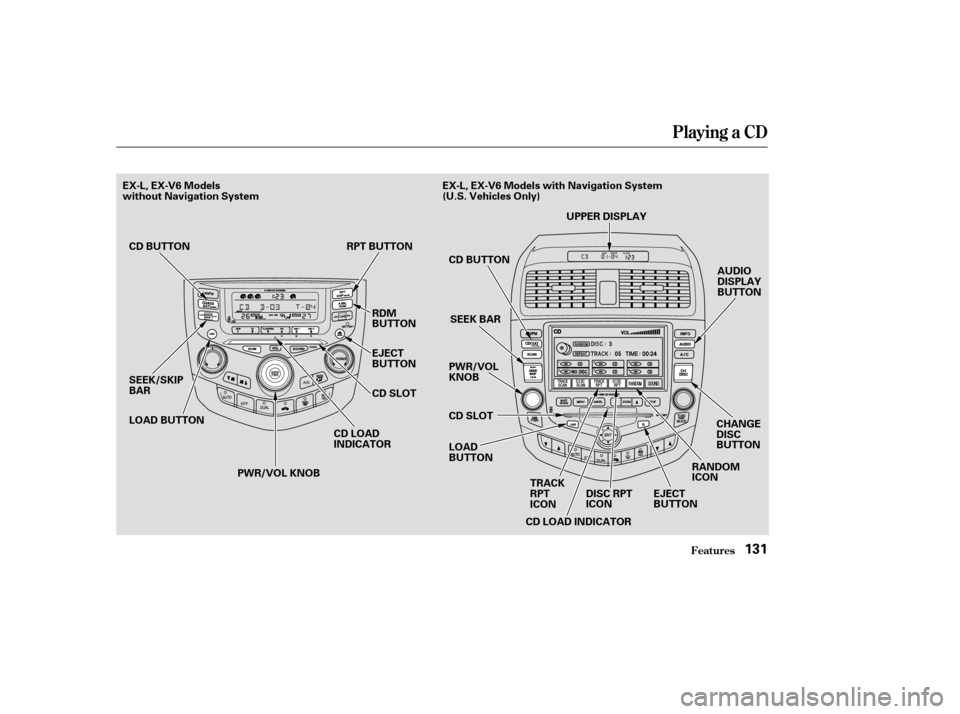
Playing a CD
Features130
DX and LX Models
EX, EX-V6 and LX-V6 Models
without Navigation SystemPWR/VOL KNOB
PWR/VOLKNOB
EJECT BUTTON
CD SLOT
CD BUTTON RPT BUTTON EJECT
BUTTON
CD SLOT
PWR/VOL KNOB
SEEK/SKIP
BAR
SEEK/SKIP
BAR
TRACK
RPTICON RANDOMICON
DISC
RPTICON
CD LOAD INDICATOR
CD LOAD
INDICATOR
RDM
BUTTON
CD
BUTTON
SEEK/SKIP
BAR SCAN/RPT BUTTON
RDM
BUTTON
CD LOAD INDICATOR
LOAD
BUTTON
SCAN BUTTON CD BUTTON
SCAN
BUTTON
LOAD
BUTTON
CD SLOT
EJECT BUTTONCHANGE
DISC
BUTTON
AUDIO
DISPLAY
BUTTON
UPPER DISPLAY
PRESET
BAR
PRESET BAR EX, EX-V6 Models with Navigation System
(U.S. Vehicles Only)
�����—�����—�����y�
�
���������
�y���
�(�������
���y���
�����y
Page 130 of 301
Playing a CD
Features131
AUDIO
DISPLAY
BUTTON
SEEK/SKIP
BAR CD LOAD
INDICATORCD BUTTON
SEEK BAR
PWR/VOLKNOB
LOAD
BUTTON
CD SLOT
CD LOAD INDICATOR RANDOMICON
EJECT
BUTTON
EX-L, EX-V6 Models
without Navigation System
LOAD BUTTON RPT BUTTON
RDM
BUTTON
EJECT
BUTTON
CD SLOT
PWR/VOL KNOB
CD BUTTON
UPPER DISPLAY
CHANGE
DISC
BUTTON
TRACK
RPTICON DISC RPTICON
EX-L, EX-V6 Models with Navigation System
(U.S. Vehicles Only)
�����—�����—�����y�
�
�����������y���
�(�������
���y���
�����y
Page 131 of 301

To load or play CD’s, the ignition
switch must be in the ACCESSORY
(I) or ON(II) position.To play the radio when a CD is
playing, press the AM/FM button.
Press the CD button again to switch
back to the CD player.
Insert a CD into the CD slot. The
drive will pull the CD in the rest of
the way to play it. When the system
reaches the end of the disc, it will
return to the beginning and play the
disc again.
You operate the CD player/CD
changer with the same controls used
for the radio. To select the CD
player/CD changer, press the CD
button. The number of the track
playing is shown in the display. With
the in-dash CD changer, the disc and
track numbers are displayed. The
system will continuously play a CD
until you change modes. To listen to satellite radio when a CD
is playing, press the CD/SAT button.
To play the tape when a CD is
playing, insert a tape in the player
(optional). If a tape is in the player,
press the AUX button. Press the CD
button again to switch back to the
CD player. The cassette player is
optional on all U.S. models.
If you turn the system of f while a CD
is playing, either with the PWR/VOL
knob or by turning off the ignition,
the disc will stay in the drive. When
youturnthesystembackon,theCD
will begin playing where it lef t of f .
For vehicles with Satellite Radio
DX, LX, and LX-G Models in CanadaTo Play a CD
Playing a CD, CD Changer
Features132
�����—�����—�����y�
�
�����������y���
�(�������
���y���
�����y
Page 132 of 301

�µ�µ�´
�Û
�Ý
Press the LOAD button until you
hear a beep and see ‘‘LOAd’’ in the
display.
The disc number f or an empty
position is highlighted and the red
light starts blinking.
When the CD load indicator turns
green and ‘‘LOAD’’ appears in the
screen again, insert the next CD in
the slot.
Repeat steps 1 through 3 until all
six positions are loaded. If you are
not loading all six positions, the
system begins playing the last CD
loaded. You can also load a CD into an empty
position while a CD is playing. Select
the empty position (the disc number
indicator is not highlighted) and
press the appropriate preset bar or
touch a disc icon. The current CD
stops playing and starts the loading
sequence. The CD just loaded will
play.
You operate the CD changer with
the same controls used f or the radio.
The numbers of the disc and track
playingareshowninthedisplay.On
vehicles with navigation system,
these numbers also appear in the
upper display.
To select a dif f erent disc, press the
appropriate side of a preset bar
(1 6) or use the Preset 5 (DISC )
to select the previous disc or Preset
6 (DISC ) to select the next disc in
sequence. On vehicles with
navigation system, touch the
appropriate disc icon or press the
or side of the CH/DISC bar. If
youselectanemptypositioninthe
CD changer, the system will try to
load the CD in the next available slot.
Insert the disc into the CD slot
when the green CD load indicator
comes on. Insert it only about
half way; the drive will pull it in the
rest of the way. You will see
‘‘BUSY’’ in the display as the CD
load indicator turns red and blinks
as the CD is loaded.
1. 2.3. 4. 5.
On vehicles with in-dash CD changer
For Vehicle with in-dash CD Changer
Playing a CD, CD Changer
Features133
�����—�����—�����y�
�
�����������y���
�(�������
���y���
�����y
Page 133 of 301

�µ
�µ �µ
�µ
�µ �µ
�µ To use the controls, press the
AUDIO DISPLAY button, the control
icons will appear on the screen.
Press the icon or
SCAN button, to get a 10 second
sampling of each track on the
current CD. Press the icon or button
again to turn it off.
Touch to get a 10
second sampling of the f irst song of
each disc in the CD changer. Touch
the icon again to turn it off.
Touch to
continuously play the same song on
the CD. Press the icon again to stop
the function.
Push the to
play the next track on the disc. Push
the oncetoreplaythetrackin
play, press twice to replay the
previous track.
To remove rapidly within a track,
press and hold the , or the button.
Press to continuously
replay a track. You will see RPT in
the display. Press the RPT button
again to turn it off. Press to play the
tracks in random order. You will see
RDM in the display. Press the RDM
button again to return to normal play.
The SCAN f unction
samples all the tracks on the
selected disc in the order they are
recorded. To activate it, press and
release the SCAN button. You will
see SCAN in the display, and you will
get a 10 second sampling of each
track on the selected CD. Press the
SCAN button again to get out of the
system.
For Vehicles without Navigation System EX-L, EX-V6 Models with Navigation
System
TRACK SCAN
DISC SCAN
TRACK RPT
SEEK /SK IP
REPEAT
RANDOM
SCAN
Playing a CD, CD Changer
Features134
�����—�����—�����y�
�
�����������y���
�(�������
���y���
�����y