Page 73 of 301

�µ�µ
Turn Signal
Of f
Parking and interior lights
Headlight on
High beams
FlashhighbeamsPush down on the
lef t lever to signal a lef t turn and up
to signal a right turn. To signal a lane
change, push lightly on the lever in
the proper direction and hold it. The
lever will return to center when you
release it or complete a turn. Rotating the
switch on the lef t lever to the
‘‘ ’’ position turns on the parking
lights, taillights, instrument panel
lights, side-marker lights, and rear
license plate lights. Turning the
switch to the ‘‘ ’’ position turns
on the headlights. If you leave the
lights on with the ignition switch in
ACCESSORY (I) or LOCK (0), you
will hear a reminder chime when you
open the driver’s door.
When the light switch is in either of
these positions, the Lights On
indicator comes on as a reminder.
1.2.3.4.5.6.
T urn Signal and Headlights T urn Signal Headlights ON
Turn Signal, Headlights
Inst rument s and Cont rols74
�����—�����—�����y�
�
�����������y���
�(�������
���y���������y
Page 75 of 301

With the headlight switch off, the
high beam headlights and the high
beam indicator come on with
reduced brightness when you turn
the ignition switch to ON (II) and
release the parking brake. They
remain on until you turn the ignition
of f , even if you set the parking brake.
The headlights revert to normal
operation when you turn them on
with the switch.The knob on the instrument panel
controls the brightness of the instru-
ment panel lights. Turn the knob to
adjust the brightness.Push the button between the center
vents to turn on the hazard warning
lights (f our-way f lashers). This
causes all f our outside turn signals
and both turn indicators in the
instrument panel to f lash. Use the
hazard warning lights if you need to
park in a dangerous area near heavy
traf f ic, or if your vehicle is disabled.
Instrument Panel Brightness Hazard Warning
Daytime Running L ights
(Canadian Models)
Daytime Running L ights, Instrument Panel Brightness, Hazard Warning
Inst rument s and Cont rols76
INSTRUMENT PANEL BRIGHTNESS KNOB
�����—�����—�����y�
�
�����������y���
�(�������
���y���������y
Page 77 of 301
Insert the key in the ignition
switch, and unlock the steering
column.
Push the lever under the steering
column all the way down.Move the steering wheel up or
down, and in or out to the desired
position, making sure the wheel
points toward your chest, not
towardyourface.Makesureyou
can see the instrument panel
gauges and the indicator lights.
Make any steering wheel adjustment
bef ore you start driving.
1. 2.
3.See page f or important saf etyinf ormation about how to properlyposition the steering wheel. 16
Steering Wheel A djustment
Inst rument s and Cont rols78
Adjusting the steering wheel
position while driving may
cause you to lose control of the
vehicle and be seriously injured
inacrash.
Adjust the steering wheel only
when the vehicle is stopped.
�����—�����—�����y�
�
�����������y���
�(�������
���y�������
�y
Page 81 of 301

�µ�µ�µ
�µ
You can insert or
remove the key only in this position.
To turn the key, the shift lever must
be in Park, and you must push the
key in slightly. If the f ront wheels
are turned, the anti-thef t lock may
make it difficult to turn the key.
Firmly turn the steering wheel to the
left or to the right as you turn thekey.
The ignition switch has f our
positions: LOCK (0), ACCESSORY
(I), ON (II), START (III) You can
operate the audio system and the
accessory power sockets in this
position.
This is the normal key
position when driving. Several of the
lights on the instrument panel come
on as a test when you turn the
ignition switch f rom ACCESSORY
(I) to ON (II).
Use this position
only to start the engine. The switch
returns to ON (II) when you let go of
the key.
L OCK (0) A CCESSORY (I)
ON (II)
ST A RT (III)
Ignition Switch
Inst rument s and Cont rols82
Removing the key from the
ignition switch while driving
locks the steering. This can
cause you to lose control.
Remove the key from the
ignition switch only whenparked.
�����—�����—�����y�
�
�����������y���
�(�������
���y���������y
Page 102 of 301
To apply the parking brake, pull the
lever up f ully. To release it, pull up
slightly, push the button, and lower
the lever. The parking brake light on
the instrument panel should go out
when the parking brake is f ully
released with the engine running
(see page ).
The moonroof has a key-of f delay.
You can still open and close the
moonroof f or up to ten minutes af ter
you turn of f the ignition. The key-of f
delay cancels as soon as you open
either f ront door. You must then
turn the ignition ON (II) for the
moonroof to operate.
62
Parking Brake
Moonroof , Parking Brake
Inst rument s and Cont rols103
NOTICE:
PARKING BRAKE LEVER
Driving the vehicle with the
parking brake applied can damage the
rear brakes and hubs.
If you try to open the moonroof in
below-f reezing temperatures, or when
it is covered with snow or ice, you can
damage the moonroof panel or motor.
�����—�����—�����y�
�
����
������y���
�(�������
���y���
�����y
Page 104 of 301

The ceiling lights have a three or
two-position switch; ON (f or three-
position), Door Activated, and OFF.
In the Door Activated (center or left)
position, the lights come on when
you:
After all doors are closed tightly, the
light dims slightly, then f ades out in
about 30 seconds.Open any door.
Unlock the doors with the key or
remote transmitter. The f ront ceiling light also contains
two spotlights. Push the spotlight
lenses to turn it on and off.
The courtesy light between the
spotlights comes on when you turn
the parking lights on. To adjust its
brightness, turn the Select/Reset
knob on the instrument panel. Push on the spotlight lenses to turn
the light on and of f .
The courtesy lights in the f ront
doors and around the ignition switch
come on when you open any door.
Af ter you close the door, the ignition
switch light stays on f or several
seconds.On EX and EX-V6
On LX models
Ceiling L ight
Individual Interior L ights
Interior Lights
Inst rument s and Cont rols105
DOOR ACTIVATEDON
OFF DOOR ACTIVATED
COURTESY LIGHT
�����—�����—�����y�
�
���������
�y���
�(�������
���y���
�����y
Page 153 of 301

The security system helps to protect
your vehicle and valuables f rom thef t.
The horn sounds and a combination
of headlights, parking lights, side
marker lights and taillights f lashes if
someone attempts to break into your
vehicleorremovetheradio.This
alarm continues f or two minutes,
then the system resets. To reset an
alarming system before the two
minutes have elapsed, unlock either
f ront door with the key or the
remote transmitter.
The security system automatically
sets 15 seconds after you lock the
doors, hood, and trunk. For the
system to activate, you must lock the
doors f rom the outside with the key,
lock tab, door lock switch, or remote
transmitter. The security system
light on the instrument panel starts
blinking immediately to show you
the system is setting itself.Once the security system is set,
opening any door (without using the
key or the remote transmitter), the
hood, or the trunk will cause it to
sound. It also sounds if the radio is
removed f rom the dashboard or the
wiring is cut.With the system set, you can still
open the trunk with the master key
or the remote transmitter without
triggering the alarm. The alarm will
sound if the trunk lock is f orced, or
the trunk is opened with the trunk
release handle.
The security system will not set if
the hood, trunk, or any door is not
f ully closed. If the system will not set,
check the Door Monitor on the
instrument panel (see page ), to
see if the doors and trunk are f ully
closed. Since it is not part of the
monitor display, manually check thehood.
Do not attempt to alter this system
or add other devices to it.
61
On EX, all V6, and Canadian LX-G
models
Security System
Features154
SECURITY SYSTEM LIGHT
�����—�����—�����y�
�
�����������y���
�(�������
���y���
�����y
Page 154 of 301
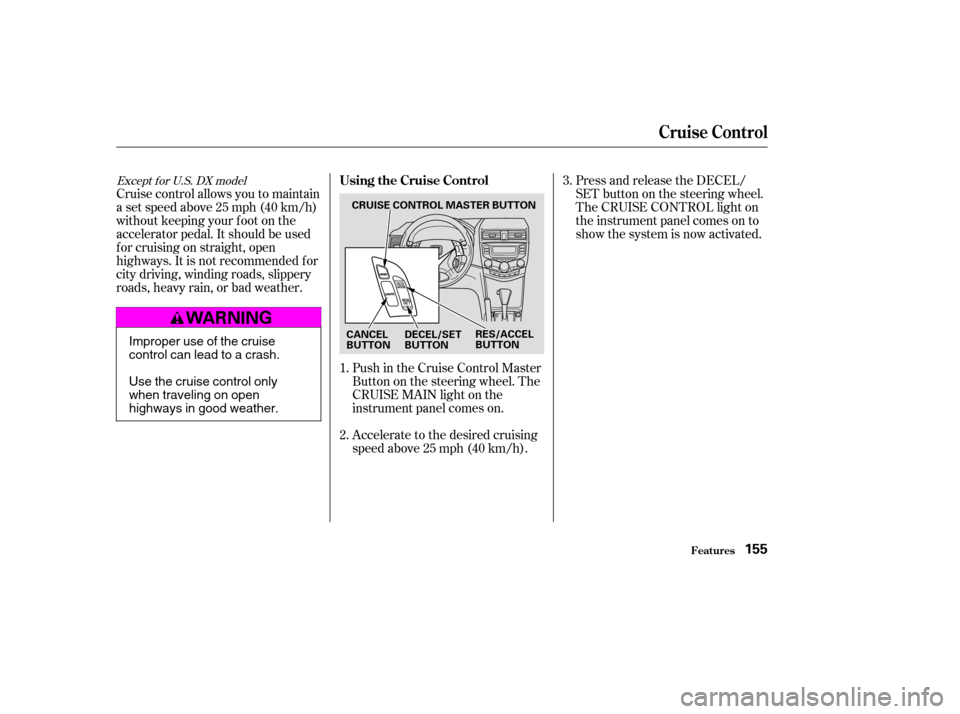
Cruise control allows you to maintain
asetspeedabove25mph(40km/h)
without keeping your f oot on the
accelerator pedal. It should be used
f or cruising on straight, open
highways. It is not recommended f or
city driving, winding roads, slippery
roads, heavy rain, or bad weather.Push in the Cruise Control Master
Buttononthesteeringwheel.The
CRUISE MAIN light on the
instrument panel comes on.
Accelerate to the desired cruising
speedabove25mph(40km/h).Press and release the DECEL/
SET button on the steering wheel.
The CRUISE CONTROL light on
the instrument panel comes on to
show the system is now activated.
1. 2. 3.
Except f or U.S. DX modelUsing the Cruise Control
Cruise Control
Features155
CRUISE CONTROL MASTER BUTTON
CANCEL
BUTTON RES/ACCEL
BUTTON
DECEL/SET
BUTTON
Improper use of the cruise
control can lead to a crash.
Use the cruise control only
when traveling on open
highways in good weather.
�����—�����—�����y�
�
�����������y���
�(�������
���y���
�����y