2004 GMC YUKON brake light
[x] Cancel search: brake lightPage 307 of 554
Anti-lock Brake System
Your vehicle has anti-lock brakes. ABS is an advanced
electronic braking system that will help prevent a
braking skid.
When you start your engine and begin to drive away,
your anti-lock brake system will check itself. You
may hear a momentary motor or clicking noise while
this test is going on. This is normal.
If there is a problem with
the anti-lock brake system,
this warning light will
stay on. SeeAnti-Lock
Brake System Warning
Light on page 3-47.
Along with ABS, your vehicle has a Dynamic Rear
Proportioning (DRP) system. If there is a DRP problem,
both the brake and ABS warning lights will come on
accompanied by a 10-second chime. The lights
and chime will come on each time the ignition is turned
on until the problem is repaired. See your dealer for
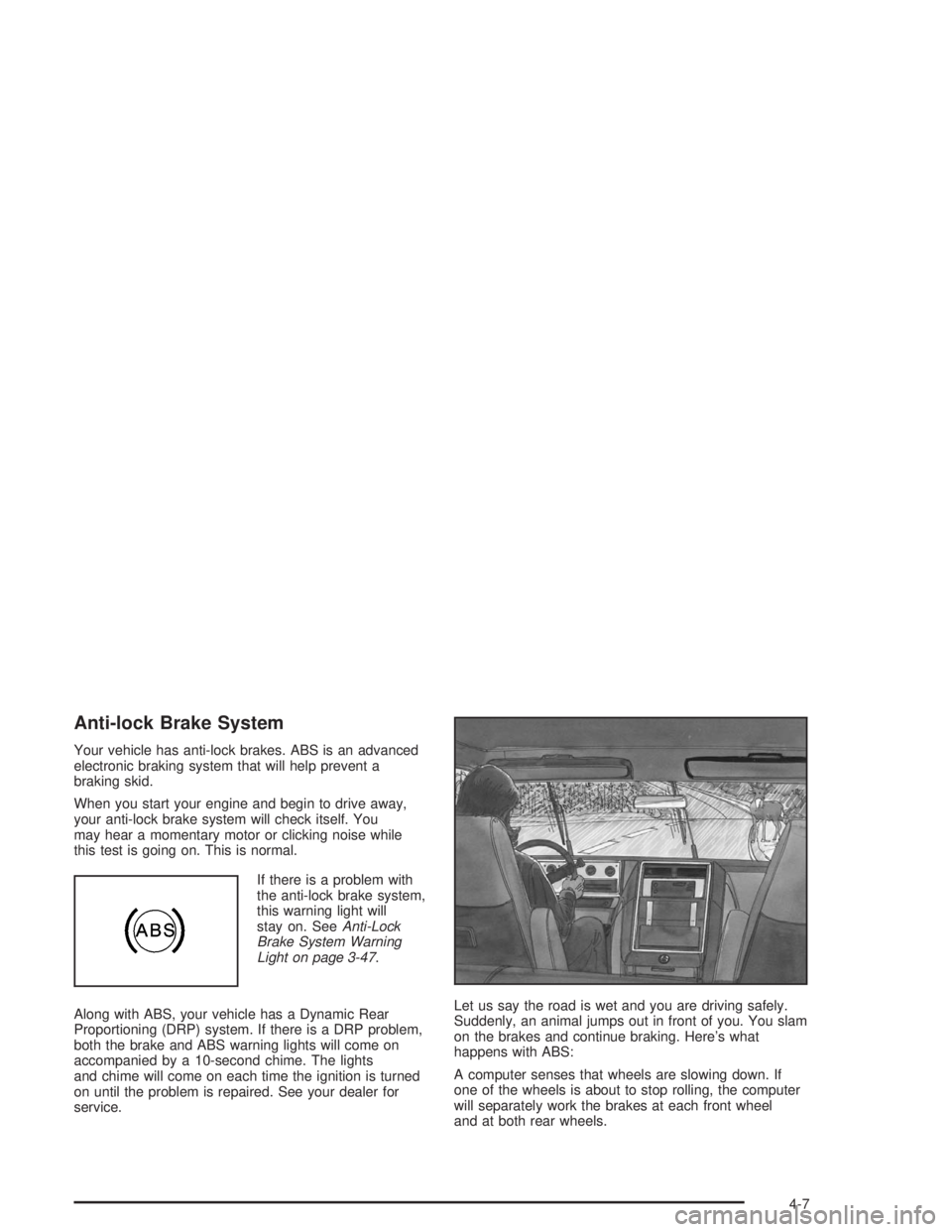
service.Let us say the road is wet and you are driving safely.
Suddenly, an animal jumps out in front of you. You slam
on the brakes and continue braking. Here’s what
happens with ABS:
A computer senses that wheels are slowing down. If
one of the wheels is about to stop rolling, the computer
will separately work the brakes at each front wheel
and at both rear wheels.
4-7
Page 310 of 554
The traction off light will come on under the following
conditions:
The Traction Assist System is turned off, either by
pressing the TAS on/off button or turning off the
automatic engagement feature of the TAS.
The transmission is in FIRST (1); TAS will not
operate in this gear. This is normal.
The vehicle is driven on an extremely rough road.
When the vehicle leaves the rough surface, slows
down or stops, the light will go off and TAS will
be on again. This is normal.
A Traction Assist System, Anti-Lock Brake System
or engine-related problem has been detected and
the vehicle needs service.
If the vehicle has been driven with the TAS system
on for long periods of time, or if the vehicle has
gone through many high speed braking maneuvers
the system may be automatically disabled. The
system will automatically re-enable after
approximately two minutes of not using the brakes.
SeeTraction Off Light on page 3-48.The Traction Assist System, as delivered from the
factory, will automatically come on whenever you start
your vehicle. To limit wheel spin, especially in
slippery road conditions, you should always leave the
system on. But you can turn the TAS off if you ever need
to. You should turn the TAS off if your vehicle ever
gets stuck in sand, mud or snow and rocking the vehicle
is required. See “Rocking Your Vehicle” underIf You
Are Stuck: In Sand, Mud, Ice or Snow on page 4-50.
To turn the system on or
off, press the TAS on/off
button located on the
instrument panel.
If you used the button to turn the system off, the traction
off light will come on and stay on. You can turn the
system back on at any time by pressing the button
again. The traction off light should go off.
4-10
Page 312 of 554

The STABILITY SYS ACTIVE message will appear on
the Driver Information Center (DIC) only when the
system is both on and activated. You may also feel or
hear the system working; this is normal. For more
information on the stability messages, seeDriver
Information Center (DIC) on page 3-58.
The Stabilitrak
®mode
button is located on the
instrument panel.
Stabilitrak
®and part of the traction control system can
be turned off or back on by pressing the
Stabilitrak
®button. All-wheel drive vehicles must be in
all-wheel drive mode to turn the system on or off.
When the system is turned off, the traction off light will
illuminate, and the STABILITY SYS DISABLED
message will appear on the DIC to warn the driver that
both the stability system and part of the traction
control system are disabled. Your vehicle will still have
brake-traction control when Stabilitrak
®is off, but
will not be able to use the engine speed management
system. See “Traction Control Operation” next for
more information.When the Stabilitrak
®system has been turned off you
may still hear system noises as a result of the
brake-traction control coming on.
It is recommended to leave the system on for normal
driving conditions, but it may be necessary to turn
the system off if your vehicle is stuck in sand, mud, ice
or snow, and you want to “rock” your vehicle to
attempt to free it. It may also be necessary to turn off
the system when driving in extreme off-road conditions
where high wheel spin is required. SeeIf You Are
Stuck: In Sand, Mud, Ice or Snow on page 4-50.
When the transfer case is in 4 low, the stability system
is automatically disabled, and the STABILITY SYS
DISABLED message will appear on the DIC. In 4LO,
the Stabilitrak
®button only turns the traction control
system on and off.
Traction Control Operation
The traction control system is part of the
Stabilitrak®system. Traction control limits wheel spin by
reducing engine power to the wheels (engine speed
management) and by applying brakes to each individual
wheel (brake-traction control) as necessary.
4-12
Page 313 of 554

The traction control system is enabled automatically
when you start your vehicle, and it will activate and
display the TRACTION ACTIVE message in the Driver
Information Center (DIC) if it senses that any of the
wheels are spinning or beginning to lose traction while
driving. If you turn off Stabilitrak
®, only the brake-traction
control portion of traction control will work. The engine
speed management will be disabled. In this state, engine
power is not reduced automatically and the driven wheels
can spin more freely. This can cause the brake-traction
control to activate constantly. For more information on the
traction active message, seeDriver Information
Center (DIC) on page 3-58.
Notice:If the traction off light comes on due to
heavy braking and/or because the traction control
system has been continuously active, do not
allow the wheel(s) of one axle to spin excessively.
If you do, you may be causing damage to the
transfer case. This could lead to costly repairs not
covered by your warranty.
If the brake-traction control system activates constantly or
if the brakes have heated up due to high speed braking,
the brake-traction control will be disabled and the
TRACTION SYS LIMITED message will be displayed. In
the limited mode, the traction control system will only use
engine traction-control and is limited in its ability to
provide optimal performance since the system will not
utilize brake traction-control to control slip on the drivewheels. The system will return to normal operation after
the brakes have cooled. This can take up to two minutes
or longer depending on brake usage.
Notice:If you allow the wheel(s) of one axle to spin
excessively while the traction off, ABS and brake
warning lights and the SERVICE STABILITY
MESSAGE are displayed, you could damage the
transfer case. The repairs would not be covered by
your warranty. Reduce engine power and do not
spin the wheel(s) excessively while these lights and
this message are displayed.
The traction control system may activate on dry or
rough roads or under conditions such as heavy
acceleration while turning or abrupt upshifts/downshifts
of the transmission. When this happens you may
notice a reduction in acceleration, or may hear a noise
or vibration. This is normal.
If your vehicle is in cruise control when the system
activates, the STABILITY SYS ACTIVE message will
appear on the Driver Information Center (DIC), and the
cruise control will automatically disengage. When
road conditions allow you to use cruise again, you may
re-engage the cruise control. See “Cruise Control”
underTurn Signal/Multifunction Lever on page 3-8
Stabilitrak
®may also turn off automatically if it
determines that a problem exists with the system. If the
problem does not clear itself after restarting the
vehicle, you should see your dealer for service.
4-13
Page 332 of 554

If you decide you can go down a hill safely, then try to
keep your vehicle headed straight down, and use a
low gear. This way, engine drag can help your brakes
and they will not have to do all the work. Descend
slowly, keeping your vehicle under control at all times.
{CAUTION:
Heavy braking when going down a hill can
cause your brakes to overheat and fade. This
could cause loss of control and a serious
accident. Apply the brakes lightly when
descending a hill and use a low gear to keep
vehicle speed under control.
Q:Are there some things I should not do when
driving down a hill?
A:Yes! These are important because if you ignore
them you could lose control and have a serious
accident.
When driving downhill, avoid turns that take you
across the incline of the hill. A hill that is not too
steep to drive down may be too steep to drive
across. You could roll over if you do not drive
straight down.
Never go downhill with the transmission in
NEUTRAL (N). This is called “free-wheeling.” Your
brakes will have to do all the work and could
overheat and fade.
Q:Am I likely to stall when going downhill?
A:It is much more likely to happen going uphill. But if
it happens going downhill, here is what to do.
Stop your vehicle by applying the regular brakes.
Apply the parking brake.
Shift to PARK (P) and, while still braking, restart the
engine.
Shift back to a low gear, release the parking brake,
and drive straight down.
If the engine will not start, get out and get help.
4-32
Page 339 of 554

Driving too fast through large water puddles or even
going through some car washes can cause problems,
too. The water may affect your brakes. Try to avoid
puddles. But if you can not, try to slow down before you
hit them.
{CAUTION:
Wet brakes can cause accidents. They will not
work as well in a quick stop and may cause
pulling to one side. You could lose control of
the vehicle.
After driving through a large puddle of water
or a car wash, apply your brake pedal lightly
until your brakes work normally.
4-39
Page 362 of 554

Autoride™
If equipped, the Autoride™ feature will provide a
superior vehicle ride and handling under a variety of
passenger and loading conditions.
The system is fully automatic and uses a computer
controller to continuously monitor vehicle speed, wheel
to body position, lift/dive and steering position of the
vehicle. The controller then sends signals to each shock
absorber to independently adjust the damping level to
provide the optimum vehicle ride.
Autoride™ also interacts with the tow/haul switch that,
when engaged, will provide additional control of the
shock absorbers. This additional control results in better
ride and handling characteristics when the vehicle is
loaded or towing a trailer. SeeTow/Haul Mode Light on
page 3-56for more information.
Trailer Recommendations
You must subtract your hitch loads from the Cargo
Weight Rating (CWR) for your vehicle. CWR is the
maximum weight of the load your vehicle can carry. It
doesn’t include the weight of the people inside. But you
can gure about 150 lbs. (68 kg) for each seat. The total
cargo load must not be more than your vehicle’s CWR.
Weigh your vehicle with the trailer attached, so that you
won’t go over the GVWR or GAWR. If you are using
a weight-distributing hitch, weigh the vehicle without the
spring bars in place.
You’ll get the best performance if you spread out the
weight of your load the right way, and if you choose the
correct hitch and trailer brakes.
For more information, seeTowing a Trailer on page 4-63
Towing a Trailer.
4-62
Page 375 of 554

Trailer Wiring Harness
Your vehicle is equipped with the following wiring
harnesses for towing a trailer.
Basic Trailer Wiring
The trailer wiring harness, with a seven-pin connector,
is located at the rear of the vehicle and is tied to
the vehicle’s frame. The harness connector can be
plugged into a seven-pin universal heavy-duty trailer
connector available through your dealer.The seven-wire harness contains the following trailer
circuits:
Yellow: Left Stop/Turn Signal
Dark Green: Right Stop/Turn Signal
Brown: Taillamps
White: Ground
Light Green: Back-up Lamps
Red: Battery Feed
Dark Blue: Trailer Brake
4-75