2004 GMC YUKON DENALI ECU
[x] Cancel search: ECUPage 333 of 468

Adding Coolant
If you need more coolant, add the proper DEX-COOLž
coolant mixtureat the surge tank, but only when the
engine is cool.
{CAUTION:
You can be burned if you spill coolant on hot
engine parts. Coolant contains ethylene glycol,
and it will burn if the engine parts are hot
enough. Do not spill coolant on a hot engine.
When replacing the pressure cap, make sure it is
hand-tight.
Coolant Surge Tank Pressure Cap
The coolant surge tank pressure cap must be fully
installed on the coolant surge tank. SeeEngine
Compartment Overview on page 5-12for more
information on location.
Notice:If the pressure cap is not tightly installed,
coolant loss and possible engine damage may
occur. Be sure the cap is properly and tightly
secured.
Engine Overheating
You will ®nd a coolant temperature gage on your
vehicle's instrument panel. SeeEngine Coolant
Temperature Gage on page 3-38. In addition, you will
®nd an ENGINE COOLANT HOT, ENGINE
OVERHEATED and a REDUCED ENGINE POWER
message in the DIC on the instrument panel. See
DIC
Warnings and Messages on page 3-57.
Overheated Engine Protection
Operating Mode
If an overheated engine condition exists and the
REDUCED ENGINE POWER message is displayed, an
overheat protection mode which alternates ®ring
groups of cylinders helps prevent engine damage. In
this mode, you will notice a loss in power and engine
performance. This operating mode allows your vehicle to
be driven to a safe place in an emergency. Driving
extended miles (km) and/or towing a trailer in the
overheat protection mode should be avoided.
Notice:After driving in the overheated engine
protection operating mode, to avoid engine damage,
allow the engine to cool before attempting any
repair. The engine oil will be severely degraded.
Repair the cause of coolant loss, change the oil and
reset the oil life system. See
Engine Oil on
page 5-13.
5-25
Page 374 of 468

9. After hearing the con®rming horn chirp for the left
rear tire, check to see if the TPM warning light is
still ¯ashing. If yes, turn the ignition switch to OFF.
10. Set all four tires to the recommended air pressure
level as indicated on the Certi®cation/Tire label or
the Tire and Loading Information label.
11. Put the valve caps back on the valve stems
The spare tire does not have a TPM sensor. If you
replace one of the road tires with the spare, the CHECK
TIRE PRESSURE message will be displayed on the DIC
screen. This message should go off once you re-install
the road tire containing the TPM sensor. The SERVICE
TIRE MONITOR message is displayed when the TPM
system is malfunctioning. One or more missing or
inoperable TPM sensors will cause the service tire
monitor message to be displayed. See your dealer for
service.
Federal Communications Commission and
Industry and Science Canada
The TPM system operates on a radio frequency subject
to Federal Communications Commission (FCC) Rules
and with Industry and Science Canada.
This device complies with Part 15 of the FCC Rules and
with RSS-210 of Industry and Science Canada.
Operation is subject to the following two conditions:
(1) This device may not cause harmful interference, and(2) this device must accept any interference received
including interference that may cause undesired
operation of the device.
Changes or modi®cations to this system by other than
an authorized service facility could void authorization to
use this equipment.
Tire Inspection and Rotation
Tires should be rotated every 5,000 to 8,000 miles
(8 000 to 13 000 km).
Any time you notice unusual wear, rotate your tires as
soon as possible and check wheel alignment. Also
check for damaged tires or wheels. See
When It Is Time
for New Tires on page 5-68andWheel Replacement
on page 5-71for more information.
Make sure the spare tire is stored securely. Push, pull,
and then try to rotate or turn the tire. If it moves,
use the ratchet/wheel wrench to tighten the cable.
See
Changing a Flat Tire on page 5-74.
The purpose of regular rotation is to achieve more
uniform wear for all tires on the vehicle. The ®rst rotation
is the most important. See
Scheduled Maintenance
on page 6-4.
5-66
Page 395 of 468
7. Make sure the tire is stored securely. Push, pull,
and then try to rotate or turn the tire. If the tire
moves, use the wheel wrench to tighten the cable.
Reinstall the spare tire lock (if equipped).
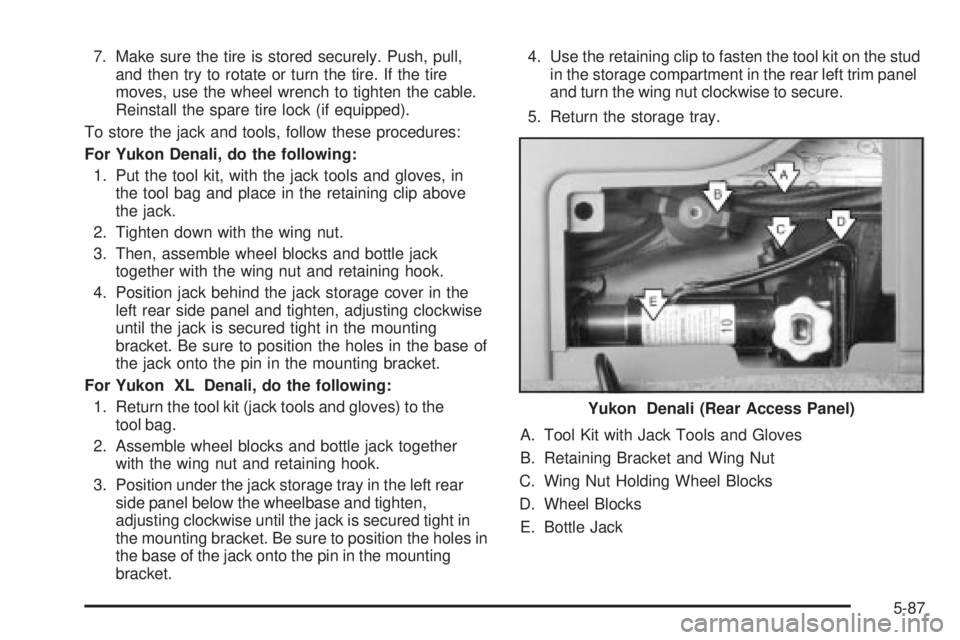
To store the jack and tools, follow these procedures:
For Yukon Denali, do the following:
1. Put the tool kit, with the jack tools and gloves, in
the tool bag and place in the retaining clip above
the jack.
2. Tighten down with the wing nut.
3. Then, assemble wheel blocks and bottle jack
together with the wing nut and retaining hook.
4. Position jack behind the jack storage cover in the
left rear side panel and tighten, adjusting clockwise
until the jack is secured tight in the mounting
bracket. Be sure to position the holes in the base of
the jack onto the pin in the mounting bracket.
For Yukon XL Denali, do the following:
1. Return the tool kit (jack tools and gloves) to the
tool bag.
2. Assemble wheel blocks and bottle jack together
with the wing nut and retaining hook.
3. Position under the jack storage tray in the left rear
side panel below the wheelbase and tighten,
adjusting clockwise until the jack is secured tight in
the mounting bracket. Be sure to position the holes in
the base of the jack onto the pin in the mounting
bracket.4. Use the retaining clip to fasten the tool kit on the stud
in the storage compartment in the rear left trim panel
and turn the wing nut clockwise to secure.
5. Return the storage tray.
A. Tool Kit with Jack Tools and Gloves
B. Retaining Bracket and Wing Nut
C. Wing Nut Holding Wheel Blocks
D. Wheel Blocks
E. Bottle JackYukon Denali (Rear Access Panel)
5-87
Page 397 of 468
To release the spare tire from the secondary latch do
the following:
1. Check under the vehicle to see if the cable end is
visible.
2. If the cable is not visible proceed to Step 6.
If it is visible, ®rst try to tighten the cable by turning
the wheel wrench clockwise until you hear two
clicks or feel it skip twice. You cannot overtighten
the cable.
3. Loosen the cable by turning the wrench
counterclockwise three or four turns.4. Repeat this procedure at least two times. If the
spare tire lowers to the ground, continue with
Step 5 of ªRemoving the Spare Tire and Toolsº
earlier in this section.
5. Turn the wrench counterclockwise until
approximately six inches (15 cm) of cable is
exposed.
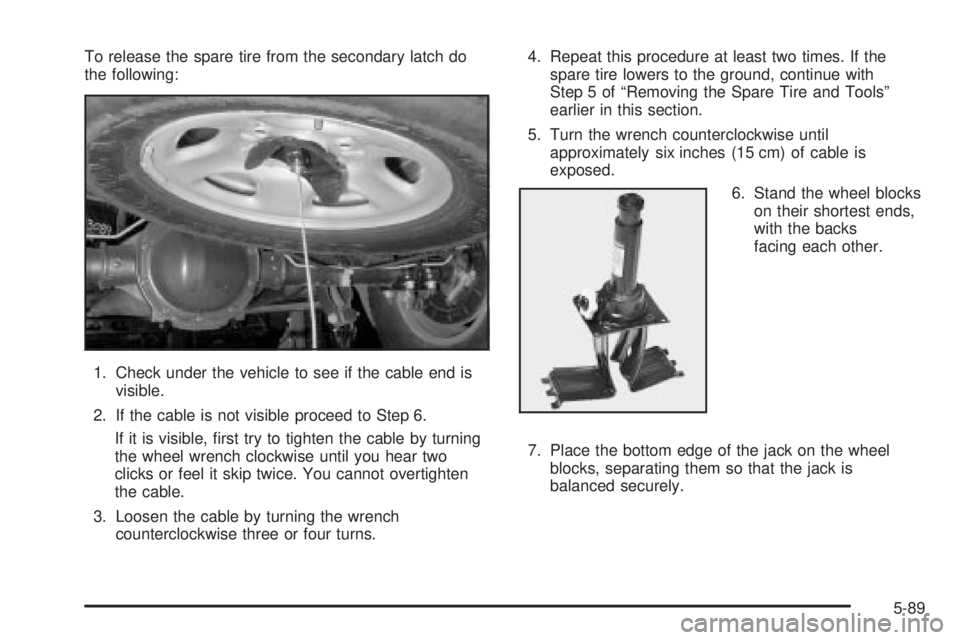
6. Stand the wheel blocks
on their shortest ends,
with the backs
facing each other.
7. Place the bottom edge of the jack on the wheel
blocks, separating them so that the jack is
balanced securely.
5-89
Page 432 of 468
Engine Coolant Level Check
Check the engine coolant level and add
DEX-COOLžcoolant mixture if necessary. SeeEngine
Coolant on page 5-23for further details.
Windshield Washer Fluid Level Check
Check the windshield washer ¯uid level in the windshield
washer tank and add the proper ¯uid if necessary.
At Least Once a Month
Tire In¯ation Check
Visually inspect your tires and make sure tires are
in¯ated to the correct pressures. Do not forget to check
your spare tire. See
Tires on page 5-54for further
details. Check to make sure the spare tire is stored
securely. Push, pull and then try to rotate or turn
the spare tire. If it moves, tighten it. See
Changing a
Flat Tire on page 5-74.
At Least Once a Year
Starter Switch Check
{CAUTION:
When you are doing this inspection, the
vehicle could move suddenly. If the vehicle
moves, you or others could be injured.
1. Before you start, be sure you have enough room
around the vehicle.
2. Firmly apply both the parking brake and the regular
brake. See
Parking Brake on page 2-26if
necessary.
Do not use the accelerator pedal, and be ready to
turn off the engine immediately if it starts.
3. Try to start the engine in each gear. The starter
should work only in PARK (P) or NEUTRAL (N).
If the starter works in any other position, contact
your GM Goodwrench dealer for service.
6-10
Page 445 of 468
GM Mobility Program for Persons
with Disabilities
This program, available to
quali®ed applicants, can
reimburse you up to $1,000
toward eligible aftermarket
driver or passenger
adaptive equipment you
may require for your vehicle
(hand controls, wheelchair/
scooter lifts, etc.).
This program can also provide you with free resource
information, such as area driver assessment centers and
mobility equipment installers. The offer is available for
a limited period of time from the date of vehicle
purchase/lease. For more details, or to determine your
vehicle's eligibility, see your GM dealer or call the
GM Mobility Assistance Center at 1-800-323-9935.
Text telephone (TTY) users, call 1-800-833-9935.
GM of Canada also has a Mobility Program. Call
1-800-GM-DRIVE (463-7483) for details. All TTY users
call 1-800-263-3830.
Roadside Assistance Program
Security While You Travel
1-800-GMC-8782 (1-800-462-8782, Roadside
Assistance prompt)
As the proud owner of a new GMC vehicle, you are
automatically enrolled in the GMC Roadside Assistance
program. This value-added service is intended to
provide you with peace of mind as you drive in the city
or travel the open road. GMC's Roadside Assistance
toll-free number is staffed by courteous and capable
Roadside Assistance Representatives who are available
24 hours a day, 365 days a year.
We will provide the following services during the
Bumper-to-Bumper warranty period, at no expense
to you:
·Fuel Delivery:Delivery of enough fuel ($5
maximum) for the customer to get to the nearest
service station.
·Lock-out Service (identi®cation required):
Replacement keys or locksmith service will
be covered at no charge if you are unable to gain
entry into your vehicle. Delivery of the replacement
key will be covered within 10 miles.
7-5
Page 446 of 468
·Emergency Tow:Tow to the nearest dealership for
warranty service or in the event of a
vehicle-disabling accident. Assistance when the
vehicle is mired in sand, mud or snow.
·Flat Tire Change:Installation of a spare tire will be
covered at no charge. (The customer is responsible
for the repair or replacement of the tire if not
covered by a warrantable failure.)
·Jump Start:No-start occurrences which require a
battery jump start will be covered at no charge.
·Dealer Locator Service
·Trip Routing:Your Roadside Assistance
Representative can provide you with speci®c
information regarding this feature.
·Trip Interruption Expense Bene®ts:Your
Roadside Assistance Representative can provide
you with speci®c information regarding this feature.
In many instances, mechanical failures are covered
under GMC's Bumper-to-Bumper warranty. However,
when other services are utilized, our Roadside
Assistance Representatives will explain any payment
obligations you might incur.For prompt and efficient assistance when calling, please
provide the following to the Roadside Assistance
Representative:
·Your name, home address, and home telephone
number
·Telephone number of your location
·Location of the vehicle
·Model, year, color, and license plate number
·Mileage, Vehicle Identi®cation Number, and delivery
date of the vehicle
·Description of the problem
While we hope you never have the occasion to use our
service, it is added security while traveling for you
and your family. Remember, we are only a phone call
away. GMC Roadside Assistance: 1-800-462-8782, text
telephone (TTY) users, call 1-888-889-2438.
GMC reserves the right to limit services or
reimbursement to an owner or driver when, in GMC's
judgement, the claims become excessive in frequency or
type of occurrence.
Roadside Assistance is not part of or included in the
coverage provided by the New Vehicle Limited Warranty.
GMC reserves the right to make any changes or
discontinue the Roadside Assistance program at any
time without noti®cation.
7-6
Page 455 of 468

Care of
Safety Belts................................................5-95
Your Cassette Tape Player............................3-97
Your CD and DVD Player.............................3-99
Your CD Changer........................................3-98
Your CDs and DVDs....................................3-98
Cargo Cover..................................................2-46
Cargo Tie Downs............................................2-47
Cassette Tape Messages.................................3-76
CD Adapter Kits.............................................3-77
CD Changer...................................................3-93
CD Changer Errors.........................................3-95
CD Functions.................................................3-94
CD Messages................................................3-79
Center Console Storage Area...........................2-44
Center High-Mounted Stoplamp (CHMSL)...........5-51
Center Instrument Panel Fuse Block................5-106
Center Passenger Position, Safety Belts.............1-39
Chains, Tires..................................................5-72
CHANGE ENGINE OIL....................................3-58
Charging System Light....................................3-35
Check
Engine Light...............................................3-40
Check Engine Light.........................................3-40
CHECK OIL LEVEL.........................................3-58
CHECK TIRE PRESSURE...............................3-58
CHECK WASHER FLUID.................................3-58
Checking Brake Fluid......................................5-37
Checking Coolant............................................5-24
Checking Engine Oil........................................5-13Checking Things Under the Hood......................5-10
Checking Your Restraint Systems......................1-86
Chemical Paint Spotting.................................5-100
Child Restraints
Child Restraint Systems...............................1-54
Infants and Young Children...........................1-50
Lower Anchorages and Top Tethers for
Children (LATCH System)..........................1-61
Older Children.............................................1-48
Securing a Child Restraint Designed for the
LATCH System........................................1-63
Securing a Child Restraint in a Center Rear
Seat Position...........................................1-65
Securing a Child Restraint in a Rear Outside
Seat Position...........................................1-63
Securing a Child Restraint in the Right Front
Seat Position...........................................1-68
Top Strap...................................................1-57
Top Strap Anchor Location............................1-59
Where to Put the Restraint...........................1-56
Chime Level Adjustment..................................3-99
Cigarette Lighter.............................................3-19
Cleaning
Inside of Your Vehicle..................................5-93
Outside of Your Vehicle................................5-96
Underbody Maintenance...............................5-99
Video Screen..............................................3-99
Weatherstrips..............................................5-95
Cleaning Aluminum Wheels..............................5-98
Cleaning Exterior Lamps/Lenses.......................5-96
3