2004 GMC SIERRA engine
[x] Cancel search: enginePage 216 of 588

Oil Pressure Gage
The oil pressure gage shows the engine oil pressure in
psi (pounds per square inch) when the engine is
running. Canadian vehicles indicate pressure in kPa
(kilopascals).
Oil pressure may vary with engine speed, outside
temperature and oil viscosity, but readings above the
low pressure zone indicate the normal operating range.
A reading in the low pressure zone may be caused
by a dangerously low oil level or some other problem
causing low oil pressure. Check your oil as soon
as possible. See
Oil Pressure LowunderDIC Warnings
and Messages on page 3-66andEngine Oil on
page 5-18.
{CAUTION:
Do not keep driving if the oil pressure is low. If
you do, your engine can become so hot that it
catches ®re. You or others could be burned.
Check your oil as soon as possible and have
your vehicle serviced.
Notice:Lack of proper engine oil maintenance may
damage the engine. The repairs would not be
covered by your warranty. Always follow the
maintenance schedule in this manual for changing
engine oil. United States
Canada
3-52
Page 218 of 588
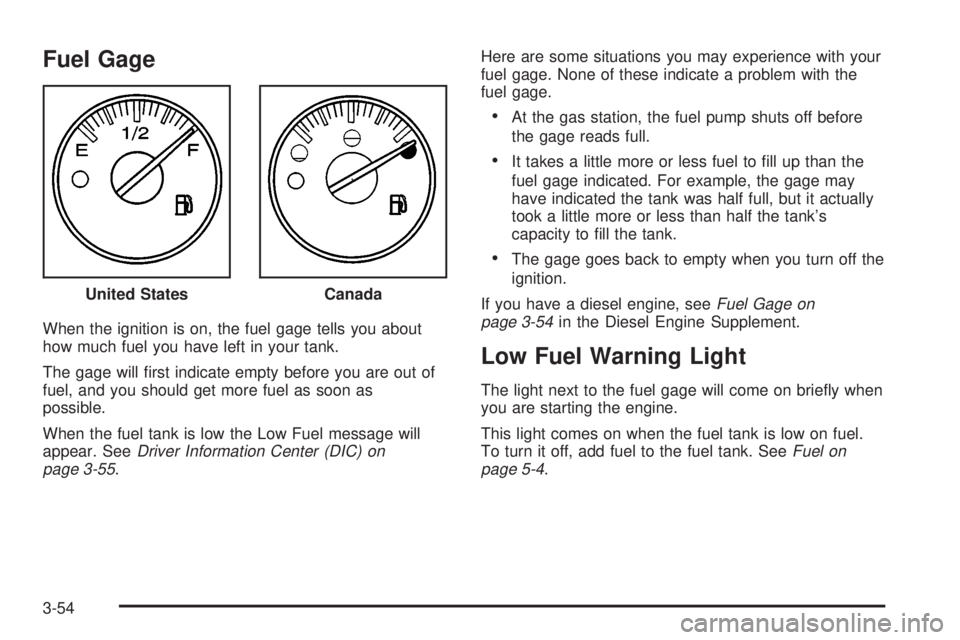
Fuel Gage
When the ignition is on, the fuel gage tells you about
how much fuel you have left in your tank.
The gage will ®rst indicate empty before you are out of
fuel, and you should get more fuel as soon as
possible.
When the fuel tank is low the Low Fuel message will
appear. See
Driver Information Center (DIC) on
page 3-55.Here are some situations you may experience with your
fuel gage. None of these indicate a problem with the
fuel gage.
·At the gas station, the fuel pump shuts off before
the gage reads full.
·It takes a little more or less fuel to ®ll up than the
fuel gage indicated. For example, the gage may
have indicated the tank was half full, but it actually
took a little more or less than half the tank's
capacity to ®ll the tank.
·The gage goes back to empty when you turn off the
ignition.
If you have a diesel engine, see
Fuel Gage on
page 3-54in the Diesel Engine Supplement.
Low Fuel Warning Light
The light next to the fuel gage will come on brie¯y when
you are starting the engine.
This light comes on when the fuel tank is low on fuel.
To turn it off, add fuel to the fuel tank. See
Fuel on
page 5-4. United States
Canada
3-54
Page 219 of 588
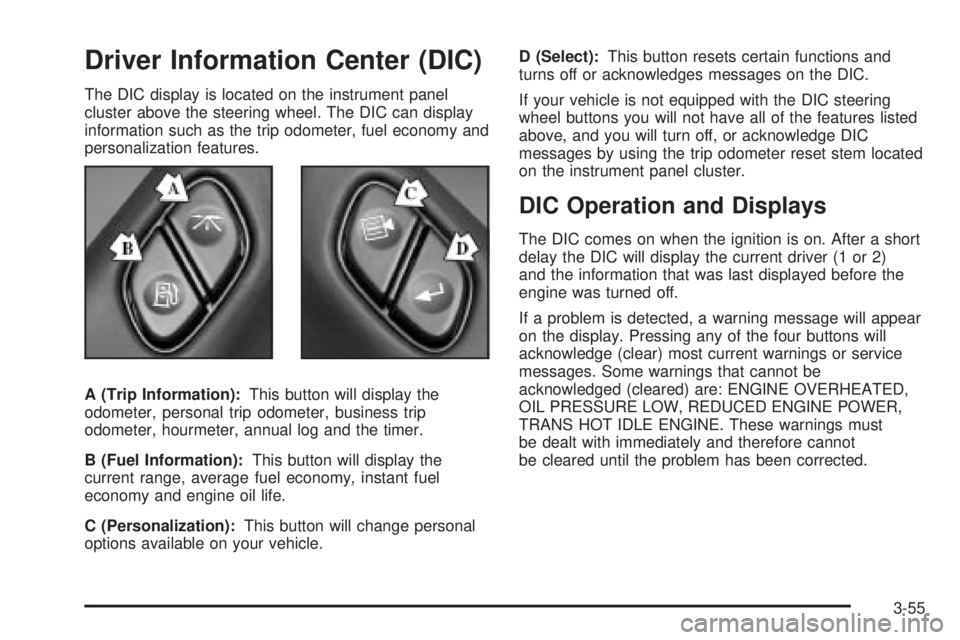
Driver Information Center (DIC)
The DIC display is located on the instrument panel
cluster above the steering wheel. The DIC can display
information such as the trip odometer, fuel economy and
personalization features.
A (Trip Information):This button will display the
odometer, personal trip odometer, business trip
odometer, hourmeter, annual log and the timer.
B (Fuel Information):This button will display the
current range, average fuel economy, instant fuel
economy and engine oil life.
C (Personalization):This button will change personal
options available on your vehicle.D (Select):This button resets certain functions and
turns off or acknowledges messages on the DIC.
If your vehicle is not equipped with the DIC steering
wheel buttons you will not have all of the features listed
above, and you will turn off, or acknowledge DIC
messages by using the trip odometer reset stem located
on the instrument panel cluster.
DIC Operation and Displays
The DIC comes on when the ignition is on. After a short
delay the DIC will display the current driver (1 or 2)
and the information that was last displayed before the
engine was turned off.
If a problem is detected, a warning message will appear
on the display. Pressing any of the four buttons will
acknowledge (clear) most current warnings or service
messages. Some warnings that cannot be
acknowledged (cleared) are: ENGINE OVERHEATED,
OIL PRESSURE LOW, REDUCED ENGINE POWER,
TRANS HOT IDLE ENGINE. These warnings must
be dealt with immediately and therefore cannot
be cleared until the problem has been corrected.
3-55
Page 221 of 588
Business Trip
Turn BUSINESS TRIP on or off by pressing the select
button. When it is on, you will also be able to scroll
through the following by pressing the trip information
button:
·BUSINESS: XXXXXX.X MI Ð This shows the
current distance traveled since the last reset for the
business trip odometer in either miles or kilometers.
·BUSINESS: XXXX.X GAL Ð This shows the
amount of fuel used for the business trip.
·BUSINESS: XX.X MPG Ð This shows the amount
of fuel used for the business trip.
·BUSINESS: XXX.X AVG MPH Ð This shows the
vehicle's average speed for the business trip.
·BUSINESS: % ANNUAL Ð This shows the ratio of
business trip miles to annual miles as a percent.
To reset personal or business trip information press and
hold the select button for approximately one second
while in one of the personal or business trip modes. This
will reset all of the information for the personal or
business trip.You can also reset the PERSONAL: XX MI, or
BUSINESS: XX MI while they are displayed by pressing
the reset stem on the cluster. If you press and hold
the reset stem or select button for four seconds,
the display will show the distance traveled since the last
ignition cycle for the personal or business trip.
Odometer
Press the trip information button until ODOMETER
appears on the display. This shows the total distance
the vehicle has been driven in either miles or kilometers.
Pressing the reset stem located on the instrument
cluster with the vehicle off will also display the odometer.
Hourmeter
Press the trip information button to scroll to the
hourmeter. The hourmeter shows the total number of
hours the engine has run. Pressing and holding the reset
stem for about 4 seconds on the instrument cluster
will also display the hourmeter after the odometer
is displayed when the vehicle is off.
Annual Log
Press the trip information button to scroll to the annual
log. The annual log shows the mileage accumulated
since it was last reset. To reset the annual log,
press and hold the select button, or the trip odometer
reset stem, for approximately one second.
3-57
Page 223 of 588

Instant Fuel Economy
Press the fuel information button until INST ECON
appears in the display. Instant fuel economy is how
many miles per gallon your vehicle is getting at
the particular moment in time. The instant fuel economy
cannot be reset.
GM Oil Life System
Press the fuel information button until ENGINE OIL LIFE
appears in the display. The GM Oil Life System shows
an estimate of the oil's remaining useful life. It will show
100% when the system is reset after an oil change. It
will alert you to change your oil on a schedule consistent
with your driving conditions.
Always reset the engine oil life after an oil change. To
reset the Oil Life System use the fuel button to reach the
ENGINE OIL LIFE screen and then press and hold the
select button for ®ve seconds while ENGINE OIL LIFE is
displayed. OIL LIFE RESET will appear on the display for
10 seconds to let you know the system is reset.
The DIC does not replace the need to maintain your
vehicle as recommended in the Maintenance Schedule
in this manual. Also, the oil change reminder will not
detect dusty conditions or engine malfunctions that may
affect the oil. Also, the oil change reminder does not
measure how much oil you have in your engine. So, be
sure to check your oil level often. See
Engine Oil on
page 5-18.
Personalization Button
You can program certain features to a preferred setting
for up to two people. Press the personalization button
to scroll through the following personalization features.
All of the personalization options may not be available
on your vehicle. Only the options available will be
displayed on your DIC.
If your vehicle is not equipped with the DIC steering
wheel buttons you will not have any of the following
personalization options except for DISPLAY
LANGUAGE. See DISPLAY LANGUAGE later in this
section for more information.
·AUTOMATIC LOCKING
·AUTOMATIC UNLOCKING
·DELAYED LOCKING
·REMOTE LOCK FEEDBACK
·ALARM WARNING TYPE
·REMOTE UNLOCK FEEDBACK
·HEADLAMPS ON AT EXIT
·PERIMETER LIGHTING
·SEAT POSITION RECALL
·EASY EXIT DRIVER SEAT
·CURB VIEW ASSIST
3-59
Page 232 of 588

CHANGE ENGINE OIL
This message is displayed when the engine oil needs to
be changed.
When you change the engine oil, be sure to reset the
CHANGE ENGINE OIL message. See ªEngine Oil,
When to Changeº under
Engine Oil on page 5-18.
DRIVER DOOR AJAR
If the driver's door is not fully closed, this message will
appear on the display and you will hear a chime.
Stop and turn off the vehicle, check the door for
obstacles, and close the door again. Check to see if the
message still appears on the DIC. Press the select
button to acknowledge the message and clear it from
the DIC display.
ENGINE COOLANT HOT
If the cooling system temperature gets hot, this message
will appear in the DIC. Stop the vehicle and let the
engine idle in PARK (P) to allow the coolant to reach a
safe temperature. This message will clear when the
coolant temperature drops to safe operating
temperature.
ENGINE OVERHEATED
If the engine cooling system reaches unsafe
temperatures for operation, this message will appear in
the DIC and you will hear a chime. Stop and turn off
the vehicle as soon as it is safe to do so to avoid severe
damage. This message will clear when the engine
has cooled to a safe operating temperature.
FUEL LEVEL LOW
If the fuel level is low, this message will appear on the
DIC and you will hear a chime. Refuel as soon as
possible. Press the select button to acknowledge the
message and clear it from the DIC display.
KEYFOB X BATTERY LOW
If a remote keyless entry transmitter battery is low, this
message will appear on the DIC. The battery needs
to be replaced in the transmitter. Press the select button
to acknowledge the message and clear it from the
DIC display.
3-68
Page 233 of 588

LEFT REAR DOOR AJAR (Crew Cab)
If the driver's side rear door is not fully closed, this
message will appear on the display and you will hear a
chime. Stop and turn off the vehicle, check the door
for obstacles, and close the door again. Check to see if
the message still appears on the DIC. Press the
select button to acknowledge the message and clear it
from the DIC display.
LOW COOLANT LEVEL
If your vehicle is equipped with a low coolant level
sensor, this message will appear on the DIC if
the engine coolant level is low. Adding coolant will clear
the message.
OIL PRESSURE LOW
If low oil pressure levels occur, this message will be
displayed on the DIC and a chime will sound. Stop the
vehicle as soon as safely possible and do not operate
it until the cause of the low oil pressure has been
corrected. Check your oil as soon as possible and have
your vehicle serviced.
OIL LIFE RESET
This message will appear on the display for about 10
seconds after resetting the change engine oil message.
PASSENGER DOOR AJAR
If the passenger's door is not fully closed, this message
will appear on the display and you will hear a chime.
Stop and turn off the vehicle, check the door for
obstacles, and close the door again. Check to see if the
message still appears on the DIC. Press the select
button to acknowledge the message and clear it from
the DIC display.
RANGE SHIFT INHIBITED (Allison
TransmissionžOnly)
If the transmission is unable to shift into a selected gear
this message will appear on the DIC. The electronic shift
position indicator on the instrument panel cluster may
blink when this occurs. To make the vehicle shift to the
requested gear you may have to shift back to PARK (P)
or NEUTRAL (N) and re-select the desired gear.
3-69
Page 234 of 588

REDUCED ENGINE POWER
This message is displayed when the cooling system
temperature gets too hot and the engine further enters
the engine coolant protection mode.
See
Engine Overheating on page 5-36for further
information.
RIGHT REAR DOOR AJAR (Crew Cab)
If the passenger's side rear door is not fully closed,
this message will appear on the display and you
will hear a chime. Stop and turn off the vehicle, check
the door for obstacles, and close the door again. Check
to see if the message still appears on the DIC. Press
the select button to acknowledge the message and clear
it from the DIC display.
SERVICE AIRBAG
If there is a problem with the air bag system, this
message will be displayed on the DIC. Have a quali®ed
technician inspect the system for problems. Press
the select button to acknowledge the message and clear
it from the DIC display.
SERVICE BRAKE SYSTEM
If there is a problem with the brake system, this
message will be displayed on the DIC. If this message
appears, stop as soon as possible and turn off the
vehicle. Restart the vehicle and check for the message
on the DIC display. If the message is still displayed,
or appears again when you begin driving, the brake
system needs service.
SERVICE BRAKE BOOSTER
If your vehicle has vaccum assist power brakes, this
message will be displayed on the DIC when there is a
problem with the Supplemental Brake Assist system.
If the message is displayed immediately after starting
the vehicle or the message appears while driving,
your Supplemental Brake Assist system needs service.
See
Brake System Warning Light on page 3-43.
3-70