2004 GMC ENVOY XUV wheel
[x] Cancel search: wheelPage 142 of 460

Reading Lamps
Press the lens on the lamp located above the doors to
turn the reading lamps on and off.
Dome Lamps
The dome lamps will come on when you open a door
unless the dome lamp override is pressed in.
You can also turn the dome lamps on by turning the
thumbwheel, located next to the exterior lamps knob, all
the way up to the top detent position. In this position,
the dome lamps will remain on until they are turned off.
Battery Run-Down Protection
This feature shuts off the dome, courtesy, vanity, and
reading lamps if they are left on for more than
20 minutes when the ignition is off. This will keep your
battery from running down.
If the battery run-down protection shuts off the interior
lamps, it may be necessary to do one of the following to
return to normal operation:
·Shut off all lamps and close all doors, or
·turn the ignition key to RUN.
This feature will also turn off the parking lamps and
headlamps under most circumstances, if they are left on.
If you would like to turn them back on, turn the exterior
lamps knob.
3-18
Page 168 of 460

Service Four-Wheel Drive Warning
Light
This light should come on brie¯y when you turn on the
ignition, as a check to show you it is working.
The SERVICE 4WD light comes on to indicate that
there may be a problem with the drive system and
service is required. Malfunctions can be indicated by the
system before any problem is apparent, which may
prevent serious damage to the vehicle. This system is
also designed to assist your service technician in
correctly diagnosing a malfunction.
Check Gages Warning Light
The CHECK GAGES light will come on brie¯y when you
are starting the engine.
If the light comes on and stays on while you are driving,
check your coolant temperature and engine oil
pressure gages to see if they are in the warning zones. United StatesCanada
United StatesCanada
3-44
Page 170 of 460
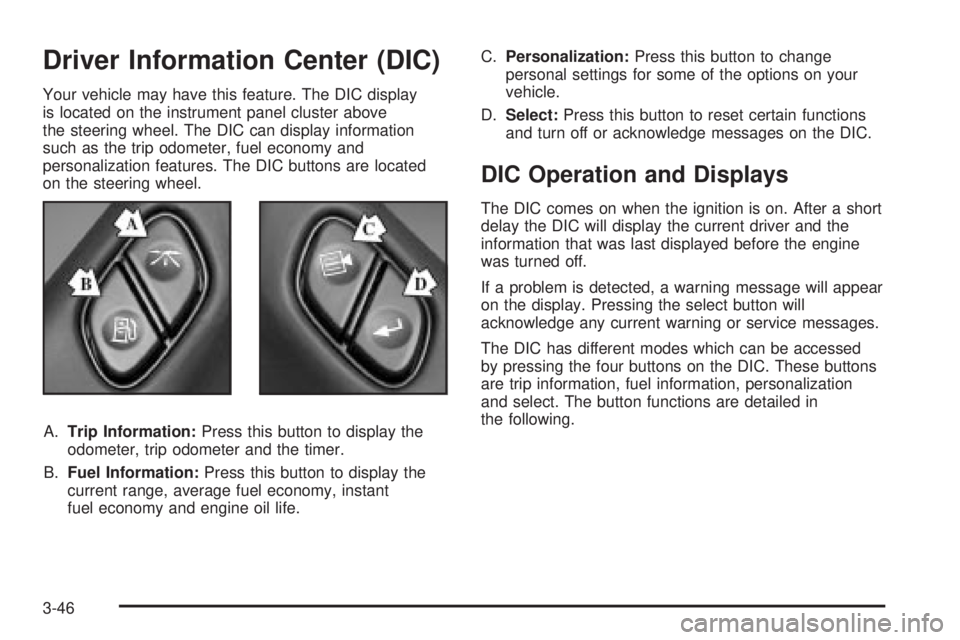
Driver Information Center (DIC)
Your vehicle may have this feature. The DIC display
is located on the instrument panel cluster above
the steering wheel. The DIC can display information
such as the trip odometer, fuel economy and
personalization features. The DIC buttons are located
on the steering wheel.
A.Trip Information:Press this button to display the
odometer, trip odometer and the timer.
B.Fuel Information:Press this button to display the
current range, average fuel economy, instant
fuel economy and engine oil life.C.Personalization:Press this button to change
personal settings for some of the options on your
vehicle.
D.Select:Press this button to reset certain functions
and turn off or acknowledge messages on the DIC.
DIC Operation and Displays
The DIC comes on when the ignition is on. After a short
delay the DIC will display the current driver and the
information that was last displayed before the engine
was turned off.
If a problem is detected, a warning message will appear
on the display. Pressing the select button will
acknowledge any current warning or service messages.
The DIC has different modes which can be accessed
by pressing the four buttons on the DIC. These buttons
are trip information, fuel information, personalization
and select. The button functions are detailed in
the following.
3-46
Page 179 of 460

Display Language
To select your personalization for display language,
press the select button while DISPLAY LANGUAGE is
displayed on the DIC. Pressing the select button
will scroll through the available languages:
Choosing a language will display all of the information
on the DIC in the desired language.
If your vehicle is equipped with an Information Center,
press and hold the trip stem while the odometer is
displayed. While holding down the trip stem button, the
Information Center will begin to list the available
languages. The name of each language will be
displayed in its native language (ENGLISH for English,
FRANCAIS for French and ESPANOL for Spanish).
When you see the language that you would like, release
the trip stem. The Information Center will then display
the information in the language you chose.If you accidentally choose a language you do not want
or understand, press and hold the trip information
button and the personalization button at the same time.
After a short time, the display will begin cycling
through the available languages. Release the buttons
when you see a language you would like. This will also
reset all of the current driver's personalization features
to their factory default settings.
For vehicles with redundant steering wheel controls, see
ªPersonalizationº under the DIC.
Select
The select button is used to reset certain functions and
turn off or acknowledge messages on the DIC display.
The select button also toggles through the options
available in each personalization menu. For example, this
button will reset the trip odometers, turn off the FUEL
LEVEL LOW message, and toggle through the languages
you can select the DIC to display information in.
3-55
Page 180 of 460

DIC Warnings and Messages
Warning messages are displayed on the DIC to notify
the driver that the status of the vehicle has changed and
that some action may be needed by the driver to
correct the condition. More than one message may
appear at one time. They will appear one behind
the other. Some messages may not require immediate
action but you should press the trip stem to
acknowledge that you received the message and clear it
from the display. Pressing any of the DIC steering
wheel buttons (Trip Information, Fuel Information,
Personalization or Select button) will also acknowledge
any warnings or service messages. Some messages
cannot be cleared from the display because they
are more urgent. These messages require action before
they can be removed from the DIC display. The
following are the possible messages that can be
displayed and some information about them.
ENGINE COOLANT HOT/ ENGINE
OVERHEATED
If the cooling system temperature gets hot, this message
will appear in the DIC and you will hear a chime.
Refer to the ªEngine Overheatingº section of your
owner's manual for the proper course of action. This
message will clear when the coolant temperature drops
to a safe operating temperature.
OIL PRESSURE LOW/STOP ENGINE
If low oil pressure levels occur, this message will
be displayed on the DIC. Stop the vehicle as soon as
safely possible and do not operate it until the cause
of the low oil pressure has been corrected. Check your
oil as soon as possible and have your vehicle
serviced.
BATTERY NOT CHARGING
If the battery is not charging during operation, this
message will appear on the DIC. Driving with this
problem could drain your battery. Have the electrical
system checked as soon as possible. Pressing the
select button will acknowledge this message and clear it
from the DIC display.
SERVICE AIR BAG
If there is a problem with the air bag system this
message will be displayed on the DIC. Have a quali®ed
technician inspect the system for problems. Pressing
the select button will acknowledge this message
and clear it from the DIC display.
3-56
Page 184 of 460

REAR WIPER OBSTRUCTION
Check the rear wiper. An object is preventing it from
moving to the off position. Tailgate glass operations
cannot be performed if the rear wiper is not in the off
position.
CLOSE THE TAILGATE
The tailgate must be closed to operate the
tailgate glass.
TAILGATE GLASS DOWN
The rear wiper/defog request cannot be performed
because the tailgate glass is down.
TAILGATE OPEN
The tailgate is in drop mode. Operate the vehicle with
caution.
TAILGATE AJAR
The tailgate is ajar and should be closed before moving
the vehicle.
SEE MANUAL ±TAILGATE
Window position needs to be reset. Activate the tailgate
window up switch and continue to hold it for two
seconds after the window is fully closed. Then activate
the tailgate window down switch and continue to
hold it for two seconds after the window is fully open.
If this process does not restore tailgate function,
see your dealer for service.
TIGHTEN FUEL CAP
If the vehicle's fuel cap is not tightened properly, this
message may appear on the DIC and a chime will
sound. Fully reinstall the fuel cap. The diagnostic system
can determine if the fuel cap has been left off or
improperly installed. A loose or missing fuel cap will
allow fuel to evaporate into the atmosphere. The
DIC message will remain on until the message is
cancelled with the return button on the steering wheel.
The DIC message will also be cancelled if the ignition
is turned off.
The DIC message and the Service Engine Soon light
may come on again during a second trip if the fuel cap is
still not tightened properly. See
Malfunction Indicator
Lamp on page 3-38for more information.
3-60
Page 242 of 460

Audio Steering Wheel Controls
You can control certain radio functions using the buttons
on your steering wheel.
g(OnStar/Voice Recognition):If your vehicle has
OnStarž, you can press this button to interact with
the OnStaržsystem. See the OnStaržmanual provided
with your vehicle for more information.
If your vehicle does not have OnStar
ž, pressing this
button will mute the audio system.
PROG (Program):Press this button to play a station
you have stored on the radio preset pushbuttons.
If a CD is playing in the CD changer, press this button
to go to the next available CD.
QSOURCER:Press this button to select FM1,
FM2, AM, or XM1 or XM2 (48 contiguous US states, if
equipped), or a CD. If a CD is loaded the CD symbol
will appear on the display.
QSEEKR:Press the up or the down arrow to go to
the next or to the previous radio station and stay
there.
If a CD is playing, press the up or the down arrow to
fast forward or reverse.
QVOLR(Volume):Press the up or the down arrow
to increase or to decrease volume.
DVD Distortion
You may experience audio distortion in the
IR headphones when operating cellular phones,
scanners, CB radios, Global Positioning Systems
(GPS)*, two-way radios, mobile fax, or walkie talkies.
It may be necessary to turn off the DVD player
when operating one of these devices in or near the
vehicle.
* Excludes the OnStar
žSystem.
3-118
Page 247 of 460

Your Driving, the Road, and Your Vehicle..........4-2
Defensive Driving...........................................4-2
Drunken Driving.............................................4-2
Control of a Vehicle........................................4-5
Braking.........................................................4-5
Traction Assist System (TAS)...........................4-8
Locking Rear Axle........................................4-10
Steering......................................................4-10
Off-Road Recovery.......................................4-12
Passing.......................................................4-12
Loss of Control.............................................4-14
Off-Road Driving with Your Four-Wheel-Drive
Vehicle....................................................4-15
Driving at Night............................................4-28Driving in Rain and on Wet Roads..................4-30
City Driving..................................................4-33
Freeway Driving...........................................4-34
Before Leaving on a Long Trip.......................4-35
Highway Hypnosis........................................4-36
Hill and Mountain Roads................................4-37
Winter Driving..............................................4-39
If You Are Stuck: In Sand, Mud, Ice or Snow........4-44
Towing..........................................................4-45
Towing Your Vehicle.....................................4-45
Recreational Vehicle Towing...........................4-45
Loading Your Vehicle....................................4-49
Adding a Snow Plow or Similar Equipment.......4-56
Towing a Trailer...........................................4-56
Section 4 Driving Your Vehicle
4-1