2004 GMC ENVOY instrument panel
[x] Cancel search: instrument panelPage 131 of 474

Headlamp High/Low-Beam Changer
To change the headlamps from low to high beam, push
the lever toward the instrument panel. To return to
low-beam headlamps, pull the multifunction lever toward
you. Then release it.
When the high beams are
on, this indicator light on
the instrument panel
cluster will also be on.
Flash-to-Pass
This feature lets you use your high-beam headlamps to
signal a driver in front of you that you want to pass.
It works even if your headlamps are in the automatic
position.
To use it, pull the turn signal lever toward you, then
release it.
If your headlamps are in the automatic position or on low
beam, your high-beam headlamps will turn on. They’ll
stay on as long as you hold the lever toward you. The
high-beam indicator on the instrument panel cluster will
come on. Release the lever to return to normal operation.
Windshield Wipers
8
(Mist):For a single wiping cycle, turn the band to
mist. Hold it there until the wipers start. Then let go.
The wipers will stop after one wipe. If you want
more wipes, hold the band on mist longer.
9(Off):To stop the wipers, move the band to off.
N(Windshield Wipers):Turn the band to control the
windshield wipers.
You can set the wiper speed for a long or short delay
between wipes. This can be very useful in light rain
or snow. Turn the band to choose the delay time. The
closer to the top of the lever, the shorter the delay.
For steady wiping at low speed, turn the band away from
you to the rst solid band past the delay settings. For
high-speed wiping, turn the band further, to the second
solid band past the delay settings. To stop the wipers,
move the band to off.
Be sure to clear ice and snow from the wiper blades
before using them. If they’re frozen to the windshield,
carefully loosen or thaw them. If your blades do become
worn or damaged, get new blades or blade inserts.
3-9
Page 133 of 474

Rear Window Washer/Wiper
This control is located to
the right of the steering
wheel on the instrument
panel.
To turn the rear wiper on, turn the control to either 1, 2,
or 3. For delayed wiping, turn the control to 1 or 2.
For steady wiping, turn the control to 3. To turn the wiper
off, turn the control to 0.
To wash the rear window, press the washer symbol
located in the center of the control.
The rear window washer uses the same uid bottle as
the windshield washer. However, the rear window
washer will run out of uid before the windshield washer.
If you can wash your windshield but not your rear
window, check the uid level.
Headlamp Washer
Your vehicle may be
equipped with a headlamp
washer system. The
button to operate this
feature is located on the
instrument panel and
functions separately from
your other washer
systems.
To wash your headlamps, press the headlamp washer
button briey and release to activate the system.
Two pressurized bursts of washer uid will then be
applied to the headlamps.
3-11
Page 135 of 474

{CAUTION:
If you leave your cruise control on when you
are not using cruise, you might hit a button
and go into cruise when you do not want to.
You could be startled and even lose control.
Keep the cruise control switch off until you
want to use cruise control.
Setting Cruise Control
1. Move the cruise control switch to on.
2. Get up to the speed you want.
3. Press the set button at the end of the lever and
release it.
4. Take your foot off the accelerator pedal. The
accelerator pedal will not go down.The cruise light on the instrument panel cluster will
come on when the cruise control is engaged.
Resuming a Set Speed
Suppose you set your cruise control at a desired speed
and then you apply the brake. This, of course, shuts
off the cruise control. But you don’t need to reset it.
Once you’re going about 25 mph (40 km/h) or more, you
can move the cruise control switch briey from on to
resume/accelerate.
You’ll go right back up to your chosen speed and stay
there.
If you hold the switch at resume/accelerate, the vehicle
will keep going faster until you release the switch or
apply the brake. So unless you want to go faster, don’t
hold the switch at resume/accelerate.United States
Canada
3-13
Page 137 of 474

Exterior Lamps
Your exterior lamps knob
is located on your
instrument panel to the left
of the steering wheel.
c(Off):Turn the knob to this symbol and release it to
turn off the Daytime Running Lamps (DRL) and the
automatic headlamps. An indicator will illuminate when
the position is selected. This position is not available
for vehicles rst sold in Canada.
i(Automatic DRL/AHS):Turning the knob to this
symbol puts the system into automatic headlamp mode.
An indicator will illuminate when the position is
selected.
;(Parking Lamps):Turn the knob to this symbol to
manually turn on the following:
Parking Lamps
Sidemarker Lamps
Taillamps
License Plate Lamps
Instrument Panel Lights
2(Headlamps):Turn the knob to this symbol to turn
on all the lamps listed as well as the headlamps.
Automatic Headlamp System
When it is dark enough outside, your Automatic
Headlamp System will turn on your headlamps at the
normal brightness along with other lamps such as
the taillamps, sidemarker, parking lamps and the
instrument panel lights. The radio lights will also be on.
Your vehicle is equipped with a light sensor on the
top of the instrument panel. Be sure it is not covered or
the system will be on whenever the ignition is on.
The system may also turn on your lights when driving
through a parking garage, heavy overcast weather
or a tunnel. This is normal.
3-15
Page 138 of 474

There is a delay in the transition between the daytime
and nighttime operation of the Daytime Running
Lamps (DRL) and the automatic headlamp systems, so
that driving under bridges or bright overhead street
lights does not affect the system. The DRL and
automatic headlamp system will only be affected when
the light sensor sees a change in lighting lasting
longer than the delay.
If you start your vehicle in a dark garage, the automatic
headlamp system will come on immediately. Once
you leave the garage, it will take about one minute for
the automatic headlamp system to change to DRL if it is
light outside. During that delay, your instrument panel
cluster may not be as bright as usual. Make sure
your instrument panel brightness control is in the full
bright position.
To idle your vehicle with the automatic headlamp system
off, set the parking brake while the ignition is off. Then
start your vehicle. The automatic headlamp system will
stay off until you release the parking brake, shift out of
park or turn the exterior lamp control to the off position as
described in “Exterior Lamps” listed previously.
Lamps On Reminder
A reminder tone will sound when your headlamps or
parking lamps are manually turned on, the driver’s door
is open and your ignition is in LOCK or ACCESSORY.To turn the tone off, turn the knob all the way
counterclockwise. In the automatic mode, the headlamps
turn off once the ignition key is in LOCK.
Daytime Running Lamps (DRL)
Daytime Running Lamps (DRL) can make it easier for
others to see the front of your vehicle during the
day. DRL can be helpful in many different driving
conditions, but they can be especially helpful in the short
periods after dawn and before sunset. Fully functional
daytime running lamps are required on all vehicles
rst sold in Canada.
The DRL system will make your headlamps come
on at reduced brightness when the following conditions
are met:
The ignition is on
the exterior lamps knob is in automatic headlamp
mode
the light sensor detects daytime light
the transmission is not in PARK (P)
When the DRL are on, only your headlamps will be on.
The taillamps, sidemarker and other lamps won’t be
on. The instrument panel won’t be lit up either.
When it begins to get dark, the headlamps will
automatically switch from DRL to the regular headlamps.
3-16
Page 139 of 474
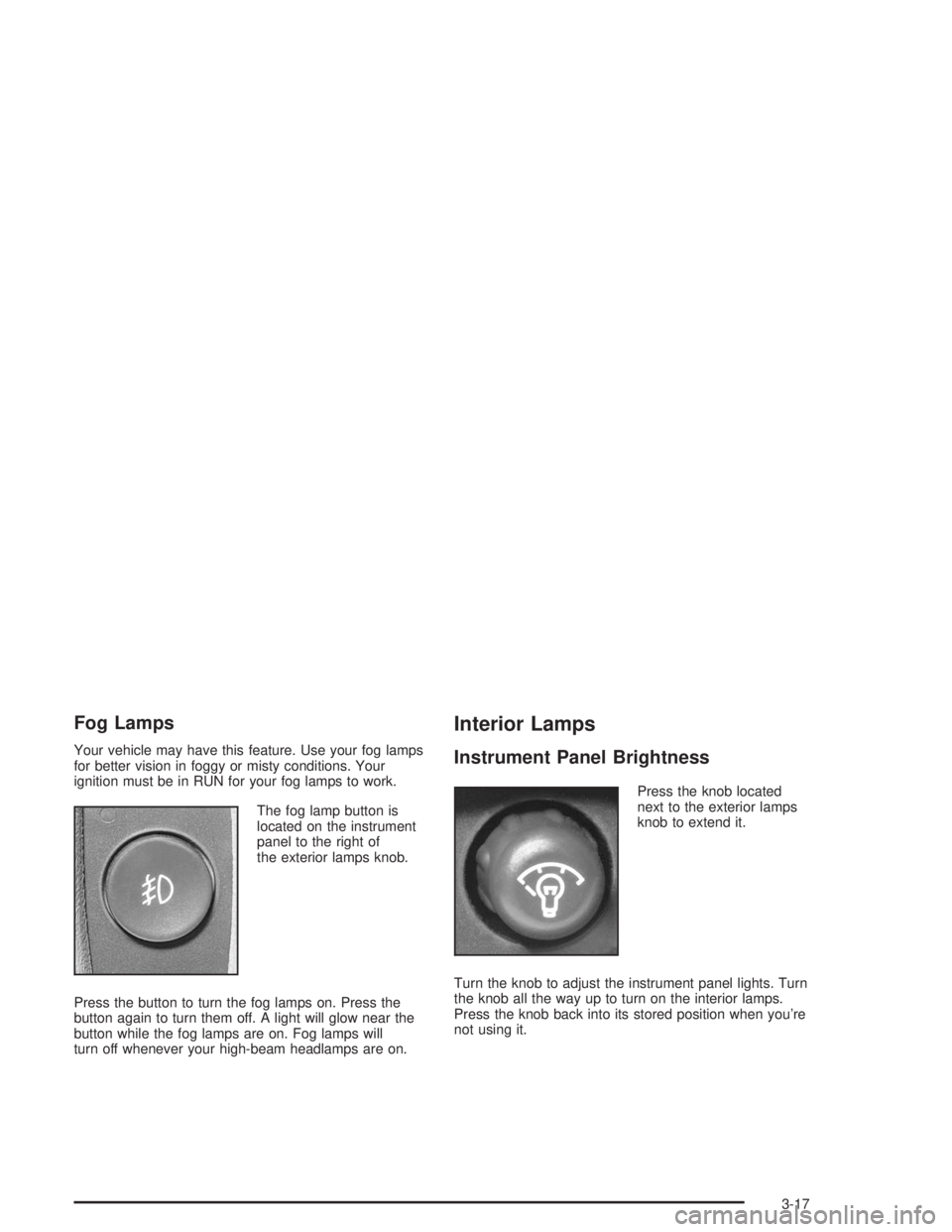
Fog Lamps
Your vehicle may have this feature. Use your fog lamps
for better vision in foggy or misty conditions. Your
ignition must be in RUN for your fog lamps to work.
The fog lamp button is
located on the instrument
panel to the right of
the exterior lamps knob.
Press the button to turn the fog lamps on. Press the
button again to turn them off. A light will glow near the
button while the fog lamps are on. Fog lamps will
turn off whenever your high-beam headlamps are on.
Interior Lamps
Instrument Panel Brightness
Press the knob located
next to the exterior lamps
knob to extend it.
Turn the knob to adjust the instrument panel lights. Turn
the knob all the way up to turn on the interior lamps.
Press the knob back into its stored position when you’re
not using it.
3-17
Page 141 of 474

You can also turn the dome lamps on by turning the
thumbwheel, located next to the exterior lamps knob, all
the way up to the top detent position. In this position,
the dome lamps will remain on until they are turned off.
Battery Run-Down Protection
This feature shuts off the dome, courtesy, vanity, and
reading lamps if they are left on for more than
20 minutes when the ignition is off. This will keep your
battery from running down.
If the battery run-down protection shuts off the interior
lamps, it may be necessary to do one of the following to
return to normal operation:
Shut off all lamps and close all doors, or
turn the ignition key to RUN.
This feature will also turn off the parking lamps and
headlamps under most circumstances, if they are left on.
If you would like to turn them back on, turn the exterior
lamps knob.
Accessory Power Outlets
Your vehicle may have accessory power outlets. With
the accessory power outlets, you can plug in auxiliary
electrical equipment such as a cellular telephone or
CB radio.The rst two outlets are located below the cigarette
lighter and the rear wiper switch on the instrument panel.
The third outlet is located on the rear of the center
console.
Remove the cover from the outlet to use the outlet.
Be sure to put the cover back on when not using the
accessory power outlet.
Certain electrical accessories may not be compatible
with the accessory power outlet and could result
in blown vehicle or adaptor fuses. If you experience a
problem, see your dealer for additional information
on the accessory power outlets.
Notice:Adding any electrical equipment to your
vehicle may damage it or keep other components
from working as they should. The repairs would not
be covered by your warranty. Check with your
dealer before adding electrical equipment.
When adding electrical equipment, be sure to follow the
proper installation instructions included with the
equipment.
Notice:Improper use of the power outlet can cause
damage not covered by your warranty. Do not
hang any type of accessory or accessory bracket
from the plug because the power outlets are
designed for accessory power plugs only.
3-19
Page 143 of 474

Turn the right knob clockwise or counterclockwise to
direct the airow inside of your vehicle.
To change the current mode, select one of the following:
H(Vent):This mode directs air to the instrument
panel outlets.
)(Bi-Level):This mode directs about half of the air
to the instrument panel outlets; then directs most of
the remaining air to the oor outlets. A little air is
directed toward the windshield and the side window
outlets. Cooler air is directed to the upper vents
and warmer air to the oor outlets.
6(Floor):This mode directs most of the air to the
oor outlets with a little air directed to the windshield and
the side window outlets. The recirculation button
cannot be selected while in oor mode.
h(Recirculation):Recirculation mode is used to
recirculate the air inside of your vehicle. When this button
is pressed, an indicator light in the button will come on to
let you know that it is active. Use this mode to help
prevent outside odors and/or dust from entering your
vehicle or to help cool the air inside of your vehicle more
quickly. The air conditioning compressor will also come
on when this mode is activated. While in recirculationmode, the windows may fog when the weather is cold and
damp. To clear the fog, select either the defog or defrost
mode and increase fan speed. Recirculation mode shuts
off when the engine is turned off.
Temperature Control
Driver’s Side:The lever on the left side of the climate
control panel is used to raise or lower the temperature
on the driver’s side of the vehicle. Slide the lever
up or down to adjust the temperature.
Passenger’s Side:The lever on the right side of the
climate control panel is used to raise or lower the
temperature on the passenger’s side of the vehicle. Slide
the lever up or down to adjust the temperature. This lever
also adjusts the temperature to the rear seat outlets.
When the temperature outside is 0°F (-18°C) or lower,
use the engine coolant heater, if equipped, to provide
warmer air, faster to your vehicle.#(Air Conditioning):Press this button to turn the
air-conditioning system on or off. When the button is
pressed, an indicator light will come on and the system
will begin to cool and dehumidify the air inside of your
vehicle. You may notice a slight change in engine
performance when the air conditioning compressor shuts
off and turns on again. This is normal.
3-21