2004 GMC ENVOY horn
[x] Cancel search: hornPage 175 of 474

Personalization
You can program certain features to a preferred setting
for up to two people. Press the personalization button
to scroll through the following personalization features.
All of the personalization options may not be available
on your vehicle. Only the options available will be
displayed on your DIC.
ALARM WARNING TYPE
AUTOMATIC LOCKING
AUTOMATIC UNLOCKING
SEAT POSITION RECALL
PERIMETER LIGHTING
REMOTE LOCK FEEDBACK
REMOTE UNLOCK FEEDBACK
HEADLAMPS ON AT EXIT
MIRROR CURB VIEW ASSIST
EASY EXIT DRIVER SEAT
DISPLAY UNITS — U.S./MET
DISPLAY LANGUAGE
The driver’s preferences are recalled by pressing the
unlock button on the remote keyless entry transmitter or
by pressing the appropriate memory button 1 or 2
located on the driver’s door.
Alarm Warning Type
Press the personalization button until ALARM
WARNING TYPE appears in the display. To select your
personalization for alarm warning type, press the
select button while ALARM WARNING TYPE is
displayed on the DIC. Pressing the select button will
scroll through the following choices:
ALARM WARNING: BOTH (default): If you choose
BOTH, the headlamps will ash and the horn will
chirp when the alarm is active.
ALARM WARNING: OFF: If you choose OFF, there
will be no alarm warning on activation.
ALARM WARNING: HORN: If you choose HORN,
the horn will chirp when the alarm is active.
ALARM WARNING: LAMPS: If you choose LAMPS,
the headlamps will ash when the alarm is active.
Choose one of the four settings and press the
personalization button while it is displayed on the DIC to
select it and move on to the next feature. For more
information on alarm warning type, seeContent
Theft-Deterrent on page 2-17.
3-53
Page 178 of 474

Remote Lock Feedback
Press the personalization button until REMOTE LOCK
FEEDBACK appears in the display. To select your
personalization for the feedback you will receive when
locking the vehicle with the remote keyless entry
transmitter, press the select button while REMOTE
LOCK FEEDBACK is displayed on the DIC. Pressing
the select button will scroll through the following choices:
LOCK FEEDBACK: BOTH (default): If you choose
both, the parking lamps will ash each time you
press the button with the lock symbol on the remote
keyless entry transmitter and the horn will chirp
the second time you press the lock button.
LOCK FEEDBACK: OFF: If you choose off, there
will be no feedback when locking the vehicle.
LOCK FEEDBACK: HORN: If you choose horn, the
horn will chirp the second time you press the button
with the lock symbol on the remote keyless entry
transmitter.
LOCK FEEDBACK: LAMPS: If you choose lamps,
the parking lamps will ash each time you press
the button with the lock symbol on the remote
keyless entry transmitter.
Choose one of the four settingss and press the
personalization button while it is displayed on the DIC to
select it and move on to the next feature.
Remote Unlock Feedback
Press the personalization button until REMOTE UNLOCK
FEEDBACK appears in the display. To select your
personalization for the feedback you will receive when
unlocking the vehicle with the remote keyless entry
transmitter, press the select button while REMOTE
UNLOCK FEEDBACK is displayed on the DIC. Pressing
the select button will scroll through the following choices:
UNLOCK FEEDBACK: LAMPS (default): If you
choose lamps, the parking lamps will ash each time
you press the button with the unlock symbol on the
remote keyless entry transmitter.
UNLOCK FEEDBACK: BOTH: If you choose both,
the parking lamps will ash each time you press the
button with the unlock symbol on the remote keyless
entry transmitter. The horn will chirp the second time
you press the unlock button.
UNLOCK FEEDBACK: OFF: If you choose off, there
will be no feedback when unlocking the vehicle.
UNLOCK FEEDBACK: HORN: If you choose horn,
the horn will chirp the second time you press the
button with the unlock symbol on the remote keyless
entry transmitter.
Choose one of the four settings and press the
personalization button while it is displayed on the DIC to
select it and move on to the next feature.
3-56
Page 263 of 474

Attach a ag to the vehicle to make you more
visible to approaching traffic on trails or hills.
Sound the horn as you approach the top of the hill
to let opposing traffic know you are there.
Use your headlamps even during the day. They
make you more visible to oncoming traffic.
{CAUTION:
Driving to the top (crest) of a hill at full speed
can cause an accident. There could be a
drop-off, embankment, cliff, or even another
vehicle. You could be seriously injured or
killed. As you near the top of a hill, slow down
and stay alert.
Q:What should I do if my vehicle stalls, or is about
to stall, and I can not make it up the hill?
A:If this happens, there are some things you should
do, and there are some things you must not do.
First, here is what youshoulddo:
Push the brake pedal to stop the vehicle and keep
it from rolling backwards. Also, apply the parking
brake.
If your engine is still running, shift the transmission
to REVERSE (R), release the parking brake, and
slowly back down the hill in REVERSE (R).
If your engine has stopped running, you will need to
restart it. With the brake pedal pressed and the
parking brake still applied, shift the transmission to
PARK (P) and restart the engine. Then, shift to
REVERSE (R), release the parking brake, and
slowly back down the hill as straight as possible in
REVERSE (R).
As you are backing down the hill, put your left hand
on the steering wheel at the 12 o’clock position.
This way, you will be able to tell if your wheels are
straight and maneuver as you back down. It is
best that you back down the hill with your wheels
straight rather than in the left or right direction.
Turning the wheel too far to the left or right
will increase the possibility of a rollover.
4-21
Page 412 of 474

Fuses Usage
1Electrically-Controlled Air
Suspension
2Passenger’s Side High-Beam
Headlamp
3Passenger’s Side Low-Beam
Headlamp
4 Back-Up-Trailer Lamps
5Driver’s Side High-Beam
Headlamp
6Driver’s Side Low-Beam
Headlamp
7Rear Window Washer, Headlamp
Washer
8 Active Transfer Case
9 Windshield Washer
10 Powertrain Control Module B
11 Fog LampsFuses Usage
12 Stop Lamp
13 Cigarette Lighter
14 Ignition Coils
15 Blank
16 TBC-Ignition 1
17 Crank
18 Air Bag
19 Trailer Electric Brake
20 Cooling Fan
21 Horn
22 Ignition E
23 Electronic Throttle Control
24Instrument Panel Cluster, Driver
Information Center
25Automatic Shift Lock Control
System
5-104
Page 413 of 474

Fuses Usage
26 Backup
27 Engine 1
28 Powertrain Control Module 1
29 Oxygen Sensor
30 Air Conditioning
31 Truck Body Controller
32 Trailer
33 Anti-Lock Brakes (ABS)
34 Ignition A
35 Blower Motor
36 Ignition B
50 Passenger’s Side Trailer Turn
51 Driver’s Side Trailer Turn
52 Hazard Flashers
53 Electric Adjustable Pedal
54 A.I.R. Solenoid
56 A.I.R. PumpFuses Usage
Relays Usage
37 Headlamp Washer
38 Rear Window Washer
39 Fog Lamps
40 Horn
41 Fuel Pump
42 Windshield Washer
43 High-Beam Headlamp
44 Air Conditioning
45 Cooling Fan
46 Headlamp Driver Module
47 Starter
49 Electric Adjustable Pedal
55 A.I.R. Solenoid
Miscellaneous Usage
48 Instrument Panel Battery
49 Blank
5-105
Page 415 of 474
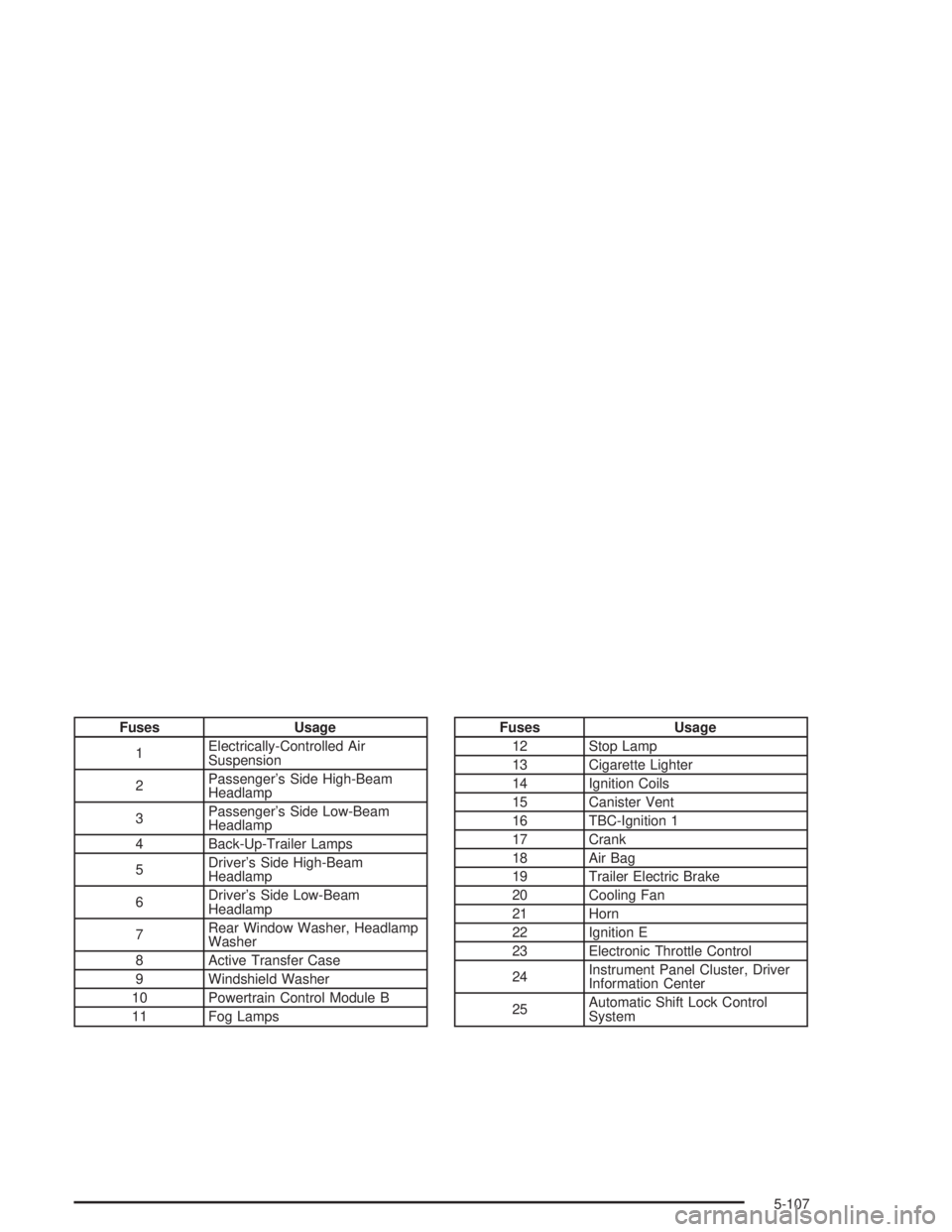
Fuses Usage
1Electrically-Controlled Air
Suspension
2Passenger’s Side High-Beam
Headlamp
3Passenger’s Side Low-Beam
Headlamp
4 Back-Up-Trailer Lamps
5Driver’s Side High-Beam
Headlamp
6Driver’s Side Low-Beam
Headlamp
7Rear Window Washer, Headlamp
Washer
8 Active Transfer Case
9 Windshield Washer
10 Powertrain Control Module B
11 Fog LampsFuses Usage
12 Stop Lamp
13 Cigarette Lighter
14 Ignition Coils
15 Canister Vent
16 TBC-Ignition 1
17 Crank
18 Air Bag
19 Trailer Electric Brake
20 Cooling Fan
21 Horn
22 Ignition E
23 Electronic Throttle Control
24Instrument Panel Cluster, Driver
Information Center
25Automatic Shift Lock Control
System
5-107
Page 416 of 474

Fuses Usage
26 Backup
27 Engine 1
28 Powertrain Control Module 1
30 Air Conditioning
31 Truck Body Controller 1
32 Trailer
33 Anti-Lock Brakes (ABS)
34 Ignition A
35 Blower Motor
36 Ignition B
50 Passenger’s Side Trailer Turn
51 Driver’s Side Trailer Turn
52 Hazard Flashers
53 Oxygen Sensor Bank B
54 Oxygen Sensor Bank A
55 Injector Bank A
56 Injector Bank B
57 Electric Adjustable PedalFuses Usage
Relays Usage
37 Headlamp Washer
38 Rear Window Washer
39 Fog Lamps
40 Horn
41 Fuel Pump
42 Windshield Washer
43 High-Beam Headlamp
44 Air Conditioning
45 Cooling Fan
46 Headlamp Driver Module
47 Starter
49 Electric Adjustable Pedal
58 Ignition 1
Miscellaneous Usage
48 Instrument Panel Battery
5-108
Page 464 of 474

Horn............................................................... 3-7
How to Add Coolant to the
Coolant Recovery Tank................................5-32
How to Add Coolant to the Radiator..................5-34
How to Add Fluid............................................5-25
How to Check........................................5-23, 5-66
How to Check Lubricant...................................5-49
How to Check Power Steering Fluid..................5-37
How to Inspect...............................................5-22
How to Use This Manual...................................... ii
How to Wear Safety Belts Properly...................1-14
Hydroplaning..................................................4-31
I
ICE POSSIBLE..............................................3-61
If No Steam Is Coming From Your Engine..........5-29
If Steam Is Coming From Your Engine...............5-28
If the Light Is Flashing.....................................3-41
If the Light Is On Steady.................................3-42
If You Are Caught in a Blizzard.........................4-40
If You Are Stuck in Sand, Mud, Ice or Snow.......4-42
If You Do Decide To Pull A Trailer.....................4-56
Ignition Positions.............................................2-20
Infants and Young Children, Restraints...............1-31
Ination - Tire Pressure...................................5-65Instrument Panel
Cluster.......................................................3-33
Overview..................................................... 3-4
Instrument Panel Brightness.............................3-17
Interior Lamps................................................3-17
J
Jump Starting.................................................5-43
K
Keyless Entry System....................................... 2-5
Keys............................................................... 2-3
L
Lamps
Exterior......................................................3-15
Interior.......................................................3-17
Lamps On Reminder.......................................3-16
Lap-Shoulder Belt...................................1-14, 1-23
LATCH System
Child Restraints...........................................1-42
Securing a Child Restraint Designed for the
LATCH System........................................1-44
8