Page 3 of 216
Maintenance and Specifications 163
Engine compartment 164
Engine oil 165
Battery 168
Fuel information 175
Air filter(s) 187
Part numbers 201
Refill capacities 201
Lubricant specifications 203
Accessories 210
Index 212
All rights reserved. Reproduction by any means, electronic or mechanical
including photocopying, recording or by any information storage and retrieval
system or translation in whole or part is not permitted without written
authorization from Ford Motor Company. Ford may change the contents without
notice and without incurring obligation.Copyright © 2003 Ford Motor Company
2004 Thunderbird(tbr)
Owners Guide (post-2002-fmt)
USA English (fus)
Table of Contents
3
Page 5 of 216

SAFETY AND ENVIRONMENT PROTECTION
Warning symbols in this guide
How can you reduce the risk of personal injury and prevent possible
damage to others, your vehicle and its equipment? In this guide, answers
to such questions are contained in comments highlighted by the warning
triangle symbol. These comments should be read and observed.
Warning symbols on your vehicle
When you see this symbol, it is
imperative that you consult the
relevant section of this guide before
touching or attempting adjustment
of any kind.
Protecting the environment
We must all play our part in
protecting the environment. Correct
vehicle usage and the authorized
disposal of waste cleaning and
lubrication materials are significant
steps towards this aim. Information in this respect is highlighted in this
guide with the tree symbol.
BREAKING-IN YOUR VEHICLE
Your vehicle does not need an extensive break-in. Try not to drive
continuously at the same speed for the first 1,600 km (1,000 miles) of
new vehicle operation. Vary your speed to allow parts to adjust
themselves to other parts.
Do not add friction modifier compounds or special break-in oils during
the first few thousand kilometers (miles) of operation, since these
additives may prevent piston ring seating. See Engine oilin the
Maintenance and specifications chapter for more information on oil
usage.
2004 Thunderbird (tbr)
Owners Guide (post-2002-fmt)
USA English (fus)
Introduction
5
Page 9 of 216
Vehicle Symbol Glossary
Power Windows
Front/Rear
Power Window Lockout
Child Safety Door
Lock/UnlockInterior Luggage
Compartment Release
Symbol
Panic AlarmEngine Oil
Engine CoolantEngine Coolant
Temperature
Do Not Open When HotBattery
Avoid Smoking, Flames,
or SparksBattery Acid
Explosive GasFan Warning
Power Steering FluidMaintain Correct Fluid
LevelMAX MIN
Emission SystemEngine Air Filter
Passenger Compartment
Air FilterJack
Check fuel capLow tire warning
2004 Thunderbird (tbr)
Owners Guide (post-2002-fmt)
USA English (fus)
Introduction
9
Page 12 of 216
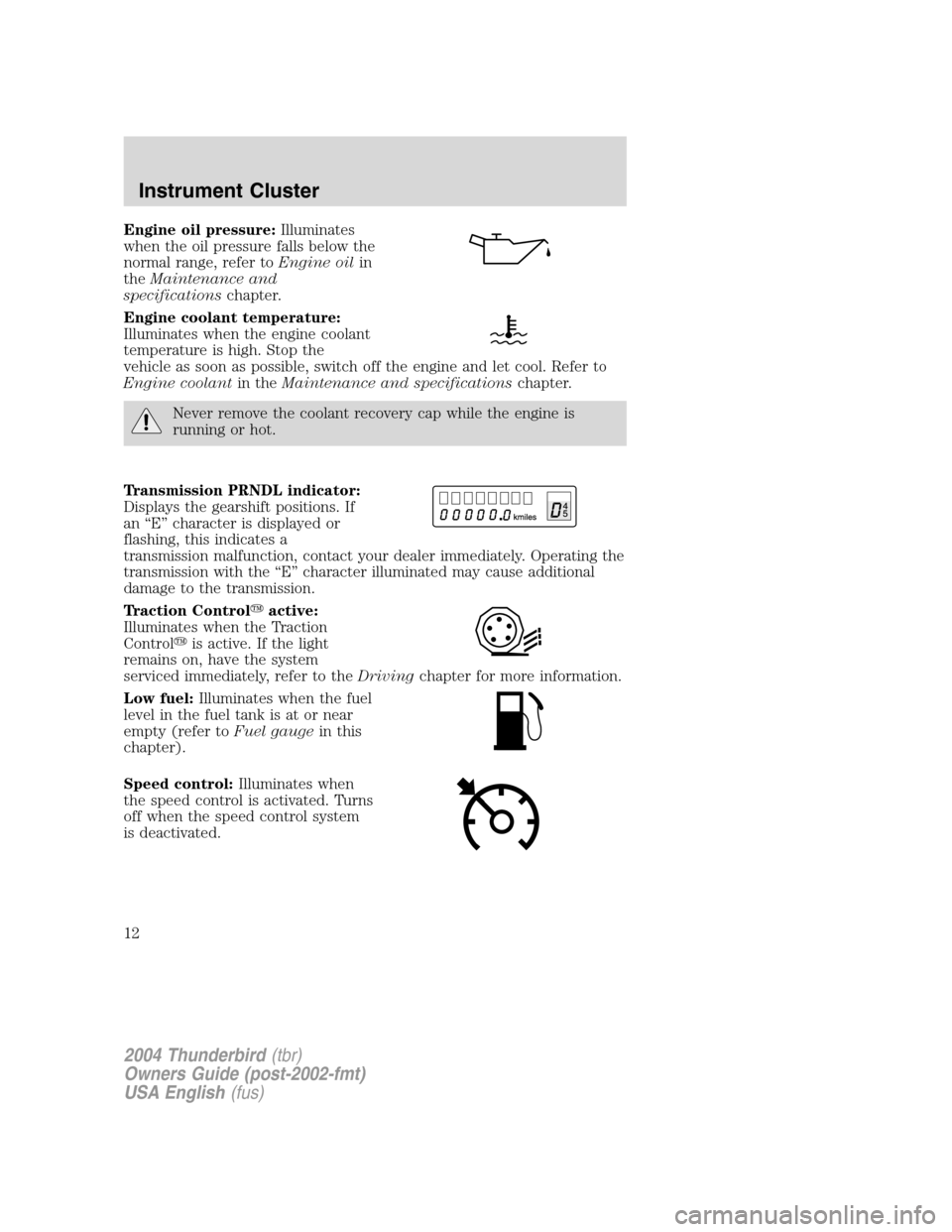
Engine oil pressure:Illuminates
when the oil pressure falls below the
normal range, refer to Engine oilin
the Maintenance and
specifications chapter.
Engine coolant temperature:
Illuminates when the engine coolant
temperature is high. Stop the
vehicle as soon as possible, switch off the engine and let cool. Refer to
Engine coolant in theMaintenance and specifications chapter.
Never remove the coolant recovery cap while the engine is
running or hot.
Transmission PRNDL indicator:
Displays the gearshift positions. If
an “E ” character is displayed or
flashing, this indicates a
transmission malfunction, contact your dealer immediately. Operating the
transmission with the “E ” character illuminated may cause additional
damage to the transmission.
Traction Control �active:
Illuminates when the Traction
Control �is active. If the light
remains on, have the system
serviced immediately, refer to the Drivingchapter for more information.
Low fuel: Illuminates when the fuel
level in the fuel tank is at or near
empty (refer to Fuel gaugein this
chapter).
Speed control: Illuminates when
the speed control is activated. Turns
off when the speed control system
is deactivated.
2004 Thunderbird (tbr)
Owners Guide (post-2002-fmt)
USA English (fus)
Instrument Cluster
12
Page 33 of 216

6. Without turning, remove the old
bulb from the lamp assembly by
pulling it straight out of the lamp
assembly.
To install the new bulb:
Handle a halogen headlamp bulb carefully and keep out of
children’s reach. Grasp the bulb only by its plastic base and do
not touch the glass. The oil from your hand could cause the bulb to
break the next time the headlamps are operated.
Note: If the bulb is accidentally touched, it should be cleaned with
rubbing alcohol before being used.
1. With the flat side of the new bulb ’s plastic base facing upward, insert
the glass end of the bulb into the lamp assembly. Turn the bulb left or
right to align the grooves in the plastic base with the tabs in the lamp
assembly. When the grooves are aligned, push the bulb into the lamp
assembly until the plastic base contacts the rear of the lamp assembly.
2. Install the bulb retaining ring over the plastic base and lock the ring
by rotating clockwise until it snaps into place.
3. Connect the electrical connector to the bulb.
4. Install the headlamp on vehicle by aligning the lamp on the vehicle,
push rearward to fully seat the lamp assembly and install the screw on
the headlamp.
5. Push the two retainer pins down.
6. Turn the headlamps on and make sure they work properly. If the
headlamp was correctly aligned before you changed the bulb, you should
not need to align it again.
2004 Thunderbird (tbr)
Owners Guide (post-2002-fmt)
USA English (fus)
Lights
33
Page 129 of 216
The fuses are coded as follows.
Fuse/RelayLocation Fuse Amp
Rating Passenger Compartment Fuse
Panel Description
1 5A Starter relay coil
2 5A Radio start signal
3 5A Anti-lock Brake System (ABS) module
4 5A Cluster, Powertrain Control Module (PCM) relay coil, Inertia switch,
Transmission park switch
5 5A Traction control switch, Cruise deactivation brake switch and
transmission mode switch
6 10A OBD II connector
7 5A PCM, Remote Keyless Entry (RKE), Anti-theft indicator
8 5A Right-hand turn/park lamp and side marker
SEE
OWNER'S MANUAL
RELAY 1
REPLACEMENTFUSES
FUSE 8FUSE 9FUSE 10FUSE 11FUSE 12FUSE 13FUSE 14FUSE 15FUSE 16FUSE 17FUSE 18FUSE 19FUSE 20FUSE 21
FUSE 1FUSE 2FUSE 3FUSE 4FUSE 5FUSE 6FUSE 7
FUSE 22FUSE 23FUSE 24FUSE 25FUSE 26FUSE 27FUSE 28FUSE 29FUSE 30FUSE 31FUSE 32FUSE 33FUSE 34FUSE 35
2004 Thunderbird (tbr)
Owners Guide (post-2002-fmt)
USA English (fus)
Roadside Emergencies
129
Page 132 of 216
The high-current fuses are coded as follows.
Fuse/RelayLocation Fuse Amp
Rating Power Distribution Box
Description
1 10A* A/C clutch
2 15A* Heated wiper park
3 10A* Park lamp
4 15A* Horn
5 15A* Fuel injectors
6 15A* Transmission solenoids
7 —Not used
8 20A* Power point
9 —Not used
10 —Not used
11 15A* Heated Exhaust Gas Oxygen (HEGO) sensors
12 15A* Coil-on-plug
RELAY 14 RELAY
15
RELAY11 RELAY
12
RELAY10 13
1234
5678
9 10111214 15 16 17 18
19 20 21 22 23 24
RELAY 13RELAY 08 DIODE
RELAY 04 RELAY 05
RELAY 01
RELAY 09
RELAY 06 RELAY 02RELAY 07
RELAY 03
2004 Thunderbird
(tbr)
Owners Guide (post-2002-fmt)
USA English (fus)
Roadside Emergencies
132
Page 133 of 216
Fuse/RelayLocation Fuse Amp
Rating Power Distribution Box
Description
13 —Not used
14 30A** ABS module power
15 —Not used
16 30A** Blower motor
17 —Not used
18 40A** PCM
19 —Not used
20 —Not used
21 30A** Starter solenoid
22 40A** ABS pump
23 —Not used (fuse plug)
24 30A** Wiper module
Relay 01 —Not used
Relay 02 —Not used
Relay 03 1/2 ISO Relay Coil-on-plug and HEGOs
Relay 04 1/2 ISO Relay Heated wiper park relay
Relay 05 1/2 ISO Relay Auxiliary coolant pump
Relay 06 1/2 ISO Relay Horn
Relay 07 —Not used
Relay 08 1/2 ISO Relay A/C clutch
Relay 09 60A** Cooling fan motor
Relay 10 Full ISO Relay Blower motor
Relay 11 —Not used
Relay 12 —Not used
Relay 13 —Not used
Relay 14 Full ISO Relay PCM
Relay 15 Full ISO Relay Starter motor Diode —PCM relay coil
*Mini fuses **Cartridge fuses
2004 Thunderbird (tbr)
Owners Guide (post-2002-fmt)
USA English (fus)
Roadside Emergencies
133


