Page 29 of 216
Note:The panel dimmer control is only active when the autolamp has
determined that it is night. The dome light will only go on when the
dome light switch is in the delay or ON position.
HEADLAMP VERTICAL AIM ADJUSTMENT
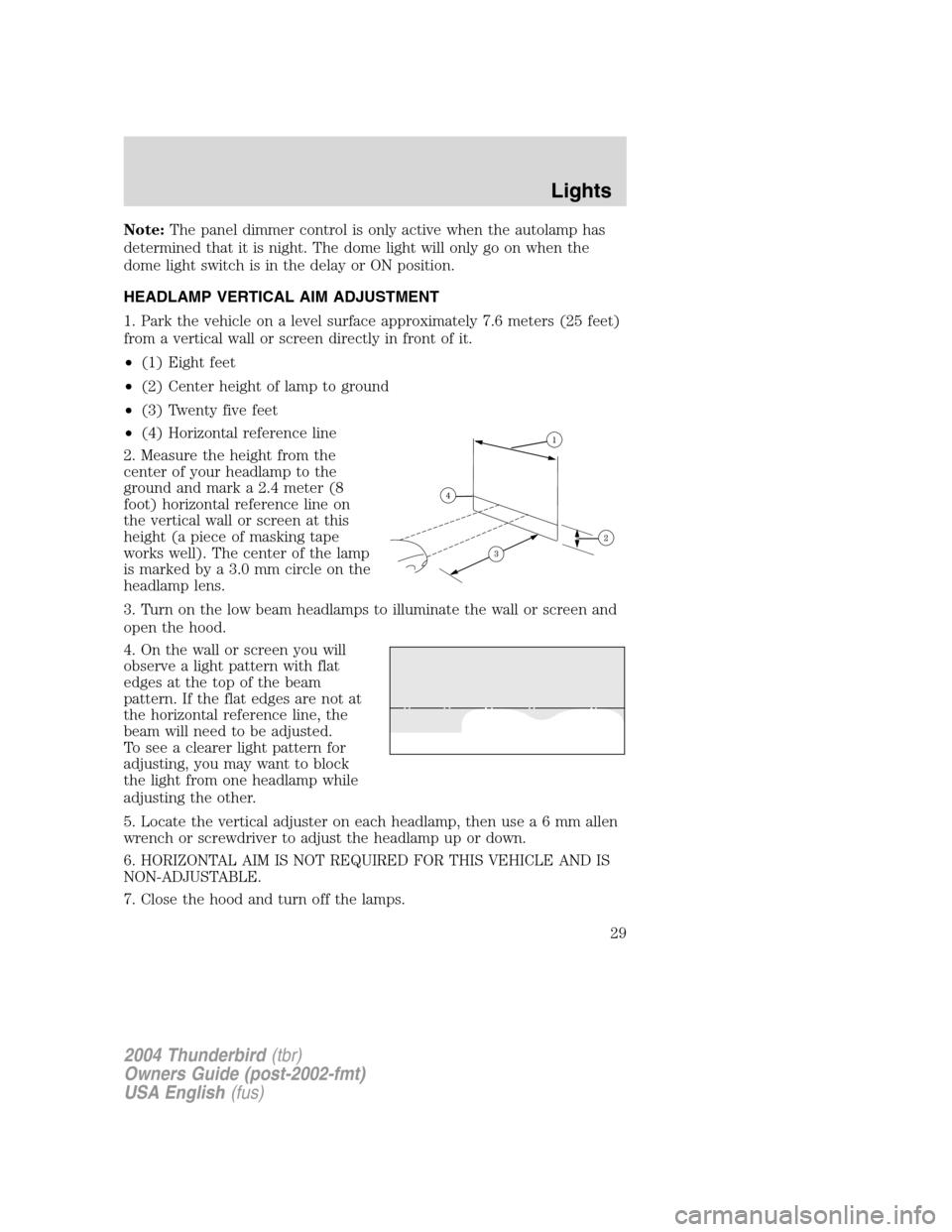
1. Park the vehicle on a level surface approximately 7.6 meters (25 feet)
from a vertical wall or screen directly in front of it.
• (1) Eight feet
• (2) Center height of lamp to ground
• (3) Twenty five feet
• (4) Horizontal reference line
2. Measure the height from the
center of your headlamp to the
ground and mark a 2.4 meter (8
foot) horizontal reference line on
the vertical wall or screen at this
height (a piece of masking tape
works well). The center of the lamp
is marked by a 3.0 mm circle on the
headlamp lens.
3. Turn on the low beam headlamps to illuminate the wall or screen and
open the hood.
4. On the wall or screen you will
observe a light pattern with flat
edges at the top of the beam
pattern. If the flat edges are not at
the horizontal reference line, the
beam will need to be adjusted.
To see a clearer light pattern for
adjusting, you may want to block
the light from one headlamp while
adjusting the other.
5. Locate the vertical adjuster on each headlamp, then us ea6mmallen
wrench or screwdriver to adjust the headlamp up or down.
6. HORIZONTAL AIM IS NOT REQUIRED FOR THIS VEHICLE AND IS
NON-ADJUSTABLE.
7. Close the hood and turn off the lamps.
2004 Thunderbird (tbr)
Owners Guide (post-2002-fmt)
USA English (fus)
Lights
29
Page 32 of 216
Replacing headlamp bulbs
To remove the headlamp bulb:
1. Make sure headlamp switch is in
OFF position, then open the hood.
2. Pry up the two retainer pins to
release the headlamp assembly from
the vehicle.
3. Remove the nut from the back of
the headlamp and pull headlamp
forward.
4. Disconnect the electrical
connector from the bulb by pulling
rearward.
5. Remove the bulb retaining ring by
rotating it counterclockwise (when
viewed from the rear) to free it
from the bulb socket, and slide the
ring off the plastic base. Keep the
ring to retain the new bulb.
2004 Thunderbird(tbr)
Owners Guide (post-2002-fmt)
USA English (fus)
Lights
32
Page 33 of 216

6. Without turning, remove the old
bulb from the lamp assembly by
pulling it straight out of the lamp
assembly.
To install the new bulb:
Handle a halogen headlamp bulb carefully and keep out of
children’s reach. Grasp the bulb only by its plastic base and do
not touch the glass. The oil from your hand could cause the bulb to
break the next time the headlamps are operated.
Note: If the bulb is accidentally touched, it should be cleaned with
rubbing alcohol before being used.
1. With the flat side of the new bulb ’s plastic base facing upward, insert
the glass end of the bulb into the lamp assembly. Turn the bulb left or
right to align the grooves in the plastic base with the tabs in the lamp
assembly. When the grooves are aligned, push the bulb into the lamp
assembly until the plastic base contacts the rear of the lamp assembly.
2. Install the bulb retaining ring over the plastic base and lock the ring
by rotating clockwise until it snaps into place.
3. Connect the electrical connector to the bulb.
4. Install the headlamp on vehicle by aligning the lamp on the vehicle,
push rearward to fully seat the lamp assembly and install the screw on
the headlamp.
5. Push the two retainer pins down.
6. Turn the headlamps on and make sure they work properly. If the
headlamp was correctly aligned before you changed the bulb, you should
not need to align it again.
2004 Thunderbird (tbr)
Owners Guide (post-2002-fmt)
USA English (fus)
Lights
33
Page 34 of 216
Replacing front parking lamp/turn signal bulbs
1. Make sure headlamp switch is in
OFF position, then open the hood.
2. Pry up the two retainer pins to
release the headlamp assembly from
the vehicle.
3. Remove the nut from the back of
the headlamp and pull headlamp
forward.
4. Rotate bulb socket
counterclockwise and remove from
lamp assembly.
5. Carefully pull bulb straight out of
socket and push in the new bulb.
6. Install bulb socket in lamp
assembly by turning clockwise.
7. Install the headlamp on vehicle by
aligning the lamp on the vehicle,
push rearward to fully seat the lamp
assembly and install the screw on the headlamp.
8. Push the two retainer pins down.
9. Turn the lamps on and make sure the new bulb works properly.
2004 Thunderbird(tbr)
Owners Guide (post-2002-fmt)
USA English (fus)
Lights
34
Page 35 of 216
Replacing front/rear side marker bulbs
1. Make sure the headlamp switch is
in the OFF position and then
remove the screw and carefully pull
the lamp assembly out from the
bumper.
2. Rotate bulb socket
counterclockwise and remove from
lamp assembly.
3. Carefully pull bulb straight out of
socket and push in the new bulb.
4. To complete installation, follow the removal procedure in reverse
order.
Replacing supplemental parking lamp bulbs (if equipped)
1. Make sure the headlamp switch is
in the OFF position and then
remove the screw and carefully pull
the lamp assembly out from the
bumper.
2. Rotate the bulb socket
counterclockwise and remove from
lamp assembly.
3. Pull the bulb straight out of the
socket and push in the new bulb.
4. To complete installation, follow the removal procedure in reverse
order.
2004 Thunderbird(tbr)
Owners Guide (post-2002-fmt)
USA English (fus)
Lights
35
Page 37 of 216
4. Rotate the bulb socket
counterclockwise and remove from
lamp assembly.
5. Pull the bulb straight out of the
socket and push in the new bulb.
6. To complete installation, follow
the removal procedure in reverse
order.
Replacing license plate lamp bulbs
1. Make sure the headlamp switch is
in the OFF position and then
remove two screws and the license
plate lamp assembly from the
vehicle.
2. Rotate bulb socket
counterclockwise and remove from
lamp assembly.
3. Carefully pull the bulb from the
socket and push in the new bulb.
4. Install the lamp assembly with two screws.
Replacing high-mount brake lamp assembly
For bulb replacement, see a dealer or qualified technician.
2004 Thunderbird(tbr)
Owners Guide (post-2002-fmt)
USA English (fus)
Lights
37
Page 38 of 216
MULTI-FUNCTION LEVER
Windshield wiper:Rotate the end
of the control away from you to
increase the speed of the wipers;
rotate towards you to decrease the
speed of the wipers.
Windshield washer: Push the end
of the stalk:
• briefly: causes a single swipe of
the wipers without washer fluid.
• a quick push and hold: the wipers
will swipe three times with
washer fluid.
• a long push and hold: the wipers and washer fluid will be activated for
up to ten seconds.
CHANGING THE WIPER BLADES
1. Pull the wiper arm away from the
vehicle. Turn the blade at an angle
from the wiper arm. Push the lock
pin manually to release the blade
and pull the wiper blade down
toward the windshield to remove it
from the arm.
2. Attach the new wiper to the
wiper arm and press it into place
until a click is heard.
3. Replace wiper blades every 6
months for optimum performance.
2004 Thunderbird (tbr)
Owners Guide (post-2002-fmt)
USA English (fus)
Driver Controls
Driver Controls
38
Page 41 of 216

closed. To re-calibrate the window, press the up switch to raise the
window until it completes its travel and hold the switch down for 2
seconds. Another possible effect of lost calibration is that the feature
may not lower the window. To re-calibrate the window in this case, lower
the window until it completes its travel and hold the switch down for 2
seconds. Immediately after releasing the window down switch, press the
up switch to raise the window until it completes its travel and hold the
switch down for 2 seconds.
VISOR MIRROR
To open the visor mirror, slide the
mirror cover.
POWER SIDE VIEW MIRRORS
To adjust your mirrors:
1. SelectLto adjust the left mirror
or Rto adjust the right mirror.
2. Move the control in the direction
you wish to tilt the mirror.
3. Return to the center position to
disable the adjust function.
LOCKABLE AND ELECTRONIC TRUNK REMOTE CONTROL
The remote trunk release control is
located on the driver ’s door trim
panel and can be operated at any
time, except when the security
system is armed. This control will
not work until the vehicle is
disarmed.
LR
2004 Thunderbird (tbr)
Owners Guide (post-2002-fmt)
USA English (fus)
Driver Controls
41


