Page 100 of 280

will need two previously programmedcoded keys(keys that already
operate your vehicle’s engine) and the new unprogrammed key(s) readily
accessible for timely implementation of each step in the procedure.
If two previously programmed coded keys are not available, you must
bring your vehicle to your dealership to have the spare coded key(s)
programmed.
Please read and understand the entire procedure before you begin.
1. Insert the first previously
programmedcoded keyinto the
ignition and turn the ignition from 2
(OFF/LOCK) to 3 (RUN) (maintain
ignition in 3 (RUN) for at least
three seconds, but no more than ten
seconds).
2. Turn ignition from 3 (RUN) back
to 2 (OFF/LOCK) in order to
remove the firstcoded keyfrom
the ignition.
3. Within ten seconds of removing the firstcoded key,insert the second
previously programmedcoded keyinto the ignition and turn the ignition
from 2 (OFF/LOCK) to 3 (RUN) (maintain ignition in 3 (RUN) for at
least three seconds but no more than ten seconds).
4. Turn the ignition from 3 (RUN) back to 2 (OFF/LOCK) in order to
remove the secondcoded keyfrom the ignition.
5. Within 10 seconds of removing the secondcoded key,insert the new
unprogrammed key (new key/valet key) into the ignition and turn the
ignition from 2 (OFF/LOCK) to 3 (RUN) (maintain ignition in 3 (RUN)
for at least three seconds, but no more than ten seconds). This step will
program your new key to a coded key.
6. To program additional new unprogrammed key(s), repeat this
procedure from step 1.
If successful, the new coded key(s) will start the vehicle’s engine and the
theft indicator will illuminate for three seconds and then go out.
If not successful, the new coded key(s) will not start the vehicle’s engine
and the theft indicator will flash on and off and you may repeat steps 1
through 5. If failure repeats, bring your vehicle to your dealership to
have the new spare key(s) programmed.
4
3
2
1
2004 Windstar(win)
Owners Guide (post-2002-fmt)
USA English(fus)
Locks and Security
100
Page 101 of 280

PERIMETER ALARM SYSTEM (IF EQUIPPED)
The perimeter anti-theft system will warn you in the event of an
unauthorized entry to your vehicle.
If there is any potential perimeter anti-theft problem with your vehicle,
ensureALL remote entry transmittersare taken to the dealership to
aid in troubleshooting.
Arming the system
When armed, this system will help protect your vehicle from
unauthorized entry. When unauthorized entry occurs, the system will
flash the turn signal lamps and side repeaters and honk the horn.
The system is ready to arm whenever the key is removed from the
ignition. Any of the following actions will prearm the alarm system:
•Locking the vehicle using the remote entry transmitter.
•Locking the vehicle using the keyless entry keypad.
•Pressing the interior power door lock control while the door is open.
Twenty seconds after one of the above events occurs, any door/hood that
is closed is armed.
Any door/hood that is still open is prearmed and waiting for the
door/hood to be closed.
Once that input is closed, the input will arm in 20 seconds and the
exterior lamps may flash.
Disarming the system
You can disarm the system by any of the following actions:
•Unlock the vehicle with the remote keyless transmitter.
•Unlock the vehicle with the keyless entry keypad.
•Unlock the vehicle with a key in the driver’s door lock cylinder.
•Use a SecuriLock�key to move the ignition to the RUN or START
position.
2004 Windstar(win)
Owners Guide (post-2002-fmt)
USA English(fus)
Locks and Security
101
Page 105 of 280

Using the manual lumbar support (if equipped)
The lumbar control is located on the
inboard side of the seat under the
armrest.
Rotate the control to change the
firmness of the lumbar support.
Kangaroo pouch and map pocket (if equipped)
The front of the cushion contains a pocket which can be used to hold
small objects that need to be easily accessible. The rear of the seat back
also contains a pocket for larger items which need to be easily
accessible.
Memory seats/rearview mirrors/adjustable pedals (if equipped)
This system allows automatic
positioning of the driver seat,
outside rearview mirrors, and
adjustable pedals to two
programmable positions.
The memory seat control is located
on the door next to the window
inside from the mirror.
•To program position one, move
the driver seat to the desired
position using the seat controls. Press the SET control. The SET
control indicator light will briefly illuminate. While the light is
illuminated, press control 1.
•To program position two, repeat the previous procedure using control
2.
A position can only be recalled when the transmission gearshift is in
Park. A memory seat position may be programmed at any time.
The memory seat positions are also recalled when you press your remote
entry transmitter UNLOCK control.
To program the memory seat to remote entry transmitter, refer to
Remote entry systemin theLocks and securitychapter.
SE T
12
2004 Windstar(win)
Owners Guide (post-2002-fmt)
USA English(fus)
Seating and Safety Restraints
105
Page 111 of 280
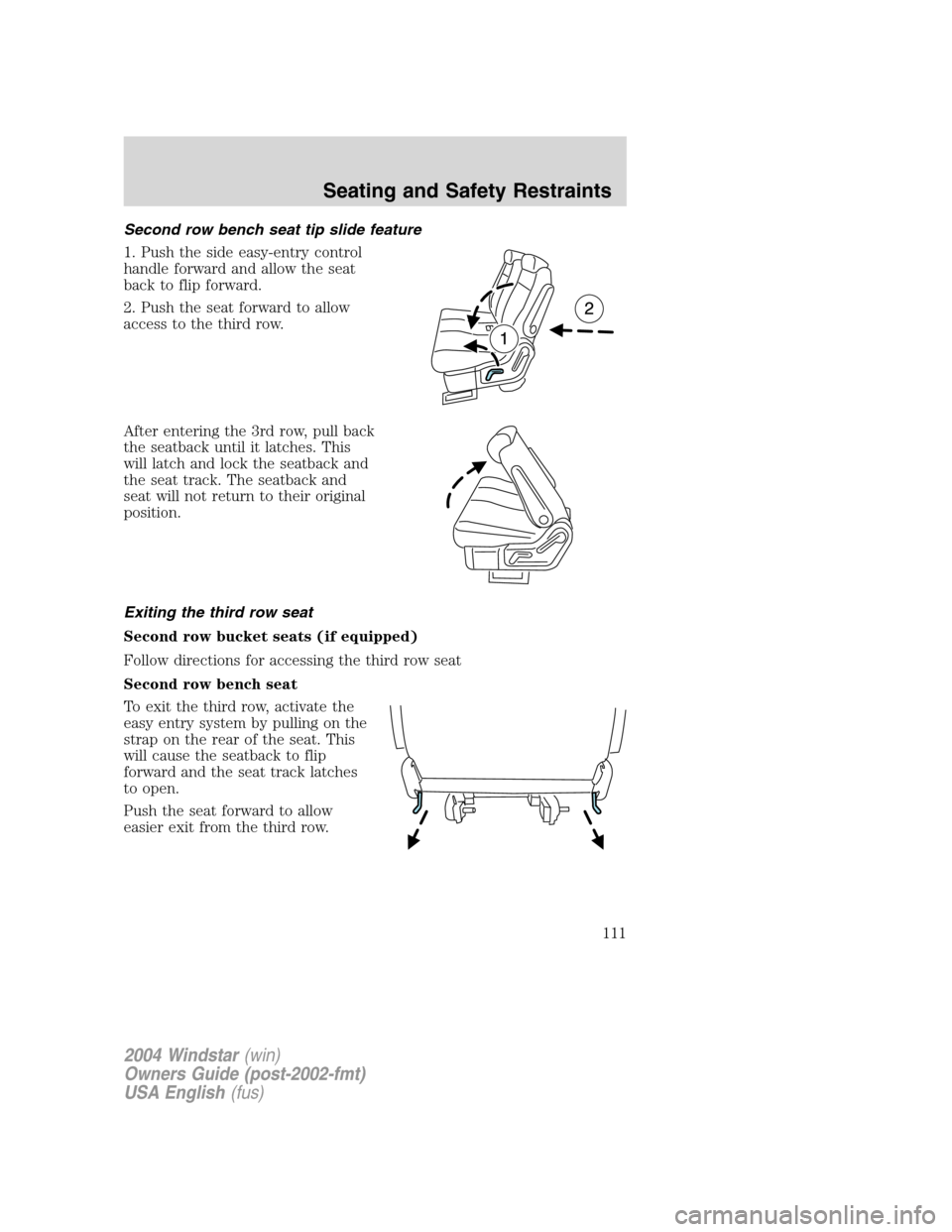
Second row bench seat tip slide feature
1. Push the side easy-entry control
handle forward and allow the seat
back to flip forward.
2. Push the seat forward to allow
access to the third row.
After entering the 3rd row, pull back
the seatback until it latches. This
will latch and lock the seatback and
the seat track. The seatback and
seat will not return to their original
position.
Exiting the third row seat
Second row bucket seats (if equipped)
Follow directions for accessing the third row seat
Second row bench seat
To exit the third row, activate the
easy entry system by pulling on the
strap on the rear of the seat. This
will cause the seatback to flip
forward and the seat track latches
to open.
Push the seat forward to allow
easier exit from the third row.
2004 Windstar(win)
Owners Guide (post-2002-fmt)
USA English(fus)
Seating and Safety Restraints
111
Page 112 of 280
After exiting the third row, push
rearward on the cushion of the seat
to return the seat to its original
position.
Push the seatback rearward until it
latches. This will latch and lock the
seatback and the seat track.
Note:Do not attempt to return the seat by pushing on the seatback, as
this will cause the seat tracks to re-lock before the seat can be returned.
Push on the cushion to return the seat.
Removal of second row seats from vehicle
Second row bucket seats
1. Place seat in tumbled position.
(SeeAccessing 3rd row seat)
2. Pull up on front floor release
handle (yellow).
2004 Windstar(win)
Owners Guide (post-2002-fmt)
USA English(fus)
Seating and Safety Restraints
112
Page 117 of 280
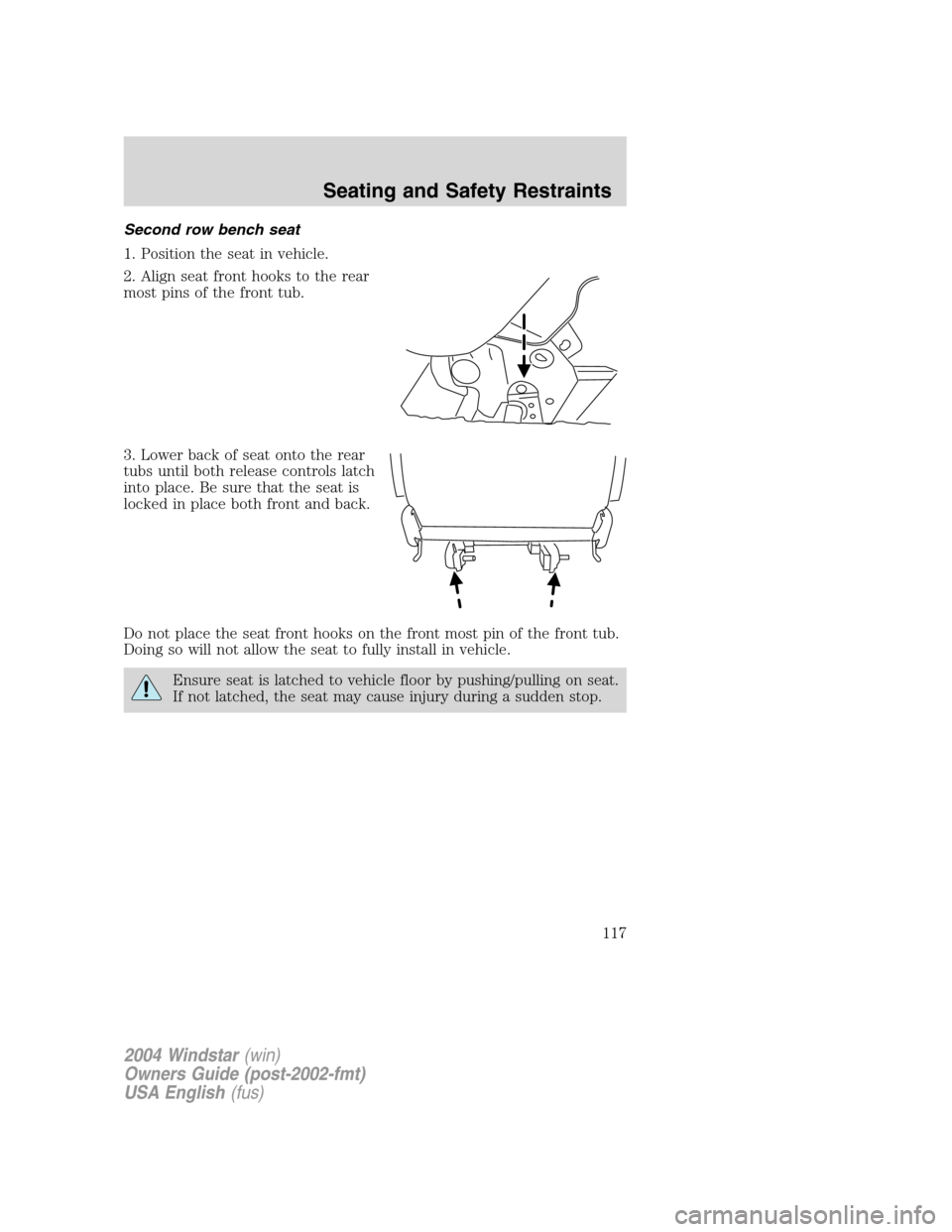
Second row bench seat
1. Position the seat in vehicle.
2. Align seat front hooks to the rear
most pins of the front tub.
3. Lower back of seat onto the rear
tubs until both release controls latch
into place. Be sure that the seat is
locked in place both front and back.
Do not place the seat front hooks on the front most pin of the front tub.
Doing so will not allow the seat to fully install in vehicle.
Ensure seat is latched to vehicle floor by pushing/pulling on seat.
If not latched, the seat may cause injury during a sudden stop.
2004 Windstar(win)
Owners Guide (post-2002-fmt)
USA English(fus)
Seating and Safety Restraints
117
Page 130 of 280

All restraints in the vehicle are combination lap and shoulder belts.
While you are fastened in the seat belt, the combination lap/shoulder belt
adjusts to your movement. However, if you brake hard, turn hard, or if
your vehicle receives an impact of 8 km/h (5 mph) or more, the safety
belt will become locked and help reduce your forward movement.
Energy Management Feature — Outboard
•This vehicle has a safety belt system with an energy management
feature at the front seats to help further reduce the risk of injury in
the event of a head-on collision.
•This safety belt system has a retractor assembly that is designed to
extend the seat belt webbing in a controlled manner. This helps
reduce the belt force acting on the user’s chest.
Failure to inspect and replace if necessary the Belt and
Retractor assembly after an accident could increase the risk of
injury in a collision.
Safety belt height adjustment
Your vehicle has safety belt height
adjustments at the front and second
row seating positions. Adjust the
height of the shoulder belt so the
belt rests across the middle of your
shoulder.
To adjust the shoulder belt height,
squeeze and hold the buttons on the
side and slide the height adjuster up
or down. Release the buttons and
pull down on the height adjuster to
make sure it is locked in place.
Position the safety belt height adjusters so that the belt rests
across the middle of your shoulder. Failure to adjust the safety
belt properly could reduce the effectiveness of the safety belt and
increase the risk of injury in a collision.
2004 Windstar(win)
Owners Guide (post-2002-fmt)
USA English(fus)
Seating and Safety Restraints
130
Page 155 of 280
3. While holding the shoulder and
lap belt portions together, route the
tongue through the child seat
according to the child seat
manufacturer’s instructions. Be sure
the belt webbing is not twisted.
4. Insert the belt tongue into the
proper buckle (the buckle closest to
the direction the tongue is coming
from) for that seating position until
you hear a snap and feel the latch
engage. Make sure the tongue is
latched securely by pulling on it.
5. To put the retractor in the
automatic locking mode, grasp the
shoulder portion of the belt and pull
downward until all of the belt is
pulled out and a click is heard.
6. Allow the belt to retract. The belt will click as it retracts to indicate it
is in the automatic locking mode.
2004 Windstar(win)
Owners Guide (post-2002-fmt)
USA English(fus)
Seating and Safety Restraints
155