2004 FORD FOCUS change time
[x] Cancel search: change timePage 28 of 232
Press again for a brief sampling of all MP3 directories on the disc. SCAN
ALL appears at the bottom of the display.
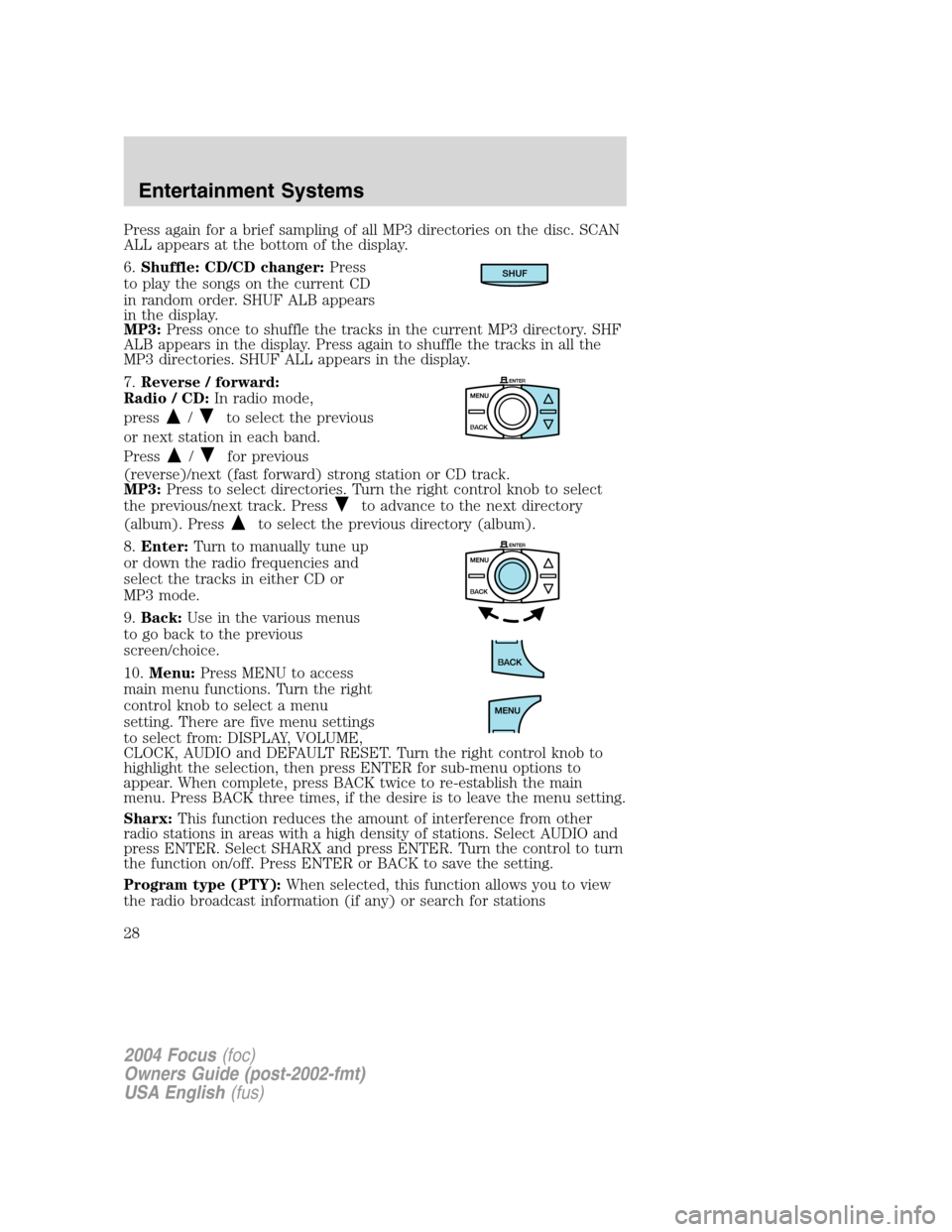
6.Shuffle: CD/CD changer: Press
to play the songs on the current CD
in random order. SHUF ALB appears
in the display.
MP3: Press once to shuffle the tracks in the current MP3 directory. SHF
ALB appears in the display. Press again to shuffle the tracks in all the
MP3 directories. SHUF ALL appears in the display.
7. Reverse / forward:
Radio / CD: In radio mode,
press
/to select the previous
or next station in each band.
Press
/for previous
(reverse)/next (fast forward) strong station or CD track.
MP3: Press to select directories. Turn the right control knob to select
the previous/next track. Press
to advance to the next directory
(album). Press
to select the previous directory (album).
8. Enter: Turn to manually tune up
or down the radio frequencies and
select the tracks in either CD or
MP3 mode.
9. Back: Use in the various menus
to go back to the previous
screen/choice.
10. Menu: Press MENU to access
main menu functions. Turn the right
control knob to select a menu
setting. There are five menu settings
to select from: DISPLAY, VOLUME,
CLOCK, AUDIO and DEFAULT RESET. Turn the right control knob to
highlight the selection, then press ENTER for sub-menu options to
appear. When complete, press BACK twice to re-establish the main
menu. Press BACK three times, if the desire is to leave the menu setting.
Sharx: This function reduces the amount of interference from other
radio stations in areas with a high density of stations. Select AUDIO and
press ENTER. Select SHARX and press ENTER. Turn the control to turn
the function on/off. Press ENTER or BACK to save the setting.
Program type (PTY): When selected, this function allows you to view
the radio broadcast information (if any) or search for stations
SHUF
2004 Focus (foc)
Owners Guide (post-2002-fmt)
USA English (fus)
Entertainment Systems
28
Page 29 of 232
broadcasting a particular program type. Select AUDIO and press ENTER.
Select PTY to view the broadcast information or PTY SEARCH to search
for stations broadcasting a particular program type. There are 30
different possible program types, some being: News, Inform, Sports, Talk,
Rock, Country, Jazz, etc. If no station is found broadcasting the selected
program type, NO PTY will appear in the display at the end of the
search.
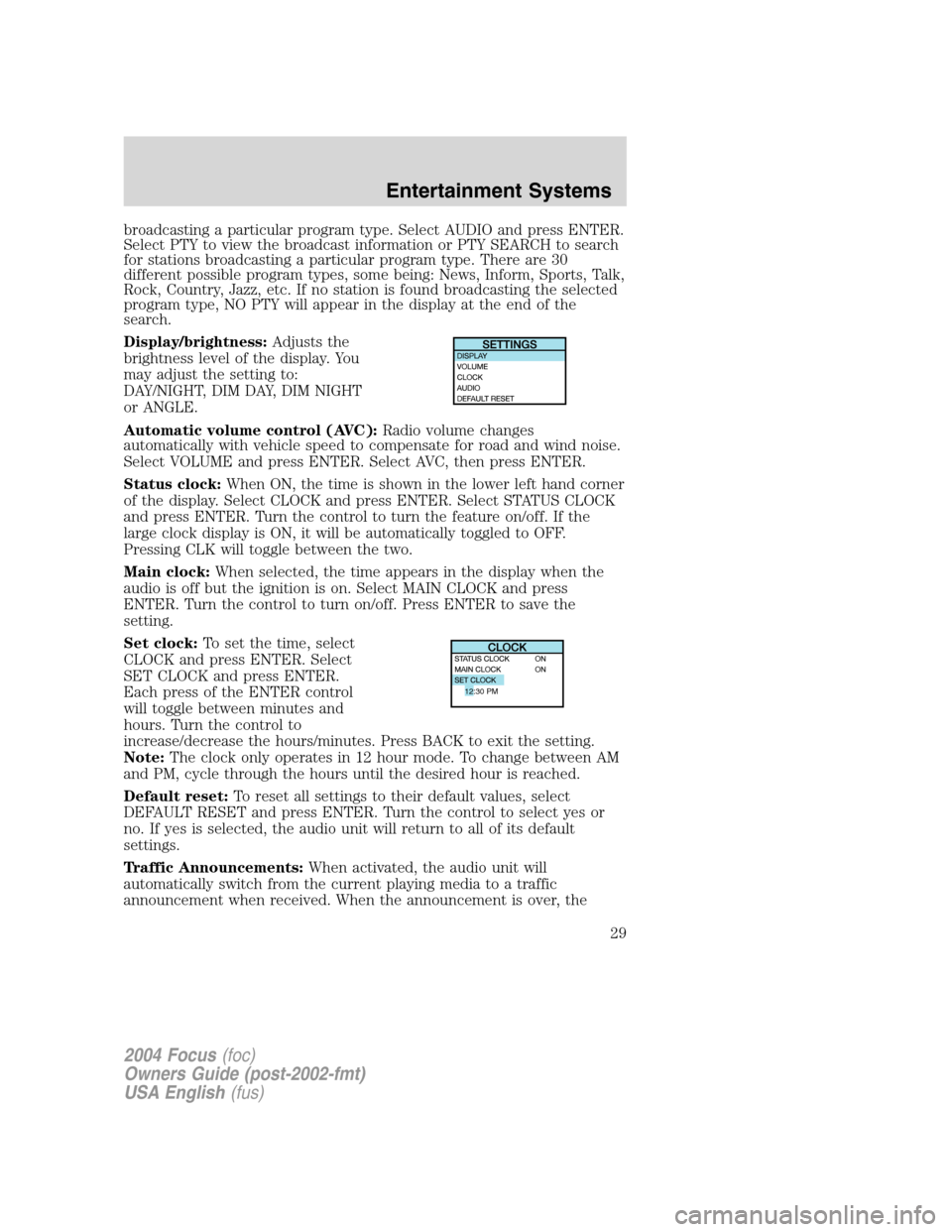
Display/brightness:Adjusts the
brightness level of the display. You
may adjust the setting to:
DAY/NIGHT, DIM DAY, DIM NIGHT
or ANGLE.
Automatic volume control (AVC): Radio volume changes
automatically with vehicle speed to compensate for road and wind noise.
Select VOLUME and press ENTER. Select AVC, then press ENTER.
Status clock: When ON, the time is shown in the lower left hand corner
of the display. Select CLOCK and press ENTER. Select STATUS CLOCK
and press ENTER. Turn the control to turn the feature on/off. If the
large clock display is ON, it will be automatically toggled to OFF.
Pressing CLK will toggle between the two.
Main clock: When selected, the time appears in the display when the
audio is off but the ignition is on. Select MAIN CLOCK and press
ENTER. Turn the control to turn on/off. Press ENTER to save the
setting.
Set clock: To set the time, select
CLOCK and press ENTER. Select
SET CLOCK and press ENTER.
Each press of the ENTER control
will toggle between minutes and
hours. Turn the control to
increase/decrease the hours/minutes. Press BACK to exit the setting.
Note: The clock only operates in 12 hour mode. To change between AM
and PM, cycle through the hours until the desired hour is reached.
Default reset: To reset all settings to their default values, select
DEFAULT RESET and press ENTER. Turn the control to select yes or
no. If yes is selected, the audio unit will return to all of its default
settings.
Traffic Announcements: When activated, the audio unit will
automatically switch from the current playing media to a traffic
announcement when received. When the announcement is over, the
12:30 PM
2004 Focus (foc)
Owners Guide (post-2002-fmt)
USA English (fus)
Entertainment Systems
29
Page 33 of 232
Don’t:
• Expose tapes to direct sunlight, extreme humidity, heat or cold.
• Leave tapes in the cassette player for a long time when not being
played.
CD/CD PLAYER CARE
Do:
• Handle discs by their edges only. Never touch the playing surface.
• Inspect discs before playing. Clean only with an approved CD cleaner
and wipe from the center out.
Don ’t:
• Expose discs to direct sunlight or heat sources for extended periods
of time.
• Insert more than one disc into each slot of the CD changer magazine.
• Clean using a circular motion.
CD units are designed to play commercially pressed 12 cm (4.75
in) audio compact discs only. Due to technical incompatibility,
certain recordable and re-recordable compact discs may not
function correctly when used in Ford CD players. Irregular
shaped CDs, CDs with a scratch protection film attached, and CDs
with homemade paper (adhesive) labels should not be inserted
into the CD player. The label may peel and cause the CD to
become jammed. It is recommended that homemade CDs be
identified with permanent felt tip marker rather than adhesive
labels. Ball point pens may damage CDs. Please contact your
dealer for further information.
AUDIO SYSTEM WARRANTY AND SERVICE
Refer to the Warranty Guide for audio system warranty information. If
service is necessary, see your dealer or qualified technician.
2004 Focus (foc)
Owners Guide (post-2002-fmt)
USA English (fus)
Entertainment Systems
33
Page 88 of 232
5. Buckle then unbuckle the safety belt three times, ending with the
safety belt unbuckled.
•After step 5 the safety belt warning light will be turned on for three
seconds.
6. Within seven seconds of the safety belt warning light turning off,
buckle then unbuckle the safety belt.
•This will disable BeltMinder if it is currently enabled, or enable
BeltMinder if it is currently disabled.
7. Confirmation of disabling BeltMinder is provided by the safety belt
warning light flashing four times per second for three seconds.
8. Confirmation of enabling BeltMinder is provided by:
•The safety belt warning light flashing four times per second for three
seconds.
•Followed by three seconds with the safety belt warning light off.
•Once again, the safety belt warning light will flash four times per
second for three seconds.
9. After receiving confirmation, the deactivation/activation procedure is
complete.
Safety belt extension assembly
If the safety belt is too short when fully extended, there is a 20 cm (8
inch) safety belt extension assembly that can be added (part number
611C22). This assembly can be obtained from your dealer at no cost.
Use only extensions manufactured by the same supplier as the safety
belt. Manufacturer identification is located at the end of the webbing on
the label. Also, use the safety belt extension only if the safety belt is too
short for you when fully extended.
Do not use extensions to change the fit of the shoulder belt
across the torso.
Safety belt maintenance
Inspect the safety belt systems periodically to make sure they work
properly and are not damaged. Inspect the safety belts to make sure
there are no nicks, tears or cuts. Replace if necessary. All safety belt
assemblies, including retractors, buckles, front seat belt buckle
assemblies, buckle support assemblies (slide bar-if equipped), shoulder
belt height adjusters (if equipped), shoulder belt guide on seatback (if
2004 Focus(foc)
Owners Guide (post-2002-fmt)
USA English(fus)
Seating and Safety Restraints
88
Page 150 of 232
In the United States, a warranty dispute must be submitted to the
Dispute Settlement Board before taking action under the Magnuson-Moss
Warranty Act, or to the extent allowed by state law, before pursuing
replacement or repurchase remedies provided by certain state laws. This
dispute handling procedure is not required prior to enforcing state
created rights or other rights which are independent of the
Magnuson-Moss Warranty Act or state replacement or repurchase laws.
FORD EXTENDED SERVICE PLAN
You can get more protection for your new car or light truck by
purchasing Ford Extended Service Plan (Ford ESP) coverage. Ford ESP
is an optional service contract which is backed by Ford Motor Company
or Ford Motor Service Company (in the U.S.) and Ford of Canada (in
Canada). It provides the following:
•Benefits during the warranty period depending on the plan you
purchase (such as: reimbursement for rentals; coverage for certain
maintenance and wear items).
•Protection against covered repair costs after your Bumper-to-Bumper
Warranty expires.
You may purchase Ford ESP from any participating Ford and Lincoln
Mercury and Ford of Canada dealer. There are several plans available in
various time, distance and deductible combinations which can be tailored
to fit your own driving needs. Ford ESP also offers reimbursement
benefits for towing and rental coverage.
When you buy Ford ESP, you receive Peace-of-Mind protection
throughout the United States and Canada, provided by a network of
more than 5,000 participating Ford or Lincoln Mercury and Ford of
Canada dealers.
If you did not take advantage of the Ford Extended Service Plan at the
time of purchasing your vehicle, you may still be eligible. Since this
information is subject to change, please ask your dealer for complete
details about Ford Extended Service Plan coverage options, or visit the
Ford ESP website at www.ford-esp.com.
THE DISPUTE SETTLEMENT BOARD (U.S. ONLY)
The Dispute Settlement Board is:
•an independent, third-party arbitration program for warranty disputes.
•available free to owners and lessees of qualifying Ford Motor Company
vehicles.
2004 Focus(foc)
Owners Guide (post-2002-fmt)
USA English(fus)
Customer Assistance
150
Page 186 of 232
2. Each time you fill the tank, record the amount of fuel added (in liters
or gallons).
3. After at least three to five tank fill-ups, fill the fuel tank and record
the current odometer reading.
4. Subtract your initial odometer reading from the current odometer
reading.
5. Follow one of the simple calculations in order to determine fuel
economy:
Calculation 1:Multiply liters used by 100, then divide by total
kilometers traveled.
Calculation 2:Divide total miles traveled by total gallons used.
Keep a record for at least one month and record the type of driving (city
or highway). This will provide an accurate estimate of the vehicle’s fuel
economy under current driving conditions. Additionally, keeping records
during summer and winter will show how temperature impacts fuel
economy. In general, lower temperatures give lower fuel economy.
Driving style—good driving and fuel economy habits
Give consideration to the lists that follow and you may be able to change
a number of variables and improve your fuel economy.
Habits
•Smooth, moderate operation can yield up to 10% savings in fuel.
•Steady speeds without stopping will usually give the best fuel
economy.
•Idling for long periods of time (greater than one minute) may waste
fuel.
•Anticipate stopping; slowing down may eliminate the need to stop.
•Sudden or hard accelerations may reduce fuel economy.
•Slow down gradually.
•Driving at reasonable speeds (traveling at 88 km/h [55 mph] uses 15%
less fuel than traveling at 105 km/h [65 mph]).
•Revving the engine before turning it off may reduce fuel economy.
•Using the air conditioner or defroster may reduce fuel economy.
•You may want to turn off the speed control in hilly terrain if
unnecessary shifting between third and fourth gear occurs.
Unnecessary shifting of this type could result in reduced fuel
economy.
2004 Focus(foc)
Owners Guide (post-2002-fmt)
USA English(fus)
Maintenance and Specifications
186
Page 197 of 232

Information on“P”type tires
P215/65R15 95H is an example of a
tire size, load index and speed
rating. The definitions of these
items are listed below. (Note that
the tire size, load index and speed
rating for your vehicle may be
different than this example.)
1.P:Indicates a tire, designated by
the Tire and Rim Association
(T&RA), that may be used for
service on cars, SUVs, minivans and
light trucks.
Note:If your tire size does not
begin with a letter this may mean it
is designated by either ETRTO
(European Tire and Rim Technical Organization) or JATMA (Japan Tire
Manufacturing Association).
2.215:Indicates the nominal width of the tire in millimeters from
sidewall edge to sidewall edge. In general, the larger the number, the
wider the tire.
3.65:Indicates the aspect ratio which gives the tire’s ratio of height to
width.
4.R:Indicates a“radial”type tire.
5.15:Indicates the wheel or rim diameter in inches. If you change your
wheel size, you will have to purchase new tires to match the new wheel
diameter.
6.95:Indicates the tire’s load index. It is an index that relates to how
much weight a tire can carry. You may find this information in your
owner’s guide. If not, contact a local tire dealer.
Note:You may not find this information on all tires because it is not
required by federal law.
7.H:Indicates the tire’s speed rating. The speed rating denotes the
speed at which a tire is designed to be driven for extended periods of
time under a standard condition of load and inflation pressure. The tires
on your vehicle may operate at different conditions for load and inflation
pressure. These speed ratings may need to be adjusted for the difference
in conditions. The ratings range from 159 km/h (99 mph) to 299 km/h
(186 mph). These ratings are listed in the following chart.
2004 Focus(foc)
Owners Guide (post-2002-fmt)
USA English(fus)
Maintenance and Specifications
197
Page 224 of 232

choosing the right fuel ...........183
comparisons with EPA fuel
economy estimates .................187
detergent in fuel .....................184
filling your vehicle with fuel .180,182, 185
filter, specifications ........184, 207
fuel pump shut-off switch .....127
improving fuel economy ........185
octane rating ...................183, 212
quality ......................................184
running out of fuel .................184
safety information relating to
automotive fuels .....................180
Fuel pump shut-off switch .......127
Fuses ..................................128 –129
G
Gas cap (see Fuel cap) ............182
Gas mileage
(see Fuel economy) .................185
Gauges .........................................14
H
Hazard flashers .........................127
Headlamps ...................................38 aiming ........................................39
bulb specifications ....................42
daytime running lights .............38
flash to pass ..............................39
high beam .................................39
turning on and off ....................38
Heating heater only system ...................34
Hood ..........................................165
I
Ignition ...............................107, 212 Infant seats (see Safety seats) ..99
Inspection/maintenance (I/M)
testing ........................................189
Instrument panel
cleaning ...................................161
cluster ........................................10
lighting up panel and interior .39
J
Jump-starting your vehicle ......139
K
Keyless entry system autolock .....................................61
Keys positions of the ignition .........107
L
Lamps bulb replacement
specifications chart ..................42
daytime running light ...............38
fog lamps ...................................38
headlamps .................................38
headlamps, flash to pass ..........39
instrument panel, dimming .....39
interior lamps ...........................42
Lane change indicator
(see Turn signal) ........................41
Lights, warning and indicator ....10 anti-lock brakes (ABS) ..........112
Load limits .................................119
Locks autolock .....................................61
childproof ..................................62
Lubricant specifications ...210, 212
2004 Focus (foc)
Owners Guide (post-2002-fmt)
USA English (fus)
Index
224