Page 18 of 280
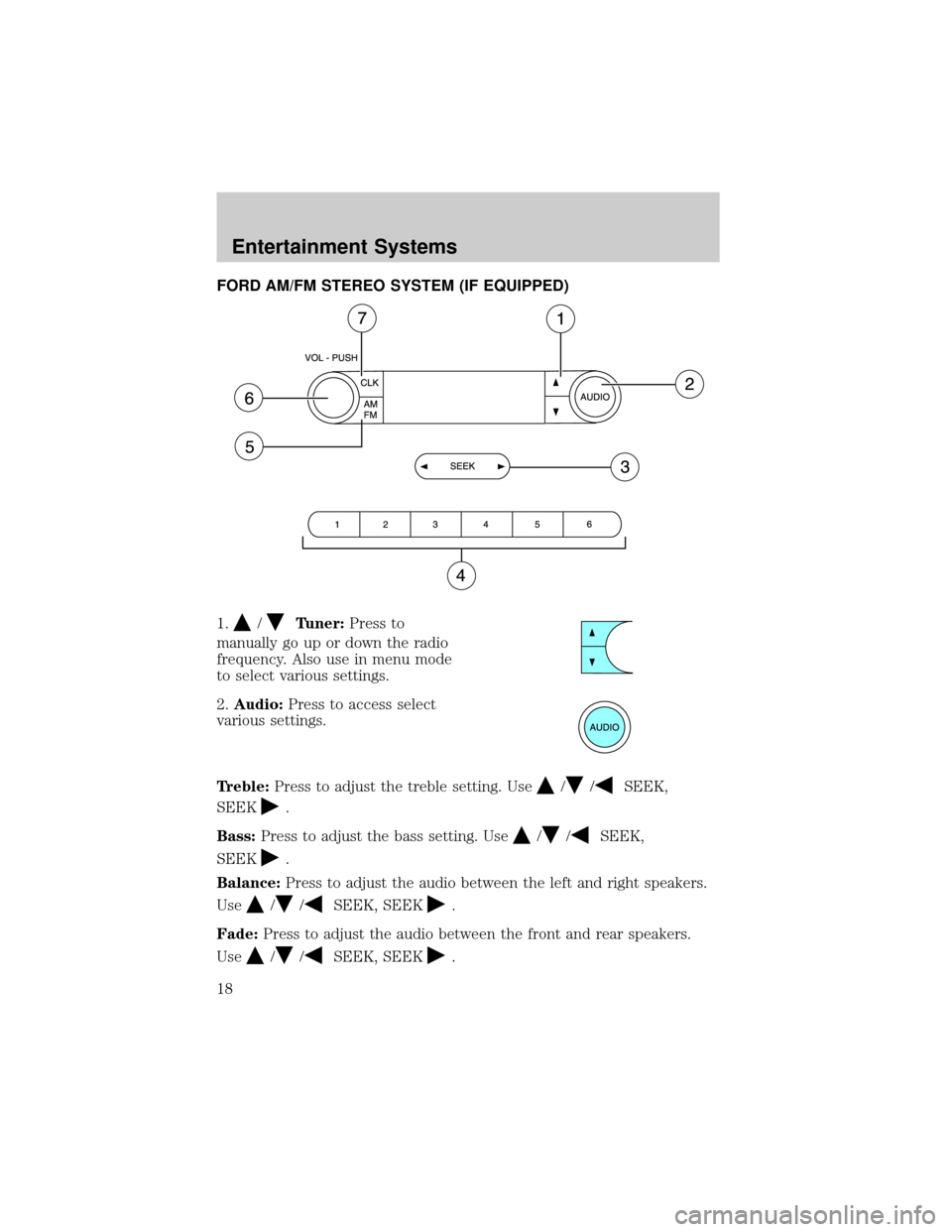
FORD AM/FM STEREO SYSTEM (IF EQUIPPED)
1.
/Tuner:Press to
manually go up or down the radio
frequency. Also use in menu mode
to select various settings.
2.Audio:Press to access select
various settings.
Treble:Press to adjust the treble setting. Use
//SEEK,
SEEK
.
Bass:Press to adjust the bass setting. Use
//SEEK,
SEEK
.
Balance:Press to adjust the audio between the left and right speakers.
Use
//SEEK, SEEK.
Fade:Press to adjust the audio between the front and rear speakers.
Use
//SEEK, SEEK.
Entertainment Systems
Entertainment Systems
18
Page 20 of 280
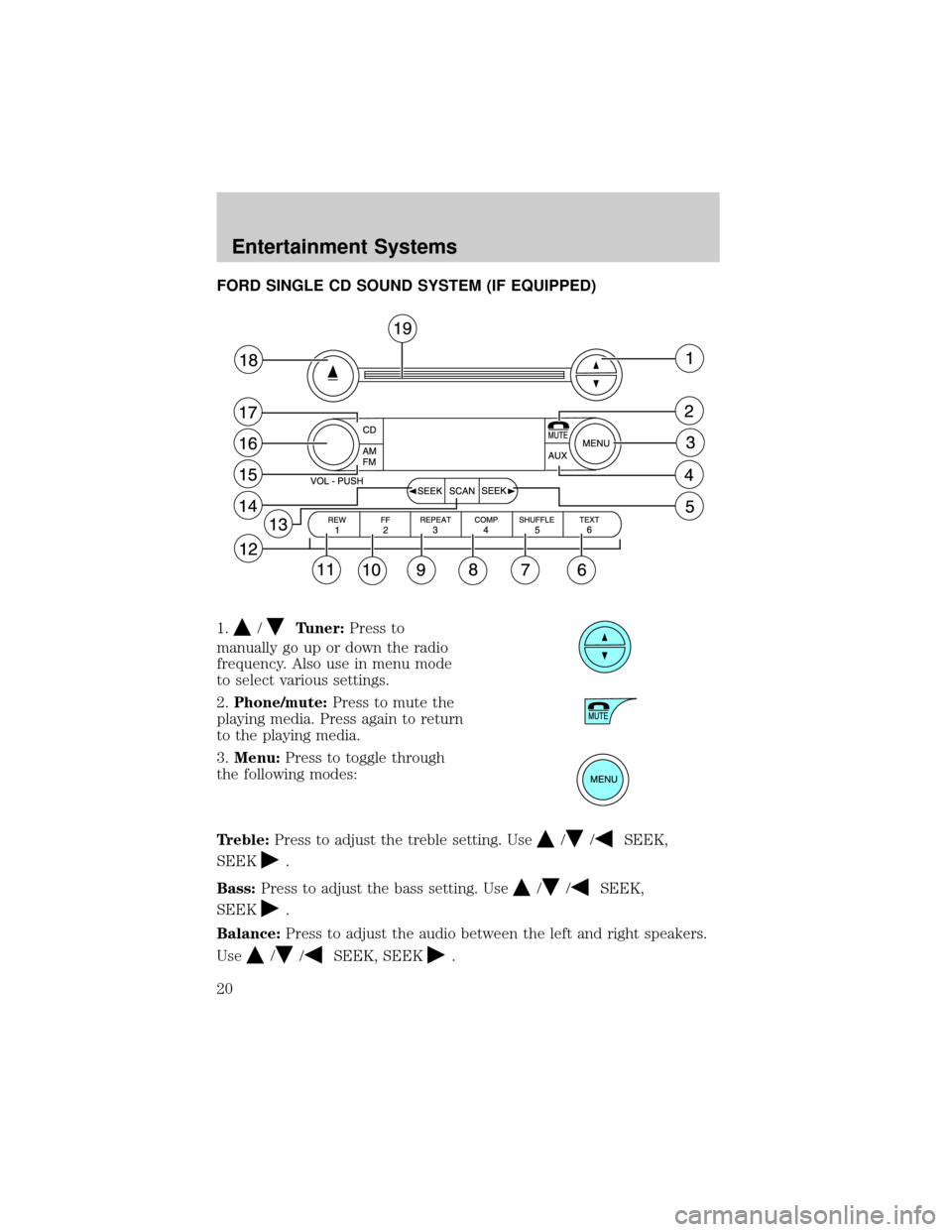
FORD SINGLE CD SOUND SYSTEM (IF EQUIPPED)
1.
/Tuner:Press to
manually go up or down the radio
frequency. Also use in menu mode
to select various settings.
2.Phone/mute:Press to mute the
playing media. Press again to return
to the playing media.
3.Menu:Press to toggle through
the following modes:
Treble:Press to adjust the treble setting. Use
//SEEK,
SEEK
.
Bass:Press to adjust the bass setting. Use
//SEEK,
SEEK
.
Balance:Press to adjust the audio between the left and right speakers.
Use
//SEEK, SEEK.
Entertainment Systems
20
Page 21 of 280
Fade:Press to adjust the audio between the front and rear speakers.
Use
//SEEK, SEEK.
Speed sensitive volume:Radio volume automatically changes slightly
with vehicle speed to compensate for road and wind noise. Press MENU
to access and use
//SEEK, SEEKto adjust.
Compression:Brings soft and loud CD passages together for a more
consistent listening level.
Autoset:Allows you to set the strongest local radio stations without
losing your original manually set preset stations for AM/FM1/FM2 . Press
MENU to access. Use
//SEEK, SEEKto set.
When the six strongest stations are filled, the station stored in preset 1
will begin playing. If there are less than six strong stations, the system
will store the last one in the remaining presets.
Setting the clock:Press MENU until SELECT HOUR or SELECT
MINUTE is displayed. Use SEL to manually increase (
) or decrease
(
) the hours/minutes. Press MENU again to disengage clock mode.
4.Aux:Press to toggle between
FES/DVD and AUX modes. If no
auxiliary sources are available, NO
AUX AUDIO will be displayed.
5.Seek:Press to access the next
strong station or track.
6.Text:This control currently not
supported.
7.Shuffle:Press to play tracks in
random order.
8.Comp (Compression):In CD
mode, brings soft and loud CD
passages together for a more
consistent listening level.
9.Repeat:Press to repeat the
current CD track.
Entertainment Systems
21
Page 24 of 280
Balance:Press to adjust the audio between the left and right speakers.
Use
//SEEK, SEEK.
Fade:Press to adjust the audio between the front and rear speakers.
Use
//SEEK, SEEK.
Speed sensitive volume:Radio volume automatically changes slightly
with vehicle speed to compensate for road and wind noise. Press MENU
to access and use
//SEEK, SEEKto adjust.
Compression:Brings soft and loud CD passages together for a more
consistent listening level.
Autoset:Allows you to set the strongest local radio stations without
losing your original manually set preset stations for AM/FM1/FM2 . Press
MENU to access. Use
//SEEK, SEEKto set.
When the six strongest stations are filled, the station stored in preset 1
will begin playing. If there are less than six strong stations, the system
will store the last one in the remaining presets.
Setting the clock:Press MENU until SELECT HOUR or SELECT
MINUTE is displayed. Press
//SEEK, SEEKto adjust the
hours/minutes.
5.Aux:Press to toggle between
FES/DVD and AUX modes. If no
auxiliary sources are available, NO
AUX AUDIO will be displayed.
6.Tape eject:Press to eject a tape.
7.Text:This control currently not
supported.
8.Shuffle:Press to play CD tracks
in random order.
9.Comp (Compression):In CD
mode, brings soft and loud CD
passages together for a more
consistent listening level.
Entertainment Systems
24
Page 26 of 280
21.Seek:Press to access the
previous strong station or track.
22.Scan:Press for a brief sampling
of radio stations or CD tracks. Press
again to stop.
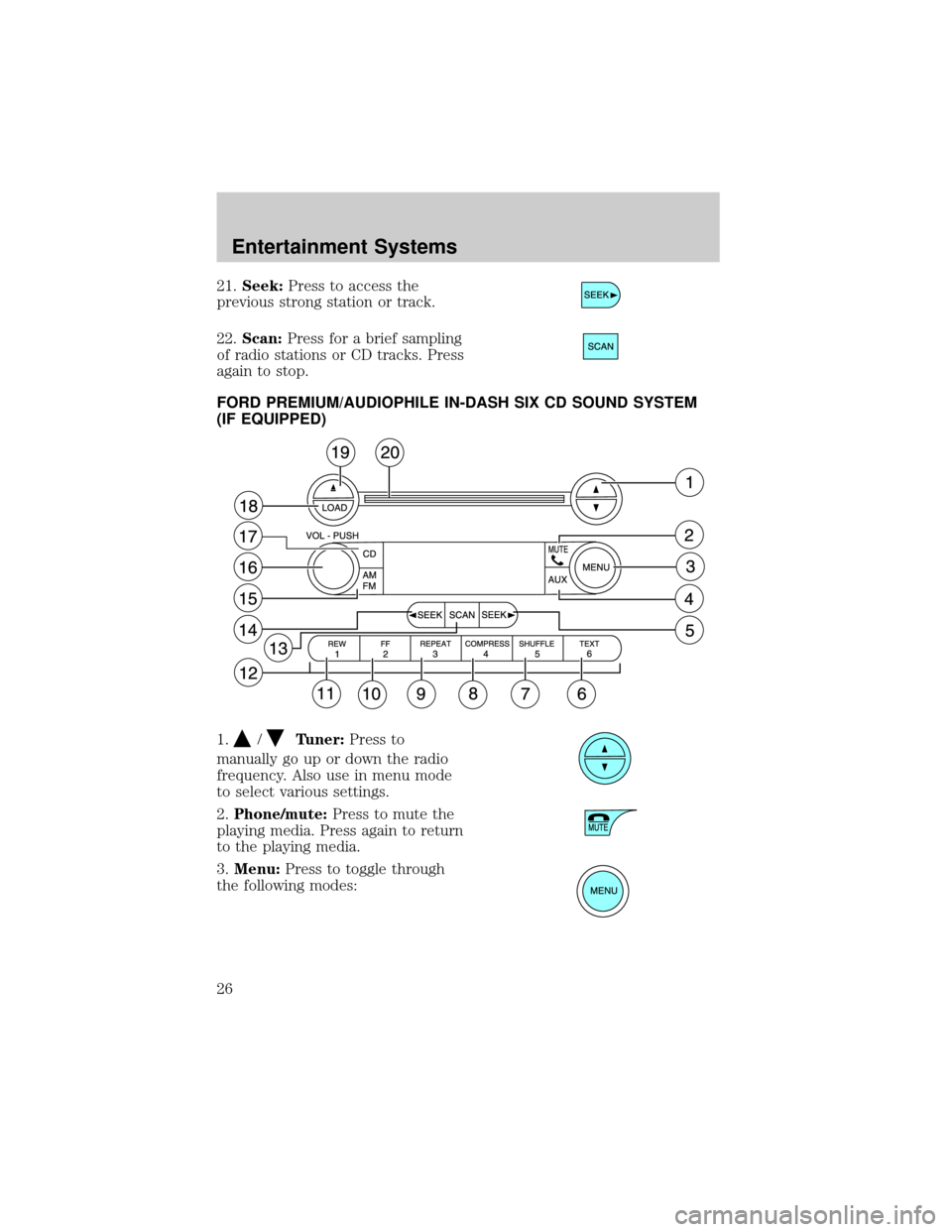
FORD PREMIUM/AUDIOPHILE IN-DASH SIX CD SOUND SYSTEM
(IF EQUIPPED)
1.
/Tuner:Press to
manually go up or down the radio
frequency. Also use in menu mode
to select various settings.
2.Phone/mute:Press to mute the
playing media. Press again to return
to the playing media.
3.Menu:Press to toggle through
the following modes:
Entertainment Systems
26
Page 27 of 280
Treble:Press to adjust the treble setting. Use//SEEK,
SEEK
.
Bass:Press to adjust the bass setting. Use
//SEEK,
SEEK
.
Balance:Press to adjust the audio between the left and right speakers.
Use
//SEEK, SEEK.
Fade:Press to adjust the audio between the front and rear speakers.
Use
//SEEK, SEEK.
RDS(Available on Audiophile radios only): Allows you to search
RDS-equipped stations for a certain category of music format: Classic,
Country, Info, Jazz, Oldies, R&B, Religious, Rock, Soft, Top 40.
Speed sensitive volume:Radio volume automatically changes slightly
with vehicle speed to compensate for road and wind noise. Press MENU
to access and use
//SEEK, SEEKto adjust.
Traffic(Available on Audiophile radios only): Allows you to hear traffic
broadcasts. With the feature ON, press SEEK or SCAN to find a station
broadcasting a traffic report (if it is broadcasting RDS data).Traffic
information is not available in most U.S. markets.
Compression:Brings soft and loud CD passages together for a more
consistent listening level.
Ambiance(Available on Audiophile radios only): This feature gives the
feeling of ªbeing thereº to your music, creating increased clarity as well
as an open and spacious feel to the music. Press MENU to access then
use
//SEEK, SEEKto adjust. Turn the volume control to
increase/decrease the level of ambiance.
Occupancy mode:(Available on Audiophile radios only): Press MENU to
access. Use
//SEEK, SEEKselect and optimize sound for
ALL SEATS, DRIVER SEAT or REAR SEATS.
Autoset:Allows you to set the strongest local radio stations without
losing your original manually set preset stations for AM/FM1/FM2 . Press
MENU to access. Use
//SEEK, SEEKto set.
When the six strongest stations are filled, the station stored in preset 1
will begin playing. If there are less than six strong stations, the system
will store the last one in the remaining presets.
Entertainment Systems
27
Page 28 of 280
Setting the clock:Press MENU until SELECT HOUR or SELECT
MINUTE is displayed. Press
//SEEK, SEEKto adjust the
hours/minutes.
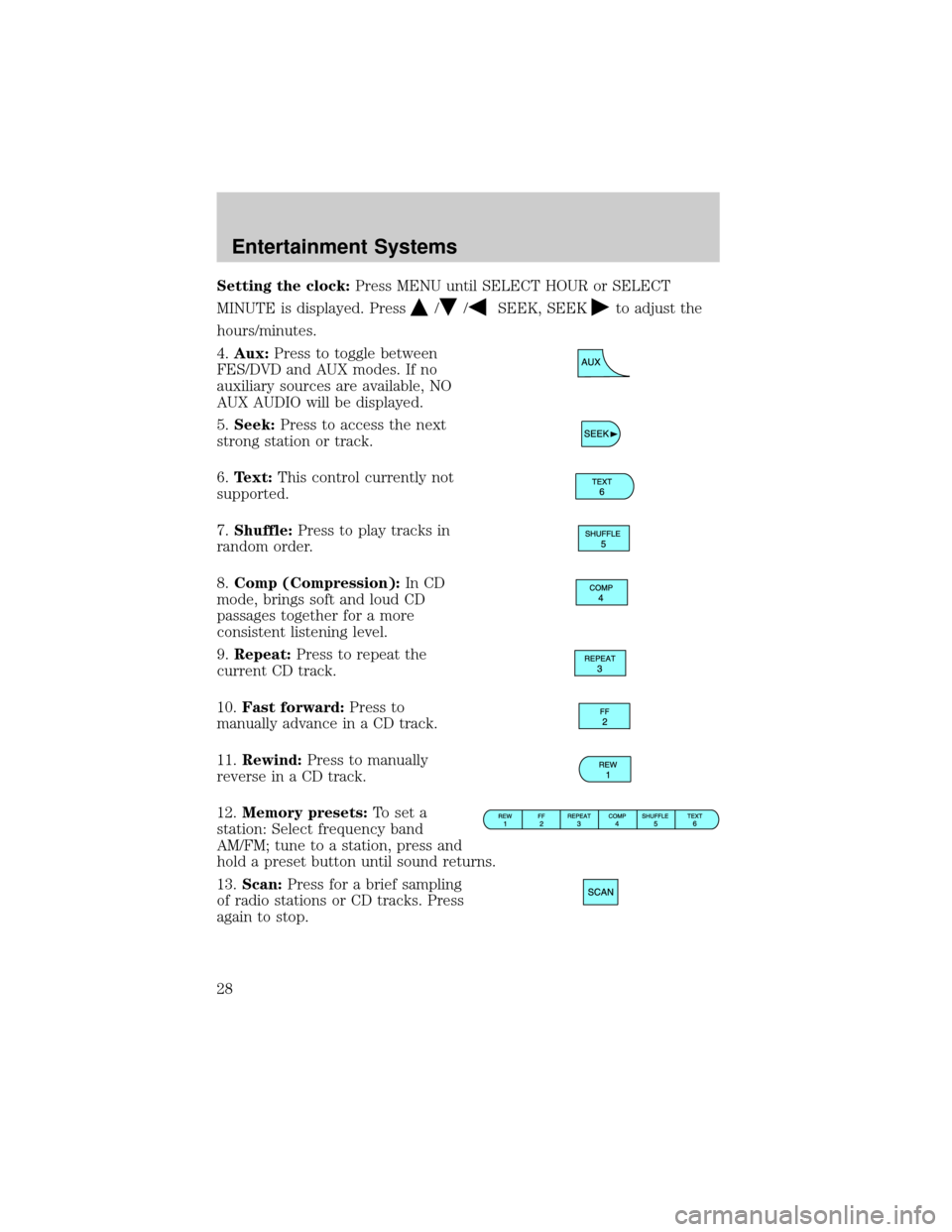
4.Aux:Press to toggle between
FES/DVD and AUX modes. If no
auxiliary sources are available, NO
AUX AUDIO will be displayed.
5.Seek:Press to access the next
strong station or track.
6.Text:This control currently not
supported.
7.Shuffle:Press to play tracks in
random order.
8.Comp (Compression):In CD
mode, brings soft and loud CD
passages together for a more
consistent listening level.
9.Repeat:Press to repeat the
current CD track.
10.Fast forward:Press to
manually advance in a CD track.
11.Rewind:Press to manually
reverse in a CD track.
12.Memory presets:To set a
station: Select frequency band
AM/FM; tune to a station, press and
hold a preset button until sound returns.
13.Scan:Press for a brief sampling
of radio stations or CD tracks. Press
again to stop.
Entertainment Systems
28
Page 31 of 280
CD units are designed to play commercially pressed 12 cm
(4.75 in) audio compact discs only. Due to technical
incompatibility, certain recordable and re-recordable compact
discs may not function correctly when used in Ford CD players.
Irregular shaped CDs, CDs with a scratch protection film
attached, and CDs with homemade paper (adhesive) labels should
not be inserted into the CD player. The label may peel and cause
the CD to become jammed. It is recommended that homemade
CDs be identified with permanent felt tip marker rather than
adhesive labels. Ball point pens may damage CDs. Please contact
your dealer for further information.
AUDIO SYSTEM WARRANTY AND SERVICE
Refer to theWarranty Guidefor audio system warranty information. If
service is necessary, see your dealer or qualified technician.
Entertainment Systems
31