2004 FORD F150 ECU
[x] Cancel search: ECUPage 92 of 280

4. Press and hold the 7²8. While holding the 7²8 press the 3²4.
5. Release the 3²4.
6. Release the 7²8.
The user should receive ahorn chirpto indicate the system has been
disabled or a chirp followed by a honk to indicate the system has been
enabled.
KEYLESS ENTRY SYSTEM (IF EQUIPPED)
You can use the keyless entry
keypad to:
²lock all vehicle doors.
²unlock only the driver's door.
²unlock all vehicle doors.
²program/erase the customer keycode.
²enable/disable the autolocking feature.
The keypad can be operated with the factory set 5±digit entry code; this
code is located on the owner's wallet card in the glove box, is marked on
the computer module, and is available from your authorized dealer. You
can also create your own 5±digit personal entry code.
When pressing the controls on the keypad, press the middle of the
controls to ensure a good activation.
Programming a personal entry code
To create your own personal entry code:
1. Enter the factory set code (keypad will illuminate when pressed).
2. Within five seconds press the 1²2 on the keypad.
3. Enter your personal 5-digit code. Each number must be entered
within five seconds of each other.
4. After the code is entered, the locks will cycle, confirming that the new
code has been set.
Tips:
²Do not set a code that uses five of the same number.
²Do not use five numbers in sequential order.
²The factory set code will work even if you have set your own personal
code.
²If you set a second personal code it will erase your first personal code.
Locks and Security
92
Page 93 of 280

Erasing personal code
1. Enter the factory set 5±digit code.
2. Press and hold the 1²2 for two seconds. This must be done within
five seconds of completing step 1.
Your personal code is now erased and only the factory set 5±digit code
will work.
Antiscan feature
The keyless entry keypad is equipped with an anti-theft function called
ªantiscan.º The antiscan feature provides a one-minute lockout feature,
where the user is unable to enter the vehicle using the keypad; this
lockout occurs when a valid entry code has not been entered by the user
within 7 attempts (35 consecutive button presses). During the lockout,
the keypad will flash and pressing the controls on the keypad will be
ignored, except for pressing the 7±8 and 9±0 controls simultaneously,
which will still lock the vehicle.
The antiscan feature will be turned off after:
²one minute, when the antiscan feature times out.
²one minute of keypad inactivity.
²the
control is pressed on the remote entry transmitter.
²the ignition is turned from the OFF position to the ON position, or
from the ON position to the OFF position.
Unlocking and locking the doors using keyless entry
To unlock the driver's door,enter the factory set 5-digit code or your
personal code. Each number must be pressed within five seconds of each
other. The interior lamps will illuminate after pressing the first control on
the keypad.
To unlock all doors,press the 3²4 control within five seconds.
To lock all doors,press the 7²8 and the 9²0 at the same time. You
do notneed to enter the keypad code first.Note:The interior lamps
will turn off.
SECURILOCKYPASSIVE ANTI-THEFT SYSTEM
SecuriLockypassive anti-theft system is an engine immobilization
system. This system is designed to prevent the engine from being started
unless acoded key programmed to your vehicleis used. The use of
the wrong type of coded key may lead to a ªno-startº condition.
Locks and Security
93
Page 94 of 280

Your vehicle comes with two coded keys; additional coded keys may be
purchased from your dealer. The dealer can program your spare keys to
your vehicle or you can program the keys yourself. Refer to
Programming spare keysfor instructions on how to program the coded
key.
Note:The SecuriLockypassive anti-theft system is not compatible with
non-Ford aftermarket remote start systems. Use of these systems may
result in vehicle starting problems and a loss of security protection.
Note:Large metallic objects, electronic devices that are used to
purchase gasoline or similar items, or a second coded key on the same
key chain may cause vehicle starting issues. You need to prevent these
objects from touching the coded key while starting the engine. These
objects will not cause damage to the coded key, but may cause a
momentary issue if they are too close to the key when starting the
engine. If a problem occurs, turn the ignition off, remove all objects on
the key chain away from the coded key and restart the engine.
Theft indicator
The theft indicator is located on top of the instrument panel.
²When the ignition is in the OFF position, the indicator will flash once
every 2 seconds to indicate the SecuriLockysystem is functioning as
a theft deterrent.
²When the ignition is in the ON position, the indicator will glow for 3
seconds to indicate normal system functionality.
If a problem occurs with the SecuriLockysystem, the indicator will flash
rapidly or glow steadily when the ignition is in the ON position. If this
occurs, the vehicle should be taken to an authorized dealer for service.
Automatic arming
The vehicle is armed immediately
after switching the ignition to the 1
(OFF) position.
Automatic disarming
Switching the ignition to the 3 (ON) position with acoded keydisarms
the vehicle.
4
3
2
1
Locks and Security
94
Page 95 of 280

Replacement keys
If your keys are lost or stolen and you don't have an extra coded key,
you will need to have your vehicle towed to a dealership. The key codes
need to be erased from your vehicle and new coded keys will need to be
programmed.
Replacing coded keys can be very costly. Store an extra programmed key
away from the vehicle in a safe place to help prevent any
inconveniences. Please visit an authorized dealer to purchase additional
spare or replacement keys.
Programming spare keys
A maximum of eight keys can be coded to your vehicle. Only
SecuriLockykeys can be used. To program acoded keyyourself, you
will need two previously programmedcoded keys(keys that already
operate your vehicle's engine) and the new unprogrammed key(s) readily
accessible for timely implementation of each step in the procedure.
If two previously programmed coded keys are not available, you must
bring your vehicle to your dealership to have the spare coded key(s)
programmed.
Please read and understand the entire procedure before you begin.
1. Insert the first previously
programmedcoded keyinto the
ignition and turn the ignition from 1
(OFF) to 3 (ON) (maintain ignition
in 3 (ON) for at least one second,
but no more than ten seconds).
2. Turn ignition from 3 (ON) back to
1 (OFF) in order to remove the first
coded keyfrom the ignition.
3. Within ten seconds of removing
the firstcoded key,insert the second previously programmedcoded
keyinto the ignition and turn the ignition from 1 (OFF) to 3 (ON)
(maintain ignition in 3 (ON) for at least one second but no more than
ten seconds).
4. Turn the ignition from 3 (ON) back to 1 (OFF) in order to remove the
secondcoded keyfrom the ignition.
5. Within 10 seconds of removing the secondcoded key,insert the new
unprogrammed key (new key/valet key) into the ignition and turn the
4
3
2
1
Locks and Security
95
Page 96 of 280

ignition from 1 (OFF) to 3 (ON) (maintain ignition in 3 (ON) for at least
one second, but no more than ten seconds). This step will program your
new key to a coded key.
6. To program additional new unprogrammed key(s), repeat this
procedure from step 1.
If successful, the new coded key(s) will start the vehicle's engine and the
theft indicator will illuminate for three seconds and then go out.
If not successful, the new coded key(s) will not start the vehicle's engine
and the theft indicator will flash on and off and you may repeat steps 1
through 5. If failure repeats, bring your vehicle to your dealership to
have the new spare key(s) programmed.
Locks and Security
96
Page 104 of 280
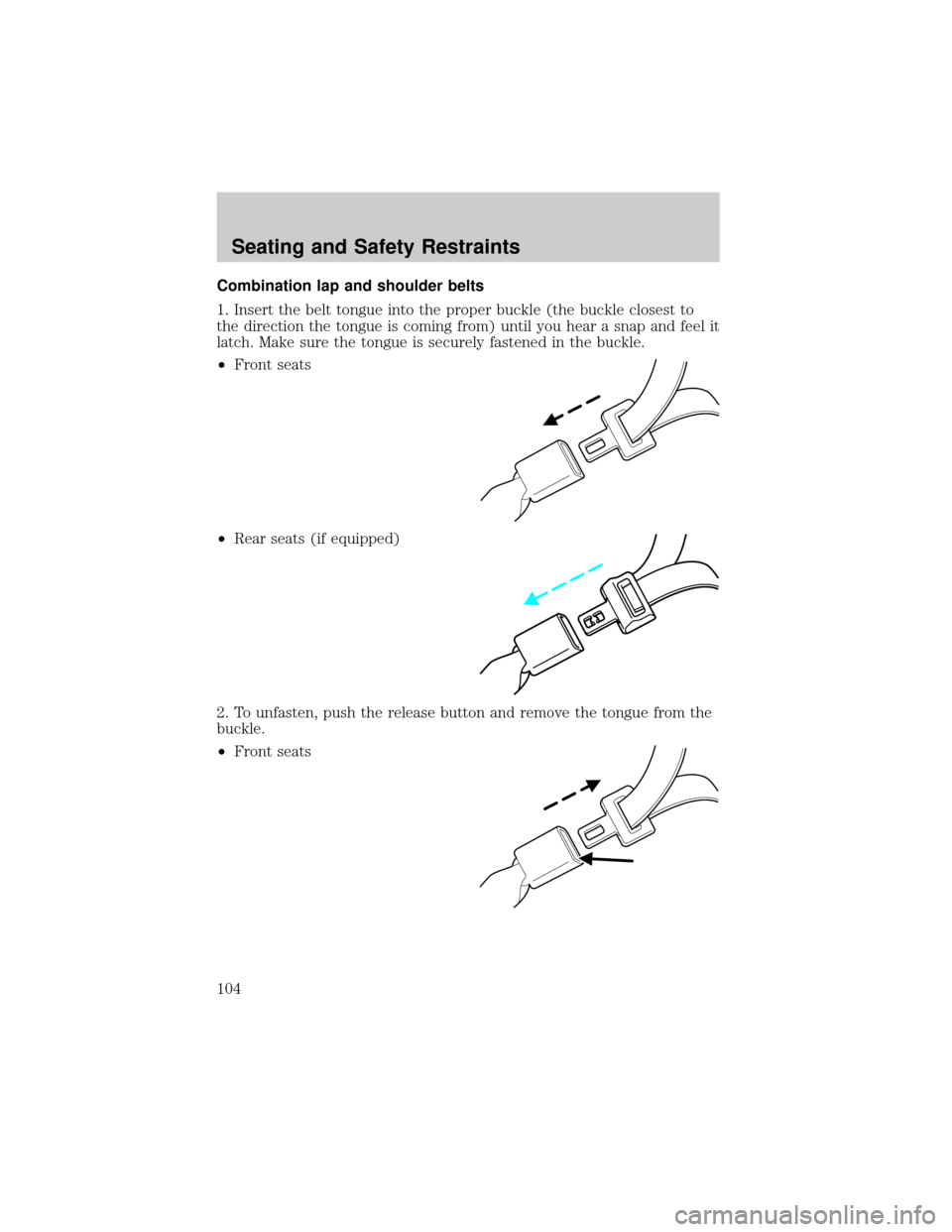
Combination lap and shoulder belts
1. Insert the belt tongue into the proper buckle (the buckle closest to
the direction the tongue is coming from) until you hear a snap and feel it
latch. Make sure the tongue is securely fastened in the buckle.
²Front seats
²Rear seats (if equipped)
2. To unfasten, push the release button and remove the tongue from the
buckle.
²Front seats
Seating and Safety Restraints
104
Page 108 of 280
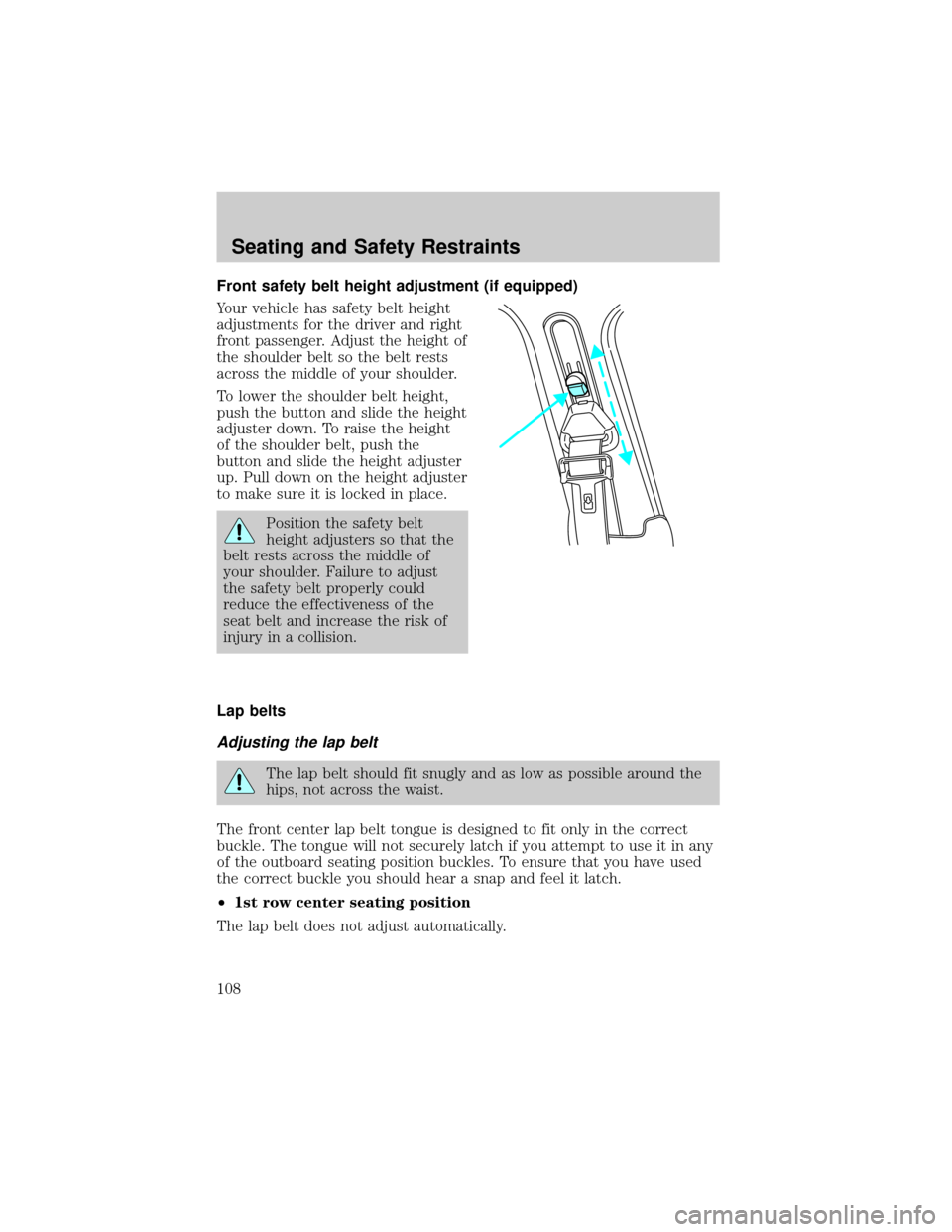
Front safety belt height adjustment (if equipped)
Your vehicle has safety belt height
adjustments for the driver and right
front passenger. Adjust the height of
the shoulder belt so the belt rests
across the middle of your shoulder.
To lower the shoulder belt height,
push the button and slide the height
adjuster down. To raise the height
of the shoulder belt, push the
button and slide the height adjuster
up. Pull down on the height adjuster
to make sure it is locked in place.
Position the safety belt
height adjusters so that the
belt rests across the middle of
your shoulder. Failure to adjust
the safety belt properly could
reduce the effectiveness of the
seat belt and increase the risk of
injury in a collision.
Lap belts
Adjusting the lap belt
The lap belt should fit snugly and as low as possible around the
hips, not across the waist.
The front center lap belt tongue is designed to fit only in the correct
buckle. The tongue will not securely latch if you attempt to use it in any
of the outboard seating position buckles. To ensure that you have used
the correct buckle you should hear a snap and feel it latch.
²1st row center seating position
The lap belt does not adjust automatically.
Seating and Safety Restraints
108
Page 129 of 280
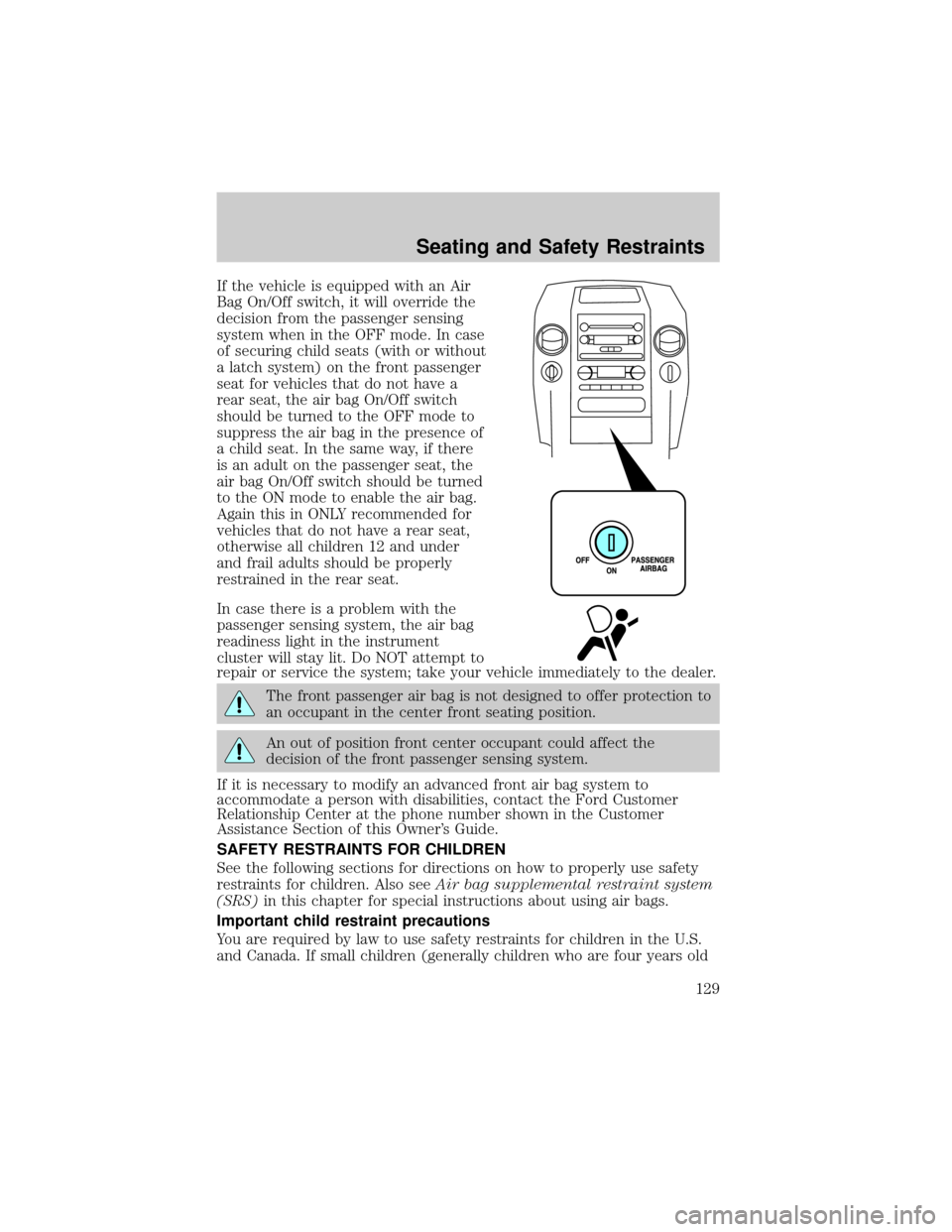
If the vehicle is equipped with an Air
Bag On/Off switch, it will override the
decision from the passenger sensing
system when in the OFF mode. In case
of securing child seats (with or without
a latch system) on the front passenger
seat for vehicles that do not have a
rear seat, the air bag On/Off switch
should be turned to the OFF mode to
suppress the air bag in the presence of
a child seat. In the same way, if there
is an adult on the passenger seat, the
air bag On/Off switch should be turned
to the ON mode to enable the air bag.
Again this in ONLY recommended for
vehicles that do not have a rear seat,
otherwise all children 12 and under
and frail adults should be properly
restrained in the rear seat.
In case there is a problem with the
passenger sensing system, the air bag
readiness light in the instrument
cluster will stay lit. Do NOT attempt to
repair or service the system; take your vehicle immediately to the dealer.
The front passenger air bag is not designed to offer protection to
an occupant in the center front seating position.
An out of position front center occupant could affect the
decision of the front passenger sensing system.
If it is necessary to modify an advanced front air bag system to
accommodate a person with disabilities, contact the Ford Customer
Relationship Center at the phone number shown in the Customer
Assistance Section of this Owner's Guide.
SAFETY RESTRAINTS FOR CHILDREN
See the following sections for directions on how to properly use safety
restraints for children. Also seeAir bag supplemental restraint system
(SRS)in this chapter for special instructions about using air bags.
Important child restraint precautions
You are required by law to use safety restraints for children in the U.S.
and Canada. If small children (generally children who are four years old
Seating and Safety Restraints
129