Page 36 of 240
Adjusting the volume
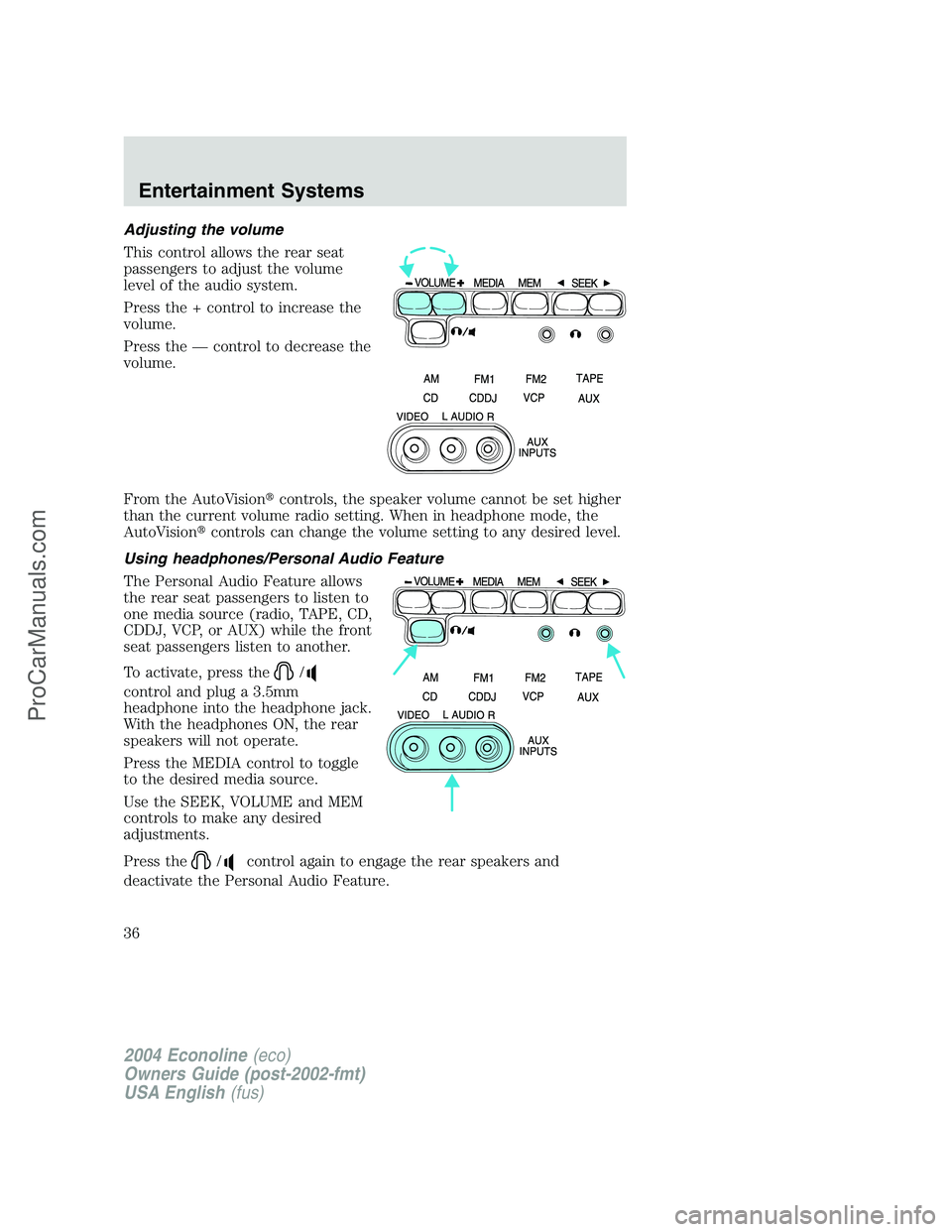
This control allows the rear seat
passengers to adjust the volume
level of the audio system.
Press the + control to increase the
volume.
Press the—control to decrease the
volume.
From the AutoVision�controls, the speaker volume cannot be set higher
than the current volume radio setting. When in headphone mode, the
AutoVision�controls can change the volume setting to any desired level.
Using headphones/Personal Audio Feature
The Personal Audio Feature allows
the rear seat passengers to listen to
one media source (radio, TAPE, CD,
CDDJ, VCP, or AUX) while the front
seat passengers listen to another.
To activate, press the
/
control and plug a 3.5mm
headphone into the headphone jack.
With the headphones ON, the rear
speakers will not operate.
Press the MEDIA control to toggle
to the desired media source.
Use the SEEK, VOLUME and MEM
controls to make any desired
adjustments.
Press the
/control again to engage the rear speakers and
deactivate the Personal Audio Feature.
2004 Econoline(eco)
Owners Guide (post-2002-fmt)
USA English(fus)
Entertainment Systems
36
ProCarManuals.com
Page 37 of 240
Speakers ON/OFF mode
With the speakers ON, you can adjust the audio output to all system
speakers—front and rear together (headphones are disabled in this
mode). The rear seat passengers can not raise the volume of the system
above the level on the front radio bezel.
With the speakers OFF, the headphones are enabled. The rear seat
passengers have control over the desired volume levels.
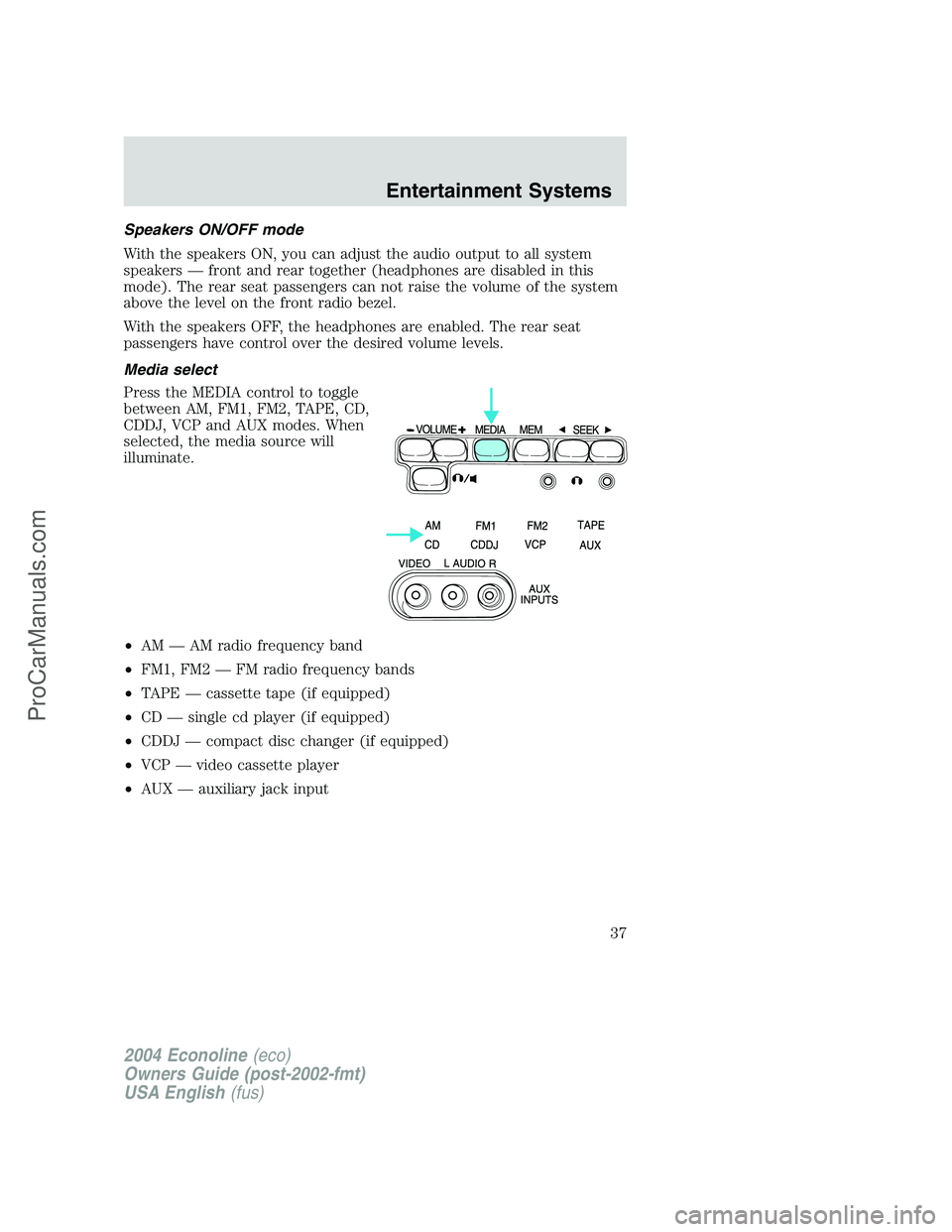
Media select
Press the MEDIA control to toggle
between AM, FM1, FM2, TAPE, CD,
CDDJ, VCP and AUX modes. When
selected, the media source will
illuminate.
•AM—AM radio frequency band
•FM1, FM2—FM radio frequency bands
•TAPE—cassette tape (if equipped)
•CD—single cd player (if equipped)
•CDDJ—compact disc changer (if equipped)
•VCP—video cassette player
•AUX—auxiliary jack input
2004 Econoline(eco)
Owners Guide (post-2002-fmt)
USA English(fus)
Entertainment Systems
37
ProCarManuals.com
Page 38 of 240
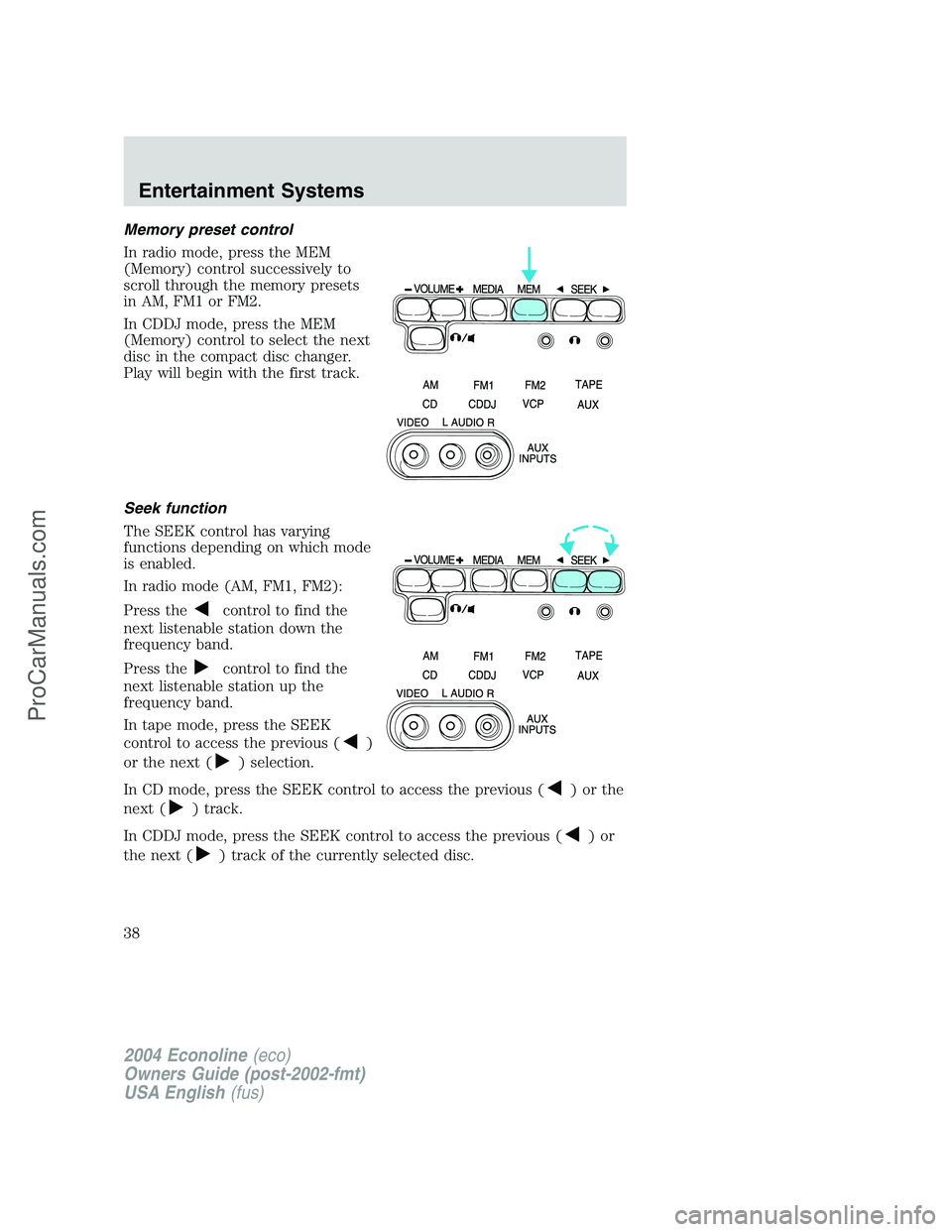
Memory preset control
In radio mode, press the MEM
(Memory) control successively to
scroll through the memory presets
in AM, FM1 or FM2.
In CDDJ mode, press the MEM
(Memory) control to select the next
disc in the compact disc changer.
Play will begin with the first track.
Seek function
The SEEK control has varying
functions depending on which mode
is enabled.
In radio mode (AM, FM1, FM2):
Press the
control to find the
next listenable station down the
frequency band.
Press the
control to find the
next listenable station up the
frequency band.
In tape mode, press the SEEK
control to access the previous (
)
or the next (
) selection.
In CD mode, press the SEEK control to access the previous (
)orthe
next (
) track.
In CDDJ mode, press the SEEK control to access the previous (
)or
the next (
) track of the currently selected disc.
2004 Econoline(eco)
Owners Guide (post-2002-fmt)
USA English(fus)
Entertainment Systems
38
ProCarManuals.com
Page 108 of 240
STARTING
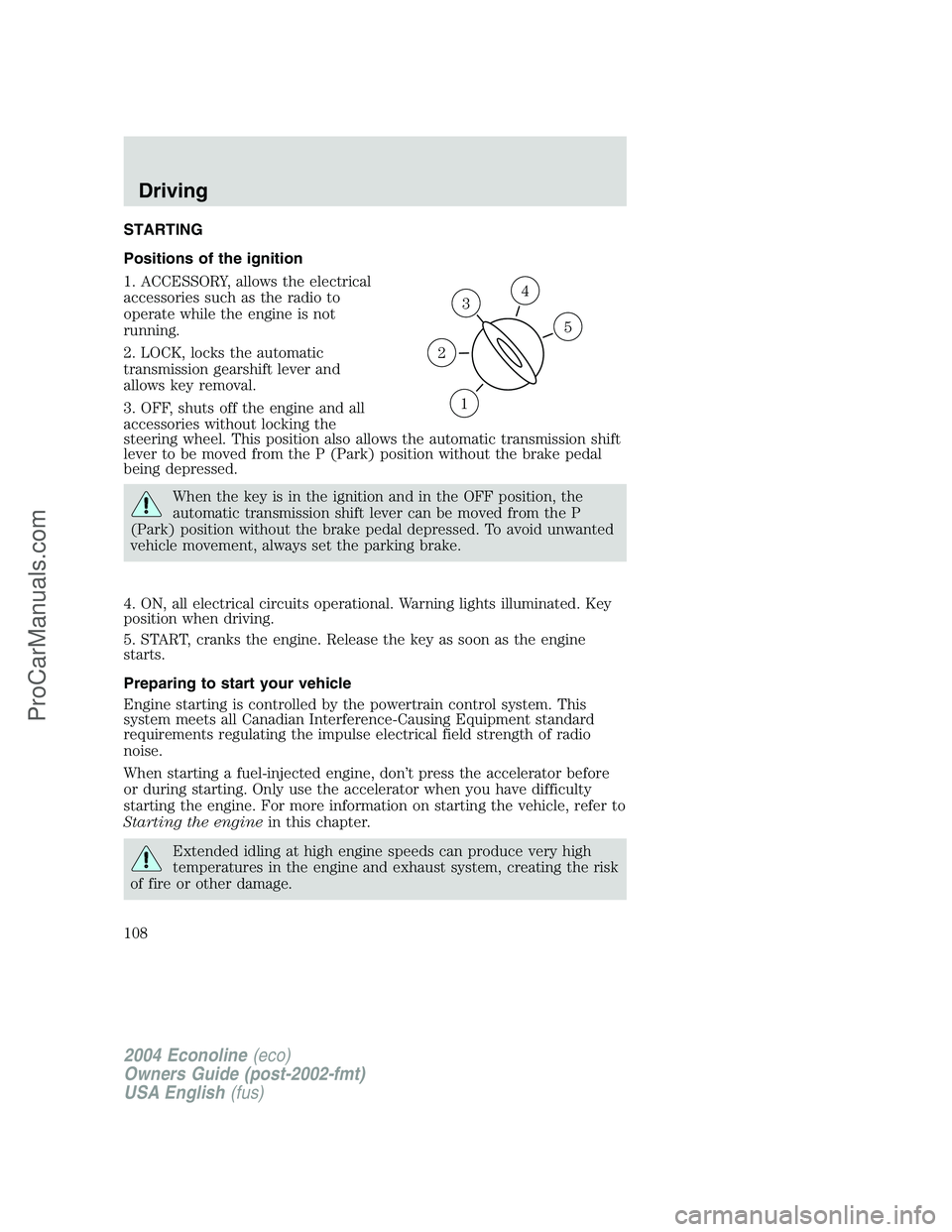
Positions of the ignition
1. ACCESSORY, allows the electrical
accessories such as the radio to
operate while the engine is not
running.
2. LOCK, locks the automatic
transmission gearshift lever and
allows key removal.
3. OFF, shuts off the engine and all
accessories without locking the
steering wheel. This position also allows the automatic transmission shift
lever to be moved from the P (Park) position without the brake pedal
being depressed.
When the key is in the ignition and in the OFF position, the
automatic transmission shift lever can be moved from the P
(Park) position without the brake pedal depressed. To avoid unwanted
vehicle movement, always set the parking brake.
4. ON, all electrical circuits operational. Warning lights illuminated. Key
position when driving.
5. START, cranks the engine. Release the key as soon as the engine
starts.
Preparing to start your vehicle
Engine starting is controlled by the powertrain control system. This
system meets all Canadian Interference-Causing Equipment standard
requirements regulating the impulse electrical field strength of radio
noise.
When starting a fuel-injected engine, don’t press the accelerator before
or during starting. Only use the accelerator when you have difficulty
starting the engine. For more information on starting the vehicle, refer to
Starting the enginein this chapter.
Extended idling at high engine speeds can produce very high
temperatures in the engine and exhaust system, creating the risk
of fire or other damage.
3
1
2
5
4
2004 Econoline(eco)
Owners Guide (post-2002-fmt)
USA English(fus)
Driving
108
ProCarManuals.com
Page 136 of 240
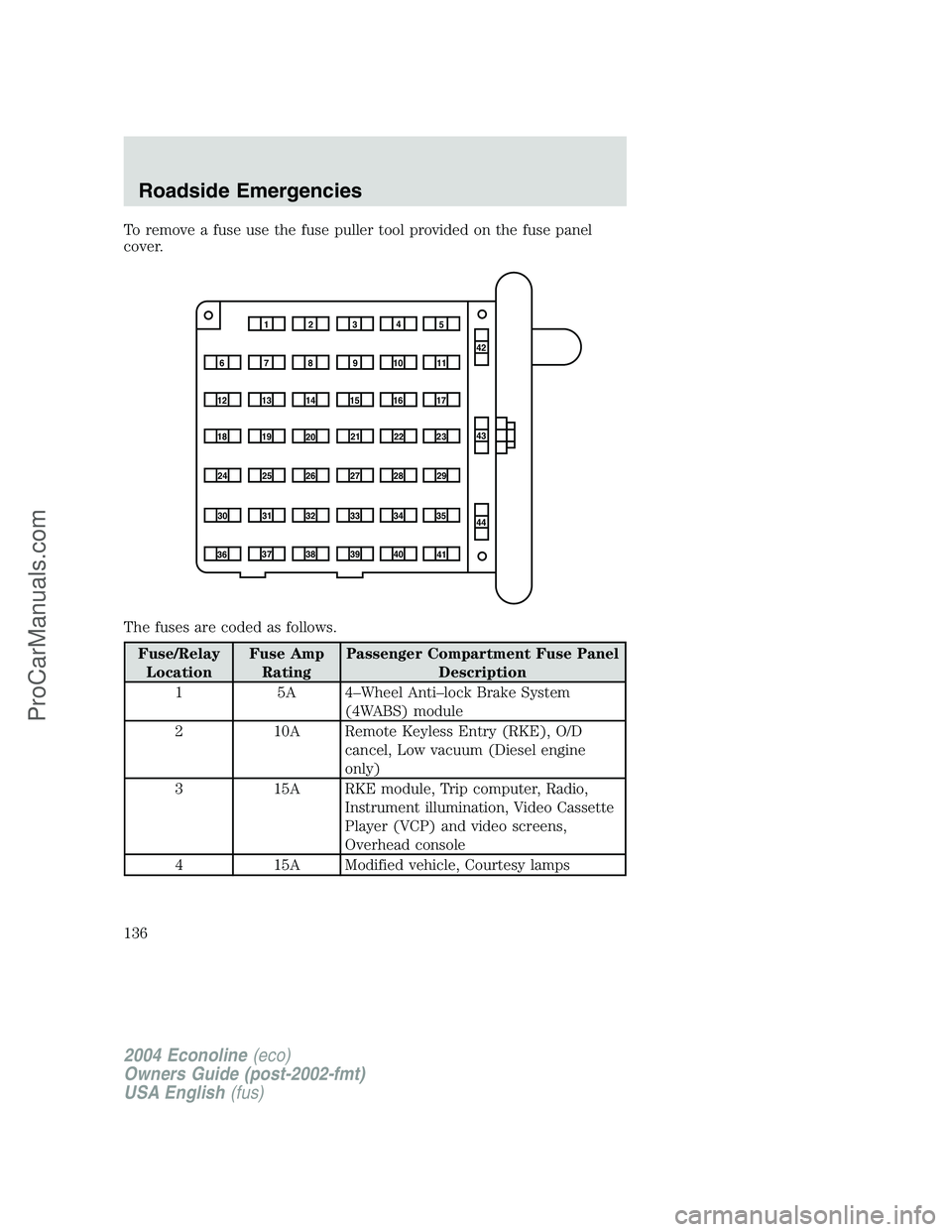
To remove a fuse use the fuse puller tool provided on the fuse panel
cover.
The fuses are coded as follows.
Fuse/RelayLocation Fuse Amp
Rating Passenger Compartment Fuse Panel
Description
1 5A 4–Wheel Anti–lock Brake System (4WABS) module
2 10A Remote Keyless Entry (RKE), O/D cancel, Low vacuum (Diesel engine
only)
3 15A RKE module, Trip computer, Radio, Instrument illumination, Video Cassette
Player (VCP) and video screens,
Overhead console
4 15A Modified vehicle, Courtesy lamps
1234 5
7
68910 1142
43
44
13
12 14
15 16 17
19
18
2021 22 23
25
24
26 27 28 29
31
30 32 33 34 35
37
36 38 39
40
41
2004 Econoline (eco)
Owners Guide (post-2002-fmt)
USA English (fus)
Roadside Emergencies
136
ProCarManuals.com
Page 180 of 240
If the battery has been disconnected or a new battery has been installed,
the clock and radio settings must be reset once the battery is
reconnected.
•Always dispose of automotive
batteries in a responsible manner.
Follow your local authorized
standards for disposal. Call your
local authorized recycling center
to find out more about recycling
automotive batteries.
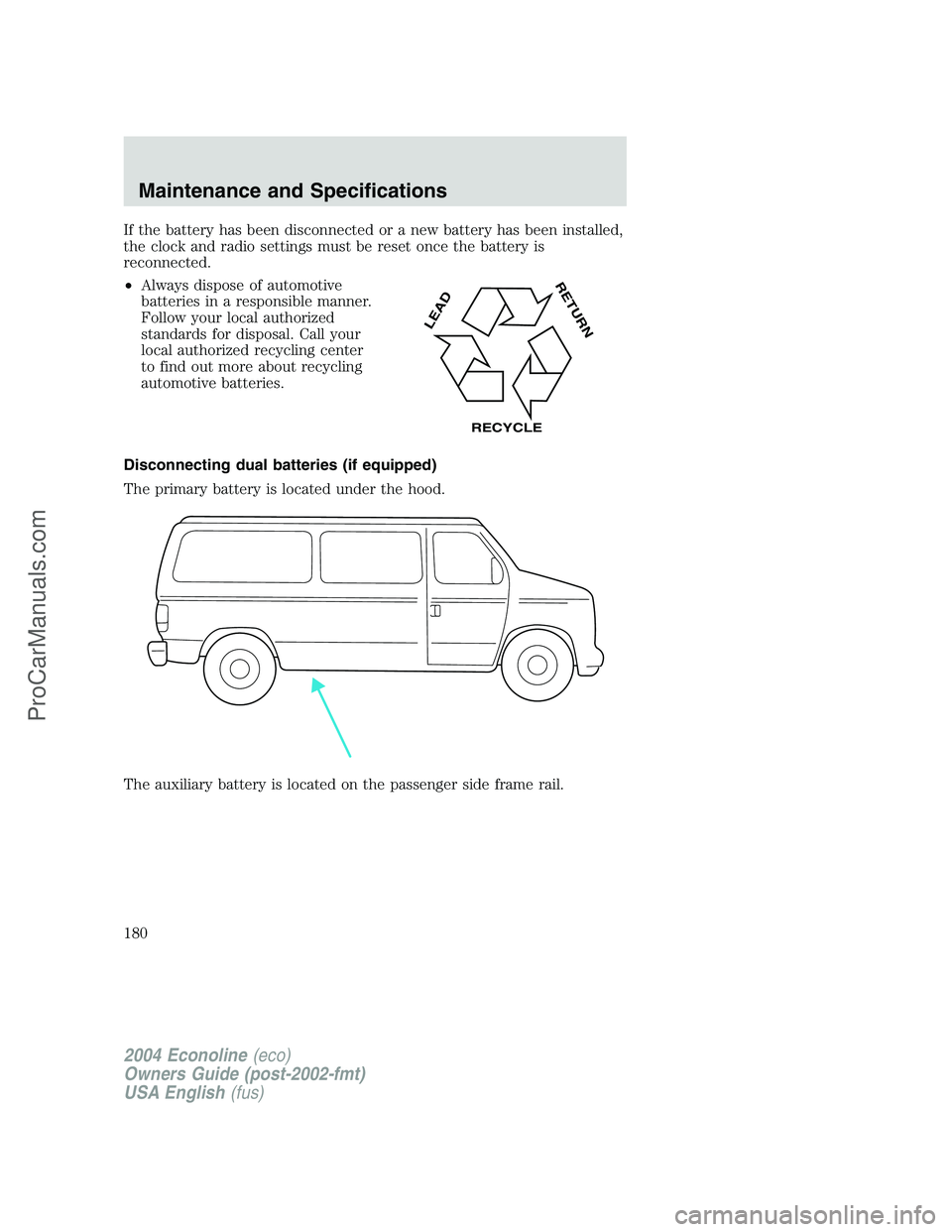
Disconnecting dual batteries (if equipped)
The primary battery is located under the hood.
The auxiliary battery is located on the passenger side frame rail.
LEAD
RETURN
RECYCLE
2004 Econoline(eco)
Owners Guide (post-2002-fmt)
USA English(fus)
Maintenance and Specifications
180
ProCarManuals.com
Page 234 of 240
A
Accessory delay ..........................63
Air bag supplemental restraint
system ..........................................89
and child safety seats ..............91
description ................................89
disposal ......................................93
driver air bag ............................91
indicator light ...........................93
operation ...................................91
passenger air bag .....................91
Air cleaner filter .......202–203, 217
Ambulance packages ....................7
Antifreeze
(see Engine coolant) ................184
Anti-lock brake system
(see Brakes) ..............................112
Audio system
(see Radio) ................15, 17, 19, 22
Automatic transmission
driving an automatic
overdrive .................................116
fluid, adding ............................200
fluid, checking ........................200
fluid, refill capacities ..............218
fluid, specification ..................225
Auxiliary power point .................62
Axle
lubricant specifications ..222, 225
refill capacities ........................218
traction lok ..............................113
B
Battery .......................................178
acid, treating emergencies .....178
disconnecting ..........................180
jumping a disabled battery ....151maintenance-free ....................178
replacement, specifications ...217
servicing ..................................178
BeltMinder ...................................84
Brakes ........................................111
anti-lock ...................................112
anti-lock brake system (ABS)
warning light ...........................112
fluid, checking and adding ....200
fluid, refill capacities ..............218
fluid, specifications .........222, 225
lubricant specifications ..222, 225
parking ....................................112
shift interlock ..........................115
Break-in period .............................5
Bulbs ............................................53
C
Calculating load ........................123
Capacities for refilling fluids ....218
Cassette tape player ...................22
CD-single premium .....................15
Cell phone use ............................62
Child safety restraints ................94
child safety belts ......................94
Child safety seats ........................97
in front seat ..............................98
in rear seat ................................98
tether anchorage hardware ...101
Cleaning your vehicle
engine compartment ..............167
exterior ....................................170
instrument panel ....................169
interior .....................................169
interior trim ............................169
plastic parts ............................168
safety belts ..............................169
2004 Econoline(eco)
Owners Guide (post-2002-fmt)
USA English(fus)
Index
Index
234
ProCarManuals.com