Page 39 of 240
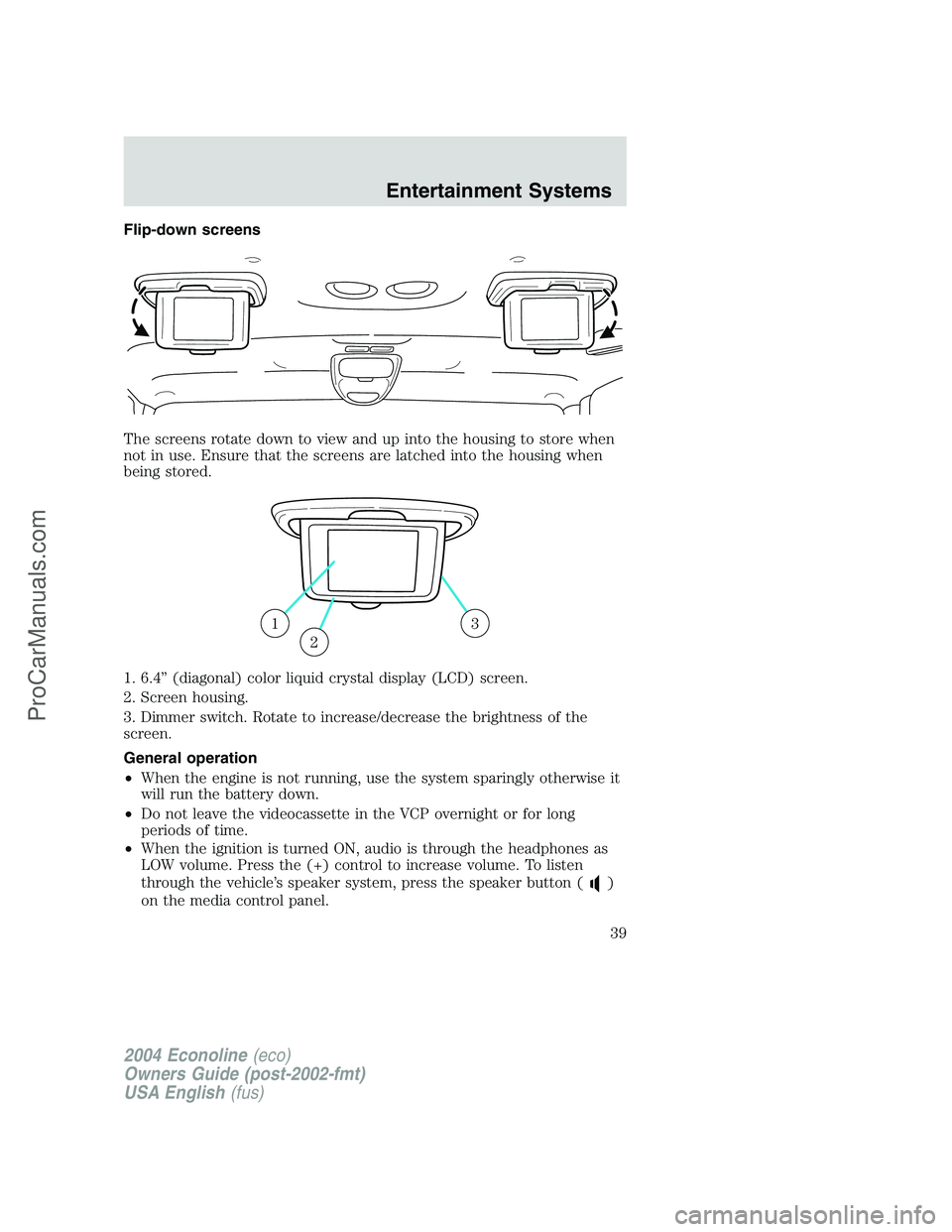
Flip-down screens
The screens rotate down to view and up into the housing to store when
not in use. Ensure that the screens are latched into the housing when
being stored.
1. 6.4”(diagonal) color liquid crystal display (LCD) screen.
2. Screen housing.
3. Dimmer switch. Rotate to increase/decrease the brightness of the
screen.
General operation
•When the engine is not running, use the system sparingly otherwise it
will run the battery down.
•Do not leave the videocassette in the VCP overnight or for long
periods of time.
•When the ignition is turned ON, audio is through the headphones as
LOW volume. Press the (+) control to increase volume. To listen
through the vehicle’s speaker system, press the speaker button (
)
on the media control panel.
13
2
2004 Econoline(eco)
Owners Guide (post-2002-fmt)
USA English(fus)
Entertainment Systems
39
ProCarManuals.com
Page 40 of 240
Inserting/removing cassette
Inserting cassette
•Open the AutoVision�console cover.
•Insert the videocassette into the cassette compartment.
Inserting a videocassette into the VCP automatically turns the power ON
(the indicator lamp will illuminate) and the tape will begin playback.
If the vehicle is traveling over rough terrain, it may be difficult to insert
the cassette because the machine attempts to hold the cassette firmly to
prevent vibration. If this condition is encountered, either press firmly or
remove the cassette and insert it again.
The system will not allow a cassette to be inserted in the wrong position.
•Once the cassette is completely inserted, close the VCP and console
covers.
Removing cassette
1. Open the console cover and press the STOP button.
2. Open the VCP cover and press the EJECT button.
3. Press the EJECT button.
Do not insert any foreign substances into the cassette compartment.
After removing the cassette from the VCP, close the door.
When the engine is turned OFF, the cassette is ejected from the
compartment.
To play a video game
1. Connect the video line from your video game device to the YELLOW
jack.
2. Connect the left and right audio cables to the WHITE and RED jacks
respectively.
3. Ensure that the system is in AUX mode. The LCD screen will turn on
and the AUX indicator will illuminate.
On-screen indicators
Playback operation
1. Press the POWER control on the VCP.
2. Insert a videocassette into the VCP.
3. The videocassette should automatically begin playback, and the
picture will appear within approximately nine seconds.
2004 Econoline(eco)
Owners Guide (post-2002-fmt)
USA English(fus)
Entertainment Systems
40
ProCarManuals.com
Page 42 of 240
Auxiliary input jacks
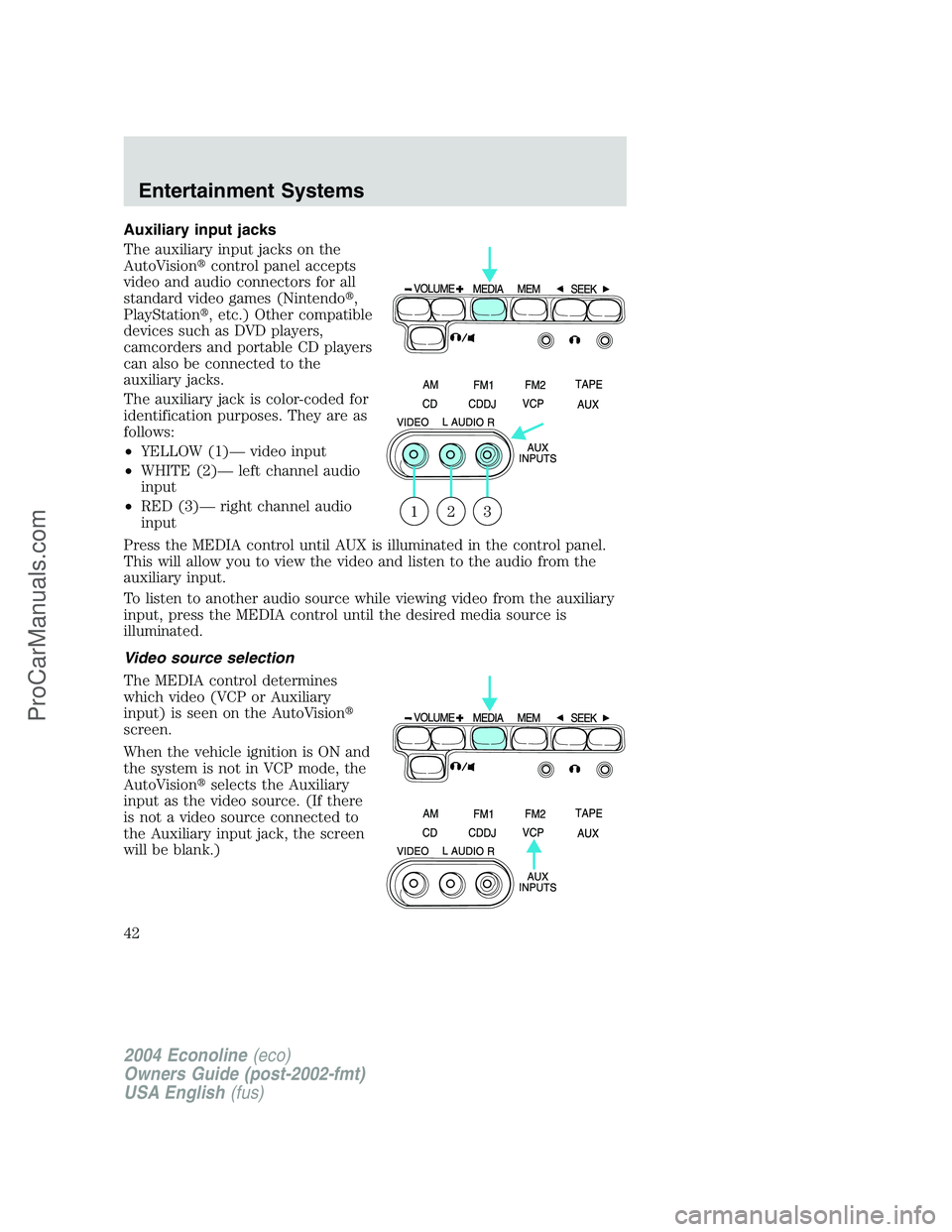
The auxiliary input jacks on the
AutoVision�control panel accepts
video and audio connectors for all
standard video games (Nintendo�,
PlayStation�, etc.) Other compatible
devices such as DVD players,
camcorders and portable CD players
can also be connected to the
auxiliary jacks.
The auxiliary jack is color-coded for
identification purposes. They are as
follows:
•YELLOW (1)—video input
•WHITE (2)—left channel audio
input
•RED (3)—right channel audio
input
Press the MEDIA control until AUX is illuminated in the control panel.
This will allow you to view the video and listen to the audio from the
auxiliary input.
To listen to another audio source while viewing video from the auxiliary
input, press the MEDIA control until the desired media source is
illuminated.
Video source selection
The MEDIA control determines
which video (VCP or Auxiliary
input) is seen on the AutoVision�
screen.
When the vehicle ignition is ON and
the system is not in VCP mode, the
AutoVision�selects the Auxiliary
input as the video source. (If there
is not a video source connected to
the Auxiliary input jack, the screen
will be blank.)
321
2004 Econoline(eco)
Owners Guide (post-2002-fmt)
USA English(fus)
Entertainment Systems
42
ProCarManuals.com
Page 43 of 240
AutoPlay feature
Your AutoVision�system is equipped with an AutoPlay Feature. When a
video cassette is inserted into the player, video and audio sources are
automatically switched to VCP. This will override any other selections
currently made.
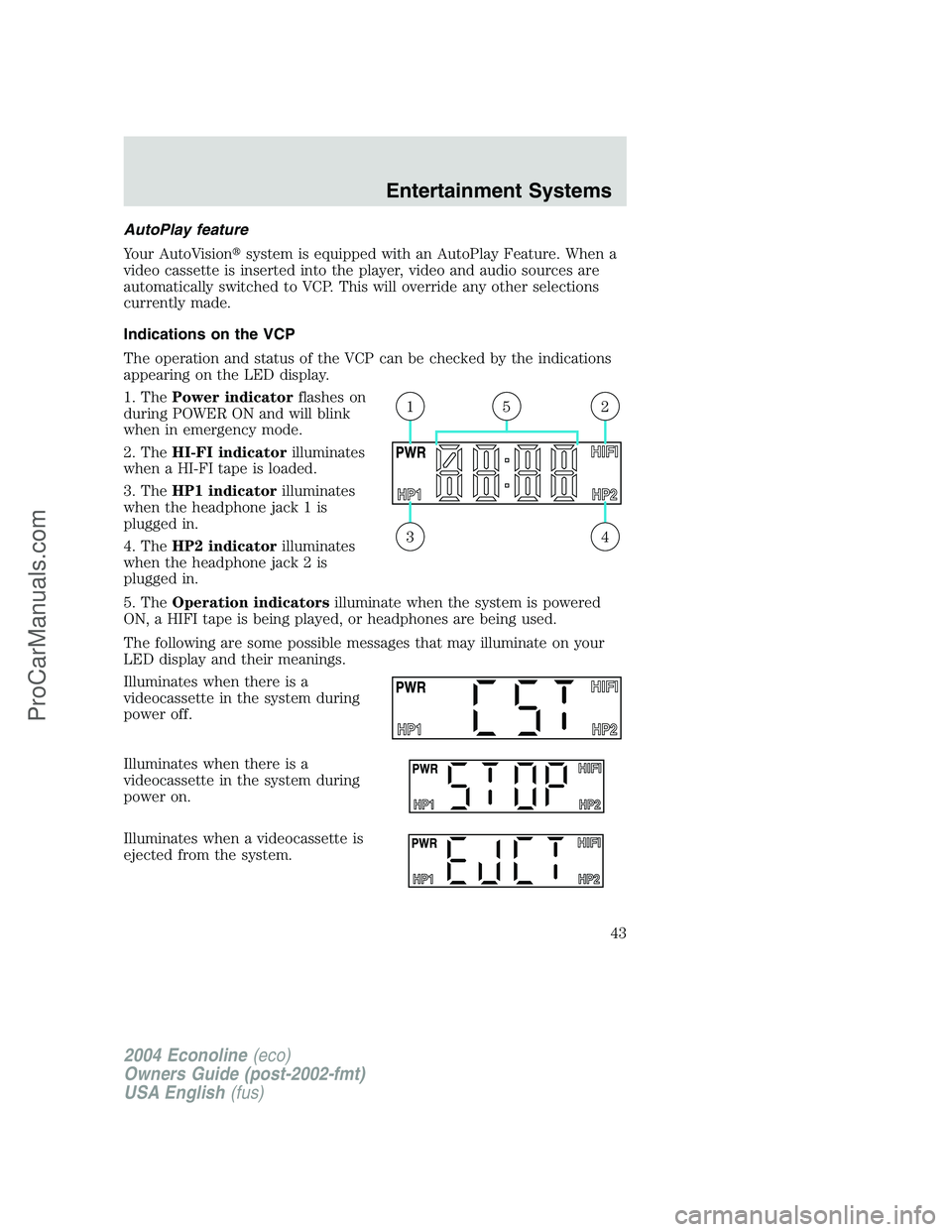
Indications on the VCP
The operation and status of the VCP can be checked by the indications
appearing on the LED display.
1. ThePower indicatorflashes on
during POWER ON and will blink
when in emergency mode.
2. TheHI-FI indicatorilluminates
when a HI-FI tape is loaded.
3. TheHP1 indicatorilluminates
when the headphone jack 1 is
plugged in.
4. TheHP2 indicatorilluminates
when the headphone jack 2 is
plugged in.
5. TheOperation indicatorsilluminate when the system is powered
ON, a HIFI tape is being played, or headphones are being used.
The following are some possible messages that may illuminate on your
LED display and their meanings.
Illuminates when there is a
videocassette in the system during
power off.
Illuminates when there is a
videocassette in the system during
power on.
Illuminates when a videocassette is
ejected from the system.
43
215
2004 Econoline(eco)
Owners Guide (post-2002-fmt)
USA English(fus)
Entertainment Systems
43
ProCarManuals.com
Page 46 of 240
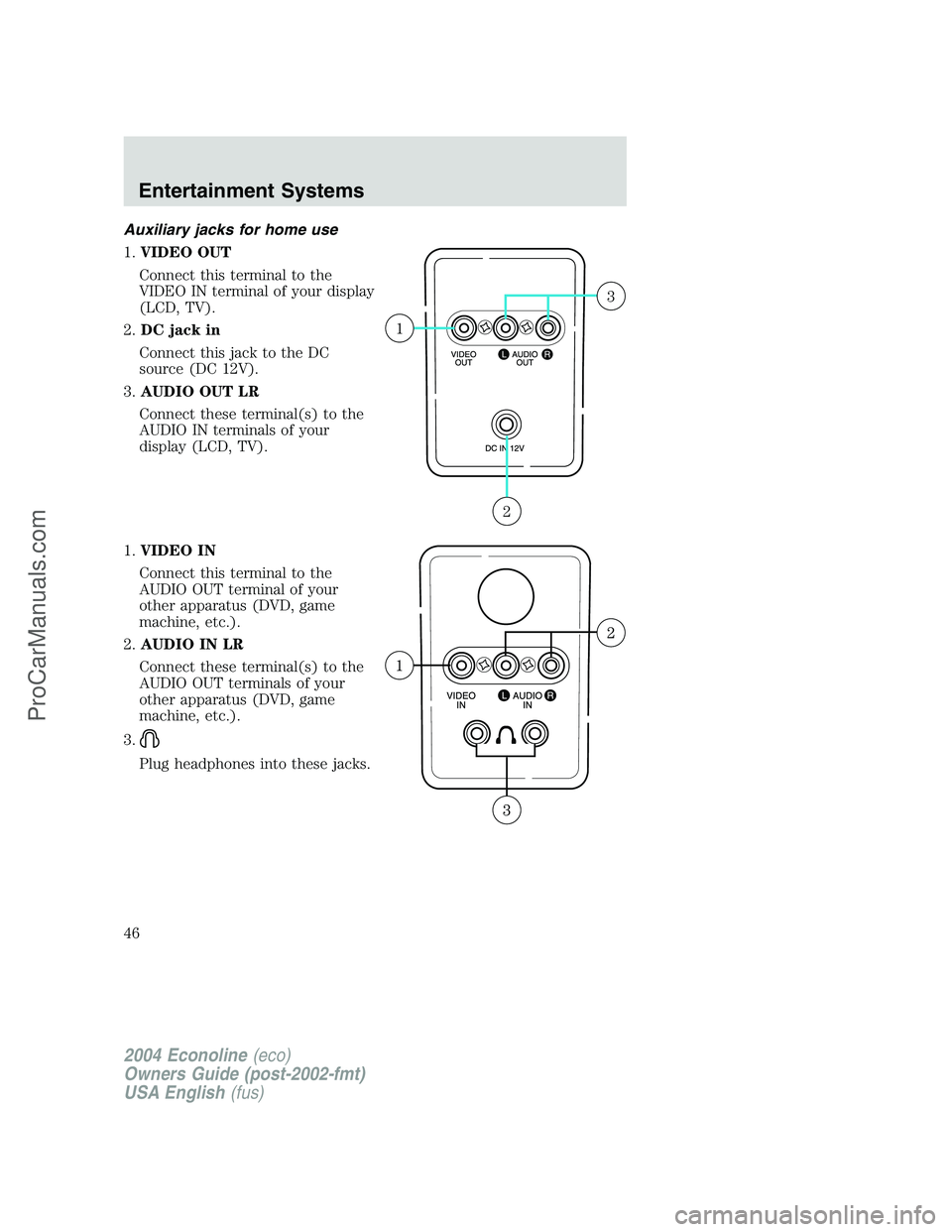
Auxiliary jacks for home use
1.VIDEO OUT
Connect this terminal to the
VIDEO IN terminal of your display
(LCD, TV).
2.DC jack in
Connect this jack to the DC
source (DC 12V).
3.AUDIO OUT LR
Connect these terminal(s) to the
AUDIO IN terminals of your
display (LCD, TV).
1.VIDEO IN
Connect this terminal to the
AUDIO OUT terminal of your
other apparatus (DVD, game
machine, etc.).
2.AUDIO IN LR
Connect these terminal(s) to the
AUDIO OUT terminals of your
other apparatus (DVD, game
machine, etc.).
3.
Plug headphones into these jacks.
2
1
3
2004 Econoline(eco)
Owners Guide (post-2002-fmt)
USA English(fus)
Entertainment Systems
46
ProCarManuals.com
Page 234 of 240
A
Accessory delay ..........................63
Air bag supplemental restraint
system ..........................................89
and child safety seats ..............91
description ................................89
disposal ......................................93
driver air bag ............................91
indicator light ...........................93
operation ...................................91
passenger air bag .....................91
Air cleaner filter .......202–203, 217
Ambulance packages ....................7
Antifreeze
(see Engine coolant) ................184
Anti-lock brake system
(see Brakes) ..............................112
Audio system
(see Radio) ................15, 17, 19, 22
Automatic transmission
driving an automatic
overdrive .................................116
fluid, adding ............................200
fluid, checking ........................200
fluid, refill capacities ..............218
fluid, specification ..................225
Auxiliary power point .................62
Axle
lubricant specifications ..222, 225
refill capacities ........................218
traction lok ..............................113
B
Battery .......................................178
acid, treating emergencies .....178
disconnecting ..........................180
jumping a disabled battery ....151maintenance-free ....................178
replacement, specifications ...217
servicing ..................................178
BeltMinder ...................................84
Brakes ........................................111
anti-lock ...................................112
anti-lock brake system (ABS)
warning light ...........................112
fluid, checking and adding ....200
fluid, refill capacities ..............218
fluid, specifications .........222, 225
lubricant specifications ..222, 225
parking ....................................112
shift interlock ..........................115
Break-in period .............................5
Bulbs ............................................53
C
Calculating load ........................123
Capacities for refilling fluids ....218
Cassette tape player ...................22
CD-single premium .....................15
Cell phone use ............................62
Child safety restraints ................94
child safety belts ......................94
Child safety seats ........................97
in front seat ..............................98
in rear seat ................................98
tether anchorage hardware ...101
Cleaning your vehicle
engine compartment ..............167
exterior ....................................170
instrument panel ....................169
interior .....................................169
interior trim ............................169
plastic parts ............................168
safety belts ..............................169
2004 Econoline(eco)
Owners Guide (post-2002-fmt)
USA English(fus)
Index
Index
234
ProCarManuals.com