Page 83 of 272
UNDERSTANDING YOUR INSTRUMENT PANEL 83
4
INSTRUMENTS A ND CONTROLSFreightliner-all.book Pag e 83 Monday , December 1, 2003 2:54 PM
Page 84 of 272

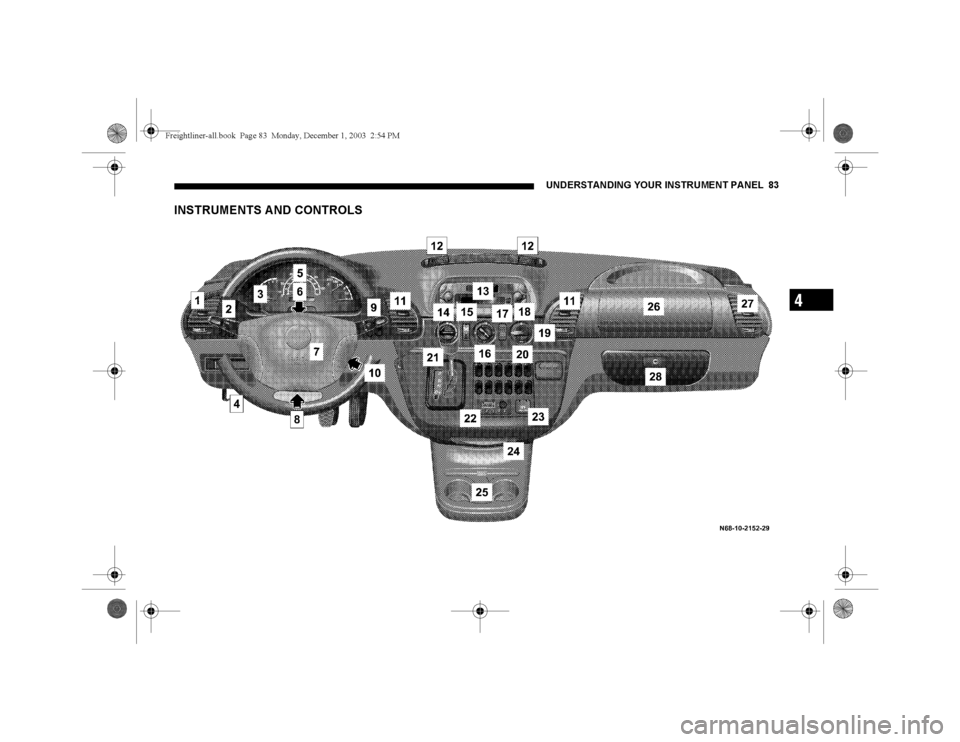
84 UNDERSTANDING YOUR INSTRUMENT PANELLegend For Instruments And Controls
1. Left-hand air vent.
2. Multifunction switch.
3. Cruise control.
4. Hood release lever.
5. Instrument cluster, refer to "Instrument Cluster
and Indicator Lamps".
6. Hazard warning flasher switch.
7. Steering wheel with horn, front driver airbag.
8. Fuse box.
9. Windshield wiper switch, refer to "Windshield
Wiper Switch".
10. Ignition lock/starter switch.
11. Center air vents.
12. Upper air vents.
13. Radio, see individual manual.14. Temperature control switch.
15. Airflow control switch.
16. Air distribution switch.
17. Temperature sensor, automatic heating
control / air conditioning, regulated.
18. Air conditioning switch.
19. Heater booster switch.
20. Residual engine heat utilization switch.
21. Gear selector lever (automatic transmission)
22. Timer for auxiliary heater (water- or air heater).
23. Electrical outlet.
24. Ashtray.
25. Cup holder.
26. Front passenger airbag.
27. Right-hand air vent.
28. Glove compartment.Freightliner-all.book Pag e 84 Monday , December 1, 2003 2:54 PM
Page 85 of 272
UNDERSTANDING YOUR INSTRUMENT PANEL 85
4
INSTRUMENT CLUSTER A ND INDICA TOR LA MPSFreightliner-all.book Pag e 85 Monday , December 1, 2003 2:54 PM
Page 86 of 272
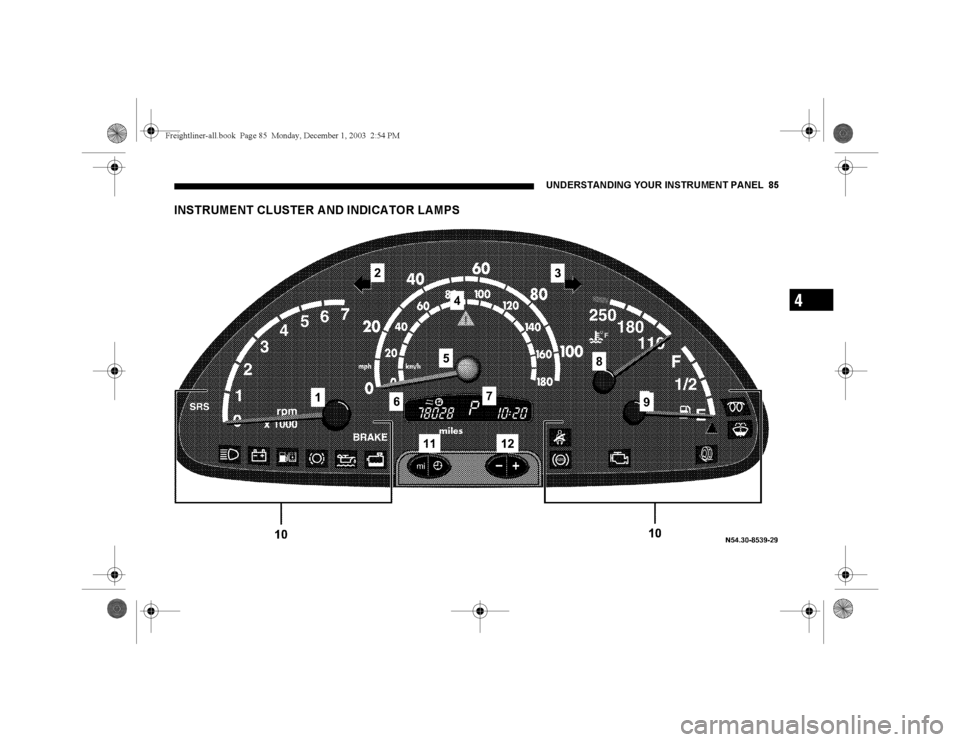
86 UNDERSTANDING YOUR INSTRUMENT PANELLegend For Instrument Cluster And Indicator Lamps
1. Tachometer (Engine rpm), refer to "Tachometer
(Engine rpm)".
2. Turn signal indicator lamp (left), refer to
"Combination Switch".
3. Turn signal indicator lamp (right), refer to
"Combination switch".
4. ASR warning lamp or ESP warning lamp.
5. Speedometer.
6. Multi-function indicator, refer to "Multi-Function
Indicator".
7. Gear selector lever position.
8. Coolant temperature gauge, refer to "Coolant
Temperature Gauge".9. Fuel gauge with reserve fuel indicator lamp
(yellow), refer to "Fuel Gauge with Reserve Fuel
Indicator Lamp".
10. Warning and indicator lamps.
11. Odometer/trip meter selector, refer to "Odometer
and Trip Meter".
Clock/outside temperature display selector, refer
to "Clock and Outside Temperature Display".
12. Instrument lighting brighter/dimmer, refer to
"Instrument Lighting".Freightliner-all.book Pag e 86 Monday , December 1, 2003 2:54 PM
Page 87 of 272
UNDERSTANDING YOUR INSTRUMENT PANEL 87
4
Multi-Function Indicator
WARNING!
Never operate buttons (1, 2, 3 and 4) in the multi-
function indicator while driving.
To operate these buttons the driver must reach
through the steering wheel, which could
significantly impede its movement.
Your attention will also be diverted from the road
and traffic conditions.
This could cause you to lose control of the vehicle
and could lead to an accident and result in severe
personal injuries or death.
For this reason, make sure that the traffic
conditions are safe before pressing the buttons, so
that nobody may be endangered.
When possible, reach around the steering wheel
to operate the multi-function indicator buttons.
Do not rest your head or chest on the steering
wheel or dashboard when operating the buttons.
Freightliner-all.book Pag e 87 Monday , December 1, 2003 2:54 PM
Page 88 of 272

88 UNDERSTANDING YOUR INSTRUMENT PANELThe multi-function indicator can be used to call up the
odometer, trip meter, clock and outside temperature,
or information such as remaining time/distance until
the next service is due, or the engine oil level.
The multi-function indicator is activated by:
Turning the key to position 2 in the ignition lock,
opening the driver’s door,
pressing one of the buttons (‘), I, ç or
æ,
switching the side lights on, refer to "Combination
Switch".1. Press the button (‘) to switch between the
odometer and the trip meter, and to reset the trip
meter.
Press the button (‘) to activate the ASSYST
maintenance computer.
2. Press the I button to switch between the time
and outside temperature and to activate the time
adjustment.
3. Press the ç to adjust (dim) the display and
instrument lighting and to adjust the clock.
4. Press the æ to adjust (brighten) the display and
instrument lighting and to adjust the clock.Freightliner-all.book Pag e 88 Monday , December 1, 2003 2:54 PM
Page 89 of 272

UNDERSTANDING YOUR INSTRUMENT PANEL 89
4
ClockActivate the multi-function indicator, refer to "Multi-
Function Indicator".
Button I
– to reverse the time adjustment/
switch between hours and minutes (1)
Button ç – to turn the time back (2)
Button æ – to advance the time (3)To switch between Time and Outside Temperature
Display (Optional)
Press the I button briefly.
If button I is pressed twice within one second, the
display will revert to the original mode after
20 seconds.
To Adjust the Time
Call up time display:
1. Press button I and hold – the hours display will
flash.
To change the time by one hour = briefly press
button æ or ç.
To change the time by several hours = press and
hold button æ or ç.
2. Briefly press button I – the minutes display will
flash.
To change the time by one minute = briefly press
button æ or ç.
To change the time by several minutes = press and
hold button æ or ç.
3. Briefly press button I – the set time is accepted.
Freightliner-all.book Pag e 89 Monday , December 1, 2003 2:54 PM
Page 90 of 272
90 UNDERSTANDING YOUR INSTRUMENT PANELOdometer and Trip MeterActivate the multi-function indicator. The total
distance covered by the vehicle will be shown.
1. To switch between the odometer and the trip meter,
press button (1) briefly.
2. To reset the trip meter, call up trip meter. Press
button (1) and hold until the trip meter shows 0000.
Instrument and Display LightingDisplay lighting:
3. Press button ç, to display lighting dimmer
4. Press button æ, to display lighting brighter
Freightliner-all.book Pag e 90 Monday , December 1, 2003 2:54 PM