Page 136 of 426
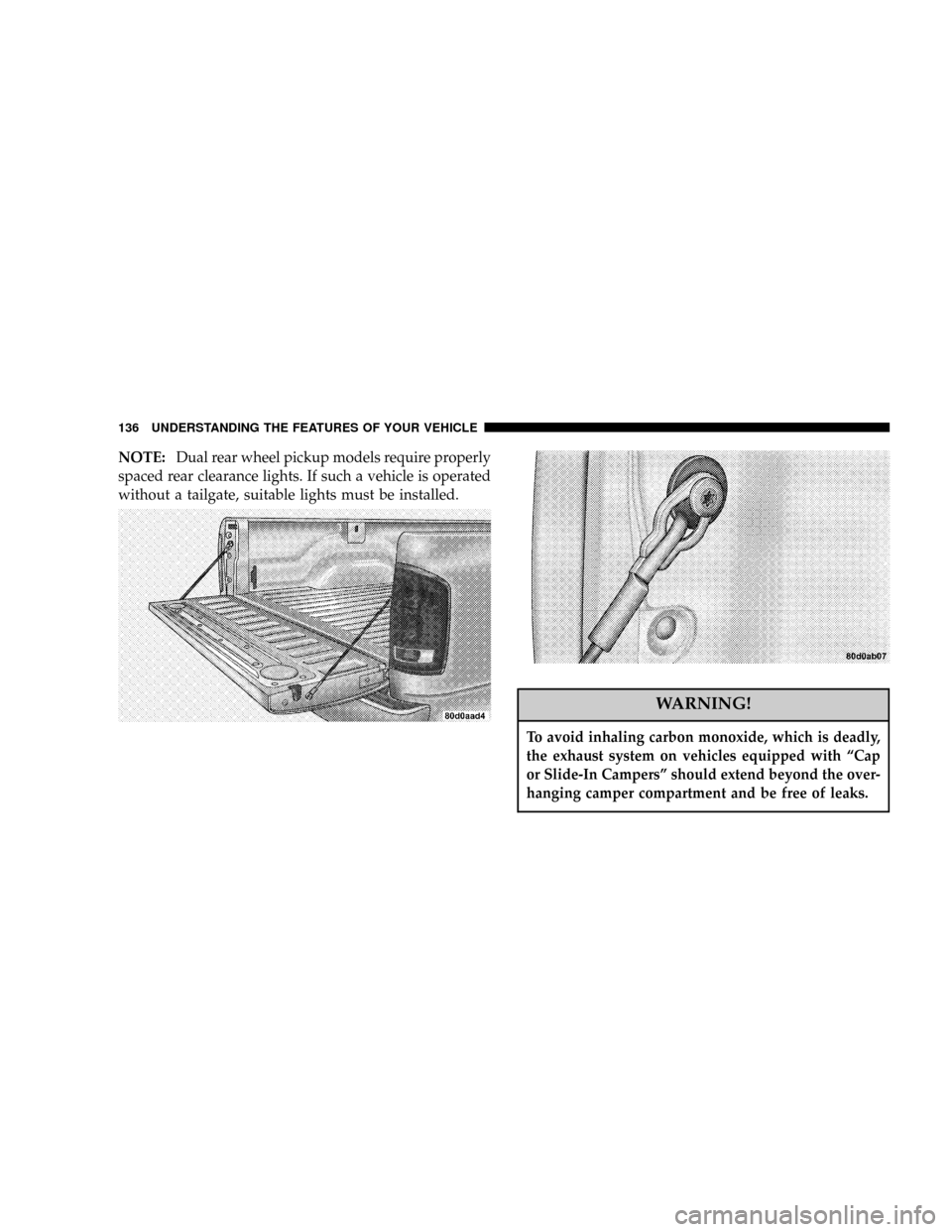
NOTE:Dual rear wheel pickup models require properly
spaced rear clearance lights. If such a vehicle is operated
without a tailgate, suitable lights must be installed.
WARNING!
To avoid inhaling carbon monoxide, which is deadly,
the exhaust system on vehicles equipped with ªCap
or Slide-In Campersº should extend beyond the over-
hanging camper compartment and be free of leaks.
136 UNDERSTANDING THE FEATURES OF YOUR VEHICLE
Page 148 of 426

If brake failure is indicated, immediate repair is necessary
and continued operation of the vehicle in this condition is
dangerous.
Acceleration which causes the rear wheels to slip for a
period of time may result in the red brake light illumi-
nating and a brake switch code being set on ABS
equipped vehicles. Depressing the brake pedal should
extinguish the red brake light.
19. Wait To Start Indicator
The Wait To Start Indicator will illuminate when
the ignition key is first turned to the ON position.
Wait until the Wait To Start Indicator turns OFF then start
the vehicle.
20. Odometer/Trip Odometer
The odometer shows the total distance the vehicle has
been driven.If the odometer reading is changed during repair or
replacement, be sure to keep a record of the reading
before and after the service so that the correct mileage can
be determined.
The trip odometer shows individual trip mileage. To
toggle between the odometer and the trip odometer,
press the Odometer/Trip Odometer Button. To reset the
Trip Odometer, press and hold the button while in trip
mode, until the Trip Odometer resets.
NOTE:There is also an engine hour function. This
indicates the total number of hours the engine has been
running. To display the engine hours perform the follow-
ing: Place the ignition in RUN, but do not start the
engine. With the odometer value displayed, hold the trip
button down for a period of 6 seconds. The odometer will
change to trip value first, then it will display the engine
148 UNDERSTANDING YOUR INSTRUMENT PANEL
Page 181 of 426

By pressing the SEEK button when the PTY icon is
displayed, the radio will be tuned to the next frequency
station with the same selected PTY name. The PTY
function only operates when in the FM mode.
The radio display will flash ªSEEKº and the selected PTY
program type when searching for the next PTY station. If
no station is found with the selected PTY program type,
the radio will return to the last station.
If a preset button is activated while in the PTY (Program
Type) mode, the PTY mode will be exited and the radio
will tune to the preset station.
By pressing the SCAN button when the PTY icon is
displayed, the radio will stop at every PTY station on the
band and list each corresponding program type in the
radio display.
Time
Press the TIME button to change the display from
elapsed CD playing time to time of day.
REMOTE SOUND SYSTEM CONTROLS Ð IF
EQUIPPED
The remote sound system controls are located on the rear
surface of the steering wheel. Reach behind the wheel to
access the switches.
The right hand control is a rocker type switch with a
button in the center. Pressing the top of the switch will
UNDERSTANDING YOUR INSTRUMENT PANEL 181
4
Page 200 of 426

NOperating Precautions..................216
NCooling System Tips Ð Automatic
Transmission........................216
mTransmission Shifting....................218
NFour-Speed Overdrive Automatic
Transmission Ð If Equipped.............218
NManual Transmission ± 5±Speed
(NV- 4500) Ð If Equipped...............222
NManual Transmission Ð 6-Speed
(NV-5600) Ð If Equipped...............224
mFour-Wheel- Drive Operation Ð If Equipped . . . 226
NManually Shifted Transfer Case Operating
Information/Precautions................226
NShifting Procedure - Manually Shifted Transfer
Case..............................229NTransfer Case Reminder Light............230
NElectronically Shifted Transfer Case
Operating Information/Precautions........230
NShifting Procedure - Electronically Shifted
Transfer Case........................234
mLimited-Slip Differential Ð If Equipped.......237
mParking Brake.........................238
mBrake System..........................239
NBrake Noise.........................240
NFour-Wheel Anti-Lock Brake System........240
mPower Steering........................242
mTire Safety Information...................243
NTire Markings........................243
NTire Identification Number (TIN)..........246
200 STARTING AND OPERATING
Page 201 of 426

NTire Loading And Tire Pressure...........247
mTiresÐGeneral Information................251
NTire Pressure.........................251
NTire Inflation Pressures.................252
NRadial-Ply Tires......................255
NCompact Spare Tire Ð If Equipped.........255
NTire Spinning........................256
NTread Wear Indicators..................257
NReplacement Tires.....................257
NAlignment And Balance.................258
mSupplemental Tire Pressure Information.......259
mTire Chains...........................259
mSnow Tires...........................261mTire Rotation Recommendations............261
NDual Rear Wheels.....................263
mEngine Runaway.......................264
mFuel Requirements......................264
NAdding Fuel.........................265
NBulk Fuel Storage.....................267
NFuel Specifications....................267
mVehicle Loading........................269
NCertification Label.....................269
mTrailer Towing.........................272
NTo Maintain Warranty Coverage...........272
NAxle Lubricant And Trailer Towing.........274
NTrailer Towing Recommendations..........274
STARTING AND OPERATING 201
5
Page 202 of 426

NTrailer Towing Ð Hitches...............275
NConnecting Trailer Lighting And Electric
Trailer Brakes........................276
NTrailer Weight And Trailer Tongue Weight....278
NTrailer Towing Information
(Maximum Trailer Weight Ratings).........279
NTrailer Towing Mirrors Ð If Equipped......279
NCooling System Tips Ð Trailer Towing......280
NAutomatic Transmission Oil Temperature
Warning Light.......................281
NTowing With An Automatic Transmission....281
mSnowplow............................282
NBefore Plowing.......................283
NSnowplow Prep Package Model Availability . . 283NOver The Road Operation With Snowplow
Attached...........................284
NMethods For Removing Snow............284
NOperating Tips.......................284
NGeneral Maintenance...................285
mRecreational Towing Ð 4±Wheel Drive Vehicles
(Behind Motorhome, Etc.).................286
NRecreational Towing Procedure Ð Manual
Shift Transfer Case Ð If Equipped.........286
NReturning To Normal Operation Ð Manual
Shift Transfer Case....................287
NRecreational Towing Procedure Ð Electronic
Shift Transfer Case Ð If Equipped.........288
NReturning To Normal Operation Ð Electronic
Shift Transfer Case....................290
202 STARTING AND OPERATING
Page 204 of 426
IGNITION/STARTER SWITCH
LOCK
Locks the automatic transmission shift control into the
PARK position. It also engages the steering wheel lock (if
equipped) when the steering wheel is turned.NOTE: This vehicle is equipped with a transmission
shift interlocking system. The brake pedal must be
depressed to shift out of Park (P).
OFF
Unlocks the steering wheel (if equipped with locking
wheel) and the automatic transmission shift control with
engine off.
ON
This is the normal running position.
START
Starts the engine. When the engine starts, release the key.
The ignition key will return to the ON position for
normal driving.
204 STARTING AND OPERATING
Page 218 of 426

²sudden change, outside the normal operating range, in
the engine operating temperature
²excessive smoke
²oil pressure drop
TRANSMISSION SHIFTING
Four-Speed Overdrive Automatic Transmission Ð
If Equipped
The gear shift selector display, located in the instrument
panel cluster, indicates the transmission gear range (the
selector is illuminated for night driving). The selector
lever is mounted on the right side of the steering column.
You must depress the brake pedal, to pull the selector
lever out of park (P) position (Brake Interlock System). To
drive, move the selector lever from Park or Neutral to the
desired drive position. Pull the selector lever toward you
when shifting into Reverse, Second, First or Park, or
when shifting out of Park.
Gear Ranges
DO NOT race the engine when shifting from Park or
Neutral position into another gear range.
ªPº Park
This gear position supplements the parking brake by
locking the transmission. The engine can be started in
this range. Never use Park while the vehicle is in motion.
Apply the parking brake when leaving the vehicle in this
range. Always apply parking brake first, then place the
selector in Park position. On 4-wheel drive vehicles be
sure that the transfer case is in a drive position!
WARNING!
Your vehicle could move and injure you and others if
it is not completely in P (Park). Check by trying to
move the gearshift lever back and forth without first
pulling it toward you after you have set it in P. Make
sure it is in Park before leaving the vehicle.
218 STARTING AND OPERATING