2004 DODGE DAKOTA ECO mode
[x] Cancel search: ECO modePage 128 of 300
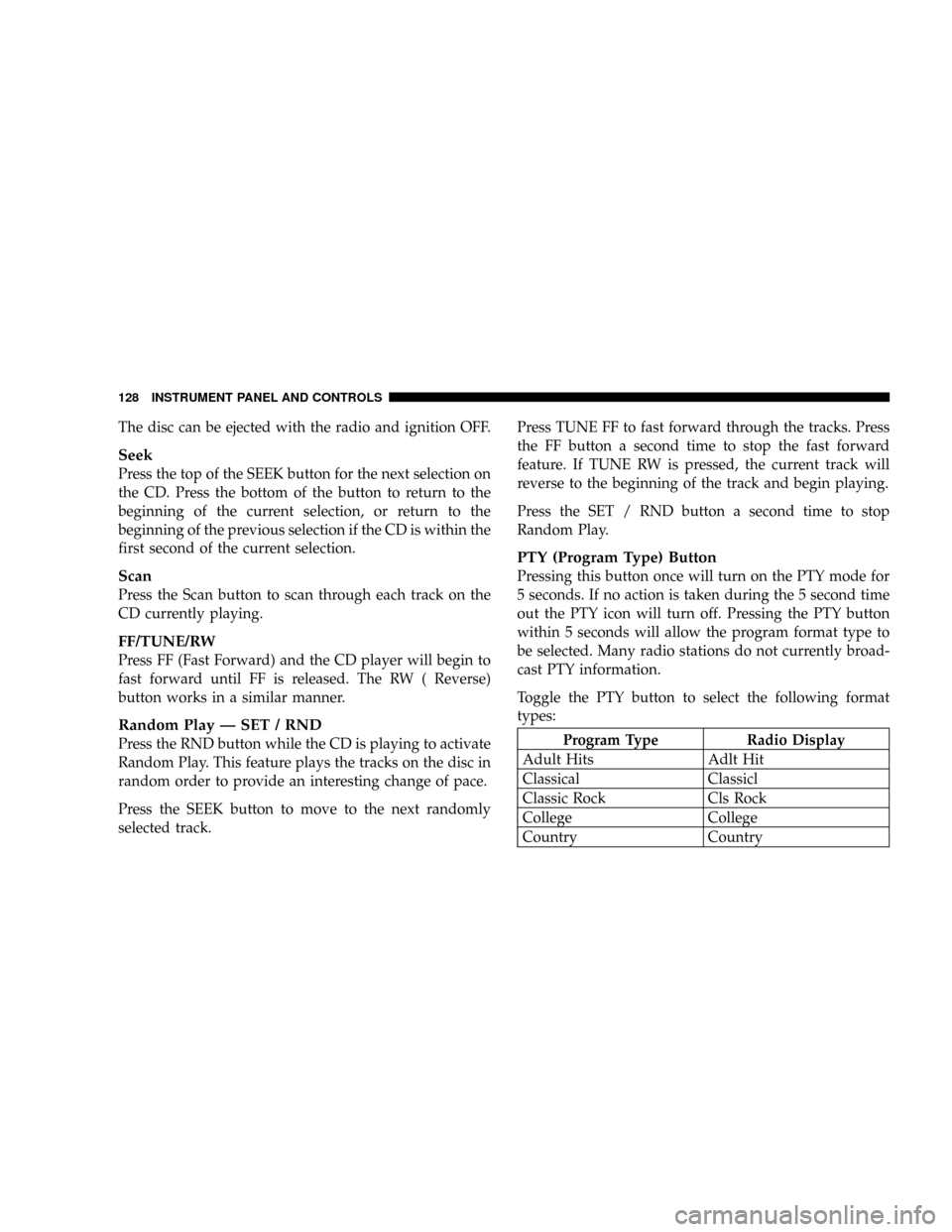
The disc can be ejected with the radio and ignition OFF.
Seek
Press the top of the SEEK button for the next selection on
the CD. Press the bottom of the button to return to the
beginning of the current selection, or return to the
beginning of the previous selection if the CD is within the
first second of the current selection.
Scan
Press the Scan button to scan through each track on the
CD currently playing.
FF/TUNE/RW
Press FF (Fast Forward) and the CD player will begin to
fast forward until FF is released. The RW ( Reverse)
button works in a similar manner.
Random Play Ð SET / RND
Press the RND button while the CD is playing to activate
Random Play. This feature plays the tracks on the disc in
random order to provide an interesting change of pace.
Press the SEEK button to move to the next randomly
selected track.Press TUNE FF to fast forward through the tracks. Press
the FF button a second time to stop the fast forward
feature. If TUNE RW is pressed, the current track will
reverse to the beginning of the track and begin playing.
Press the SET / RND button a second time to stop
Random Play.
PTY (Program Type) Button
Pressing this button once will turn on the PTY mode for
5 seconds. If no action is taken during the 5 second time
out the PTY icon will turn off. Pressing the PTY button
within 5 seconds will allow the program format type to
be selected. Many radio stations do not currently broad-
cast PTY information.
Toggle the PTY button to select the following format
types:
Program Type Radio Display
Adult Hits Adlt Hit
Classical Classicl
Classic Rock Cls Rock
College College
Country Country
128 INSTRUMENT PANEL AND CONTROLS
Page 131 of 300

Tape Player
Pressing the top of the switch once will go to the next
selection on the cassette. Pressing the bottom of the
switch once will go to the beginning of the current
selection or to the beginning of the previous selection if it
is within the first 5 seconds of the current selection.
If you press the switch up or down twice it plays the
second selection, three times, it will play the third, etc.
The button in the center of the left hand switch has no
function in this mode.
CD Player
Pressing the top of the switch once will go to the next
track on the CD. Pressing the bottom of the switch once
will go to the beginning of the current track or to the
beginning of the previous track if it is within one second
after the current track begins to play.
If you press the switch up or down twice it plays the
second track, three times, it will play the third, etc.
The button in the center of the left hand switch changes
CD's on the 6±Disc in-dash CD changer radio (RBQ). This
button does not function for all other radios.
CASSETTE TAPE AND PLAYER MAINTENANCE
To keep the cassette tapes and player in good condition,
take the following precautions:
1. Do not use cassette tapes longer than C-90; otherwise,
sound quality and tape durability will be greatly dimin-
ished.
2. Keep the cassette tape in its case to protect from
slackness and dust when it is not in use.
3. Keep the cassette tape away from direct sunlight, heat
and magnetic fields such as the radio speakers.
4. Before inserting a tape, make sure that the label is
adhering flatly to the cassette.
5. A loose tape should be corrected before use. To rewind
a loose tape, insert the eraser end of a pencil into the tape
drive gear and twist the pencil in the required directions.
Maintain your cassette tape player. The head and capstan
shaft in the cassette player can pick up dirt or tape
deposits each time a cassette is played. The result of
deposits on the capstan shaft may cause the tape to wrap
around and become lodged in the tape transport. The
INSTRUMENT PANEL AND CONTROLS 131
4
Page 135 of 300

Air Conditioning Operation
To turn on the Air Conditioning, set the fan control at any
speed and press the snowflake button located at the right
of the control panel. Conditioned air will be directed
through the outlets selected by the mode control. A light
in the snowflake button shows that the air conditioning is
on. Press the button a second time to turn the air
conditioning off.
Slight changes in engine speed or power may be noticed
when the air conditioning compressor is on. This is anormal occurrence as the compressor will cycle on and
off to maintain comfort and increase fuel economy.
The mode control (at the right of the
control panel) can be set in any of the
following positions:
NOTE:To improve your selection choices, the system
allows you to operate at intermediate positions between
the major modes. These intermediate positions are iden-
tified by the small dots.
Recirculation Modes (Panel or Bi-Level )
Select the recirculation modes when
the outside air contains smoke, odors,
high humidity, or if rapid cooling is
desired. This feature allows for recir-
culation of interior air only. Air flows
through the panel outlets in this mode.
INSTRUMENT PANEL AND CONTROLS 135
4
Page 138 of 300

speeds will reduce fogging. Interior fogging on the
windshield can be quickly removed by selecting the
defrost mode.
Regular cleaning of the inside of the windows with a
non-filming cleaning solution (vinegar and water works
very well) will help prevent contaminates (cigarette
smoke, perfumes, etc.) from sticking to the windows.
Contaminates increase the rate of window fogging.
Summer Operation
Air conditioned vehicles must be protected with a high
quality antifreeze coolant during summer to provide
proper corrosion protection and to raise the boiling point
of the coolant for protection against overheating. A 50 %
concentration is recommended.When using the air conditioner in extremely heavy traffic
in hot weather especially when towing a trailer, addi-
tional engine cooling may be required. If this situation is
encountered, operate the transmission in a lower gear.
When stopped in heavy traffic, it may be necessary to
shift into NEUTRAL and depress the accelerator slightly
for fast idle operation.
Winter Operation
When operating the system during the winter months,
make sure the air intake, located directly in front of the
windshield, is free of ice, slush, snow, or other obstruc-
tions.
138 INSTRUMENT PANEL AND CONTROLS
Page 148 of 300

ªNº Neutral
Shift to Neutral when vehicle is standing for prolonged
periods with engine running. Engine may be started in
this range. Set the parking brake if you must leave the
vehicle.
ªDº Drive
Use this position for most city and highway driving.
ª2º Second
Use this position for driving slowly in heavy city traffic
or on mountain roads where more precise speed control
is desirable. Use it also when climbing long grades, and
for engine braking when descending moderately steep
grades. To prevent excessive engine speed do not exceed
45 mph (72 km/h) in this range.
ª1º First
Use this position for driving up very steep hills and for
engine braking at low speeds 25 mph (40 km/h ) or less
when going down hill. To prevent excessive engine speed
do not exceed 25 mph (40 km/h) in this range.
Overdrive
The transmission contains a fourth and fifth (if equipped)
speed (Overdrive) and will automatically shift from
Drive to Overdrive if the following conditions are
present:
²The transmission selector is in Drive.
²Engine coolant has reached normal operating tem-
perature.
²Vehicle speed is above approximately 30 mph (48
km/h).
²The ªO/D OFFº button has not been activated.
²Transmission has reached normal operating tempera-
ture.
Overdrive can be locked out by pressing the O/D Off
button located at the end of the transmission gear shift
lever. A light in the instrument cluster shows that the
feature has been deactivated. Pressing the button a
second time restores the Overdrive function.
148 STARTING AND OPERATING
Page 151 of 300
To shift into Reverse, come to a complete stop. Depress
the clutch and pause briefly to allow the gear train to spin
down. Move the shift lever from the Neutral position
straight across and back into Reverse.
Never drive with your foot resting on the clutch pedal.
Do not attempt to hold the vehicle on a hill with the
clutch pedal partially engaged, as this will cause abnor-
mal wear on the clutch.
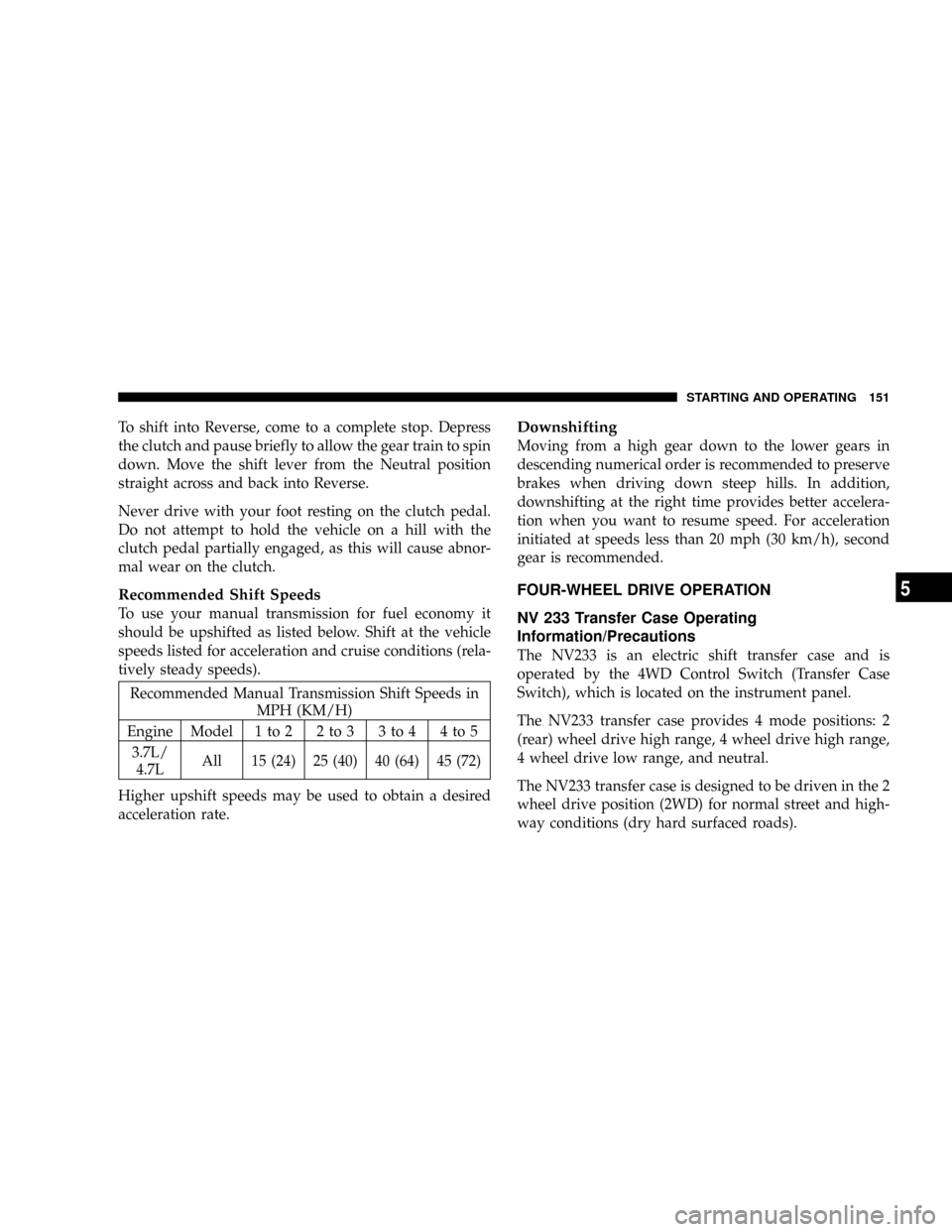
Recommended Shift Speeds
To use your manual transmission for fuel economy it
should be upshifted as listed below. Shift at the vehicle
speeds listed for acceleration and cruise conditions (rela-
tively steady speeds).
Recommended Manual Transmission Shift Speeds in
MPH (KM/H)
Engine Model 1 to 2 2 to 3 3 to 4 4 to 5
3.7L/
4.7LAll 15 (24) 25 (40) 40 (64) 45 (72)
Higher upshift speeds may be used to obtain a desired
acceleration rate.
Downshifting
Moving from a high gear down to the lower gears in
descending numerical order is recommended to preserve
brakes when driving down steep hills. In addition,
downshifting at the right time provides better accelera-
tion when you want to resume speed. For acceleration
initiated at speeds less than 20 mph (30 km/h), second
gear is recommended.
FOUR-WHEEL DRIVE OPERATION
NV 233 Transfer Case Operating
Information/Precautions
The NV233 is an electric shift transfer case and is
operated by the 4WD Control Switch (Transfer Case
Switch), which is located on the instrument panel.
The NV233 transfer case provides 4 mode positions: 2
(rear) wheel drive high range, 4 wheel drive high range,
4 wheel drive low range, and neutral.
The NV233 transfer case is designed to be driven in the 2
wheel drive position (2WD) for normal street and high-
way conditions (dry hard surfaced roads).
STARTING AND OPERATING 151
5
Page 182 of 300
SUPPLEMENTAL TIRE PRESSURE INFORMATION
A light load vehicle condition is defined as two passen-
gers {150 lbs (68 kg) each} plus 200 lbs (91kg) of cargo.
Cold tire inflation pressures for a lightly loaded vehicle
will be found on a ªSupplemental Tire Pressure Inflationº
label located on the face of the driver's door or in the Tire
Information Pressures pamphlet in the glove box.
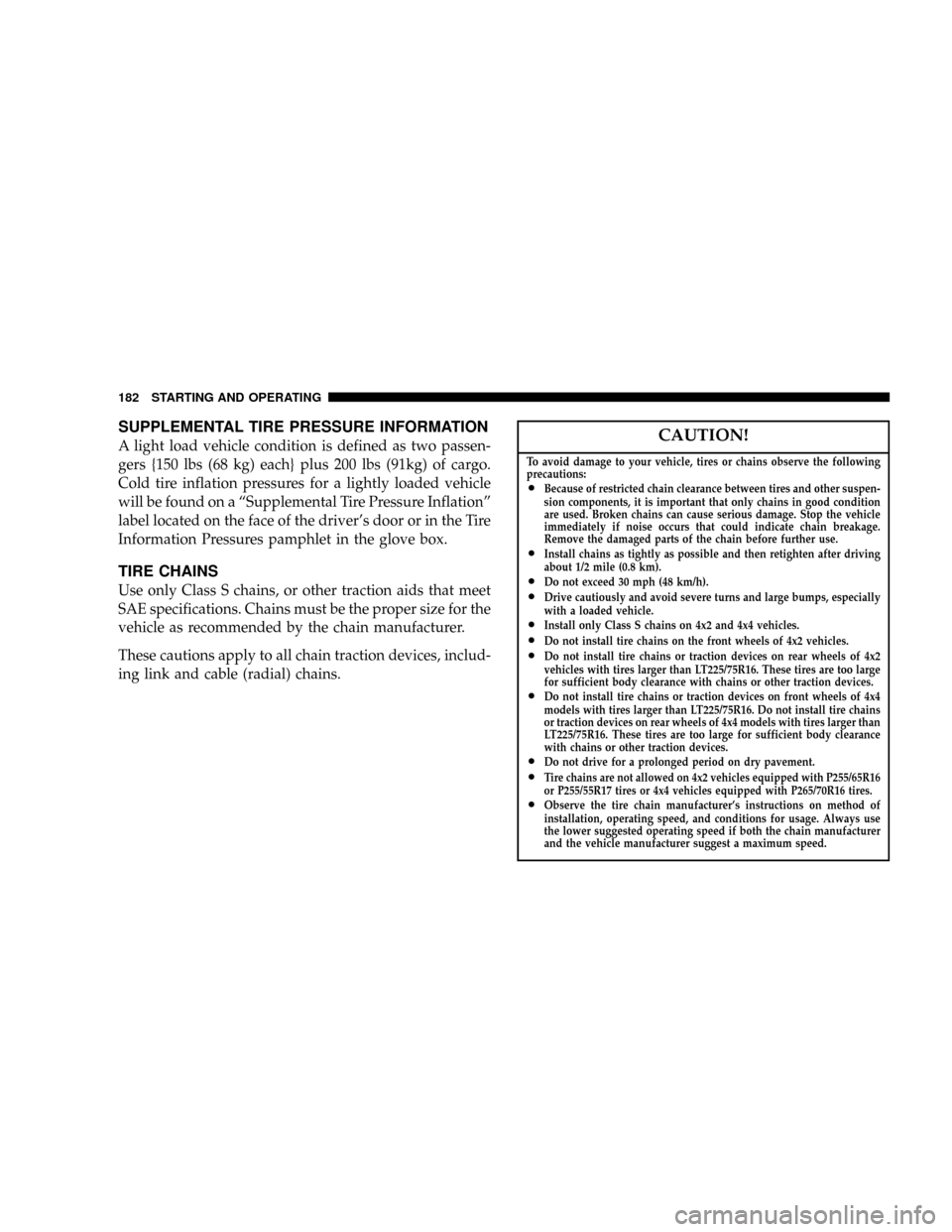
TIRE CHAINS
Use only Class S chains, or other traction aids that meet
SAE specifications. Chains must be the proper size for the
vehicle as recommended by the chain manufacturer.
These cautions apply to all chain traction devices, includ-
ing link and cable (radial) chains.
CAUTION!
To avoid damage to your vehicle, tires or chains observe the following
precautions:
²Because of restricted chain clearance between tires and other suspen-
sion components, it is important that only chains in good condition
are used. Broken chains can cause serious damage. Stop the vehicle
immediately if noise occurs that could indicate chain breakage.
Remove the damaged parts of the chain before further use.
²Install chains as tightly as possible and then retighten after driving
about 1/2 mile (0.8 km).
²Do not exceed 30 mph (48 km/h).²Drive cautiously and avoid severe turns and large bumps, especially
with a loaded vehicle.
²Install only Class S chains on 4x2 and 4x4 vehicles.²Do not install tire chains on the front wheels of 4x2 vehicles.²Do not install tire chains or traction devices on rear wheels of 4x2
vehicles with tires larger than LT225/75R16. These tires are too large
for sufficient body clearance with chains or other traction devices.
²Do not install tire chains or traction devices on front wheels of 4x4
models with tires larger than LT225/75R16. Do not install tire chains
or traction devices on rear wheels of 4x4 models with tires larger than
LT225/75R16. These tires are too large for sufficient body clearance
with chains or other traction devices.
²Do not drive for a prolonged period on dry pavement.²Tire chains are not allowed on 4x2 vehicles equipped with P255/65R16
or P255/55R17 tires or 4x4 vehicles equipped with P265/70R16 tires.
²Observe the tire chain manufacturer's instructions on method of
installation, operating speed, and conditions for usage. Always use
the lower suggested operating speed if both the chain manufacturer
and the vehicle manufacturer suggest a maximum speed.
182 STARTING AND OPERATING
Page 204 of 300

CAUTION!
Damage to the transmission may occur if the trans-
mission is shifted into Park (P) with the transfer case
in Neutral (N) and the engine RUNNING. With the
transfer case in Neutral (N) ensure that the engine is
OFF prior to shifting the transmission into Park (P).
Returning to Normal Operation
Use the following procedure to prepare your vehicle for
normal usage.
1. Bring vehicle to a complete stop.
2. Shut engine OFF.
3. Place ignition key in the ON position.
4. Depress brake pedal.
5. Shift automatic transmission to Neutral (N) or depress
clutch on manual transmission.6. Using the point of a ballpoint pen or similar object,
depress the recessed transfer case Neutral (N) button for
1 second.
7. After the Neutral (N) indicator light turns off release
the Neutral (N) button.
8. After the Neutral (N) button has been released the
transfer case will shift to the position identified by the
selector switch.
9. Shift automatic transmission into Drive (D), release
the clutch on manual transmission.
NOTE:Items 1 through 5 are requirements that must be
met prior to depressing the Neutral (N) selection button,
and must continue to be met until 1 second elapses and
the shift has been completed. If any of these requirements
(with the exception of 3 - key ON) are not met prior to
depressing the Neutral (N) button or are no longer met
during the 1 second time, then all of the mode position
indicator lights will flash continuously until all require-
ments are met or until the Neutral (N) button is released.
204 STARTING AND OPERATING