2004 CHRYSLER VOYAGER center console
[x] Cancel search: center consolePage 1097 of 2585
Component Page
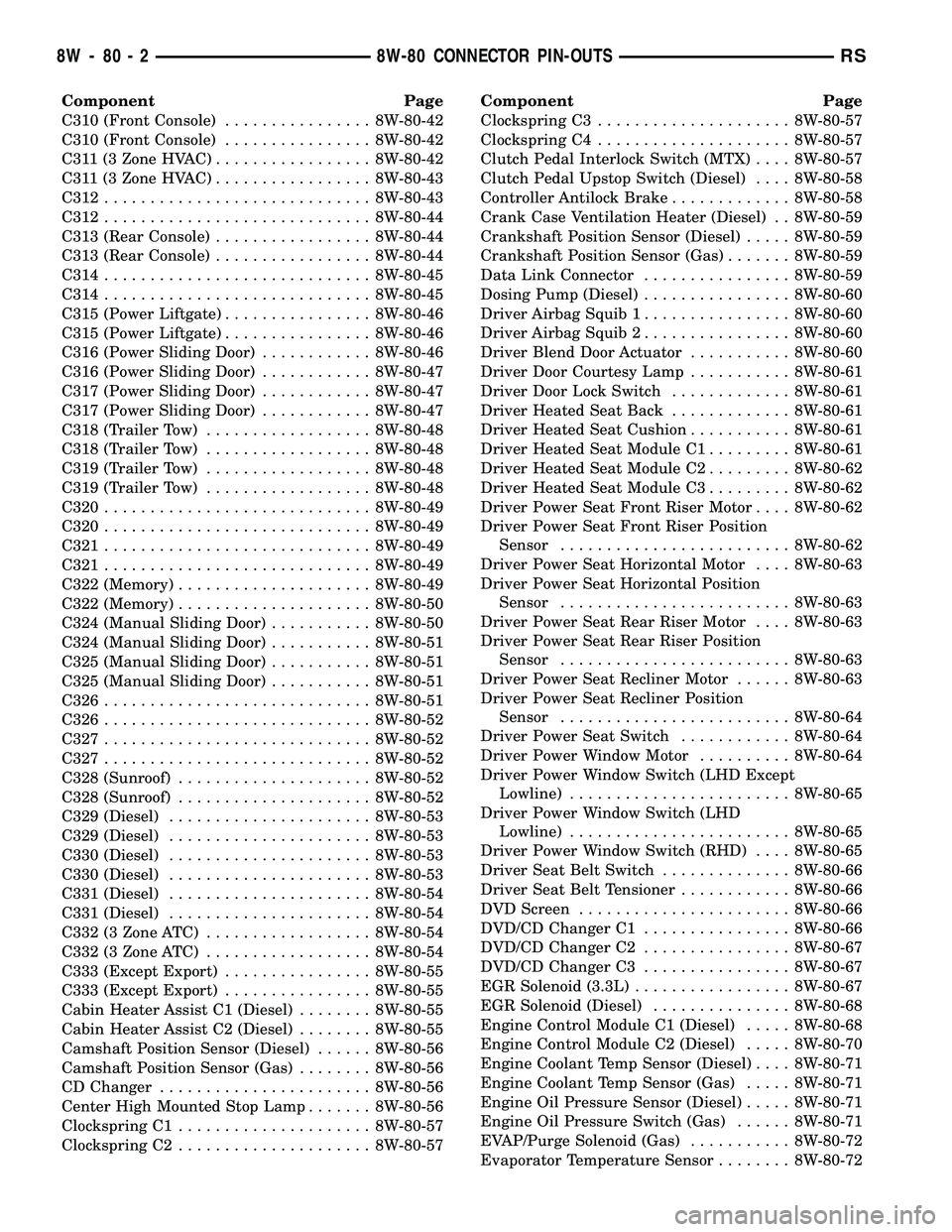
C310 (Front Console)................ 8W-80-42
C310 (Front Console)................ 8W-80-42
C311 (3 Zone HVAC)................. 8W-80-42
C311 (3 Zone HVAC)................. 8W-80-43
C312............................. 8W-80-43
C312............................. 8W-80-44
C313 (Rear Console)................. 8W-80-44
C313 (Rear Console)................. 8W-80-44
C314............................. 8W-80-45
C314............................. 8W-80-45
C315 (Power Liftgate)................ 8W-80-46
C315 (Power Liftgate)................ 8W-80-46
C316 (Power Sliding Door)............ 8W-80-46
C316 (Power Sliding Door)............ 8W-80-47
C317 (Power Sliding Door)............ 8W-80-47
C317 (Power Sliding Door)............ 8W-80-47
C318 (Trailer Tow).................. 8W-80-48
C318 (Trailer Tow).................. 8W-80-48
C319 (Trailer Tow).................. 8W-80-48
C319 (Trailer Tow).................. 8W-80-48
C320............................. 8W-80-49
C320............................. 8W-80-49
C321............................. 8W-80-49
C321............................. 8W-80-49
C322 (Memory)..................... 8W-80-49
C322 (Memory)..................... 8W-80-50
C324 (Manual Sliding Door)........... 8W-80-50
C324 (Manual Sliding Door)........... 8W-80-51
C325 (Manual Sliding Door)........... 8W-80-51
C325 (Manual Sliding Door)........... 8W-80-51
C326............................. 8W-80-51
C326............................. 8W-80-52
C327............................. 8W-80-52
C327............................. 8W-80-52
C328 (Sunroof)..................... 8W-80-52
C328 (Sunroof)..................... 8W-80-52
C329 (Diesel)...................... 8W-80-53
C329 (Diesel)...................... 8W-80-53
C330 (Diesel)...................... 8W-80-53
C330 (Diesel)...................... 8W-80-53
C331 (Diesel)...................... 8W-80-54
C331 (Diesel)...................... 8W-80-54
C332 (3 Zone ATC).................. 8W-80-54
C332 (3 Zone ATC).................. 8W-80-54
C333 (Except Export)................ 8W-80-55
C333 (Except Export)................ 8W-80-55
Cabin Heater Assist C1 (Diesel)........ 8W-80-55
Cabin Heater Assist C2 (Diesel)........ 8W-80-55
Camshaft Position Sensor (Diesel)...... 8W-80-56
Camshaft Position Sensor (Gas)........ 8W-80-56
CD Changer....................... 8W-80-56
Center High Mounted Stop Lamp....... 8W-80-56
Clockspring C1..................... 8W-80-57
Clockspring C2..................... 8W-80-57Component Page
Clockspring C3..................... 8W-80-57
Clockspring C4..................... 8W-80-57
Clutch Pedal Interlock Switch (MTX).... 8W-80-57
Clutch Pedal Upstop Switch (Diesel).... 8W-80-58
Controller Antilock Brake............. 8W-80-58
Crank Case Ventilation Heater (Diesel) . . 8W-80-59
Crankshaft Position Sensor (Diesel)..... 8W-80-59
Crankshaft Position Sensor (Gas)....... 8W-80-59
Data Link Connector................ 8W-80-59
Dosing Pump (Diesel)................ 8W-80-60
Driver Airbag Squib 1................ 8W-80-60
Driver Airbag Squib 2................ 8W-80-60
Driver Blend Door Actuator........... 8W-80-60
Driver Door Courtesy Lamp........... 8W-80-61
Driver Door Lock Switch............. 8W-80-61
Driver Heated Seat Back............. 8W-80-61
Driver Heated Seat Cushion........... 8W-80-61
Driver Heated Seat Module C1......... 8W-80-61
Driver Heated Seat Module C2......... 8W-80-62
Driver Heated Seat Module C3......... 8W-80-62
Driver Power Seat Front Riser Motor.... 8W-80-62
Driver Power Seat Front Riser Position
Sensor......................... 8W-80-62
Driver Power Seat Horizontal Motor.... 8W-80-63
Driver Power Seat Horizontal Position
Sensor......................... 8W-80-63
Driver Power Seat Rear Riser Motor.... 8W-80-63
Driver Power Seat Rear Riser Position
Sensor......................... 8W-80-63
Driver Power Seat Recliner Motor...... 8W-80-63
Driver Power Seat Recliner Position
Sensor......................... 8W-80-64
Driver Power Seat Switch............ 8W-80-64
Driver Power Window Motor.......... 8W-80-64
Driver Power Window Switch (LHD Except
Lowline)........................ 8W-80-65
Driver Power Window Switch (LHD
Lowline)........................ 8W-80-65
Driver Power Window Switch (RHD).... 8W-80-65
Driver Seat Belt Switch.............. 8W-80-66
Driver Seat Belt Tensioner............ 8W-80-66
DVD Screen....................... 8W-80-66
DVD/CD Changer C1................ 8W-80-66
DVD/CD Changer C2................ 8W-80-67
DVD/CD Changer C3................ 8W-80-67
EGR Solenoid (3.3L)................. 8W-80-67
EGR Solenoid (Diesel)............... 8W-80-68
Engine Control Module C1 (Diesel)..... 8W-80-68
Engine Control Module C2 (Diesel)..... 8W-80-70
Engine Coolant Temp Sensor (Diesel).... 8W-80-71
Engine Coolant Temp Sensor (Gas)..... 8W-80-71
Engine Oil Pressure Sensor (Diesel)..... 8W-80-71
Engine Oil Pressure Switch (Gas)...... 8W-80-71
EVAP/Purge Solenoid (Gas)........... 8W-80-72
Evaporator Temperature Sensor........ 8W-80-72
8W - 80 - 2 8W-80 CONNECTOR PIN-OUTSRS
Page 1099 of 2585
Component Page
Left Visor/Vanity Lamp (Premium/Luxury Except
Export)......................... 8W-80-96
License Lamp (Manual Release)........ 8W-80-96
License Lamp (Power Liftgate)......... 8W-80-96
License Lamp (Power Release)......... 8W-80-97
Lift Pump Motor (Diesel)............. 8W-80-97
Liftgate Ajar Switch (Manual Release) . . . 8W-80-97
Liftgate Ajar Switch (Power Release).... 8W-80-97
Liftgate Cinch/Release Motor (Power
Liftgate)........................ 8W-80-98
Liftgate Left Pinch Sensor (Power
Liftgate)........................ 8W-80-98
Liftgate Right Pinch Sensor (Power
Liftgate)........................ 8W-80-98
Low Note Horn..................... 8W-80-98
Manifold ABSolute Pressure Sensor
(Gas)........................... 8W-80-98
Mass Air Flow Sensor (Diesel)......... 8W-80-99
Memory Seat Switch................. 8W-80-99
Memory Seat/Mirror Module C1....... 8W-80-100
Memory Seat/Mirror Module C2....... 8W-80-100
Memory Seat/Mirror Module C3....... 8W-80-100
Memory Seat/Mirror Module C4....... 8W-80-101
Message Center (Highline)........... 8W-80-101
Mode Door Actuator................ 8W-80-101
Multi-Function Switch.............. 8W-80-101
Natural Vacuum Leak Detection Assembly (Except
Export)........................ 8W-80-102
Output Speed Sensor............... 8W-80-102
Overhead Console (Except Base)...... 8W-80-102
Oxygen Sensor 1/1 Upstream (Gas).... 8W-80-102
Oxygen Sensor 1/2 Downstream (Gas) . . 8W-80-103
Passenger Airbag.................. 8W-80-103
Passenger Blend Door Actuator....... 8W-80-103
Passenger Door Courtesy Lamp....... 8W-80-103
Passenger Door Lock Switch.......... 8W-80-103
Passenger Folding Mirror Relay
(Export)....................... 8W-80-104
Passenger Heated Seat Back......... 8W-80-104
Passenger Heated Seat Cushion....... 8W-80-104
Passenger Heated Seat Module C1..... 8W-80-104
Passenger Heated Seat Module C2..... 8W-80-105
Passenger Heated Seat Module C3..... 8W-80-105
Passenger Power Seat Front Riser
Motor......................... 8W-80-105
Passenger Power Seat Horizontal Motor . 8W-80-105
Passenger Power Seat Rear Riser
Motor......................... 8W-80-106
Passenger Power Seat Recliner Motor . . 8W-80-106
Passenger Power Seat Switch......... 8W-80-106
Passenger Power Window Motor....... 8W-80-106
Passenger Power Window Switch...... 8W-80-107
Passenger Seat Belt Switch.......... 8W-80-107
Passenger Seat Belt Tensioner........ 8W-80-107
Power Folding Mirror Switch (Export) . . 8W-80-107Component Page
Power Liftgate Module C1........... 8W-80-108
Power Liftgate Module C2........... 8W-80-108
Power Liftgate Motor............... 8W-80-108
Power Mirror Switch............... 8W-80-109
Power Outlet (Except Lowline)........ 8W-80-109
Power Seat Circuit Breaker (30A)..... 8W-80-109
Power Window Circuit Breaker (25A) . . . 8W-80-109
Power Window Switch (LHD Lowline) . . 8W-80-110
Powertrain Control Module C1........ 8W-80-110
Powertrain Control Module C2........ 8W-80-111
Powertrain Control Module C3........ 8W-80-112
Powertrain Control Module C4........ 8W-80-113
Radiator Fan No. 1 (Diesel).......... 8W-80-114
Radiator Fan No. 1 (Gas)............ 8W-80-114
Radiator Fan No. 2 (Diesel).......... 8W-80-114
Radiator Fan No. 2 (Gas)............ 8W-80-114
Radiator Fan Relay (Gas)............ 8W-80-115
Radiator Fan Relay No. 1 (Diesel)..... 8W-80-115
Radiator Fan Relay No. 2 (Diesel)..... 8W-80-115
Radiator Fan Relay No. 3 (Diesel)..... 8W-80-115
Radio C1......................... 8W-80-116
Radio C2 (CD Changer)............. 8W-80-116
Radio C2 (DVD/CD Changer)......... 8W-80-117
Rear A/C-Heater Unit (3 Zone MTC).... 8W-80-117
Rear Auto Temp Control Switch (3 Zone
ATC) .......................... 8W-80-117
Rear Blower Front Control Switch (3 Zone
MTC)......................... 8W-80-118
Rear Blower Motor Power Module C1 (3 Zone
ATC) .......................... 8W-80-118
Rear Blower Motor Power Module C2 (3 Zone
ATC) .......................... 8W-80-118
Rear Blower Rear Control Switch C1 (3 Zone
MTC)......................... 8W-80-118
Rear Blower Rear Control Switch C2 (3 Zone
MTC)......................... 8W-80-119
Rear Dome Lamp (Except Luxury)..... 8W-80-119
Rear Intrusion Sensor (United
Kingdom)...................... 8W-80-119
Rear Mode Motor (3 Zone ATC)........ 8W-80-119
Rear Power Outlet................. 8W-80-119
Rear Temperature Motor (3 Zone ATC) . . 8W-80-120
Rear Wiper Motor.................. 8W-80-120
Recirculation Door Actuator.......... 8W-80-120
Remote Keyless Entry Antenna (Japan) . 8W-80-120
Right B-Pillar Switch (Power Sliding
Door).......................... 8W-80-120
Right Cinch/Release Motor (Power Sliding
Door).......................... 8W-80-121
Right Cylinder Lock Switch (Export) . . . 8W-80-121
Right Door Speaker (Highline)........ 8W-80-121
Right Door Speaker (Lowline)......... 8W-80-121
Right Fog Lamp (Except Export)...... 8W-80-122
Right Fog Lamp (Export)............ 8W-80-122
Right Front Door Ajar Switch (Base) . . . 8W-80-122
8W - 80 - 4 8W-80 CONNECTOR PIN-OUTSRS
Page 1234 of 2585
CONNECTOR NAME/NUMBER COLOR LOCATION FIG.
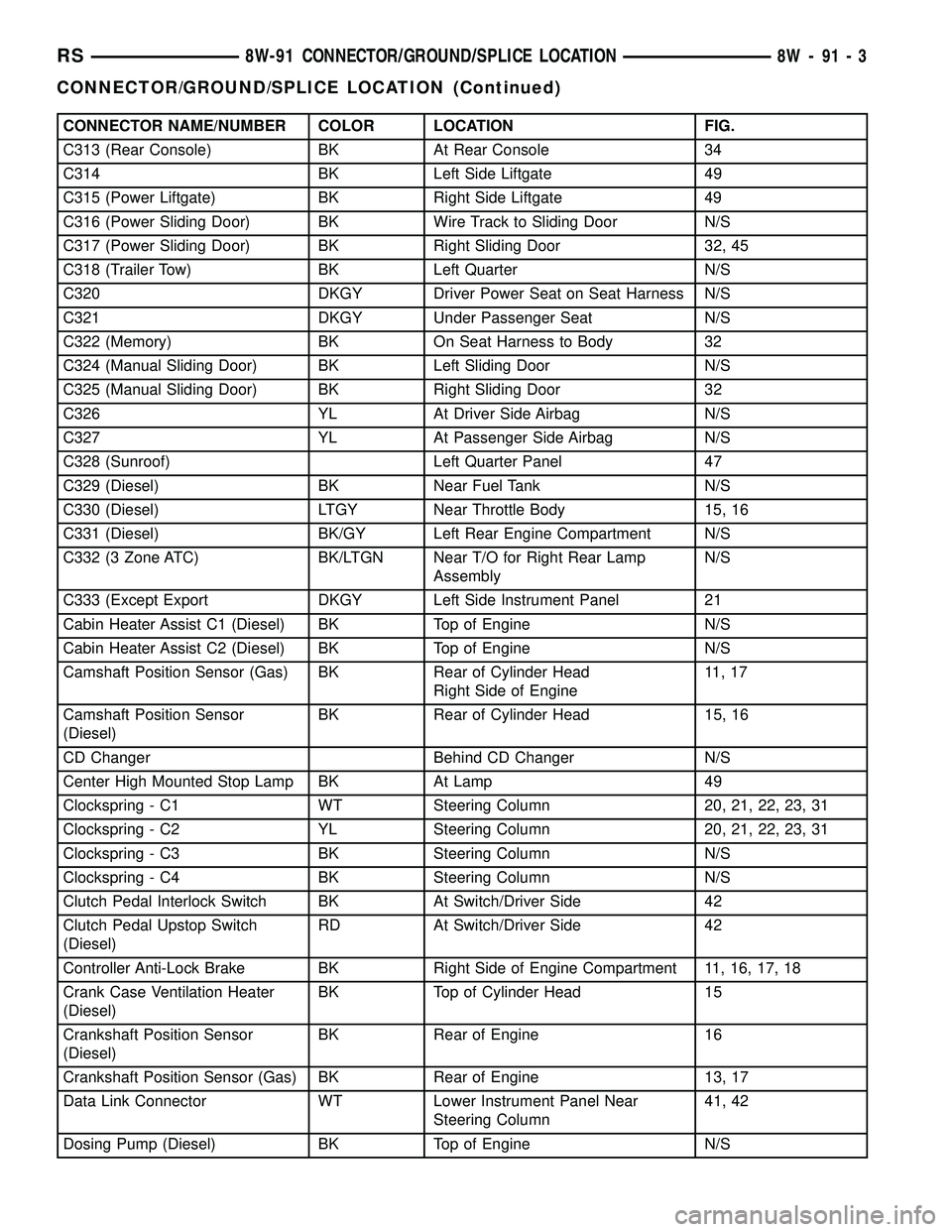
C313 (Rear Console) BK At Rear Console 34
C314 BK Left Side Liftgate 49
C315 (Power Liftgate) BK Right Side Liftgate 49
C316 (Power Sliding Door) BK Wire Track to Sliding Door N/S
C317 (Power Sliding Door) BK Right Sliding Door 32, 45
C318 (Trailer Tow) BK Left Quarter N/S
C320 DKGY Driver Power Seat on Seat Harness N/S
C321 DKGY Under Passenger Seat N/S
C322 (Memory) BK On Seat Harness to Body 32
C324 (Manual Sliding Door) BK Left Sliding Door N/S
C325 (Manual Sliding Door) BK Right Sliding Door 32
C326 YL At Driver Side Airbag N/S
C327 YL At Passenger Side Airbag N/S
C328 (Sunroof) Left Quarter Panel 47
C329 (Diesel) BK Near Fuel Tank N/S
C330 (Diesel) LTGY Near Throttle Body 15, 16
C331 (Diesel) BK/GY Left Rear Engine Compartment N/S
C332 (3 Zone ATC) BK/LTGN Near T/O for Right Rear Lamp
AssemblyN/S
C333 (Except Export DKGY Left Side Instrument Panel 21
Cabin Heater Assist C1 (Diesel) BK Top of Engine N/S
Cabin Heater Assist C2 (Diesel) BK Top of Engine N/S
Camshaft Position Sensor (Gas) BK Rear of Cylinder Head
Right Side of Engine11 , 1 7
Camshaft Position Sensor
(Diesel)BK Rear of Cylinder Head 15, 16
CD Changer Behind CD Changer N/S
Center High Mounted Stop Lamp BK At Lamp 49
Clockspring - C1 WT Steering Column 20, 21, 22, 23, 31
Clockspring - C2 YL Steering Column 20, 21, 22, 23, 31
Clockspring - C3 BK Steering Column N/S
Clockspring - C4 BK Steering Column N/S
Clutch Pedal Interlock Switch BK At Switch/Driver Side 42
Clutch Pedal Upstop Switch
(Diesel)RD At Switch/Driver Side 42
Controller Anti-Lock Brake BK Right Side of Engine Compartment 11, 16, 17, 18
Crank Case Ventilation Heater
(Diesel)BK Top of Cylinder Head 15
Crankshaft Position Sensor
(Diesel)BK Rear of Engine 16
Crankshaft Position Sensor (Gas) BK Rear of Engine 13, 17
Data Link Connector WT Lower Instrument Panel Near
Steering Column41, 42
Dosing Pump (Diesel) BK Top of Engine N/S
RS8W-91 CONNECTOR/GROUND/SPLICE LOCATION8W-91-3
CONNECTOR/GROUND/SPLICE LOCATION (Continued)
Page 1239 of 2585
CONNECTOR NAME/NUMBER COLOR LOCATION FIG.
Liftgate Right Pinch Sensor
(Power Liftgate)BK Right Side of Liftgate 49
Low Note Horn BK Left Frame Rail 5
Manifold Absolute Pressure
Sensor (Gas)BK On Intake N/S
Mass Air Flow Sensor (Diesel) OR Top of Engine 15, 16
Memory Seat/Mirror Module C1 GY Under Driver Seat N/S
Memory Seat/Mirror Module C2 GY Under Driver Seat N/S
Memory Seat/Mirror Module C3 WT Under Driver Seat N/S
Memory Seat/Mirror Module C4 GY Under Driver Seat N/S
Memory Seat Front Vertical Motor RD Under Seat N/S
Memory Seat Front Vertical
Position SensorBK Under Seat N/S
Memory Seat Horizontal Motor BK Under Seat N/S
Memory Seat Horizontal Position
SensorBK Under Seat N/S
Memory Seat Rear Vertical Motor RD Under Seat N/S
Memory Seat Rear Vertical
Position SensorBK Under Seat N/S
Memory Seat Recliner Motor GN Under Seat N/S
Memory Seat Recliner Position
SensorBK Under Seat N/S
Memory Set Switch BK At Switch Driver Door 43
Message Center (Highline) WT Rear of Message Center 20, 21, 28
Mode Door Actuator GY Left Side of HVAC N/S
Multi Function Switch BK At Steering Column 20, 21, 22, 23, 31
Natural Vacuum Leak Detection
Assembly (Except Export)LTGY Top of Engine 12
Output Speed Sensor GY Front of Transmission 14, 18, 19
Overhead Console (Except Base) BK Front of Console N/S
Oxygen Sensor 1/1 Upstream
(Gas)BK Rear of Engine 11, 12, 18
Oxygen Sensor 1/2 Downstream
(Gas)BK Rear of Engine 11, 12,18
Passenger Airbag YL Passenger Side of Instrument Panel 20, 23, 24 29
Passenger Blend Door Actuator GY On HVAC N/S
Passenger Door Courtesy Lamp GY At Lamp 44
Passenger Door Lock Switch BK At Switch 44
Passenger Folding Mirror Relay
(Export)BL Left Kick Panel 7
Passenger Heated Seat Back GN At Seat N/S
Passenger Heated Seat Cushion BK At Seat N/S
Passenger Heated Seat Module
C1GY At Heated Seat N/S
8W - 91 - 8 8W-91 CONNECTOR/GROUND/SPLICE LOCATIONRS
CONNECTOR/GROUND/SPLICE LOCATION (Continued)
Page 1295 of 2585
POWER OUTLET
DESCRIPTION
Accessory power outlets are standard equipment on
this model. Two power outlets are installed in the
instrument panel center lower bezel, which is located
near the bottom of the instrument panel center stack
area. Two additional power outlets are also incorpo-
rated into the vehicle, one on the left rear C-pillar
trim and the other in the center console, if equipped.
The power outlets bases are secured by a snap fit in
the appropriate bezels. A hinged plug flips closed to
conceal and protect the power outlet base when the
power outlet is not being used.
The power outlet receptacle unit and the power
outlet plugs are each available for service replace-
ment.
OPERATION
The power outlet base or receptacle shell is con-
nected to ground, and an insulated contact in the
bottom of the shell is connected to battery current.
The power outlet on the instrument panel marked
with a battery receives battery voltage from a fuse in
the Integrated Power Module (IPM) at all times. The
other power outlet on the instrument panel marked
with a key receives battery voltage only when the
key is in the on position.
The power outlet located in the center console
receives battery voltage all the time when positioned
between thefront seatsand key-on voltage when
positioned between therear seats. The power outlet
located on the C-pillar receives battery voltage only
when the key is in the on position.
DIAGNOSIS AND TESTING
DIAGNOSIS & TESTING - POWER OUTLET
For complete circuit diagrams, refer toCigar
Lighter/Power Outletin Wiring Diagrams.
WARNING: ON VEHICLES EQUIPPED WITH AIR-
BAGS, REFER TO RESTRAINTS BEFORE ATTEMPT-
ING ANY STEERING WHEEL, STEERING COLUMN,
SEAT OR INSTRUMENT PANEL COMPONENT DIAG-
NOSIS OR SERVICE. FAILURE TO TAKE THE
PROPER PRECAUTIONS COULD RESULT IN ACCI-
DENTAL AIRBAG DEPLOYMENT AND POSSIBLE
PERSONAL INJURY.
(1) Check the fused B(+) fuse in the Integrated
Power Module (IPM). If OK, go to Step 2. If not OK,
repair the shorted circuit or component as required
and replace the faulty fuse.
(2) Check for battery voltage at the fused B(+) fuse
in the IPM. If OK, go to Step 3. If not OK, repair the
open fused B(+) circuit to the IPM fuse as required.
(3) Open the power outlet door. Check for continu-
ity between the inside circumference of the power
outlet receptacle and a good ground. There should be
continuity. If OK, go to Step 4. If not OK, go to Step
5.
(4) Check for battery voltage at the insulated con-
tact located at the back of the power outlet recepta-
cle. If not OK, go to Step 5.
(5) Disconnect and isolate the battery negative
cable. Remove the appropriate bezel. Check for conti-
nuity between the ground circuit cavity of the power
outlet wire harness connector and a good ground.
There should be continuity. If OK, go to Step 6. If not
OK, repair the open ground circuit to ground as
required.
(6) Connect the battery negative cable. Check for
battery voltage at the fused B(+) circuit cavity of the
power outlet wire harness connector. If OK, replace
the faulty power outlet receptacle. If not OK, repair
the open fused B(+) circuit to the IPM fuse as
required.
8W - 97 - 4 8W-97 POWER DISTRIBUTION SYSTEMRS
Page 1669 of 2585
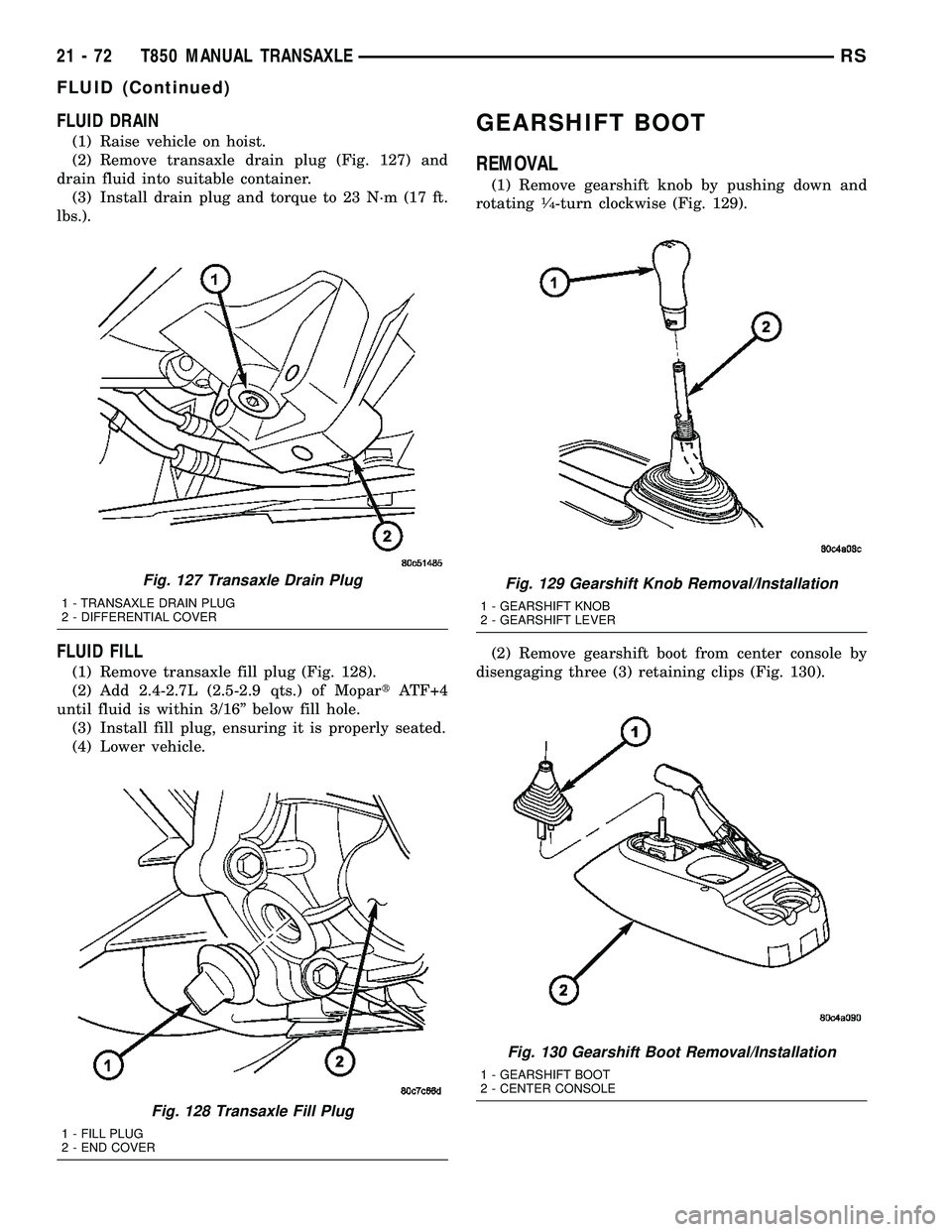
FLUID DRAIN
(1) Raise vehicle on hoist.
(2) Remove transaxle drain plug (Fig. 127) and
drain fluid into suitable container.
(3) Install drain plug and torque to 23 N´m (17 ft.
lbs.).
FLUID FILL
(1) Remove transaxle fill plug (Fig. 128).
(2) Add 2.4-2.7L (2.5-2.9 qts.) of MopartATF+4
until fluid is within 3/16º below fill hole.
(3) Install fill plug, ensuring it is properly seated.
(4) Lower vehicle.
GEARSHIFT BOOT
REMOVAL
(1) Remove gearshift knob by pushing down and
rotating1¤4-turn clockwise (Fig. 129).
(2) Remove gearshift boot from center console by
disengaging three (3) retaining clips (Fig. 130).
Fig. 127 Transaxle Drain Plug
1 - TRANSAXLE DRAIN PLUG
2 - DIFFERENTIAL COVER
Fig. 128 Transaxle Fill Plug
1 - FILL PLUG
2 - END COVER
Fig. 129 Gearshift Knob Removal/Installation
1 - GEARSHIFT KNOB
2 - GEARSHIFT LEVER
Fig. 130 Gearshift Boot Removal/Installation
1 - GEARSHIFT BOOT
2 - CENTER CONSOLE
21 - 72 T850 MANUAL TRANSAXLERS
FLUID (Continued)
Page 1670 of 2585
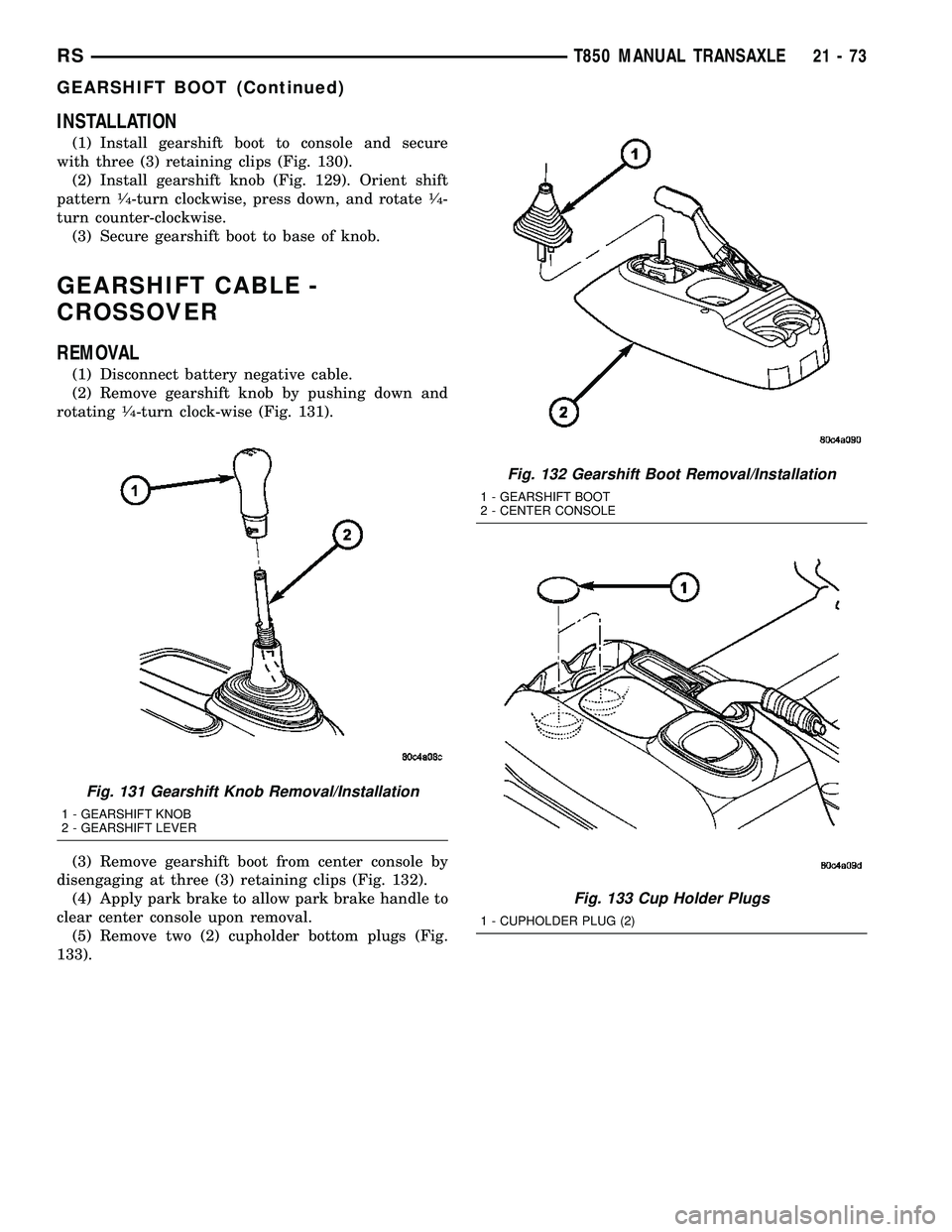
INSTALLATION
(1) Install gearshift boot to console and secure
with three (3) retaining clips (Fig. 130).
(2) Install gearshift knob (Fig. 129). Orient shift
pattern
1¤4-turn clockwise, press down, and rotate1¤4-
turn counter-clockwise.
(3) Secure gearshift boot to base of knob.
GEARSHIFT CABLE -
CROSSOVER
REMOVAL
(1) Disconnect battery negative cable.
(2) Remove gearshift knob by pushing down and
rotating
1¤4-turn clock-wise (Fig. 131).
(3) Remove gearshift boot from center console by
disengaging at three (3) retaining clips (Fig. 132).
(4) Apply park brake to allow park brake handle to
clear center console upon removal.
(5) Remove two (2) cupholder bottom plugs (Fig.
133).
Fig. 131 Gearshift Knob Removal/Installation
1 - GEARSHIFT KNOB
2 - GEARSHIFT LEVER
Fig. 132 Gearshift Boot Removal/Installation
1 - GEARSHIFT BOOT
2 - CENTER CONSOLE
Fig. 133 Cup Holder Plugs
1 - CUPHOLDER PLUG (2)
RST850 MANUAL TRANSAXLE21-73
GEARSHIFT BOOT (Continued)
Page 1671 of 2585
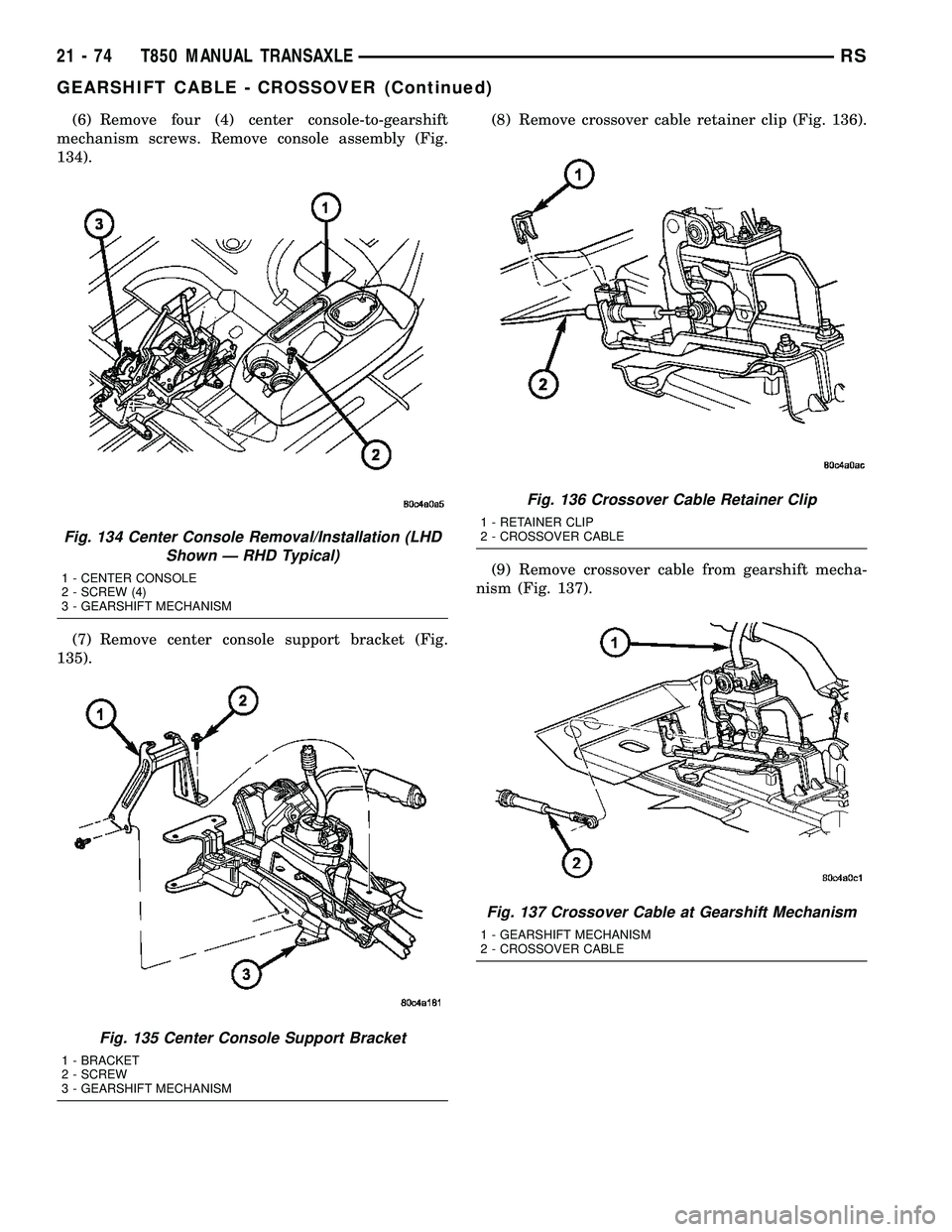
(6) Remove four (4) center console-to-gearshift
mechanism screws. Remove console assembly (Fig.
134).
(7) Remove center console support bracket (Fig.
135).(8) Remove crossover cable retainer clip (Fig. 136).
(9) Remove crossover cable from gearshift mecha-
nism (Fig. 137).
Fig. 134 Center Console Removal/Installation (LHD
Shown Ð RHD Typical)
1 - CENTER CONSOLE
2 - SCREW (4)
3 - GEARSHIFT MECHANISM
Fig. 135 Center Console Support Bracket
1 - BRACKET
2 - SCREW
3 - GEARSHIFT MECHANISM
Fig. 136 Crossover Cable Retainer Clip
1 - RETAINER CLIP
2 - CROSSOVER CABLE
Fig. 137 Crossover Cable at Gearshift Mechanism
1 - GEARSHIFT MECHANISM
2 - CROSSOVER CABLE
21 - 74 T850 MANUAL TRANSAXLERS
GEARSHIFT CABLE - CROSSOVER (Continued)