Page 7 of 382
Interior
1. Seat belt!p. 66
Adjustable seat belt shoulder anchor (for front
seats)!p. 712. Remote trunk lid release!p. 36
3. Power window switch!p. 43
4. Window lock switch!p. 44
5. Electric remote-controlled outside mirror
switch!p. 184
6. Power door lock switch!p. 34
7. Sun visor!p. 205
8. Sunroof switch (for vehicles with sunroof)!p. 45
Dome light (for vehicles without sunroof)!p. 127
9. Inside day/night rearview mirror!p. 173
Electrochromic inside rearview mirror (if so equipped)
!p. 174
Dome light (for vehicles with sunroof)
10. Vanity mirror!p. 206
11. Glove compartment!p. 210
12. Cup holder (for rear seat)!p. 208
13. Rear seat!p. 64
14. Center console with lid!p. 211
15. Supplemental restraint system-side air bag!p. 87
(for front seats, if so equipped)
16. Cup holder (for front seats)!p. 208
17. Front seat
18. Ash receptacle receiver.
INTRODUCTION 7
1
Page 130 of 382
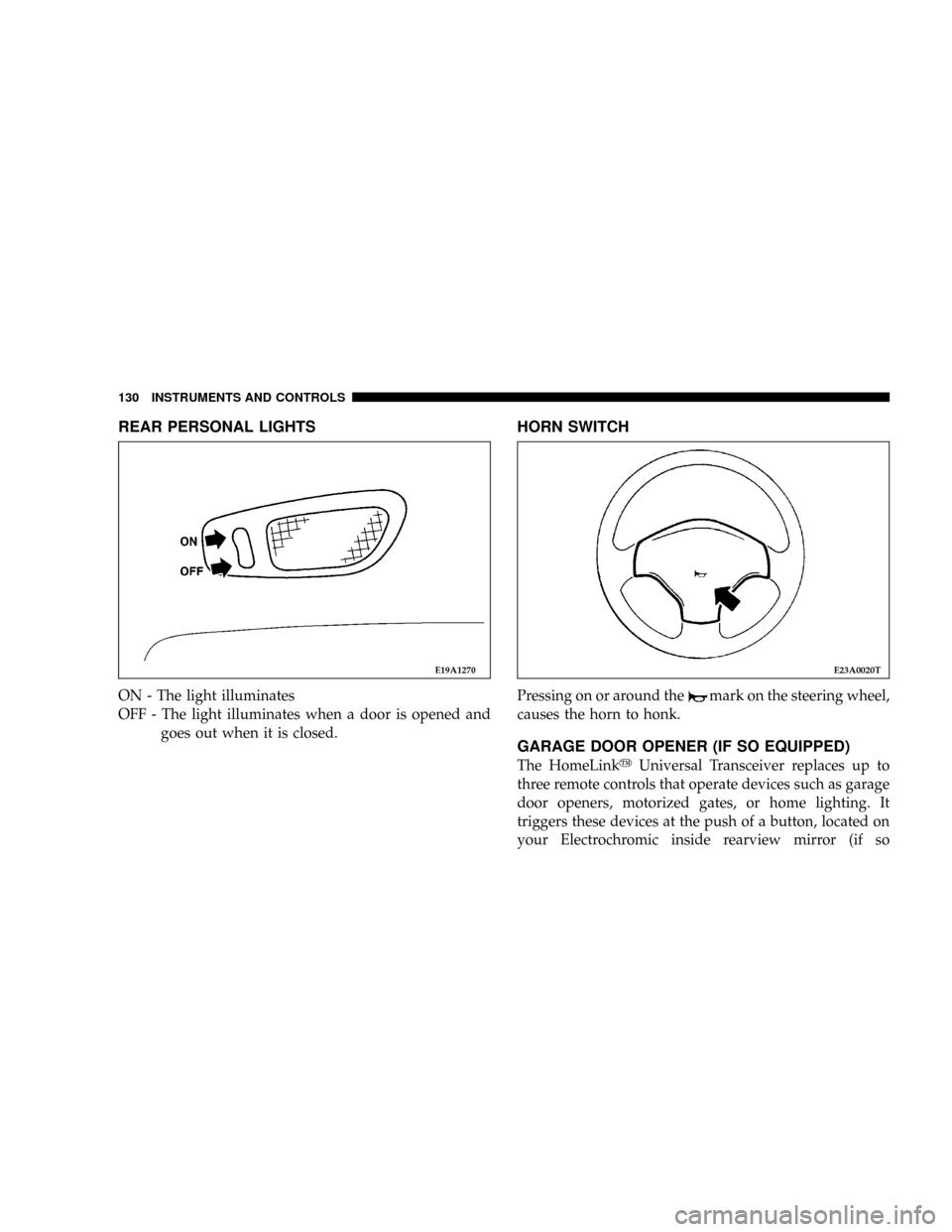
REAR PERSONAL LIGHTS
ON - The light illuminates
OFF - The light illuminates when a door is opened and
goes out when it is closed.
HORN SWITCH
Pressing on or around themark on the steering wheel,
causes the horn to honk.
GARAGE DOOR OPENER (IF SO EQUIPPED)
The HomeLinkyUniversal Transceiver replaces up to
three remote controls that operate devices such as garage
door openers, motorized gates, or home lighting. It
triggers these devices at the push of a button, located on
your Electrochromic inside rearview mirror (if so
E19A1270E23A0020T
130 INSTRUMENTS AND CONTROLS
Page 186 of 382
If the ªCALº is not displayed, but compass calibration is
required, press and hold the display switch for 12 sec-
onds, or until ªCALº is displayed. With ªCALº dis-
played, drive the vehicle in a circle at less than 5mph
(8km/h) or less until the ªCALº goes off.
Cleaning of the mirror
When cleaning the mirror, use a paper towel or similar
material dampened with glass cleaner. Do not spray glass
cleaner directly on the mirror as that may cause the liquid
cleaner to enter the mirror housing.
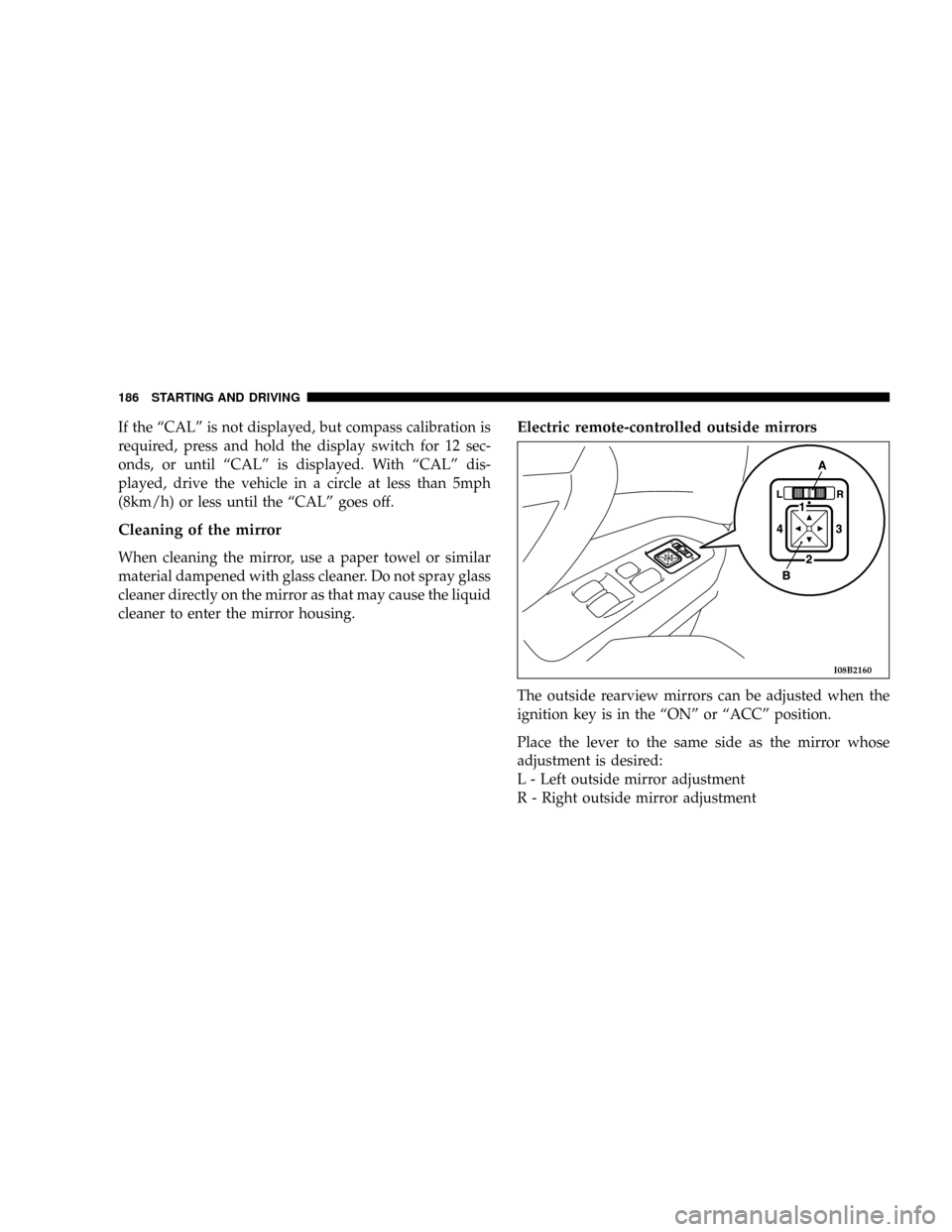
Electric remote-controlled outside mirrors
The outside rearview mirrors can be adjusted when the
ignition key is in the ªONº or ªACCº position.
Place the lever to the same side as the mirror whose
adjustment is desired:
L - Left outside mirror adjustment
R - Right outside mirror adjustment
I08B2160
186 STARTING AND DRIVING
Page 205 of 382

NTuning.............................224
NBalance............................224
NFade..............................224
NTone Control........................224
NMODE Selection......................224
NPTY (Program Type) Selection.............224
NScan Button.........................224
NTo Set The Pushbutton Memory...........225
NTo Change From Clock To Radio Mode......225
NGeneral Information...................225
NOperating Instructions Ð CD Changer......225
NInserting the Compact Disc..............225
NSeek Button.........................226
NFF /Tune/ RW Button..................226
NRandom Play........................226
NRadio/CD Button.....................226NTime Button.........................226
NScan Button.........................226
NLoading The CD Changer...............226
NPlaying Discs........................227
NRemoving Discs From The CD Changer.....227
mSteering wheel remote control switches (if so
equipped)
...........................227
NHow to adjust the volume...............228
NTo listen to the audio system..............228
NTo listen to the radio...................228
NAutomatic tuning the radio...............228
NTo select the preset memory..............228
NTo listen to a tape.....................229
NTo listen to a CD......................229
NHandling of compact discs...............230
mRadio operation and cellular phones........232
FOR PLEASANT DRIVING 205
6
Page 227 of 382
Playing Discs
The radio display indicates the CD number (the slot
where the CD is loaded), and the current track being
played at the time.
If more than one CD is loaded in the CD changer, it
automatically plays the next CD after playing the last
track of the current CD. If there is only one CD loaded, it
will automatically return to the first track of the CD. To
play any available disc select the desired disc position
button.
Removing Discs from the CD Changer
1. Press the load/eject button then press the desired disc
position button to eject that CD.
2. The display will flash the disc number that is being
ejected.
3. If the disc is not removed from the unit within 15
seconds the disc will automatically re-load.
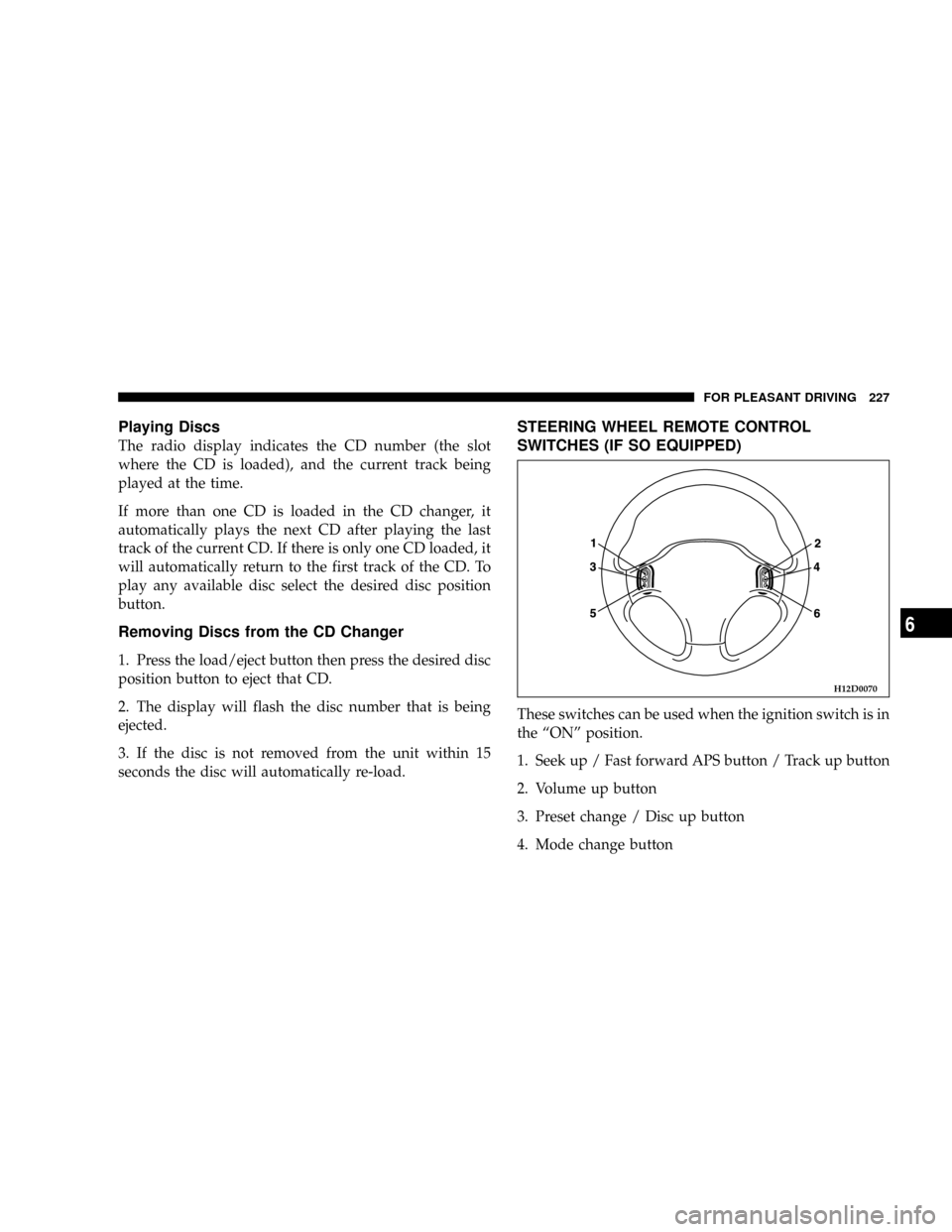
STEERING WHEEL REMOTE CONTROL
SWITCHES (IF SO EQUIPPED)
These switches can be used when the ignition switch is in
the ªONº position.
1. Seek up / Fast forward APS button / Track up button
2. Volume up button
3. Preset change / Disc up button
4. Mode change button
H12D0070
FOR PLEASANT DRIVING 227
6
Page 228 of 382

5. Seek down / Rewind APS button / Track down button
6. Volume down button
NOTE:
²Do not push two or more of the steering wheel
remote control switches at the same time.
How to adjust the volume
Volume up button - 2
The volume will increase when this button is pressed.
Volume down button - 6
The volume will decrease when this button is pressed.
To listen to the audio system
Select the desired mode by lightly pressing the Mode
change button (4). Every time the button is pressed, the
mode can be changed.
Radio (AM)!Radio (FM)!Tape!CD
NOTE:
²Tape or CD mode cannot be selected unless a tape or
CD is in the slot.
To listen to the radio
To select AM/FM mode
Mode change button - 4
Select the desired band (AM or FM) by pressing this
button.
Automatic tuning the radio
Seek up button - 1
Seek down button - 5
After pressing these buttons, release the buttons, and
reception of the selected station will begin.
To select the preset memory
Preset change button - 3
When the radio is on and this button is pressed, the
preset station frequencies are sequentially selected each
time the button is pressed; 1, 2, 3, 4, 5, 6, 7, 8, 9, 10, 1, 2 etc.
228 FOR PLEASANT DRIVING
Page 284 of 382
cover of the instrument panel (driver 's side). Always use
a fuse of the same capacity for replacement.
Passenger compartment fuse location
Fuse location table
No. Symbol Electrical system Capacity
1
Audio 20A
2
ÐÐÐ
3
Sunroof 20A
4
SOCKETAccessory socket 15A
5
Rear window defogger 30A
6
Heater 30A
7
ÐÐÐ
8
ÐÐÐ
9
SOCKETAccessory socket 15A
10
Door lock 15A
11
Rear window wiper 15A
12
ÐÐ 15A
13
Relay 7.5A
14
R/C MIRElectric remote-controlled outside
mirror7.5A
15
ÐÐÐ
16
Cigarette lighter 15A
No. Symbol Electrical system Capacity
17
Engine Control 7.5A
18
Windshield wiper 20A
19
Door mirror heater 7.5A
20
Relay 7.5A
21
CRUISECruise control 7.5A
22
Back up light 7.5A
23
Gauge 7.5A
24
Engine control 10A
30A
25
ÐSpare fuse 20A
15A
10A
ISome fuses may not be installed on your vehicles,
depending on the vehicle model or specifications.
IThe table above shows the main equipment corre-
sponding to each fuse.
284 EMERGENCIES