Page 55 of 271
CONSOLE FEATURES
The front console has two cup holders. An optional
removable ashtray may be located in the driver's side cup
holder.The center console/armrest has a pencil /tire gage holder
and a tissue holder mounted on the underside of the
cover. The bottom of the console bin also has built in
holders for compact discs or cassette tapes. The power
outlet is also mounted inside the center console (if
equipped). There are also two cup holders for rear seat
passengers and a rear courtesy lamp located directly in
back of the center console. The center console can be
locked using the ªmasterº key.
Two coin holders are located toward the front of the
inside of the console bin. Both can also accommodate
various combinations of different types of coins, includ-
ing some international currencies. The slot on the far left
side is not for coins, but for an optional power outlet, if so
equipped.
UNDERSTANDING THE FEATURES OF YOUR VEHICLE 55
3
Page 61 of 271

The left rotary switch controls the heat level for the
driver's seat, and the right rotary switch controls the heat
level for the passenger's seat. These switches feature
several heat settings ranging from 0 to 6.
To Fold The Front Seatback Forward:
Turn the high mounted release lever rearward and fold
the seatback forward. If you release the lever early, a
safety feature locks the seat into that position. Turn the
release lever again to continue lowering the seat. Just
before the seatback reaches the full forward position, a
soft ªclick ª will be heard. This is a signal that the
seatback is unlocked and can be raised without the use of
the release handle. Raise the seatback until it locks into
position.
Easy Entry System
How to operate the passenger front seat:
1. Rotate front seat handle rearward until seat back
releases.2. While holding the handle, push seat back forward
until a click is heard, then let go of the handle.
3. Continue pushing the entire seat forward until it slides
toward the dashboard.
4. To return seat to a sitting position, push seat rearward.
5. Rotate seat back upright until it locks.
UNDERSTANDING THE FEATURES OF YOUR VEHICLE 61
3
Page 63 of 271
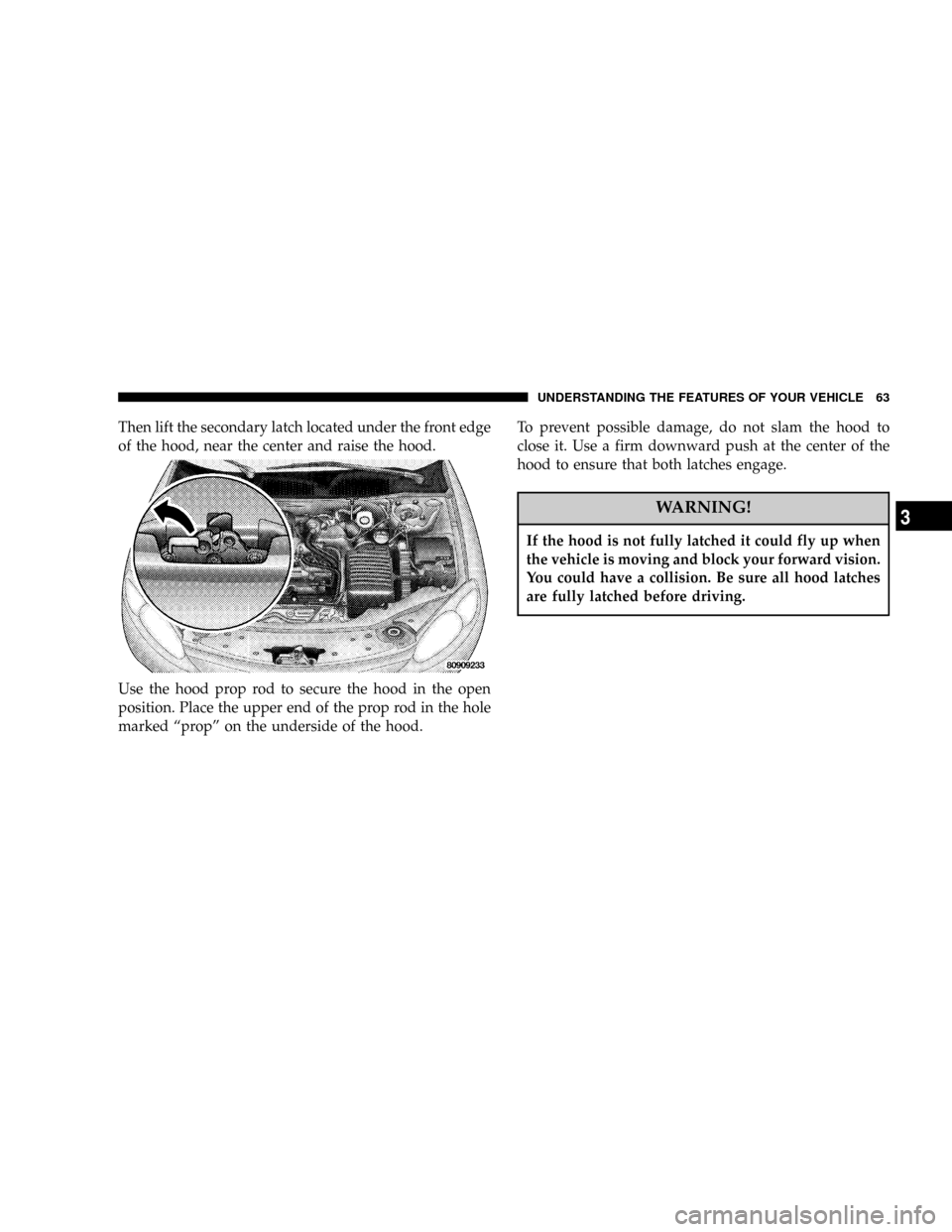
Then lift the secondary latch located under the front edge
of the hood, near the center and raise the hood.
Use the hood prop rod to secure the hood in the open
position. Place the upper end of the prop rod in the hole
marked ªpropº on the underside of the hood.To prevent possible damage, do not slam the hood to
close it. Use a firm downward push at the center of the
hood to ensure that both latches engage.
WARNING!
If the hood is not fully latched it could fly up when
the vehicle is moving and block your forward vision.
You could have a collision. Be sure all hood latches
are fully latched before driving.
UNDERSTANDING THE FEATURES OF YOUR VEHICLE 63
3
Page 64 of 271
LIGHTS
Front Map/Reading Lights
These lights, located under the rearview mirror, come on
whenever a door is opened or the illuminated entry
system is activated. The lights can also be turned on with
the doors closed by means of switches located on the
front of the rearview mirror.
NOTE:The map lights will remain on until the mirror
switches have been turned to the OFF position, so be sure
that they have been turned off before leaving the vehicle.
Interior Lights
The console rear light, map/courtesy lights, and the
optional under-door courtesy lights come on when a
door is opened and the panel lamp dimmer switch
(located on the turn signal control stalk) is in any detent
except fully counter-clockwise (dome lamp ON position)
or fully clockwise (dome lamp OFF position). Rotating
the panel dimmer switch fully counter-clockwise will
64 UNDERSTANDING THE FEATURES OF YOUR VEHICLE
Page 65 of 271

turn on the lights. Turn the panel dimmer switch fully
clockwise to prevent the lights from coming on when a
door is opened.
NOTE:The interior lights have a ªfade to offº feature.
When the lights are turned off, they gradually ªfadeº off.
Dimmer Control
With the parking lights or headlights
on, rotating the dimmer control for the
interior lights on the Multi-Function
Control Lever upward will increase
the brightness of the instrument panel
lights.
Dome Light Position
Rotate the dimmer control completely
upward to the second detent to turn
on the interior lights. The interior
lights will remain on when the dim-
mer control is in this position.
Interior light Defeat (OFF)
Rotate the dimmer control to the ex-
treme bottom full-circle position. The
interior lights will remain off when the
doors are open.
Daytime Mode (Daytime Brightness Feature)
Rotate the dimmer control to the first
detent (full-circle). This feature bright-
ens the odometer and radio display
when the parking lights or headlights
are on during daylight conditions.
UNDERSTANDING THE FEATURES OF YOUR VEHICLE 65
3
Page 69 of 271

Speed Sensitive Intermittent Wiper System
Use the intermittent wiper when weather conditions
make a single wiping cycle, with a variable pause be-
tween cycles, desirable. Turn the lever to the delay
position, then select the delay interval. The delay can be
regulated from a maximum of approximately 18 seconds
between cycles, to a cycle every 1/2 second.
NOTE:The wiper delay times depend on vehicle speed.
If the vehicle is moving less than 16 km/h (10 mph),
delay times will be doubled.
TILT STEERING COLUMN
To tilt the column, push down on the lever below the turn
signal control and move the wheel up or down, as
desired. Push the lever back up to lock the column firmly
in place.WARNING!
Tilting the steering column while the vehicle is
moving is dangerous. Without a stable steering col-
umn, you could lose control of the vehicle and have
an accident. Adjust the column only while the ve-
hicle is stopped. Be sure it is locked before driving.
UNDERSTANDING THE FEATURES OF YOUR VEHICLE 69
3
Page 70 of 271
TRACTION CONTROLÐ IF EQUIPPED
To turn the Traction Control System Off, press
the switch located on the top of the steering
column, to the right of the hazard switch, until
the Traction Control indicator in the instrument
cluster lights up.
To turn the Traction Control System On, press the switch
until the Traction Control indicator in the instrument
cluster turns off.
NOTE:The Traction Control System is enabled each
time the ignition switch is turned On. This will occureven if you used the switch to turn the system off before
powering down or turning the ignition to Lock.
ELECTRONIC SPEED CONTROLÐ IF EQUIPPED
When engaged, this device will control the throttle op-
eration to maintain a constant vehicle speed between 30
mph (48 km/h) and 85 mph (137 km/h). The controls are
on the steering wheel.
70 UNDERSTANDING THE FEATURES OF YOUR VEHICLE
Page 79 of 271

UNDERSTANDING YOUR INSTRUMENT PANEL
CONTENTS
mInstruments And Controls.................83
mInstrument Cluster Standard...............84
mInstrument Cluster Premium...............85
mInstrument Cluster ± GTC Model...........86
mInstrument Cluster Description.............87
mCompass, Temperature, And Trip Computer
Display Ð If Equipped
...................92
NControl Buttons.......................92
NTrip Conditions........................93
NCompass Temperature Display.............94
mCigar Lighter/Ashtray...................96
mElectronic Digital Clock..................96NTo Set The Clock.......................96
mRadio General Information................96
NRadio Broadcast Signals..................96
NTwo Types Of Signals...................97
NElectrical Disturbances...................97
NAM Reception........................97
NFM Reception.........................97
mSales Code RAZÐAM/ FM Stereo Radio With
Cassette Tape Player, CD Player And CD
Changer Controls Ð If Equipped
...........97
NOperating Instructions Ð Radio............97
NPower Switch, Volume Control.............97
4