Page 86 of 271
INSTRUMENT CLUSTER ± GTC MODEL
86 UNDERSTANDING YOUR INSTRUMENT PANEL
Page 87 of 271

INSTRUMENT CLUSTER DESCRIPTION
1. Fuel Gauge
When the ignition key is in the ON position, the
pointer will show the level of fuel remaining in
the fuel tank.
2. Traction Control Ð If Equipped
This display indicator illuminates momentarily
as a bulb check when the ignition switch is first
turned ON. The indicator will blink during an
active traction event, but will remain solid when the
system is deactivated or if a system malfunction occurs.
The Traction Control indicator will turn ON if:
²The Traction Control system is in use.
²The Traction Control switch has been used to turn
the system OFF.
²There is an Anti-Lock Brake system malfunction or
Traction Control system malfunction.
²The system has been deactivated to prevent damage
to the brake system due to overheated brake tem-
peratures.
NOTE:Extended heavy use of Traction Control may
cause the system to deactivate and turn on the Traction
Control indicator. This is to prevent overheating of the
brake system and is a normal condition. The system will
remain disabled for about 4 minutes until the brakes have
cooled. The system will automatically reactivate and turn
off the Traction Control indicator.
3. Cruise Light Ð If Equipped
This light shows that the Speed Control System is ON.
This light will also illuminate for a 5±second bulb check
when the ignition switch is first turned to the ON
position.
4. Airbag Light
The light comes on and remains on for 6 to 8
seconds as a bulb check when the ignition
switch is first turned ON. If the bulb does not
come on during starting, have the bulb replaced. If the
light stays on, or comes on while driving, have the
system checked by an authorized dealer.
5. Tachometer
The red area of the scale shows the maximum permissible
engine revolutions-per-minute (rpm x 1000) for each gear
UNDERSTANDING YOUR INSTRUMENT PANEL 87
4
Page 92 of 271

remain on continuously. Refer to9Enhanced Driver
Seat Belt Reminder System (BeltAlertŸ)9in the Occu-
pant Restraints section for more information.
20. Theft Alarm Light Ð If Equipped
The light in the instrument cluster will flash rapidly for
15 seconds. This shows that the system is arming. If the
light comes on but does not flash, the system is still
armed, but there is a problem in the trunk circuit. After 15
seconds the light will continue to flash slowly. This
shows that the system is fully armed.
21. Low Fuel Light
When the fuel level drops to about 21¤2gallons (91¤2liters), the fuel symbol will light and remain lit
until fuel is added.
22. Trip Odometer Button
Press and release this button to change the display from
odometer to trip odometer. The word TRIP will appear
when in the trip odometer mode. To reset the trip
odometer, press and hold the button for at least 1/2
second.
COMPASS, TEMPERATURE, AND TRIP
COMPUTER DISPLAY Ð IF EQUIPPED
This feature allows you to choose between a compass /
temperature display and one of five trip conditions being
monitored.
Control Buttons
Step Button
Use this button to choose or cycle through the five trip
conditions.
92 UNDERSTANDING YOUR INSTRUMENT PANEL
Page 141 of 271
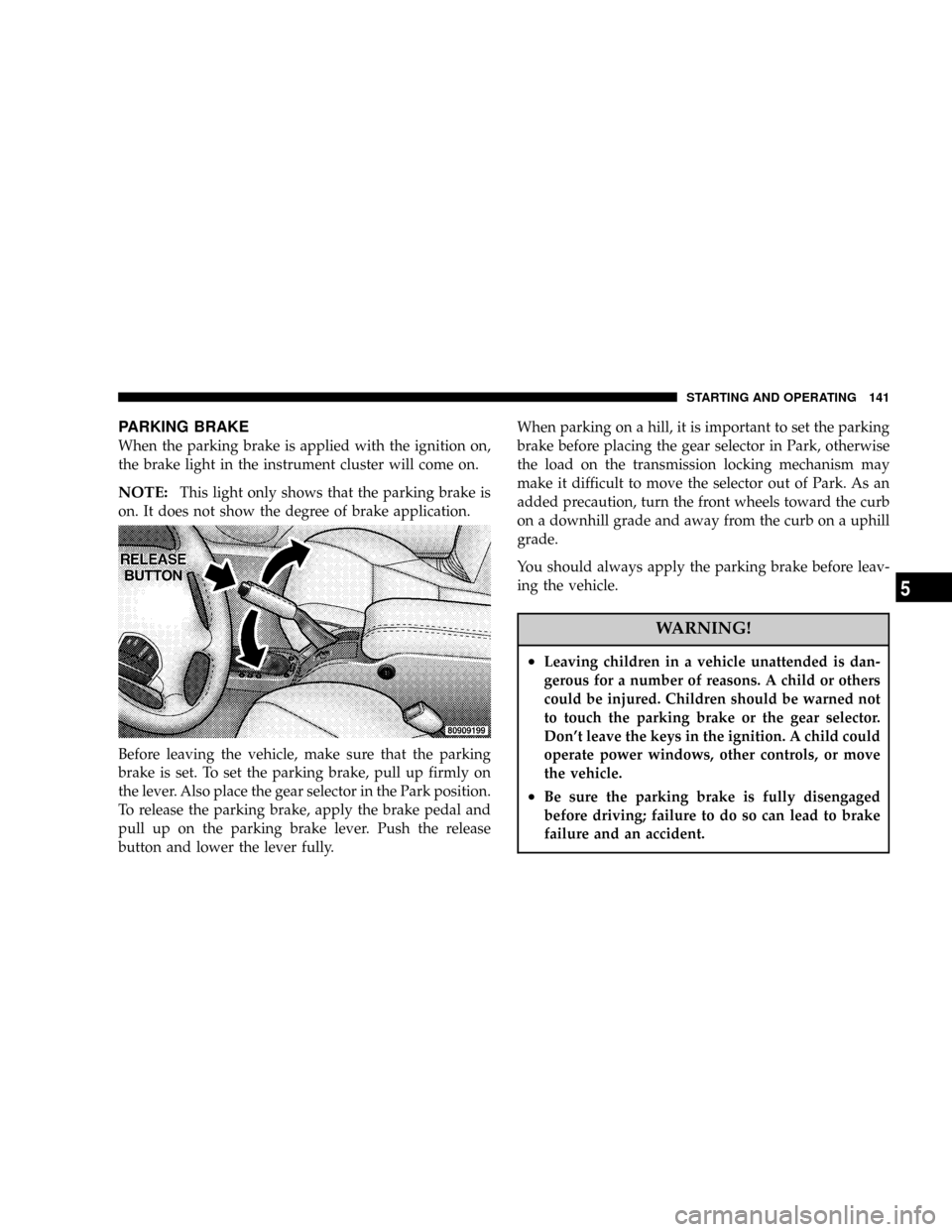
PARKING BRAKE
When the parking brake is applied with the ignition on,
the brake light in the instrument cluster will come on.
NOTE:This light only shows that the parking brake is
on. It does not show the degree of brake application.
Before leaving the vehicle, make sure that the parking
brake is set. To set the parking brake, pull up firmly on
the lever. Also place the gear selector in the Park position.
To release the parking brake, apply the brake pedal and
pull up on the parking brake lever. Push the release
button and lower the lever fully.When parking on a hill, it is important to set the parking
brake before placing the gear selector in Park, otherwise
the load on the transmission locking mechanism may
make it difficult to move the selector out of Park. As an
added precaution, turn the front wheels toward the curb
on a downhill grade and away from the curb on a uphill
grade.
You should always apply the parking brake before leav-
ing the vehicle.
WARNING!
²Leaving children in a vehicle unattended is dan-
gerous for a number of reasons. A child or others
could be injured. Children should be warned not
to touch the parking brake or the gear selector.
Don't leave the keys in the ignition. A child could
operate power windows, other controls, or move
the vehicle.
²Be sure the parking brake is fully disengaged
before driving; failure to do so can lead to brake
failure and an accident.
STARTING AND OPERATING 141
5
Page 144 of 271
TRACTION CONTROL Ð IF EQUIPPED
The Traction Control System reduces wheel
slip and maintains traction at the driving
(front) wheels. The system reduces wheel slip
by engaging the brake on the wheel that is
losing traction while spinning. The traction system oper-
ates at speeds below 35 mph (56 km/h).The system is always in the ªstand byº mode unless:
²The Traction Control switch has been used to turn the
system off;
²There is an Anti-Lock Brake or Traction System mal-
function;
²The system has been deactivated to prevent damage to
the brake system due to overheated brake tempera-
tures.
NOTE:Extended heavy use of Traction Control may
cause the system to deactivate and turn on the Traction
Control indicator located in the instrument cluster.
This is to prevent overheating of the brake system and is
a normal condition. After cooling, the system will auto-
matically reactivate and turn off the Traction Control
Light.
144 STARTING AND OPERATING
Page 220 of 271

Plastic is not as scratch resistant as glass and therefore
different lens cleaning procedures must be followed.
To minimize the possibility of scratching the lenses and
reducing light output, avoid wiping with a dry cloth. To
remove road dirt, wash with a mild soap solution fol-
lowed by rinsing.
Do not use abrasive cleaning components, solvents, steel
wool or other aggressive material to clean the lenses.
Glass Surfaces
All glass surfaces should be cleaned on a regular basis
with any commercial household-type glass cleaner.
Never use an abrasive type cleaner. Use caution when
cleaning inside rear windows equipped with electric
defrosters. Do not use scrapers or other sharp instru-
ments which may scratch the elements.
Instrument Panel Cover
The instrument panel cover has a low glare surface which
minimizes reflections in the windshield. Do not use
protectants or other products which may cause undesir-
able reflections. Use soap and warm water to restore the
low glare surface.
Cleaning Plastic Instrument Cluster Lenses
The lenses in front of the instruments in this vehicle are
molded in clear plastic. When cleaning the lenses, care
must be taken to avoid scratching the plastic.
²Clean with a wet soft rag. A mild soap solution may be
used, but do not use high alcohol content or abrasive
cleaners. If soap is used, wipe clean with a clean damp
rag.
²Dry with a soft tissue.
Seat Belt Maintenance
Do not bleach, dye or clean the belts with chemical
solvents or abrasive cleaners. This will weaken the fabric.
Sun damage will also weaken the fabric.
If the belts need cleaning, use a mild soap solution or
lukewarm water. Do not remove the belts from the
vehicle to wash them.
Replace the belts if they appear frayed or worn or if the
buckles do not work properly.
220 MAINTAINING YOUR VEHICLE
Page 224 of 271
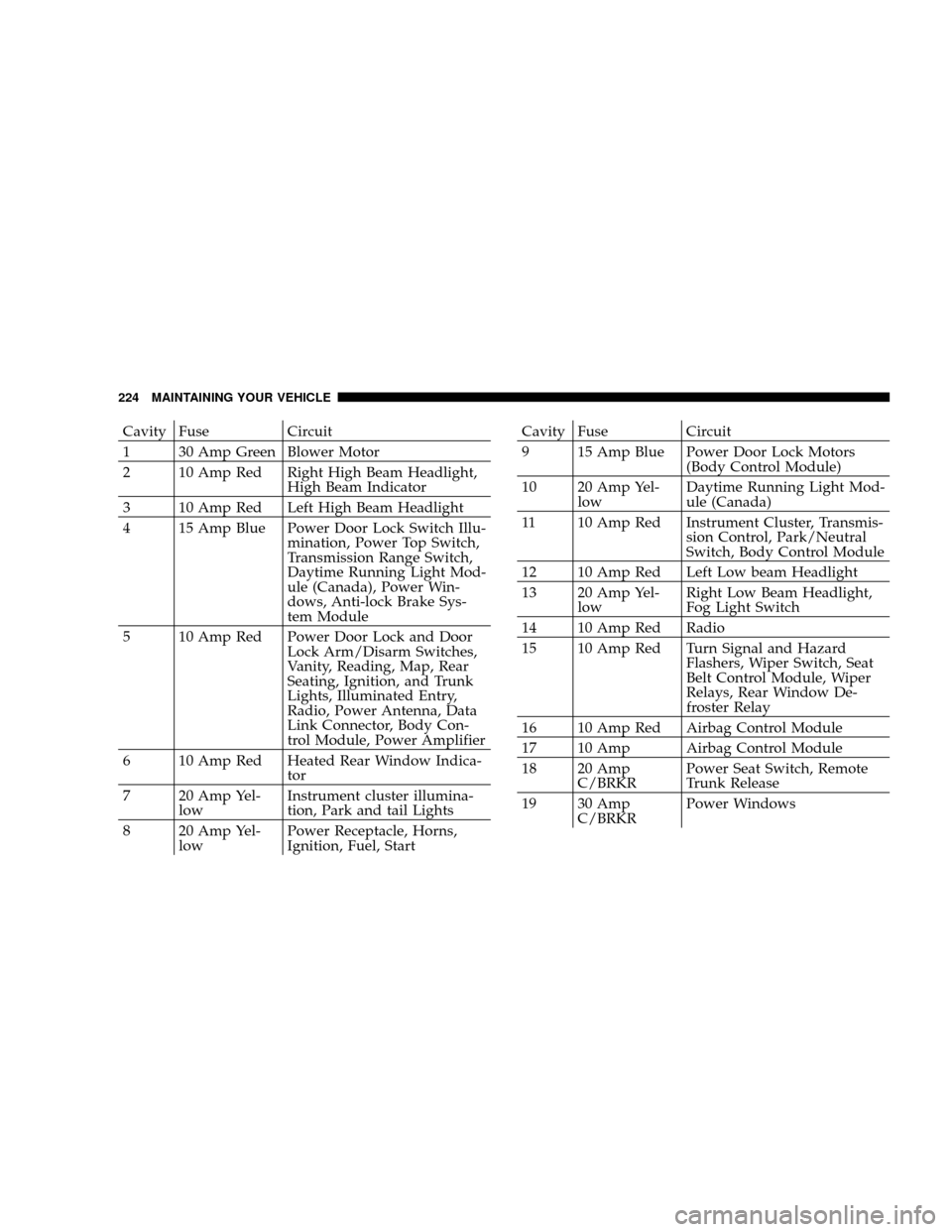
Cavity Fuse Circuit
1 30 Amp Green Blower Motor
2 10 Amp Red Right High Beam Headlight,
High Beam Indicator
3 10 Amp Red Left High Beam Headlight
4 15 Amp Blue Power Door Lock Switch Illu-
mination, Power Top Switch,
Transmission Range Switch,
Daytime Running Light Mod-
ule (Canada), Power Win-
dows, Anti-lock Brake Sys-
tem Module
5 10 Amp Red Power Door Lock and Door
Lock Arm/Disarm Switches,
Vanity, Reading, Map, Rear
Seating, Ignition, and Trunk
Lights, Illuminated Entry,
Radio, Power Antenna, Data
Link Connector, Body Con-
trol Module, Power Amplifier
6 10 Amp Red Heated Rear Window Indica-
tor
7 20 Amp Yel-
lowInstrument cluster illumina-
tion, Park and tail Lights
8 20 Amp Yel-
lowPower Receptacle, Horns,
Ignition, Fuel, StartCavity Fuse Circuit
9 15 Amp Blue Power Door Lock Motors
(Body Control Module)
10 20 Amp Yel-
lowDaytime Running Light Mod-
ule (Canada)
11 10 Amp Red Instrument Cluster, Transmis-
sion Control, Park/Neutral
Switch, Body Control Module
12 10 Amp Red Left Low beam Headlight
13 20 Amp Yel-
lowRight Low Beam Headlight,
Fog Light Switch
14 10 Amp Red Radio
15 10 Amp Red Turn Signal and Hazard
Flashers, Wiper Switch, Seat
Belt Control Module, Wiper
Relays, Rear Window De-
froster Relay
16 10 Amp Red Airbag Control Module
17 10 Amp Airbag Control Module
18 20 Amp
C/BRKRPower Seat Switch, Remote
Trunk Release
19 30 Amp
C/BRKRPower Windows
224 MAINTAINING YOUR VEHICLE
Page 225 of 271
CAUTION!
When replacing a blown fuse, it is important to use
only a fuse having the correct amperage rating. The
use of a fuse with a rating other than indicated may
result in a dangerous electrical system overload. If a
properly rated fuse continues to blow, it shows a
problem in the circuit that must be corrected.
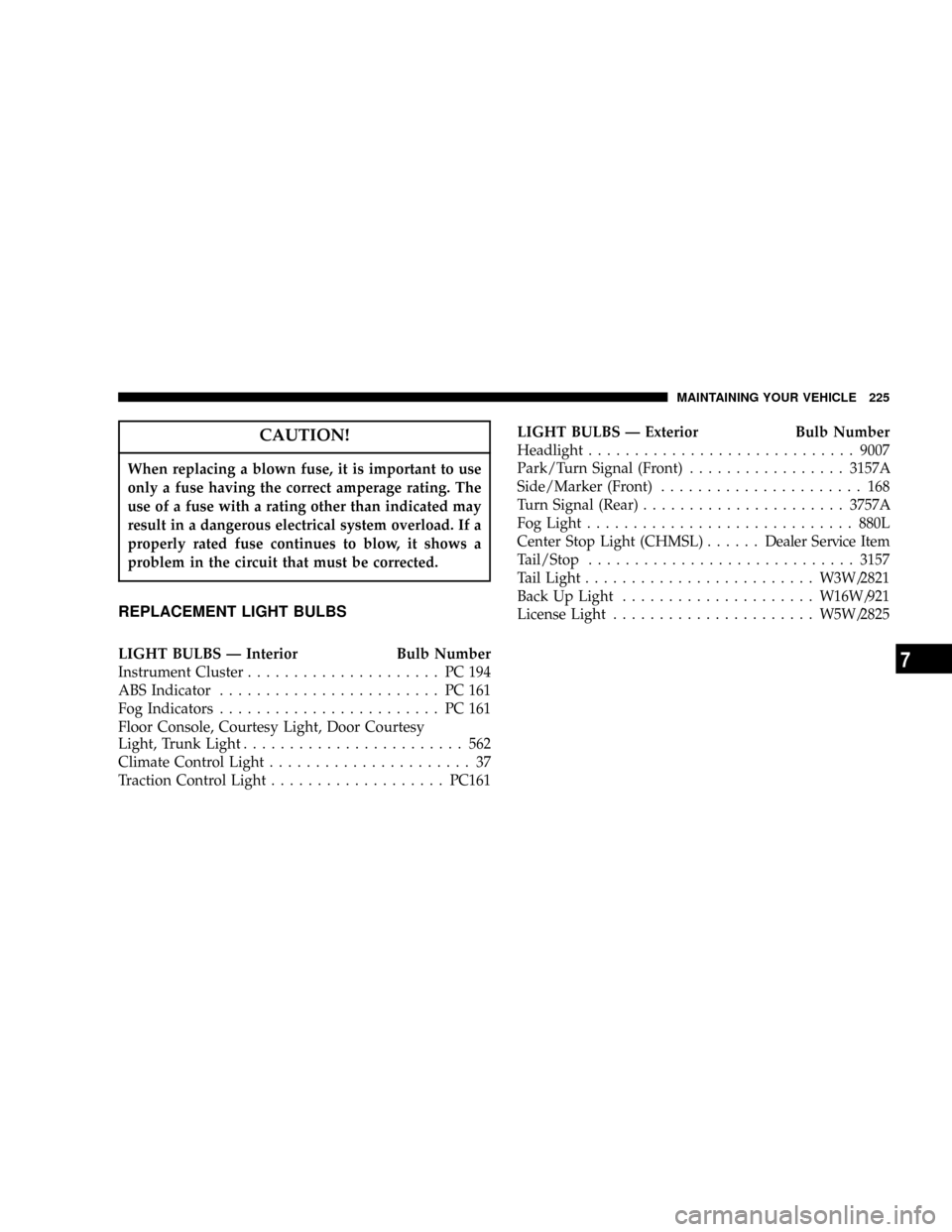
REPLACEMENT LIGHT BULBS
LIGHT BULBS Ð Interior Bulb Number
Instrument Cluster..................... PC194
ABS Indicator........................ PC161
Fog Indicators........................ PC161
Floor Console, Courtesy Light, Door Courtesy
Light, Trunk Light........................ 562
Climate Control Light...................... 37
Traction Control Light...................PC161LIGHT BULBS Ð Exterior Bulb Number
Headlight.............................9007
Park/Turn Signal (Front).................3157A
Side/Marker (Front)...................... 168
Turn Signal (Rear)......................3757A
Fog Light.............................880L
Center Stop Light (CHMSL)......Dealer Service Item
Tail/Stop.............................3157
Tail Light.........................W3W/2821
Back Up Light.....................W16W/921
License Light......................W5W/2825
MAINTAINING YOUR VEHICLE 225
7