2004 CHRYSLER CONCORDE reset
[x] Cancel search: resetPage 95 of 273
After completing three 360° turns in an area free from
large metal or metallic objects, the CAL symbol will turn
off and the compass will function normally.
Manual Compass Calibration
If the compass appears erratic and the CAL symbol does
not appear, you must manually put the compass into the
“Calibration” mode.
NOTE:To ensure proper compass calibration, make
sure the compass variance is properly set before manu-
ally calibrating the compass (see variance map).
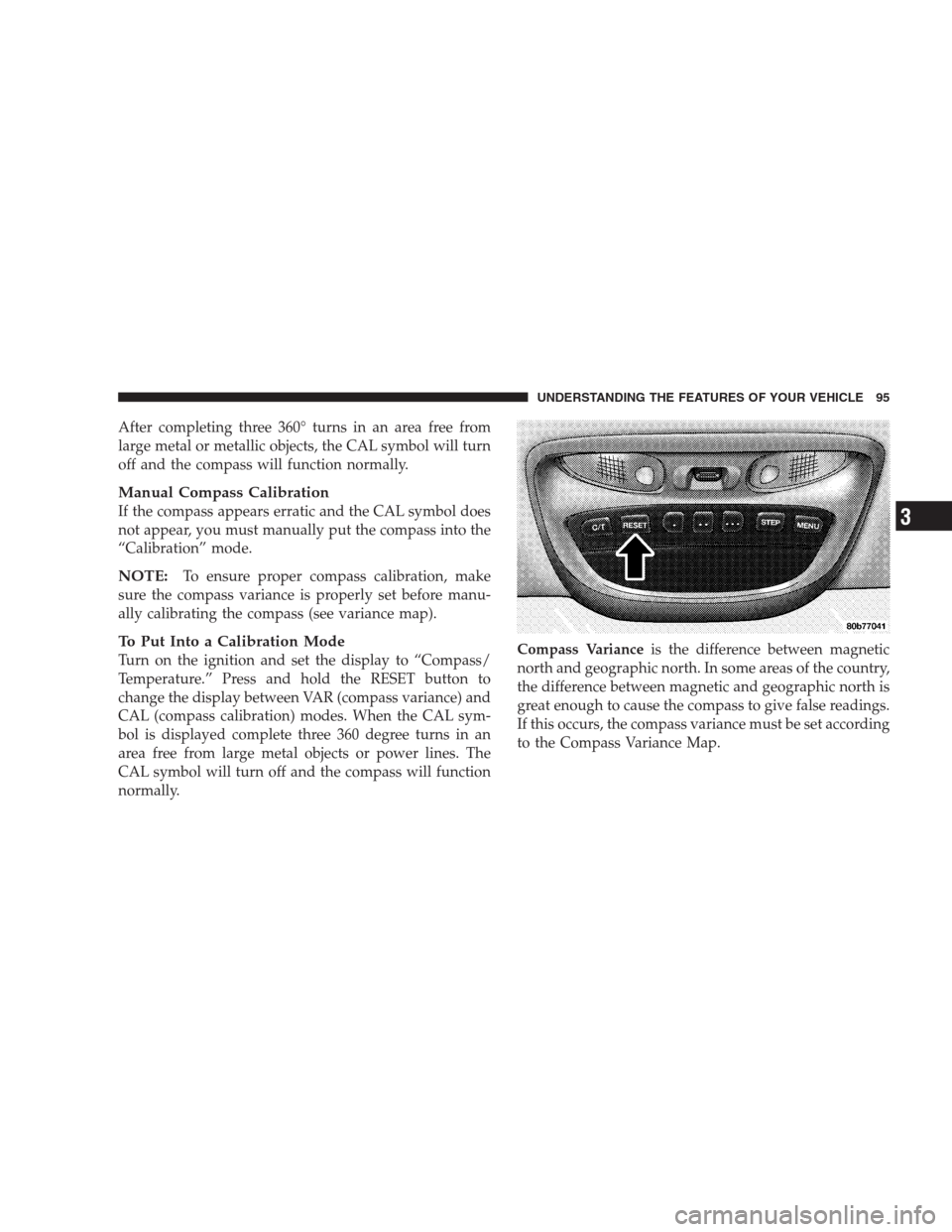
To Put Into a Calibration Mode
Turn on the ignition and set the display to “Compass/
Temperature.” Press and hold the RESET button to
change the display between VAR (compass variance) and
CAL (compass calibration) modes. When the CAL sym-
bol is displayed complete three 360 degree turns in an
area free from large metal objects or power lines. The
CAL symbol will turn off and the compass will function
normally.Compass Varianceis the difference between magnetic
north and geographic north. In some areas of the country,
the difference between magnetic and geographic north is
great enough to cause the compass to give false readings.
If this occurs, the compass variance must be set according
to the Compass Variance Map.
UNDERSTANDING THE FEATURES OF YOUR VEHICLE 95
3
Page 96 of 273

To set the variance: Turn the ignition ON and set the
display to “Compass/Temperature.” Press the RESET
button approximately five seconds. The last variance
zone number will be displayed. Press the STEP button to
select the new variance zone and press the RESET button
to resume normal operation.
OVERHEAD TRAVEL INFORMATION CENTER —
IF EQUIPPED
This feature allows you to choose between a compass /
temperature display and one of five trip conditions being
monitored.
Pressing the STEP button will select the available trip
information. Pressing the US / M button will toggle
between US and Metric displays. Pressing the C/T (Com-
pass / Temperature) button will return the display to the
normal compass / temperature display.
96 UNDERSTANDING THE FEATURES OF YOUR VEHICLE
Page 97 of 273

US/M Button
Use this button to change the display from U.S. to metric
measurement units.
RESET Button
Use this button to reset the following displays to zero:
Average Fuel Economy
Trip Odometer
Elapsed time.
Global Reset
If the RESET button is pressed twice within 3 seconds
while in any of the 3 resetable displays, the Global Reset
button will reset all 3 displays.
Step Button
Use this button to choose or cycle through the five trip
conditions.
Average Fuel Economy (AVG ECO)
This display shows the average fuel economy since the
last reset.
Distance To Empty (DTE)
This display shows the estimated distance that can be
traveled with the fuel remaining in the tank. The distance
is calculated by multiplying the amount of fuel remain-
ing by the projected fuel economy. The distance predicted
will change every few seconds to a higher or lower
number as these factors change.
This display cannot be reset.
UNDERSTANDING THE FEATURES OF YOUR VEHICLE 97
3
Page 98 of 273

Trip Odometer (ODO)
This display shows the distance traveled since the last
reset.
Elapsed Time (ET)
This display shows the accumulated ignition ON time
since the last reset.
C/T Button
Use this button to select a readout of the outside tem-
perature and one of eight compass headings that indicate
the direction in which the vehicle is facing.
Compass/Temperature Display
This display provides the outside temperature and one of
eight compass readings to indicate the direction the
vehicle is facing.
Automatic Compass Calibration
The self calibrating feature of the compass eliminates the
need to calibrate the compass for normal conditions.
During a short initial period, the compass may appear
erratic and the CAL symbol will appear on the display.
The CAL symbol may also appear after the vehicle is
subjected to a high level of magnetism. After completingthree 360 turns at about 5 mph (8 km/h) in an area free
from large metal or metallic objects, the CAL symbol will
turn off and the compass will function normally.
Manual Compass Calibration
If the compass appears erratic and the CAL light does not
appear, you must calibrate the compass. Find an open
area away from large metal objects. With the ignition ON
and the compass/temperature displayed, press and hold
the RESET button until the CAL symbol appears (about
10 seconds). Drive slowly (about 5 mph) (8 km/h) in 3
complete 360 circles. The CAL light will turn off and the
compass will be calibrated.
Variance is the difference between magnetic North and
geographic North. For proper compass function, the
correct variance zone must be set. Refer to the variance
map for the correct variance zone. To check the variance
zone, the ignition must be on and the compass/
temperature displayed. Press and hold the RESET button
for about 5 seconds until VAR appears in the display. The
number displayed is the variance zone used by the
compass. To change the zone, press the STEP button to
98 UNDERSTANDING THE FEATURES OF YOUR VEHICLE
Page 99 of 273

scroll through numbers 1 through 15. Press the RESET
button after selecting the proper zone to return to the
normal compass/temperature display.
NOTE:To ensure proper compass calibration, make
sure the compass variance is properly set before manu-
ally calibrating the compass (see variance map).
UNDERSTANDING THE FEATURES OF YOUR VEHICLE 99
3
Page 111 of 273

If the pointer rises to the “H” mark, stop the vehicle and
turn off the engine until the problem is corrected.
There are steps that you can take to slow down an
impending overheat condition. If your air conditioning is
on, turn it off. The air conditioning system adds heat to
the engine cooling system and turning off the A/C
removes this heat. You can also turn the Temperature
control to maximum heat, the Mode control to Floor and
the Fan control to High. This allows the heater core to act
as a supplement to the radiator and aids in removing heat
from the engine cooling system.
16. Malfunction Indicator Light
This light is part of an onboard diagnostic
system called OBD that monitors engine and
automatic transmission control systems. The
light will illuminate when the key is in the ON
position before engine start. If the bulb does not come
on when turning the key from OFF to ON, have the
condition checked promptly.
Certain conditions such as a loose or missing gas cap or
poor fuel quality may illuminate the light after engine
start. The vehicle should be serviced if the light stays onthrough several of your typical driving cycles. In most
situations the vehicle will drive normally and will not
require towing.
The Malfunction Indicator Light flashes to alert to serious
conditions that could lead to immediate loss of power or
severe catalytic converter damage. The vehicle should be
serviced as soon as possible if this occurs.
17. Trip Odometer Reset Knob
To reset the trip odometer, push the reset knob for about
two seconds.
18. Airbag Light
The light will come on and remain on for 6 to 8
seconds as a bulb check when the ignition switch
is first turned ON. If the bulb is not lit during starting,
have it replaced. If the light stays on, or comes on
while driving, have the system checked by an autho-
rized dealer.
19. Odometer/Trip Odometer
Shows the total distance the vehicle has been driven.
U.S. Federal regulations require that upon transfer of
vehicle ownership, the seller certify to the purchaser the
UNDERSTANDING YOUR INSTRUMENT PANEL 111
4
Page 112 of 273

correct mileage that the vehicle has been driven. There-
fore, if the odometer reading is changed during repair or
replacement, be sure to keep a record of the reading
before and after the service so that the correct mileage can
be determined.
The Trip Odometer shows individual trip mileage and is
accessed by pressing the reset button.
20. Charging System Light
This light shows the status of the electrical
charging system. The light should come on
briefly when the ignition is first turned on and remain
on briefly as a bulb check. If the light stays on or
comes on while driving, turn off some of the vehicle’s
electrical devices, such as the Fog Lights or Rear
Defroster. If the Charging System Light remains on, it
means that the vehicle is experiencing a problem with
the charging system and should be serviced immedi-
ately. See your local authorized dealer.
21. Transmission Range Indicator
This indicator illuminates to show the automatic trans-
mission gear selection.
22. ABS Light
This light monitors the Anti-Lock Brake system
described elsewhere in this manual. The yellow
ABS light will come on when the ignition key is turned
to the ON position and may stay on for several
seconds. If the ABS light does not come on have the
system checked by an authorized dealer.
If the ABS light remains on or comes on while driving, it
indicates that the Anti-Lock portion of the brake system
is not functioning and that service is required, however,
the conventional brake system will continue to operate
normally if the red BRAKE warning light is not on. A
warning chime will sound when the light comes on.
If the ABS light is on, the brake system should be serviced
as soon as possible to restore the benefits of Anti-Lock
brakes.
23. Brake System Warning Light
The dual brake system provides a reserve
braking capability if a failure occurs in a
portion of the hydraulic system.
112 UNDERSTANDING YOUR INSTRUMENT PANEL
Page 116 of 273

Program Type Radio Display
Soft Soft
Soft Rock Soft Rck
Soft Rhythm and Blues Soft R&B
Sports Sports
Talk Talk
Top 40 Top 40
Weather Weather
By pressing the SEEK button when the PTY icon is
displayed, the radio will be tuned to the next frequency
station with the same selected PTY name. The PTY
function only operates when in the FM mode.
The radio display will flash “SEEK” and the selected PTY
program type when searching for the next PTY station. If
no station is found with the selected PTY program type,
the radio will return to the last preset station.
If a preset button is activated while in the PTY (Program
Type) mode, the PTY mode will be exited and the radio
will tune to the preset station.Pressing PTY, then SCAN will scan the FM Band and stop
at all RDS stations. Each RDS station will be played for a
10 second scan once around the FM Band and stop at the
last station. The PTY icon will then turn off.
Balance
The Balance control adjusts the left-to-right speaker bal-
ance. Push in the button and it will pop out. Adjust the
balance and push the button back in. The balance will be
displayed and continuously updated while the button is
pressed.
Fade
The Fade control provides for balance between the front
and rear speakers. Push in the button and it will pop out.
Adjust the balance and push the button back in. The fade
will be displayed and continuously updated while the
button is pressed.
Tone Control
Slide the Bass and/or Treble controls up or down to
adjust the sound for the desired tone. The treble, and bass
will be displayed and continuously updated while the
slide is moved.
116 UNDERSTANDING YOUR INSTRUMENT PANEL