Page 301 of 516
qr(Tune):When listening to the radio, press the
right or the left arrow to go to the next or the previous
station and stay there. This function is inactive if
the front seat passengers are listening to the radio.
When a CD is playing, press the right arrow to go to the
next track on the CD. Press the left arrow to go to the
start of the current track, if more than eight seconds
have played. This function is inactive if the front
seat passengers are listening to a CD.
P.SET SCAN (Preset Scan):Press and hold this
button to scan the preset radio stations set on the
pushbuttons on the main radio. The radio will go to a
preset station stored on the pushbuttons, play for a few
seconds, then go on to the next preset station. The
selected radio station will appear on the display above
the video screen. Press this button again to stop
scanning presets. This function is inactive if the front
seat passengers are listening to the radio.
When a CD is playing in the six-disc CD changer, press
this button to select the next CD, if multiple CDs are
loaded. This function is inactive if the front seat
passengers are listening to a CD.
CD TAPE:Press this button to switch between playing
a CD, a DVD, or an auxiliary device when the
headphones are on channel B. If one of the devices are
not loaded, the system will skip over the device when
this button is pressed.Theft-Deterrent Feature
(Non-RDS Radios)
THEFTLOCK®is designed to discourage theft of your
vehicle’s radio. The feature works automatically by
learning a portion of the Vehicle Identication Number
(VIN). If the radio is moved to a different vehicle, it
will not operate and LOCKED will appear on the display.
When the radio and vehicle are turned off, the blinking
red light indicates that THEFTLOCK
®is armed.
With THEFTLOCK
®activated, the radio will not operate
if stolen.
Theft-Deterrent Feature
(RDS Radios)
THEFTLOCK®is designed to discourage theft of your
vehicle’s radio. The feature works automatically by
learning a portion of the Vehicle Identication Number
(VIN). If the radio is moved to a different vehicle, it
will not operate and LOCKED will appear on the display.
When the ignition is off and RAP is not active, the
blinking red light indicates that THEFTLOCK
®is armed.
With THEFTLOCK
®activated, the radio will not
operate if stolen.
3-119
Page 302 of 516
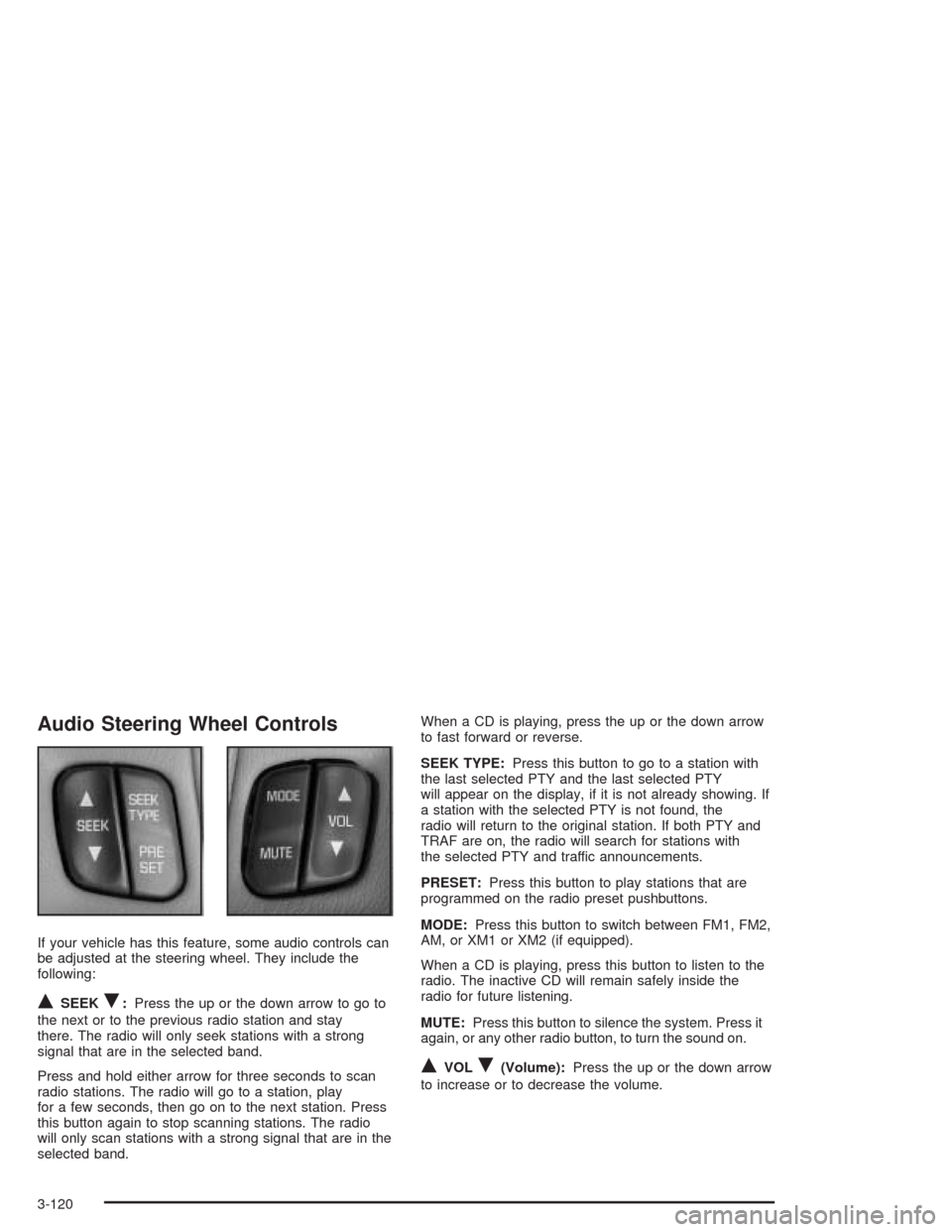
Audio Steering Wheel Controls
If your vehicle has this feature, some audio controls can
be adjusted at the steering wheel. They include the
following:
QSEEKR:Press the up or the down arrow to go to
the next or to the previous radio station and stay
there. The radio will only seek stations with a strong
signal that are in the selected band.
Press and hold either arrow for three seconds to scan
radio stations. The radio will go to a station, play
for a few seconds, then go on to the next station. Press
this button again to stop scanning stations. The radio
will only scan stations with a strong signal that are in the
selected band.When a CD is playing, press the up or the down arrow
to fast forward or reverse.
SEEK TYPE:Press this button to go to a station with
the last selected PTY and the last selected PTY
will appear on the display, if it is not already showing. If
a station with the selected PTY is not found, the
radio will return to the original station. If both PTY and
TRAF are on, the radio will search for stations with
the selected PTY and traffic announcements.
PRESET:Press this button to play stations that are
programmed on the radio preset pushbuttons.
MODE:Press this button to switch between FM1, FM2,
AM, or XM1 or XM2 (if equipped).
When a CD is playing, press this button to listen to the
radio. The inactive CD will remain safely inside the
radio for future listening.
MUTE:Press this button to silence the system. Press it
again, or any other radio button, to turn the sound on.
QVOLR(Volume):Press the up or the down arrow
to increase or to decrease the volume.
3-120
Page 504 of 516
E
Electrical System
Add-On Equipment.....................................5-105
Fuses and Circuit Breakers.........................5-106
Headlamp Wiring.......................................5-105
Power Windows and Other Power Options....5-106
Windshield Wiper Fuses.............................5-106
Emissions Inspection and Maintenance
Programs...................................................3-48
Engine
Air Cleaner/Filter.........................................5-18
Battery.......................................................5-42
Change Oil Message...................................3-54
Check and Service Engine Soon Light............3-45
Coolant......................................................5-22
Coolant Heater............................................2-34
Coolant Temperature Gage...........................3-44
Coolant Temperature Warning Message..........3-52
Drive Belt Routing.......................................6-15
Engine Compartment Overview......................5-12
Exhaust.....................................................2-43
Oil .............................................................5-13
Overheating................................................5-25
Starting......................................................2-33Engine Oil Additives........................................5-16
Engine Specications.....................................5-114
Entering Programming Mode............................2-62
Entertainment System....................................3-108
Entry Lighting.................................................3-18
Erasing HomeLink
®Buttons..............................2-51
Event Data Recorders (EDR)............................7-10
Exit Lighting...................................................3-19
Exiting Programming Mode...............................2-71
Express-Down Window....................................2-25
Extender, Safety Belt.......................................1-52
Exterior Lamps...............................................3-16
F
Filter
Engine Air Cleaner......................................5-18
Finding a Program Type (PTY) Station
(RDS and XM™).........................3-69, 3-81, 3-97
Finding a Station....................3-62, 3-67, 3-79, 3-95
Finish Care..................................................5-101
Finish Damage.............................................5-102
Fixed Mast Antenna.......................................3-122
Flash-to-Pass................................................... 3-9
6