2004 CHEVROLET SILVERADO power steering
[x] Cancel search: power steeringPage 115 of 584
Ignition Positions
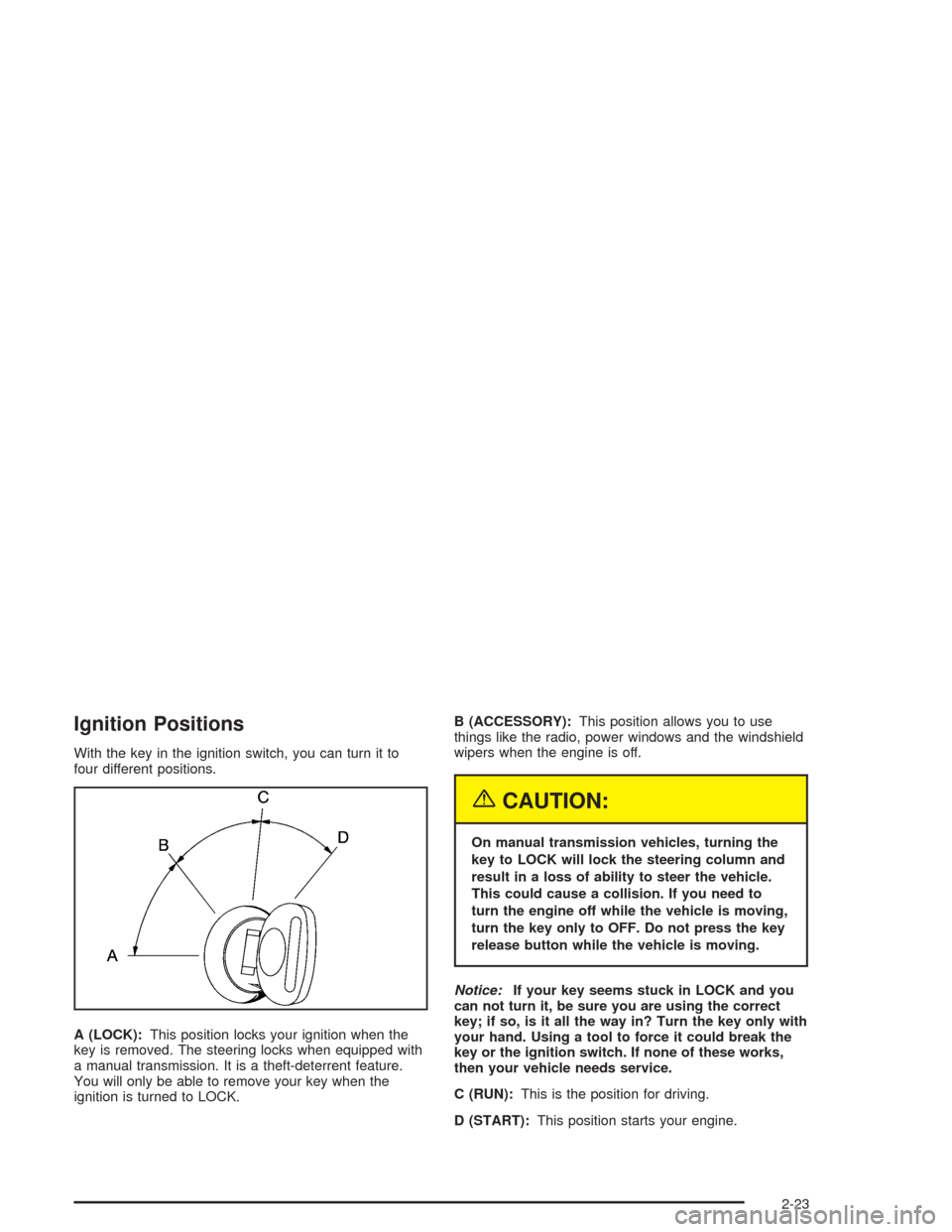
With the key in the ignition switch, you can turn it to
four different positions.
A (LOCK):This position locks your ignition when the
key is removed. The steering locks when equipped with
a manual transmission. It is a theft-deterrent feature.
You will only be able to remove your key when the
ignition is turned to LOCK.B (ACCESSORY):This position allows you to use
things like the radio, power windows and the windshield
wipers when the engine is off.
{CAUTION:
On manual transmission vehicles, turning the
key to LOCK will lock the steering column and
result in a loss of ability to steer the vehicle.
This could cause a collision. If you need to
turn the engine off while the vehicle is moving,
turn the key only to OFF. Do not press the key
release button while the vehicle is moving.
Notice:If your key seems stuck in LOCK and you
can not turn it, be sure you are using the correct
key; if so, is it all the way in? Turn the key only with
your hand. Using a tool to force it could break the
key or the ignition switch. If none of these works,
then your vehicle needs service.
C (RUN):This is the position for driving.
D (START):This position starts your engine.
2-23
Page 118 of 584

Engine Coolant Heater
In very cold weather,
0°F (−18°C) or colder, the
engine coolant heater
can help. You’ll get easier
starting and better fuel
economy during engine
warm-up. Usually, the
coolant heater should be
plugged in a minimum
of four hours prior to
starting your vehicle.
At temperatures above 32°F (0°C), use of the coolant
heater is not required.
To Use the Engine Coolant Heater
1. Turn off the engine.
2. Open the hood and unwrap the electrical cord. The
cord is located on the driver’s side of the engine
compartment, near the power steering uid
reservoir. If you have a diesel engine, refer to
diesel supplement for location.
3. Plug it into a normal, grounded 110-volt AC outlet.
{CAUTION:
Plugging the cord into an ungrounded outlet
could cause an electrical shock. Also, the
wrong kind of extension cord could overheat
and cause a re. You could be seriously
injured. Plug the cord into a properly grounded
three-prong 110-volt AC outlet. If the cord will
not reach, use a heavy-duty three-prong
extension cord rated for at least 15 amps.
2-26
Page 169 of 584

The main components of your instrument panel are the following:
A. Dome Lamp Button. See “Dome Lamps” under
Interior Lamps on page 3-18.
B. Exterior Lamp Controls. SeeExterior Lamps on
page 3-13.
C. Air Outlets. See “Climate Controls” in Section 3.
D. Automatic Transfer Case/Electronic Transfer
Case/Traction Assist System (TAS). SeeFour-Wheel
Drive on page 2-36.
E. Multifunction Lever. SeeTurn Signal/Multifunction
Lever on page 3-7.
F. Instrument Panel Cluster. SeeInstrument Panel
Cluster on page 3-34.
G. Gearshift Lever (Automatic Transmission). See
Automatic Transmission Operation on page 2-27.
H. Tow/Haul Selector and Overdrive Disable (Allison
Transmission
®Only) Button (If Equipped). See
Automatic Transmission Operation on page 2-27.
I. Audio System. SeeAudio System(s) on page 3-72.
J. Comfort Control System. SeeClimate Control
System on page 3-20.
K. Instrument Panel Fuse Block.Fuses and Circuit
Breakers on page 5-123.L. Hood Release. SeeHood Release on page 5-12.
M. Steering Wheel Control Buttons (If Equipped).
SeeDriver Information Center (DIC) on page 3-53.
N. Center Instrument Panel Utility Block. SeeFuses and
Circuit Breakers on page 5-123.
O. Parking Brake Release. SeeParking Brake on
page 2-48.
P. Tilt Wheel Lever. SeeTilt Wheel on page 3-7.
Q. Lighter and Accessory Power Outlet. SeeAccessory
Power Outlets on page 3-19, andAshtrays and
Cigarette Lighter on page 3-20.
R. Storage Area. See “Storage Areas” in Section 2.
S. Ashtray. SeeAshtrays and Cigarette Lighter
on page 3-20.
T. Manual Selectable Ride Control (If Equipped). See
Manual Selectable Ride on page 4-11.
U. 4WS Switch (If Equipped). SeeQUADRASTEER™
on page 4-15.
V. Passenger Air Bag Off Switch. SeeAir Bag Off
Switch on page 1-73.
W. Glove Box. SeeGlove Box on page 2-67.
3-5
Page 218 of 584

C (Personalization):This button will change personal
options available on your vehicle.
D (Select):This button resets certain functions and
turns off or acknowledges messages on the DIC.
If your vehicle is not equipped with the DIC steering
wheel buttons you will not have all of the features listed
above, and you will turn off, or acknowledge DIC
messages by using the trip odometer reset stem located
on the instrument panel cluster.
DIC Operation and Displays
The DIC comes on when the ignition is on. After a short
delay the DIC will display the current driver (1 or 2)
and the information that was last displayed before the
engine was turned off.
If a problem is detected, a warning message will appear
on the display. Pressing any of the four buttons will
acknowledge (clear) most current warnings or service
messages. Some warnings that cannot be
acknowledged (cleared) are: ENGINE OVERHEATED,
OIL PRESSURE LOW, REDUCED ENGINE POWER,
TRANS HOT IDLE ENGINE. These warnings must
be dealt with immediately and therefore cannot
be cleared until the problem has been corrected.
The DIC has different modes which can be accessed by
pressing the four buttons on the DIC. These buttons are
trip information, fuel information, personalization and
select. The button functions are detailed in the following.
Trip Information Button
Press the trip information button to scroll through the
ODOMETER, PERSONAL TRIP ON/OFF, BUSINESS
TRIP ON/OFF, HOURMETER, ANNUAL LOG and
TIMER. If the personal trip and/or the business trip are
set to ON, you will also be able to scroll through
more messages. See “Personal Trip” and “Business
Trip” next for more information.
If your vehicle is not equipped with the DIC steering
wheel buttons you can select the trip information
by pressing the trip odometer reset stem on the
instrument panel cluster.
Personal Trip
Turn PERSONAL TRIP on or off by pressing the
select button. When it is on, you will also be able to
scroll through the following by pressing the trip
information button:
PERSONAL: XXXXXX.X MI — This shows the
current distance traveled since the last reset for the
personal trip odometer in either miles or kilometers.
PERSONAL: XXXX.X GAL — This shows the
amount of fuel used for the personal trip.
PERSONAL: XX.X MPG— This shows how
many miles per gallon of fuel your vehicle is getting
for the personal trip based on current and past
driving conditions.
3-54
Page 295 of 584
Your Driving, the Road, and Your Vehicle..........4-2
Defensive Driving...........................................4-2
Drunken Driving.............................................4-2
Control of a Vehicle........................................4-5
Braking.........................................................4-6
Traction Assist System (TAS)...........................4-9
Manual Selectable Ride.................................4-11
Locking Rear Axle........................................4-12
Steering......................................................4-13
QUADRASTEER™........................................4-15
Off-Road Recovery.......................................4-18
Passing.......................................................4-18
Loss of Control.............................................4-20
Off-Road Driving...........................................4-21
Driving at Night............................................4-36
Driving in Rain and on Wet Roads..................4-37
City Driving..................................................4-40Freeway Driving...........................................4-41
Before Leaving on a Long Trip.......................4-42
Highway Hypnosis........................................4-43
Hill and Mountain Roads................................4-44
Winter Driving..............................................4-46
If You Are Stuck: In Sand, Mud,
Ice or Snow..............................................4-50
Towing..........................................................4-52
Towing Your Vehicle.....................................4-52
Recreational Vehicle Towing...........................4-53
Loading Your Vehicle....................................4-56
Adding a Snow Plow or Similar Equipment.......4-63
Truck-Camper Loading Information..................4-67
Trailer Recommendations...............................4-69
Pickup Conversion to Chassis Cab..................4-69
Towing a Trailer...........................................4-70
Power Take-Off (PTO).................................4-100
Section 4 Driving Your Vehicle
4-1
Page 303 of 584
Supplemental Brake Assist System
If your vehicle has vacuum assist power brakes, it is also
equipped with a supplemental brake assist system
that supplies additional vacuum to the vacuum brake
booster if engine vacuum is reduced. Under certain
conditions, the supplemental brake assist system may
run briey after starting your vehicle or when you
apply and release the brake pedal and it may continue
to run even after you have removed your foot from
the brake pedal. When the supplemental brake assist
system is operating, you may hear a motor running
or feel a slight vibration in the steering wheel or brake
pedal. This indicates that the supplemental brake
assist system is working to supply additional vacuum for
your vacuum assist power brakes. This is a normal
operation of your brake system and does not require that
the brake system be serviced.
Each time you start your vehicle and accelerate, the
supplemental brake assist system will perform a
self-diagnostic check of the system and you may hear
or feel the supplemental brake assist motor run
briey. While you are driving your vehicle, the
supplemental brake assist system monitors itself to
ensure that it is operating properly. If there is a problem
with the supplemental brake assist system, the
SERVICE BRAKE BOOSTER message will be displayed
on the Driver Information Center. SeeDIC Warnings
and Messages on page 3-64.If your supplemental brake assist system runs every
time you apply and release the brake pedal or you notice
that the brake pedal has suddenly become much
harder to push and the vehicle takes longer to stop, you
should have your vehicle serviced as soon as possible.
Traction Assist System (TAS)
Your vehicle may have a Traction Assist System (TAS)
that limits wheel spin. This is especially useful in
slippery road conditions. The system operates only if it
senses that one or both of the rear wheels are
spinning or beginning to lose traction. When this
happens, the system reduces engine power to limit
wheel spin.
The traction control system is enabled every time your
vehicle is started. The system will activate if it senses
that any of the wheels are spinning or beginning to
lose traction.
You may hear or feel the system working or notice a
lack of accelerator response, but this is normal.
The Traction Assist System may operate on dry roads
under some conditions. When this happens, you
may notice a reduction in acceleration. This is normal
and doesn’t mean there’s a problem with your vehicle.
Examples of these conditions include a hard
acceleration in a turn, an abrupt upshift or downshift of
the transmission or driving on rough roads.
4-9
Page 307 of 584

Steering
Power Steering
If you lose power steering assist because the engine
stops or the system is not functioning, you can steer but
it will take much more effort.
Steering Tips
Driving on Curves
It is important to take curves at a reasonable speed.
A lot of the “driver lost control” accidents mentioned on
the news happen on curves. Here is why:
Experienced driver or beginner, each of us is subject to
the same laws of physics when driving on curves.
The traction of the tires against the road surface makes
it possible for the vehicle to change its path when
you turn the front wheels. If there is no traction, inertia
will keep the vehicle going in the same direction. If
you have ever tried to steer a vehicle on wet ice, you
will understand this.
The traction you can get in a curve depends on the
condition of your tires and the road surface, the angle at
which the curve is banked, and your speed. While
you are in a curve, speed is the one factor you
can control.Suppose you are steering through a sharp curve.
Then you suddenly accelerate. Both control
systems — steering and acceleration — have to do
their work where the tires meet the road. Adding
the sudden acceleration can demand too much of those
places. You can lose control. SeeTraction Assist
System (TAS) on page 4-9.
What should you do if this ever happens? Ease up on
the accelerator pedal, steer the vehicle the way you
want it to go, and slow down.
Speed limit signs near curves warn that you should
adjust your speed. Of course, the posted speeds
are based on good weather and road conditions. Under
less favorable conditions you will want to go slower.
If you need to reduce your speed as you approach
a curve, do it before you enter the curve, while your front
wheels are straight ahead.
Try to adjust your speed so you can “drive” through the
curve. Maintain a reasonable, steady speed. Wait to
accelerate until you are out of the curve, and then
accelerate gently into the straightaway.
4-13
Page 322 of 584
Approaching a Hill
When you approach a hill, you need to decide if it is
one of those hills that is just too steep to climb, descend
or cross. Steepness can be hard to judge. On a very
small hill, for example, there may be a smooth, constant
incline with only a small change in elevation where
you can easily see all the way to the top. On a large hill,
the incline may get steeper as you near the top, but
you may not see this because the crest of the hill
is hidden by bushes, grass or shrubs.
Here are some other things to consider as you approach
a hill.
Is there a constant incline, or does the hill get
sharply steeper in places?
Is there good traction on the hillside, or will the
surface cause tire slipping?
Is there a straight path up or down the hill so you
will not have to make turning maneuvers?
Are there obstructions on the hill that can block
your path (boulders, trees, logs or ruts)?
What is beyond the hill? Is there a cliff, an
embankment, a drop-off, a fence? Get out and walk
the hill if you do not know. It is the smart way to
nd out.
Is the hill simply too rough? Steep hills often have
ruts, gullies, troughs and exposed rocks because
they are more susceptible to the effects of erosion.
Driving Uphill
Once you decide you can safely drive up the hill, you
need to take some special steps.
Use a low gear and get a rm grip on the
steering wheel.
Get a smooth start up the hill and try to maintain
your speed. Do not use more power than you
need, because you do not want your wheels to start
spinning or sliding.
Try to drive straight up the hill if at all possible. If
the path twists and turns, you might want to nd
another route.
{CAUTION:
Turning or driving across steep hills can be
dangerous. You could lose traction, slide
sideways, and possibly roll over. You could be
seriously injured or killed. When driving up
hills, always try to go straight up.
Ease up on your speed as you approach the top of
the hill.
Attach a ag to the vehicle to make you more
visible to approaching traffic on trails or hills.
4-28