Page 329 of 422
4. Turn the wheel wrench counterclockwise to lower
the spare tire. Keep turning the wheel wrench until
the spare tire can be pulled out from under the
vehicle.
5. When the tire has been completely lowered, tilt the
retainer at the end of the cable and pull it through
the wheel opening.
6. Pull the tire out from under the vehicle.
If your vehicle is equipped with a compact spare
tire, it is stowed underneath the rear of your vehicle.
SeeCompact Spare Tire on page 5-94.
Notice:If you drive away before the spare tire or
secondary latch system cable has been reinstalled,
you could damage your vehicle. Always reinstall
this cable before driving your vehicle.
7. Put the spare tire near the flat tire.The tools you’ll be using include the jack (A) and wheel
wrench (B). Your vehicle may also have an optional
hub cap removal tool.
5-85
Page 331 of 422
Removing the Flat Tire and Installing
the Spare Tire
1. Using the wheel wrench, loosen all the wheel nuts.
Don’t remove them yet.
2. Turn the jack handle clockwise slightly to raise the
jack lift head.
3. Fit the jack into the appropriate hole nearest the
flat tire.A. Front Frame Hole
B. Rear Frame Hole (ZR2)
C. Spring Hanger Hole (Standard Pickups)
5-87
Page 332 of 422
{CAUTION:
Getting under a vehicle when it is jacked up is
dangerous. If the vehicle slips off the jack you
could be badly injured or killed. Never get
under a vehicle when it is supported only by
a jack.
{CAUTION:
Raising your vehicle with the jack improperly
positioned can damage the vehicle and even
make the vehicle fall. To help avoid personal
injury and vehicle damage, be sure to t the
jack lift head into the proper location before
raising the vehicle.4. Raise the vehicle by turning the jack handle
clockwise. Raise the vehicle far enough off the
ground so there is enough room for the spare tire to
fit underneath the wheel well.
5. Remove all the wheel nuts and take off the flat tire.
5-88
Page 334 of 422
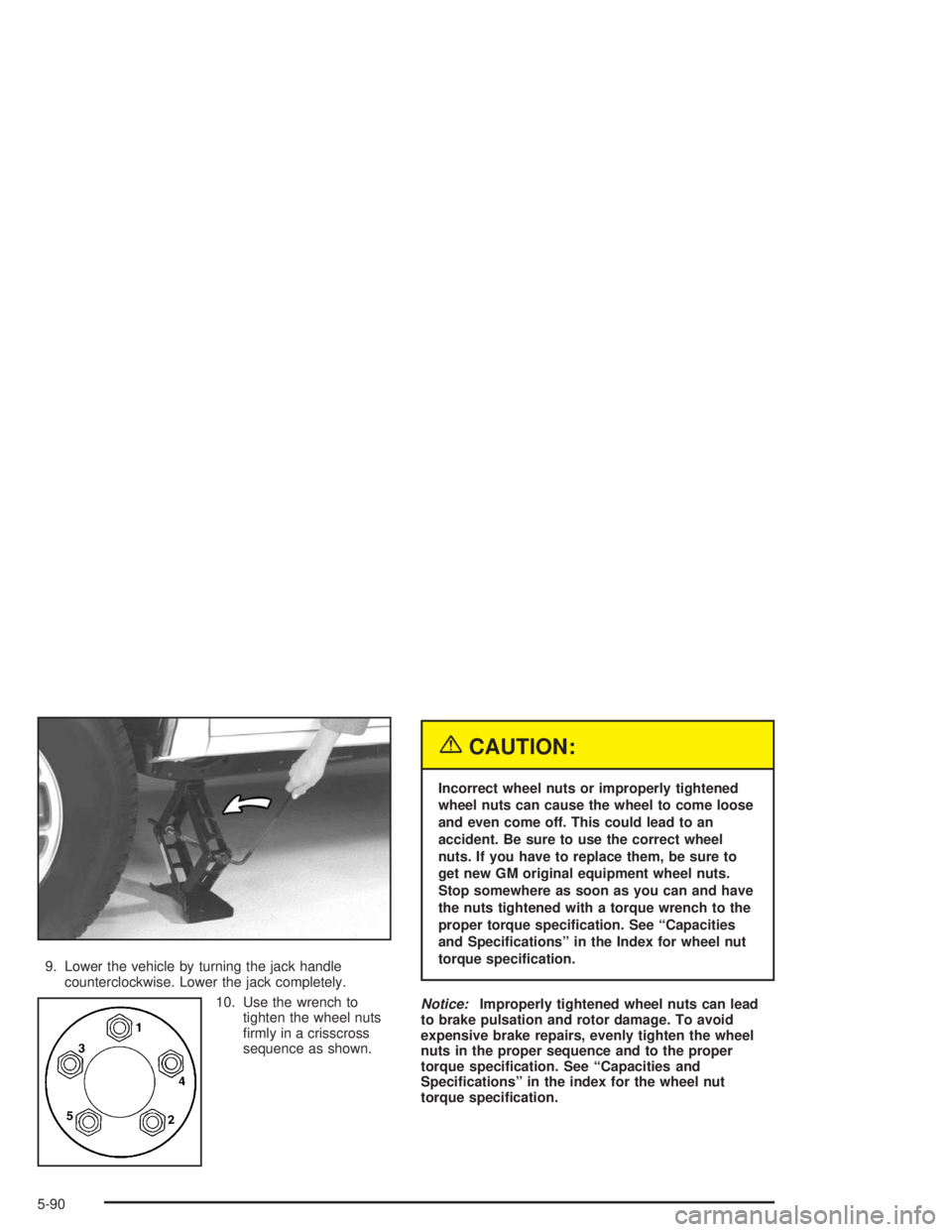
9. Lower the vehicle by turning the jack handle
counterclockwise. Lower the jack completely.
10. Use the wrench to
tighten the wheel nuts
firmly in a crisscross
sequence as shown.
{CAUTION:
Incorrect wheel nuts or improperly tightened
wheel nuts can cause the wheel to come loose
and even come off. This could lead to an
accident. Be sure to use the correct wheel
nuts. If you have to replace them, be sure to
get new GM original equipment wheel nuts.
Stop somewhere as soon as you can and have
the nuts tightened with a torque wrench to the
proper torque specication. See “Capacities
and Specications” in the Index for wheel nut
torque specication.
Notice:Improperly tightened wheel nuts can lead
to brake pulsation and rotor damage. To avoid
expensive brake repairs, evenly tighten the wheel
nuts in the proper sequence and to the proper
torque specication. See “Capacities and
Specications” in the index for the wheel nut
torque specication.
5-90
Page 336 of 422
1. Put the tire on the ground at the rear of the vehicle,
with the valve stem pointed down and to the rear.
2. Pull the retainer through the wheel.
3. Put the chisel end of the wheel wrench, on an
angle, through the hole in the rear bumper and
into the hoist shaft.
4. Raise the tire fully against the underside of the
vehicle by turning the wrench clockwise until you
hear two clicks or feel it skip twice. The spare
tire hoist cannot be overtightened.
5. Make sure the tire is stored securely. Push, pull,
and then try to rotate or turn the tire. If the tire
moves, use the wheel wrench (A) to tighten
the cable.
5-92
Page 337 of 422
Return the jack, wheel wrench and wheel blocks to the
proper location behind the seat. Secure the items.
A. Wheel Wrench
B. Bracket
C. Jacking Instructions (Roll and place instructions
behind the bracket after the tools are installed.)
D. Bolt Location
E. Wheel Blocks
F. Nut
G. Rubber Band
H. Jack PositionPut the jack cover back on, if you have one.
A. Bolt
B. Cover
5-93
Page 350 of 422
Instrument Panel Fuse Block
The instrument panel fuse
block is located at the end
of the instrument panel
on the driver’s side of
the vehicle.
Remove the cover by turning the fastener
counterclockwise. Extra fuses and the fuse extractor are
provided in the cover. To reinstall the fuse panel
cover, push in and turn the fastener clockwise.Fuse Usage
A Not Used
B Not Used
1 Not Used
2Cigarette Lighter, Data Link
Connector
3Cruise Control Module and Switch,
Body Control Module, Heated Seats
5-106
Page 351 of 422
Fuse Usage
4Gages, Body Control Module,
Instrument Panel Cluster
5Parking Lamps, Power Window
Switch, Body Control Module,
Ashtray Lamp
6 Steering Wheel Radio Controls
7Headlamps Switch, Body Control
Module, Headlamp Relay
8Courtesy Lamps, Battery Run-Down
Protection
9Heating, Ventilation, Air Cooling
Control Head (Manual)
10 Turn Signal
11 Cluster, Engine Control Module
12 Interior Lights
13 Auxiliary Power
14 Power Locks Motor
154WD Switch, Engine Controls (VCM,
PCM, Transmission)
16 Supplemental Inflatable RestraintFuse Usage
17 Front Wiper
18 Steering Wheel Radio Controls
19 Radio, Battery
20 Amplifier
21Heating, Ventilation, Air Cooling
(Manual), Heating,Ventilation, Air
Cooling (Automatic), Heating,
Ventilation, Air Cooling Sensors
(Automatic)
22 Anti-Lock Brakes
23 Rear Wiper
24 Radio, Ignition
5-107