2004 CHEVROLET MONTE CARLO ECU
[x] Cancel search: ECUPage 136 of 416

Selecting the Fan Speed
9
(Fan):Turn the left knob clockwise or
counterclockwise to increase or decrease the fan speed.
Turn the knob to OFF to turn off the fan. The fan must be
turned on for the air conditioning compressor to operate.
If the airow seems low when the fan is at the highest
setting, the passenger compartment air lter, if equipped,
may need to be replaced. For more information, see
Passenger Compartment Air Filter on page 3-27and
Scheduled Maintenance on page 6-4.
Selecting Outside Air or Recirculation
The outside air mode is used to bring outside air into your
vehicle; also use this mode to remove excess moisture
from the inside of the windows. The recirculation mode is
used to recirculate the air inside of your vehicle; also use
this mode to help prevent outside odors and/or dust from
entering your vehicle or to help heat or cool the air inside
of your vehicle quickly.
:(Outside Air):Press this button to turn the
outside air mode on. When this button is pressed, an
indicator light in the button will come on to let you know
that it is activated. During daylight hours, you may
have to adjust the instrument panel brightness control to
the highest setting in order to see the indicator light.
SeeInterior Lamps on page 3-16for more information.
When this mode is on, outside air will circulate
throughout your vehicle.
?(Recirculation):Press this button to turn the
recirculation mode on. When this mode is on, inside air
and a small percentage of outside air will recirculate
throughout your vehicle. This selection will reduce
the entry of outside air and odors from entering your
vehicle, it may also help heat or cool your vehicle more
quickly. When this button is pressed, an indicator
light in the button will also come on to let you know that
it is activated. During daylight hours, you may have
to adjust the instrument panel brightness control to
the highest setting in order to see the indicator light.
SeeInterior Lamps on page 3-16for more information.
The recirculation mode can be used with vent and
bi-level modes, but it cannot be used with oor, defog,
defrost or outside air modes.
This system will default back to the outside air setting,
so you will have to re-select this setting every time
that you start the vehicle.
If the weather is cold and damp, the system may cause
the windows to fog while using the recirculation
mode. If the windows do start to fog, do the following:
1. Select the defog or defrost mode.
2. Select the temperature.
3. Select the highest fan speed.
4. Operate the system in the outside air mode, 4to
help prevent a recurrence.
3-22
Page 163 of 416

Security Message
This message is displayed to monitor the Passlock®
system.
If the security message is displayed continuously while
driving and stays on, there may be a problem with
the Passlock
®system. Your vehicle will not be protected
by Passlock®and you should see your dealer for
service. SeePasslock®on page 2-16for more
information.
Low Washer Fluid Warning Message
This message is displayed when the vehicle is low on
windshield washer uid.
The message is only displayed for 60 seconds at the
start of each ignition cycle. For more information
seeWindshield Washer Fluid on page 5-48.
When the ignition is turned off, this message will be
displayed again for three seconds to remind you
that your washer uid is low. Be sure to rell the
washer uid tank right away. United States
CanadaUnited StatesCanada
3-49
Page 177 of 416
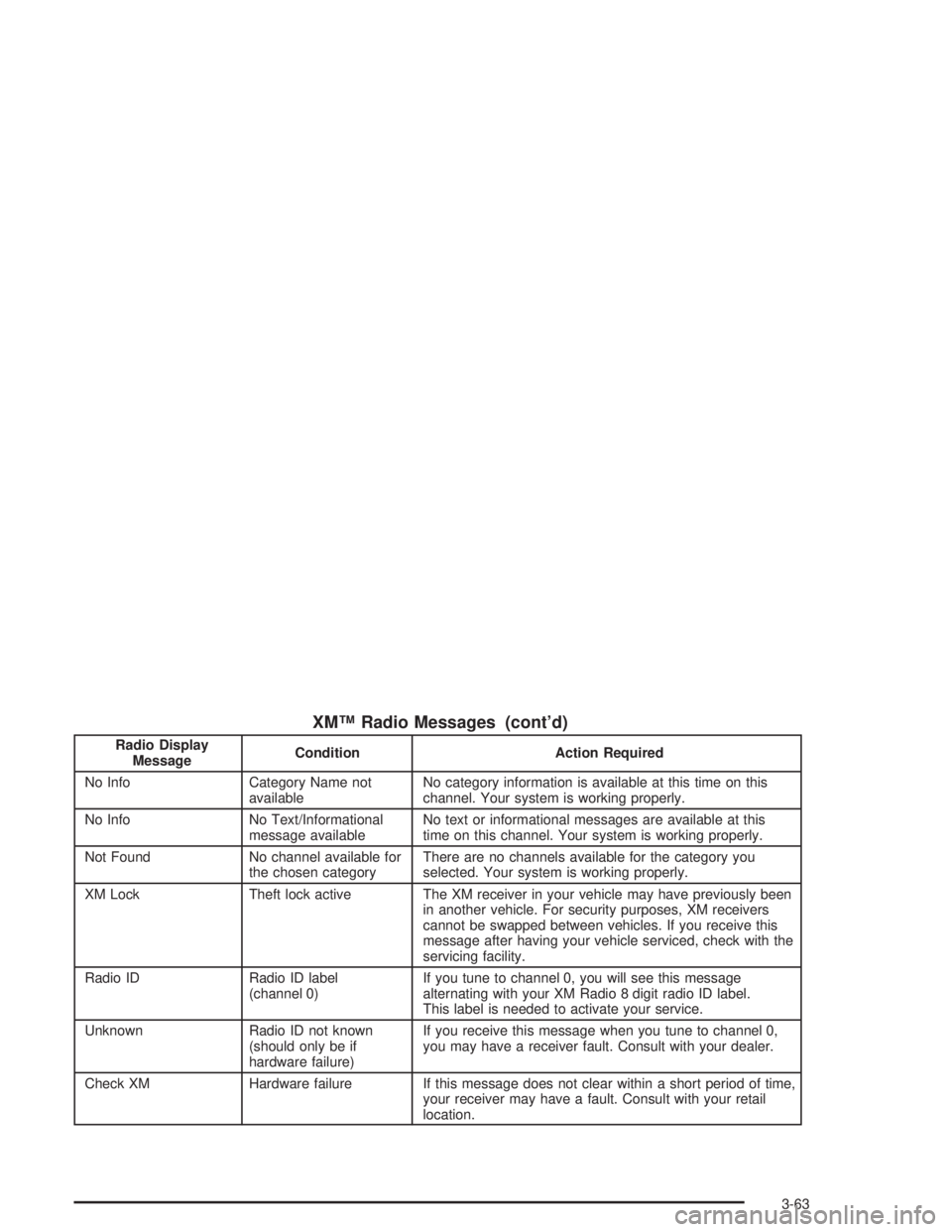
XM™ Radio Messages (cont’d)
Radio Display
MessageCondition Action Required
No Info Category Name not
availableNo category information is available at this time on this
channel. Your system is working properly.
No Info No Text/Informational
message availableNo text or informational messages are available at this
time on this channel. Your system is working properly.
Not Found No channel available for
the chosen categoryThere are no channels available for the category you
selected. Your system is working properly.
XM Lock Theft lock active The XM receiver in your vehicle may have previously been
in another vehicle. For security purposes, XM receivers
cannot be swapped between vehicles. If you receive this
message after having your vehicle serviced, check with the
servicing facility.
Radio ID Radio ID label
(channel 0)If you tune to channel 0, you will see this message
alternating with your XM Radio 8 digit radio ID label.
This label is needed to activate your service.
Unknown Radio ID not known
(should only be if
hardware failure)If you receive this message when you tune to channel 0,
you may have a receiver fault. Consult with your dealer.
Check XM Hardware failure If this message does not clear within a short period of time,
your receiver may have a fault. Consult with your retail
location.
3-63
Page 188 of 416

XM™ Radio Messages (cont’d)
Radio Display
MessageCondition Action Required
No Info Category Name not
availableNo category information is available at this time on this
channel. Your system is working properly.
No Info No Text/Informational
message availableNo text or informational messages are available at this
time on this channel. Your system is working properly.
Not Found No channel available for
the chosen categoryThere are no channels available for the category you
selected. Your system is working properly.
XM Lock Theft lock active The XM receiver in your vehicle may have previously been
in another vehicle. For security purposes, XM receivers
cannot be swapped between vehicles. If you receive this
message after having your vehicle serviced, check with the
servicing facility.
Radio ID Radio ID label
(channel 0)If you tune to channel 0, you will see this message
alternating with your XM Radio 8 digit radio ID label.
This label is needed to activate your service.
Unknown Radio ID not known
(should only be if
hardware failure)If you receive this message when you tune to channel 0,
you may have a receiver fault. Consult with your dealer.
Check XM Hardware failure If this message does not clear within a short period of time,
your receiver may have a fault. Consult with your retail
location.
3-74
Page 199 of 416

XM™ Radio Messages (cont’d)
Radio Display
MessageCondition Action Required
No Info Category Name not
availableNo category information is available at this time on this
channel. Your system is working properly.
No Info No Text/Informational
message availableNo text or informational messages are available at this
time on this channel. Your system is working properly.
Not Found No channel available for
the chosen categoryThere are no channels available for the category you
selected. Your system is working properly.
XM Lock Theft lock active The XM receiver in your vehicle may have previously been
in another vehicle. For security purposes, XM receivers
cannot be swapped between vehicles. If you receive this
message after having your vehicle serviced, check with the
servicing facility.
Radio ID Radio ID label
(channel 0)If you tune to channel 0, you will see this message
alternating with your XM Radio 8 digit radio ID label.
This label is needed to activate your service.
Unknown Radio ID not known
(should only be if
hardware failure)If you receive this message when you tune to channel 0,
you may have a receiver fault. Consult with your dealer.
Check XM Hardware failure If this message does not clear within a short period of time,
your receiver may have a fault. Consult with your retail
location.
3-85
Page 236 of 416

Winter Driving
Here are some tips for winter driving:
Have your vehicle in good shape for winter.
You may want to put winter emergency supplies in
your trunk.Include an ice scraper, a small brush or broom, a
supply of windshield washer uid, a rag, some winter
outer clothing, a small shovel, a ashlight, a red
cloth and a couple of reective warning triangles. And, if
you will be driving under severe conditions, include a
small bag of sand, a piece of old carpet or a couple of
burlap bags to help provide traction. Be sure you
properly secure these items in your vehicle.
4-26
Page 248 of 416

If you put things inside your vehicle — like suitcases,
tools, packages or anything else — they will go as fast
as the vehicle goes. If you have to stop or turn
quickly, or if there is a crash, they’ll keep going.
{CAUTION:
Things you put inside your vehicle can strike
and injure people in a sudden stop or turn, or
in a crash.
Put things in the trunk of your vehicle. In a
trunk, put them as far forward as you can.
Try to spread the weight evenly.
Never stack heavier things, like suitcases,
inside the vehicle so that some of them
are above the tops of the seats.
Do not leave an unsecured child restraint
in your vehicle.
When you carry something inside the
vehicle, secure it whenever you can.
Do not leave a seat folded down unless
you need to.
Towing a Trailer
{CAUTION:
If you do not use the correct equipment and
drive properly, you can lose control when you
pull a trailer. For example, if the trailer is too
heavy, the brakes may not work well — or even
at all. You and your passengers could be
seriously injured. You may also damage your
vehicle; the resulting repairs would not be
covered by your warranty. Pull a trailer only if
you have followed all the steps in this section.
Ask your dealer for advice and information
about towing a trailer with your vehicle.
4-38
Page 252 of 416

Your vehicle has anti-lock brakes. Do not try to tap into
your vehicle’s brake system. If you do, both brake
systems won’t work well, or at all.
Driving with a Trailer
Towing a trailer requires a certain amount of experience.
Before setting out for the open road, you’ll want to get
to know your rig. Acquaint yourself with the feel of
handling and braking with the added weight of the trailer.
And always keep in mind that the vehicle you are
driving is now a good deal longer and not nearly as
responsive as your vehicle is by itself.
Before you start, check the trailer hitch and platform
(and attachments), safety chains, electrical connector,
lamps, tires and mirror adjustment. If the trailer has
electric brakes, start your vehicle and trailer moving and
then apply the trailer brake controller by hand to be
sure the brakes are working. This lets you check your
electrical connection at the same time.
During your trip, check occasionally to be sure that the
load is secure, and that the lamps and any trailer
brakes are still working.
Following Distance
Stay at least twice as far behind the vehicle ahead as
you would when driving your vehicle without a trailer.
This can help you avoid situations that require
heavy braking and sudden turns.
Passing
You’ll need more passing distance up ahead when
you’re towing a trailer. And, because you’re a good deal
longer, you’ll need to go much farther beyond the
passed vehicle before you can return to your lane.
Backing Up
Hold the bottom of the steering wheel with one hand.
Then, to move the trailer to the left, just move that hand
to the left. To move the trailer to the right, move your
hand to the right. Always back up slowly and, if possible,
have someone guide you.
4-42