2004 CHEVROLET IMPALA reset
[x] Cancel search: resetPage 285 of 420
6. Press the TUNE DISP knob to reset. A chime will
be heard to verify the new setting and DONE will
be displayed for one second.
7. Once the indicator has been reset, scroll until EXIT
appears on the display.
8. Press the TUNE DISP knob to exit programming.
A chime will be heard to verify the exit.
9. Turn the key to OFF.
If the CHANGE ENGINE OIL message comes back on
when you start your vehicle, the engine oil life system
has not reset. Repeat the procedure.
Using the Accelerator Pedal
1. Turn the ignition to ON, with the engine off.
2. Fully press and release the accelerator pedal slowly
three times within ve seconds. If the CHANGE
ENGINE OIL message ashes, the system is reset.
However, if it stays on, it did not reset. Repeat
the procedure.
3. Turn the key to OFF.
If the CHANGE ENGINE OIL message comes back on
when you start your vehicle, the engine oil life system
has not reset. Repeat the procedure.
What to Do with Used Oil
Used engine oil contains certain elements that may be
unhealthy for your skin and could even cause cancer.
Do not let used oil stay on your skin for very long.
Clean your skin and nails with soap and water, or a
good hand cleaner. Wash or properly dispose of
clothing or rags containing used engine oil. See the
manufacturer’s warnings about the use and disposal of
oil products.
Used oil can be a threat to the environment. If you
change your own oil, be sure to drain all the oil from the
lter before disposal. Never dispose of oil by putting it
in the trash, pouring it on the ground, into sewers, or into
streams or bodies of water. Instead, recycle it by
taking it to a place that collects used oil. If you have a
problem properly disposing of your used oil, ask
your dealer, a service station or a local recycling center
for help.
5-23
Page 294 of 420

Radiator Pressure Cap
Notice:The radiator cap on your vehicle is a
pressure-type cap and must be tightly installed to
prevent coolant loss and possible engine damage
from overheating. Be sure the arrows on the cap line
up with the overow tube on the radiator ller neck.
The radiator pressure cap is located in the front of the
engine compartment on the passenger’s side, near
the diagonal cross brace. SeeEngine Compartment
Overview on page 5-12for more information on location.
Engine Overheating
You will nd a coolant temperature gage and a warning
message about a hot engine on your instrument
panel cluster. SeeEngine Coolant Temperature Gage
on page 3-36andHot Coolant Temperature Warning
Message on page 3-45.
Overheated Engine Protection
Operating Mode
This emergency operating mode allows your vehicle to
be driven to a safe place in an emergency situation.
If an overheated engine condition exists, an overheat
protection mode which alternates ring groups of
cylinders helps prevent engine damage. In this mode,
you will notice a signicant loss in power and engine
performance. The low coolant light may come on
and the temperature gage will indicate an overheat
condition exists. Driving extended miles (km) and/or
towing a trailer in the overheat protection mode should
be avoided.
Notice:After driving in the overheated engine
protection operating mode, to avoid engine damage,
allow the engine to cool before attempting any
repair. The engine oil will be severely degraded.
Repair the cause of coolant loss, change the oil
and reset the oil life system. SeeEngine Oil
on page 5-18.
5-32
Page 335 of 420
Tire Pressure Monitor System
If your vehicle has the tire pressure monitor system,
it can alert you to a large change in the pressure of one
tire. The system “learns” the pressure at each tire
throughout the operating speed range of your vehicle.
The system normally takes between 45 and 90 minutes
of driving to learn the tire pressures. This time may
be longer depending on your individual driving habits.
Learning need not be accumulated during a single
trip. Once learned, the system will remember the tire
pressures until the system is recalibrated.
After the system has learned tire pressures with
properly inated tires, the LOW TIRE PRESSURE
message will come on if the pressure in one tire
becomes 12 psi (83 kPa) lower than the other three
tires. The tire pressure monitor system won’t alert you
if the pressure in more than one tire is low, if the system
is not properly calibrated, or if the vehicle is moving
faster than 70 mph (110 km/h).The tire pressure monitor system detects differences in
tire rotation speeds that are caused by changes in
tire pressure. The system can alert you about a low
tire — but it doesn’t replace normal tire maintenance.
SeeTires on page 5-64.
When the LOW TIRE PRESSURE message comes on,
you should stop as soon as you can and check all
your tires for damage. (If a tire is at, seeIf a Tire Goes
Flat on page 5-81.) Also check the tire pressure in all
four tires as soon as you can. SeeInation - Tire
Pressure on page 5-72.
The LOW TIRE PRESSURE message will also be
displayed (while the ignition is on) until you reset
(calibrate) the system.
Don’t reset the tire pressure monitor system without rst
correcting the cause of the problem and checking
and adjusting the pressure in all four tires. If you reset
the system when the tire pressures are incorrect,
the system will not work properly and may not alert you
when a tire is low.
5-73
Page 336 of 420
Any time you adjust a tire’s pressure, rotate your tires,
or have one or more tires repaired or replaced, you’ll
need to reset (calibrate) the tire pressure monitor
system. You’ll also need to reset the system whenever
you buy new tires and whenever the vehicle’s battery
has been disconnected.
To reset (calibrate) the system: The tire pressure
monitor system can be reset two ways. With the ignition
position at ON, pull the interior lamps control to the
ON and OFF settings three times.
It can also be reset through the radio using the
following steps:
1. Turn the ignition to ACC or ON and turn the
radio off.
2. Press and hold the TUNE DISP button on the radio
for at least ve seconds until SETTINGS is
displayed.
3. Press the SEEK SCAN up or down arrow to scroll
through the main menu.
4. Scroll until TIRE MON appears on the display.
5. Press the 1 PREV or 2 NEXT button to enter the
submenu. RESET will be displayed.6. Press the TUNE DISP button to reset. A chime will
be heard to verify the new setting and DONE will
be displayed for one second.
7. Once the monitor has been reset, scroll until EXIT
appears on the display.
8. Press the TUNE DISP button to exit programming.
A chime will be heard to verify exit.
The system completes the calibration process during
driving.
The system normally takes 15 to 20 minutes of driving
in each of three speed ranges to “learn” tire pressures.
The speed ranges are 15 to 40 mph (25 to 65 km/h),
40 to 65 mph (65 to 105 km/h) and above
65 mph (105 km/h). When learning is complete, the
system will alert you after two to eight minutes if a
tire is 12 psi (83 kPa) different from the other three tires.
Detection thresholds may be higher and detection
times may be longer on rough roads, curves and at high
speeds. The system is not capable of detection at
speeds greater than 70 mph (110 km/h).
5-74
Page 337 of 420
Tire Inspection and Rotation
Tires should be rotated every 5,000 to 8,000 miles
(8 000 to 13 000 km).
Any time you notice unusual wear, rotate your tires as
soon as possible and check wheel alignment. Also check
for damaged tires or wheels. SeeWhen It Is Time for
New Tires on page 5-76andWheel Replacement on
page 5-79for more information.
The purpose of regular rotation is to achieve more
uniform wear for all tires on the vehicle. The rst rotation
is the most important. SeeScheduled Maintenance
on page 6-4for scheduled rotation intervals.
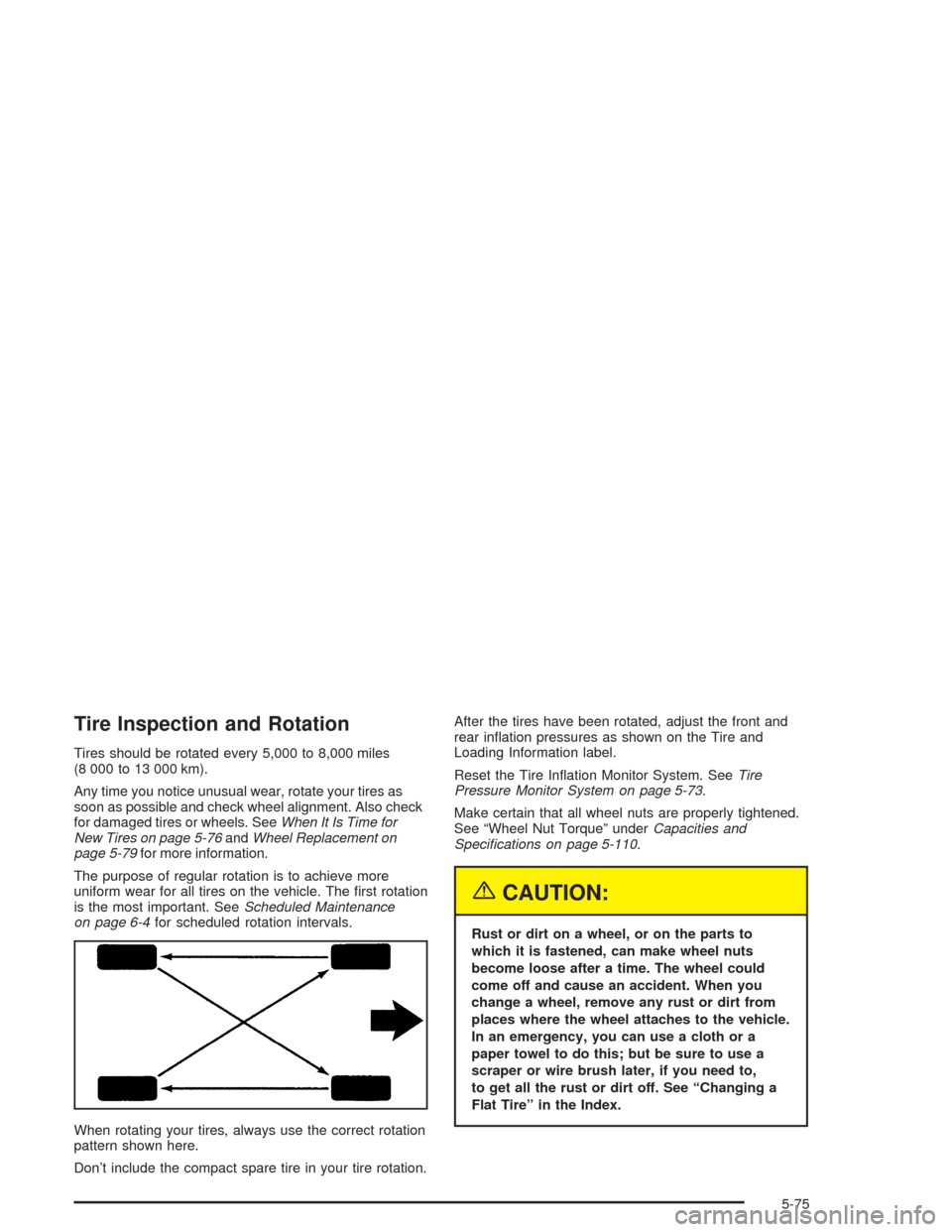
When rotating your tires, always use the correct rotation
pattern shown here.
Don’t include the compact spare tire in your tire rotation.After the tires have been rotated, adjust the front and
rear ination pressures as shown on the Tire and
Loading Information label.
Reset the Tire Ination Monitor System. SeeTire
Pressure Monitor System on page 5-73.
Make certain that all wheel nuts are properly tightened.
See “Wheel Nut Torque” underCapacities and
Specications on page 5-110.
{CAUTION:
Rust or dirt on a wheel, or on the parts to
which it is fastened, can make wheel nuts
become loose after a time. The wheel could
come off and cause an accident. When you
change a wheel, remove any rust or dirt from
places where the wheel attaches to the vehicle.
In an emergency, you can use a cloth or a
paper towel to do this; but be sure to use a
scraper or wire brush later, if you need to,
to get all the rust or dirt off. See “Changing a
Flat Tire” in the Index.
5-75
Page 341 of 420

Wheel Alignment and Tire Balance
The wheels on your vehicle were aligned and balanced
carefully at the factory to give you the longest tire life
and best overall performance.
Scheduled wheel alignment and wheel balancing are
not needed. However, if you notice unusual tire wear or
your vehicle pulling one way or the other, the alignment
may need to be reset. If you notice your vehicle
vibrating when driving on a smooth road, your wheels
may need to be rebalanced.
Wheel Replacement
Replace any wheel that is bent, cracked or badly rusted
or corroded. If wheel nuts keep coming loose, the
wheel, wheel bolts and wheel nuts should be replaced.
If the wheel leaks air, replace it (except some
aluminum wheels, which can sometimes be repaired).
See your dealer if any of these conditions exist.
Your dealer will know the kind of wheel you need.
Each new wheel should have the same load-carrying
capacity, diameter, width, offset and be mounted
the same way as the one it replaces.If you need to replace any of your wheels, wheel bolts or
wheel nuts, replace them only with new GM original
equipment parts. This way, you will be sure to have the
right wheel, wheel bolts and wheel nuts for your vehicle.
{CAUTION:
Using the wrong replacement wheels, wheel
bolts or wheel nuts on your vehicle can be
dangerous. It could affect the braking and
handling of your vehicle, make your tires lose
air and make you lose control. You could have
a collision in which you or others could be
injured. Always use the correct wheel, wheel
bolts and wheel nuts for replacement.
Notice:The wrong wheel can also cause problems
with bearing life, brake cooling, speedometer or
odometer calibration, headlamp aim, bumper height,
vehicle ground clearance and tire or tire chain
clearance to the body and chassis.
SeeChanging a Flat Tire on page 5-82for more
information.
5-79
Page 378 of 420

Scheduled Maintenance
When the CHANGE ENGINE OIL message comes on, it
means that service is required for your vehicle. Have your
vehicle serviced as soon as possible within the next
600 miles (1 000 km). It is possible that, if you are driving
under the best conditions, the engine oil life system may
not indicate that vehicle service is necessary for over a
year. However, your engine oil and lter must be changed
at least once a year and at this time the system must be
reset. Your GM Goodwrench dealer has GM-trained
service technicians who will perform this work using
genuine GM parts and reset the system.
If the engine oil life system is ever reset accidentally,
you must service your vehicle within 3,000 miles
(5 000 km) since your last service. Remember to reset
the oil life system whenever the oil is changed. See
Engine Oil on page 5-18for information on the Engine
Oil Life System and resetting the system.When the change engine oil message appears, certain
services, checks and inspections are required.
Required services are described in the following for
“MaintenanceI” and “MaintenanceII.” Generally,
it is recommended that your rst service be
MaintenanceI, your second service be MaintenanceII
and that you alternate MaintenanceIand MaintenanceII
thereafter. However, in some cases, MaintenanceII
may be required more often.
MaintenanceI— Use MaintenanceIif the change
engine oil message comes on within ten months since
vehicle was purchased or MaintenanceIIwas
performed.
MaintenanceII— Use MaintenanceIIif the previous
service performed was MaintenanceI. Always use
MaintenanceIIwhenever the message comes on ten
months or more since the last service or if the message
has not come on at all for one year.
6-4
Page 379 of 420
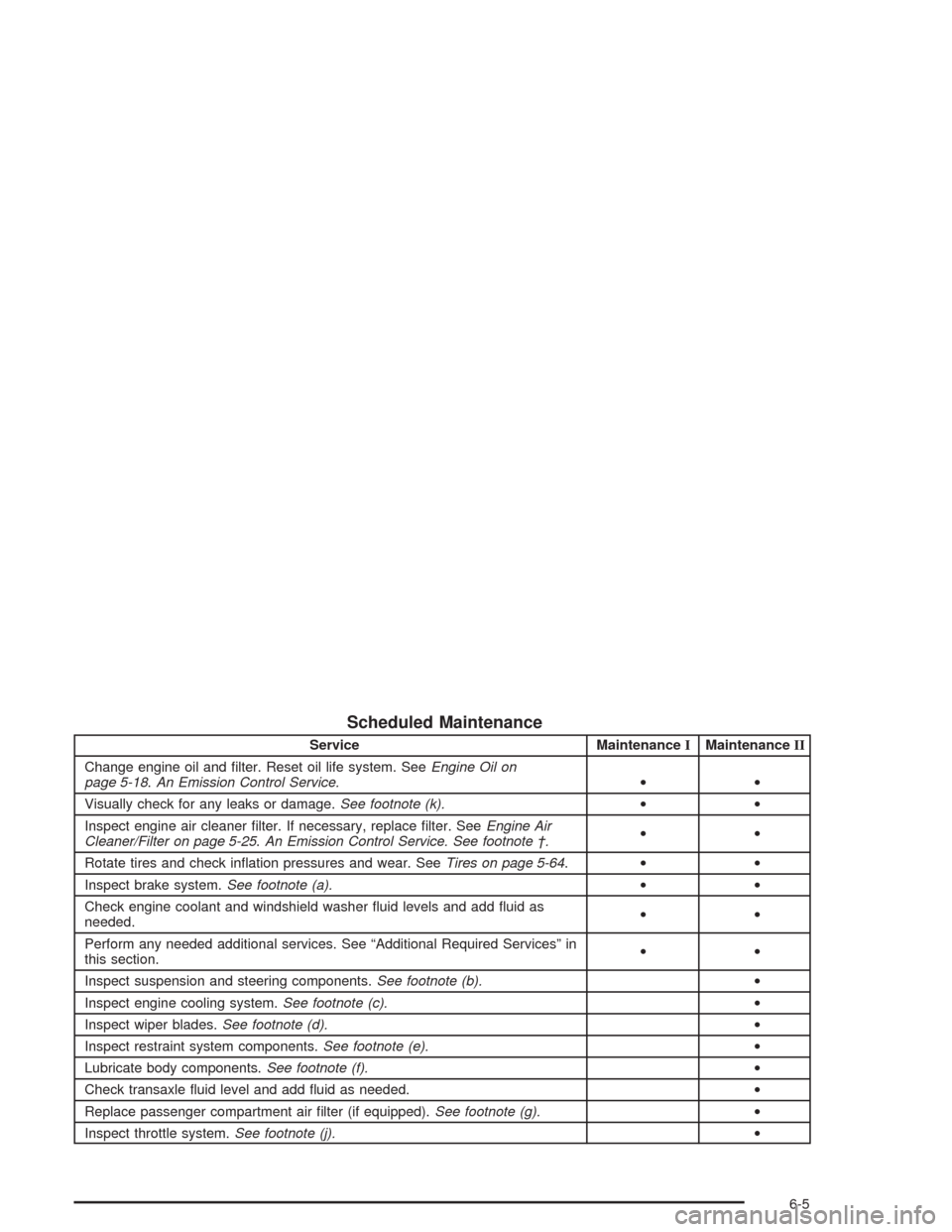
Scheduled Maintenance
Service MaintenanceIMaintenanceII
Change engine oil and lter. Reset oil life system. SeeEngine Oil on
page 5-18.An Emission Control Service.••
Visually check for any leaks or damage.See footnote (k).••
Inspect engine air cleaner lter. If necessary, replace lter. SeeEngine Air
Cleaner/Filter on page 5-25.An Emission Control Service. See footnote †.••
Rotate tires and check ination pressures and wear. SeeTires on page 5-64.••
Inspect brake system.See footnote (a).••
Check engine coolant and windshield washer uid levels and add uid as
needed.••
Perform any needed additional services. See “Additional Required Services” in
this section.••
Inspect suspension and steering components.See footnote (b).•
Inspect engine cooling system.See footnote (c).•
Inspect wiper blades.See footnote (d).•
Inspect restraint system components.See footnote (e).•
Lubricate body components.See footnote (f).•
Check transaxle uid level and add uid as needed.•
Replace passenger compartment air lter (if equipped).See footnote (g).•
Inspect throttle system.See footnote (j).•
6-5