2004 CHEVROLET COLORADO AUX
[x] Cancel search: AUXPage 138 of 414

Interior Lamps
Instrument Panel Brightness
The thumbwheel for this feature is located next to the
exterior lamps control. SeeExterior Lamps on page 3-6.
D(Instrument Panel Lights):Turn the thumbwheel
up or down to brighten or dim the instrument panel lights
and the radio display. This will only work if the
headlamps or parking lamps are on.
To turn on the dome lamp, with the vehicle doors
closed, turn the thumbwheel all the way up.
Dome Lamp
The dome lamp will come on when you open a door.
You can also turn the dome lamp on by turning the
thumbwheel all the way up. In this position, the dome
lamp will remain on whether a door is opened or closed.
E(Dome Override):Press this button, located
below the exterior lamp control, to turn the dome lamp
off even when a door is opened. To return the lamp
to automatic operation, press the button again.
Exit Lighting
With exit lighting, the interior lamps will come on when
you remove the key from the ignition. The lamps
will not come on if the dome override button is
pressed in.
Battery Run-Down Protection
This feature shuts off the dome lamp if it is left on for
more than 20 minutes when the ignition is in LOCK. This
will keep your battery from running down.
Accessory Power Outlets
Your vehicle may have an accessory power outlet.
With accessory power outlets you can plug in auxiliary
electrical equipment such as a cellular telephone or
CB radio.
Your vehicle may have two accessory power outlets
located on the lower part of the instrument panel below
the climate control system and there may be one
located on the rear of the center console. A small cap
must be pulled down to access an accessory power
outlet. When not using an outlet be sure to cover it with
the protective cap.
3-10
Page 174 of 414

3 REV (Reverse):Press and hold this pushbutton to
reverse quickly within a track. Press and hold this
pushbutton for less than two seconds to reverse at six
times the normal playing speed. Press and hold it
for more than two seconds to reverse at 17 times the
normal playing speed. Release this pushbutton to
play the passage. ET and the elapsed time of the track
will appear on the display.
4 FWD (Forward):Press and hold this pushbutton to
advance quickly within a track. Press and hold this
pushbutton for less than two seconds to advance at six
times the normal playing speed. Press and hold it for
more than two seconds to advance at 17 times the
normal playing speed. Release this pushbutton to play
the passage. ET and the elapsed time of the track
will appear on the display.
6 RDM (Random):Press this pushbutton to hear the
tracks in random, rather than sequential, order. RDM ON
will appear on the display. RDM T and the track
number will appear on the display when each track
starts to play. Press this pushbutton again to turn
off random play. RDM OFF will appear on the display.
qSEEKr:Press the left arrow to go to the start
of the current or to the previous track. Press the
right arrow to go to the start of the next track. If either
arrow is held or pressed more than once, the player will
continue moving backward or forward through the CD.
qSCANr:To scan the CD, press and hold either
SCAN arrow for more than two seconds until SCAN
appears on the display and you hear a beep. Use this
feature to listen to 10 seconds of each track of the CD.
Press either SCAN arrow again, to stop scanning.
DISPL (Display):Press this knob to see how long the
current track has been playing. ET and the elapsed time
of the track will appear on the display. To change the
default on the display, track or elapsed time, press this
knob until you see the display you want, then hold the
knob for two seconds. The radio will produce one beep
and the selected display will now be the default.
BAND:Press this button to listen to the radio when a
CD is playing. The inactive CD will remain safely
inside the radio for future listening
CD AUX (Auxiliary):Press this button to play a CD
when listening to the radio. The CD symbol will appear
on the display when a CD is loaded.
Z(Eject):Press this button to stop a CD when it is
playing or to eject a CD when it is not playing. Eject
may be activated with either the ignition or radio off. CDs
may be loaded with the ignition and radio off if this
button is pressed rst.
3-46
Page 182 of 414

As each new track starts to play, the track number will
appear on the display.
To insert multiple CDs, do the following:
1. Turn the ignition on.
2. Press and hold the LOAD button for two seconds.
You will hear a beep and the light, located to the
right of the slot, will begin to ash and LOAD
ALL will appear on the display.
3. Once the light stops ashing and turns green, load
a CD. Insert the CD partway into the slot, label side
up. The player will pull the CD in.
4. Once the CD is loaded, the light will begin ashing
again. Once the light stops ashing and turns green
you can load another CD. The CD player takes
up to six CDs. Do not try to load more than six.
To load more than one CD but less than six, complete
Steps 1 through 3. When you have nished loading
CDs, press the LOAD button to cancel the loading
function. The radio will begin to play the last CD loaded.
When a CD is inserted, the CD symbol will appear on
the display. If more than one CD has been loaded,
a number for each CD will appear on the display. If you
select an equalization setting for your CD, it will be
activated each time you play a CD.
As each new track starts to play, the track number will
appear on the display.Playing a Specic Loaded CD
For every CD loaded, a number will appear on the
display. To play a specic CD, rst press the CD AUX
button, then press the numbered pushbutton that
corresponds to the CD you want to play. A small bar will
appear under the CD number that is playing, and the
track number will appear.
If an error appears on the display, see “CD Messages”
later in this section.
CD
Z(Eject):Press the CD eject button to eject a
single CD or multiple CDs. To eject the CD that is
currently playing, press and release this button. To eject
multiple CDs, press and hold this button for two
seconds. You will hear a beep and the light will ash to
let you know when a CD is being ejected.
REMOVE CD will appear on the display. You can now
remove the CD. If the CD is not removed, after
25 seconds, the CD will be automatically pulled back
into the receiver. If you try to push the CD back into the
receiver, before the 25 second time period is complete,
the receiver will sense an error and will try to eject
the CD several times before stopping.
3-54
Page 184 of 414

sSEEKt:Press the left arrow to go to the start of
the current track, if more than ten seconds have played.
Press the right arrow to go to the next track. If you
hold either arrow or press it more than once, the player
will continue moving backward or forward through
the CD.
sSCANt:To scan one CD, press and hold either
SCAN arrow for more than two seconds until SCAN
appears on the display and you hear a beep. Use this
feature to listen to 10 seconds of each track of the
currently selected CD. Press either SCAN arrow again,
to stop scanning.
To scan all loaded CDs, press and hold either SCAN
arrow for more than four seconds until CD SCAN
appears on the display and you hear a beep. Use this
feature to listen to 10 seconds of the rst track of
each CD loaded. Press either SCAN arrow again, to
stop scanning.
RCL (Recall):Press this knob to see how long the
current track has been playing. To change the default
on the display (track or elapsed time), press this
knob until you see the display you want, then hold the
knob until the display ashes. The selected display
will now be the default.BAND:Press this button to play the radio when a
CD(s) is in the player. The inactive CD(s) will remain
safely inside the radio for future listening.
CD AUX (Auxiliary):Press this button to play a CD
when listening to the radio.Using Song List Mode
The six-disc CD changer has a feature called song list.
This feature is capable of saving 20 track selections.
To save tracks into the song list feature, perform
the following steps:
1. Turn the CD player on and load it with at least one
CD. See “LOAD CD” listed previously in this section
for more information.
2. Check to see that the CD changer is not in song list
mode. S-LIST should not appear in the display. If
S-LIST is present, press the SONG LIST button
to turn it off.
3. Select the desired CD by pressing the numbered
pushbutton and then use the SEEK SCAN right
arrow button to locate the track that you want
to save. The track will begin to play.
3-56
Page 363 of 414

Fuse Usage
1 Brake Switch, Stoplamps
2 Auxiliary Power 1
5 Air Conditioning Control Head
8 Wiper/Washer Switch
9 Fog Lamps
10 Ignition Transducers
11 Driver’s Side Headlamp
12 Passenger’s Side Headlamp
13 Fuel Pump
Fuse Usage
14 Wiper
15 Front Axle Actuator
16Antilock Brake System (ABS), ABS
module, Four-Wheel Drive, Gravity
Sensor
17Supplemental Inatable Restraint
System, Sensing and Diagnostic
Module, Air Bag Off Switch
18 Heated Seat
19Cruise Control Switch, Inside
Rearview Mirror, Transfer Case
Control Module, Brake Switch,
Clutch Disable
20 Electronic Throttle Control (ETC)
21 Power Door Locks
22 Injectors
23Ignition, Clutch Starter Switch,
Neutral Safety Back-Up Switch,
Ignition Coils 1-5, Air Conditioning
Relay
24 Transmission Solenoid
25 Powertrain Control Module (PCM)
26 Back-up Lights
27ERLS, Map Sensor, Can Purge
Solenoid
28 Rear Turn/Hazard Lights
5-105
Page 364 of 414
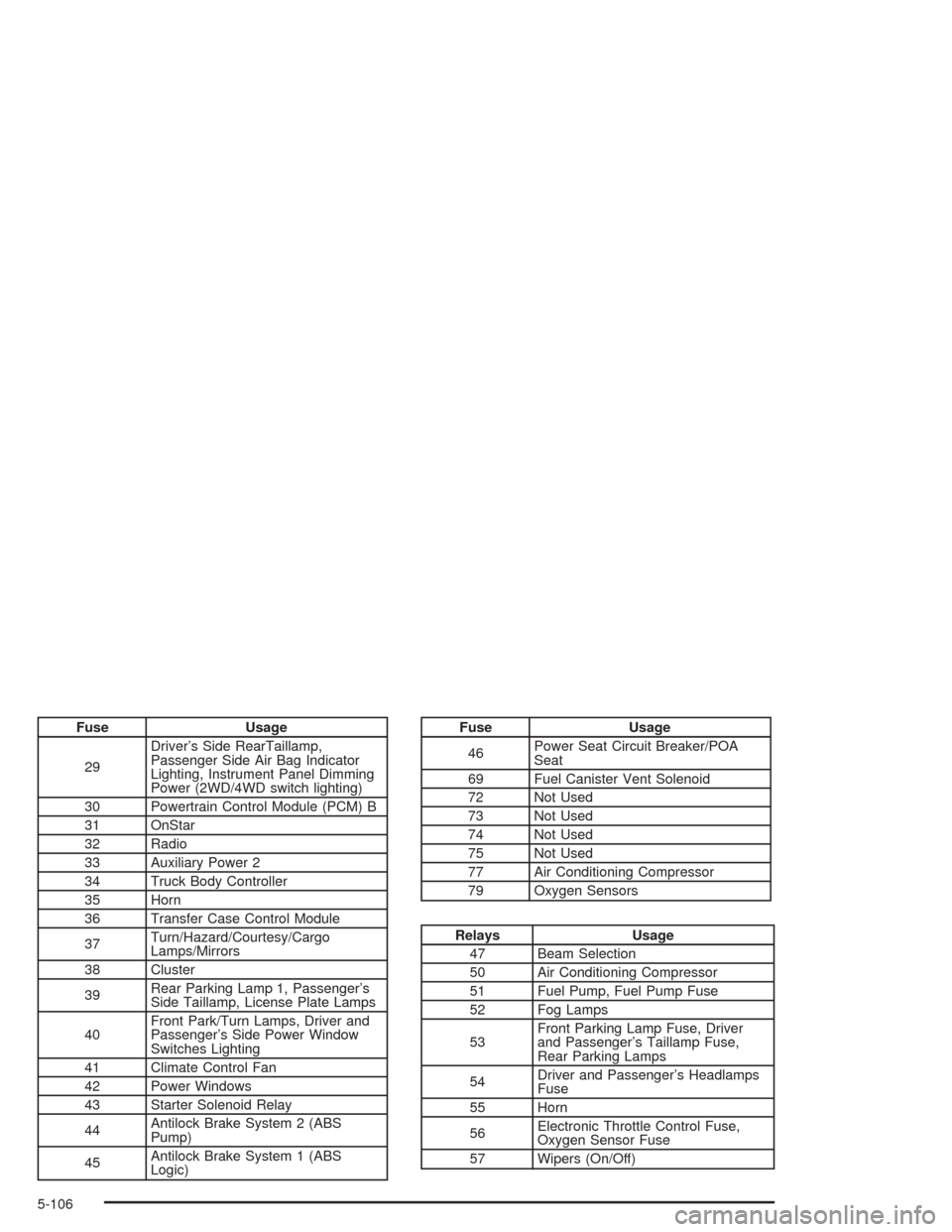
Fuse Usage
29Driver’s Side RearTaillamp,
Passenger Side Air Bag Indicator
Lighting, Instrument Panel Dimming
Power (2WD/4WD switch lighting)
30 Powertrain Control Module (PCM) B
31 OnStar
32 Radio
33 Auxiliary Power 2
34 Truck Body Controller
35 Horn
36 Transfer Case Control Module
37Turn/Hazard/Courtesy/Cargo
Lamps/Mirrors
38 Cluster
39Rear Parking Lamp 1, Passenger’s
Side Taillamp, License Plate Lamps
40Front Park/Turn Lamps, Driver and
Passenger’s Side Power Window
Switches Lighting
41 Climate Control Fan
42 Power Windows
43 Starter Solenoid Relay
44Antilock Brake System 2 (ABS
Pump)
45Antilock Brake System 1 (ABS
Logic)Fuse Usage
46Power Seat Circuit Breaker/POA
Seat
69 Fuel Canister Vent Solenoid
72 Not Used
73 Not Used
74 Not Used
75 Not Used
77 Air Conditioning Compressor
79 Oxygen Sensors
Relays Usage
47 Beam Selection
50 Air Conditioning Compressor
51 Fuel Pump, Fuel Pump Fuse
52 Fog Lamps
53Front Parking Lamp Fuse, Driver
and Passenger’s Taillamp Fuse,
Rear Parking Lamps
54Driver and Passenger’s Headlamps
Fuse
55 Horn
56Electronic Throttle Control Fuse,
Oxygen Sensor Fuse
57 Wipers (On/Off)
5-106