2004 CHEVROLET COLORADO battery
[x] Cancel search: batteryPage 138 of 414

Interior Lamps
Instrument Panel Brightness
The thumbwheel for this feature is located next to the
exterior lamps control. SeeExterior Lamps on page 3-6.
D(Instrument Panel Lights):Turn the thumbwheel
up or down to brighten or dim the instrument panel lights
and the radio display. This will only work if the
headlamps or parking lamps are on.
To turn on the dome lamp, with the vehicle doors
closed, turn the thumbwheel all the way up.
Dome Lamp
The dome lamp will come on when you open a door.
You can also turn the dome lamp on by turning the
thumbwheel all the way up. In this position, the dome
lamp will remain on whether a door is opened or closed.
E(Dome Override):Press this button, located
below the exterior lamp control, to turn the dome lamp
off even when a door is opened. To return the lamp
to automatic operation, press the button again.
Exit Lighting
With exit lighting, the interior lamps will come on when
you remove the key from the ignition. The lamps
will not come on if the dome override button is
pressed in.
Battery Run-Down Protection
This feature shuts off the dome lamp if it is left on for
more than 20 minutes when the ignition is in LOCK. This
will keep your battery from running down.
Accessory Power Outlets
Your vehicle may have an accessory power outlet.
With accessory power outlets you can plug in auxiliary
electrical equipment such as a cellular telephone or
CB radio.
Your vehicle may have two accessory power outlets
located on the lower part of the instrument panel below
the climate control system and there may be one
located on the rear of the center console. A small cap
must be pulled down to access an accessory power
outlet. When not using an outlet be sure to cover it with
the protective cap.
3-10
Page 139 of 414

Notice:Leaving electrical equipment on for
extended periods will drain the battery. Always turn
off electrical equipment when not in use and do
not plug in equipment that exceeds the maximum
amperage rating.
Certain electrical accessories may not be compatible
with the accessory power outlet and could result
in blown vehicle or adapter fuses. If you experience a
problem, see your dealer for additional information
on accessory power outlets.
Notice:Adding any electrical equipment to your
vehicle may damage it or keep other components
from working as they should. The repairs would not
be covered by your warranty. Check with your
dealer before adding electrical equipment.
When adding electrical equipment, be sure to follow
the proper installation instructions included with
the equipment.
Notice:Improper use of the power outlet can cause
damage not covered by your warranty. Do not
hang any type of accessory or accessory bracket
from the plug because the power outlets are
designed for accessory power plugs only.Ashtrays and Cigarette Lighter
Your vehicle may have an ashtray and cigarette lighter.
Your ashtray is located at the front of your center
console area.
Notice:If you put papers or other ammable items
in the ashtray, hot cigarettes or other smoking
materials could ignite them and possibly damage
your vehicle. Never put ammable items in
the ashtray.
To use the lighter, press it in all the way, and let go.
When it’s ready, it will pop back out by itself.
Notice:Holding a cigarette lighter in while it is
heating will not allow the lighter to back away from
the heating element when it is hot. Damage from
overheating may occur to the lighter or heating
element, or a fuse could be blown. Do not hold a
cigarette lighter in while it is heating.
3-11
Page 149 of 414

{CAUTION:
If the air bag readiness light ever comes on
when you have turned off the air bag, it means
that something may be wrong with the air bag
system. The right front passenger’s frontal air
bag could inate even though the switch is off.
If this ever happens, do not let anyone whom
the national government has identied as a
member of a passenger air bag risk group sit
in the right front passenger’s position (for
example, do not secure a rear-facing child
restraint in the right front passenger’s seat)
until you have your vehicle serviced.
Battery Warning Light
This light will come on
briey when you start the
vehicle, as a check to
show you it is working;
then it should go out.
If it stays on, or comes on while you are driving, you
may have a problem with the electrical charging system.
Have it checked right away. Driving while this light is
on could drain your battery and result in a vehicle that
may stall.
If you must drive a short distance with the light on, be
certain to turn off all your accessories, such as the radio
and climate control system.
3-21
Page 155 of 414

This can happen if you have recently replaced your
battery or if your battery has run down. The diagnostic
system is designed to evaluate critical emission
control systems during normal driving. This may take
several days of routine driving. If you have done this and
your vehicle still does not pass the inspection for lack
of OBD system readiness, your GM dealer can prepare
the vehicle for inspection.
Oil Pressure Light
{CAUTION:
Do not keep driving if the oil pressure is low. If
you do, your engine can become so hot that it
catches re. You or others could be burned.
Check your oil as soon as possible and have
your vehicle serviced.
Notice:Lack of proper engine oil maintenance may
damage the engine. The repairs would not be
covered by your warranty. Always follow the
maintenance schedule in this manual for changing
engine oil.This light tells you if there
could be a problem with
your engine oil pressure.
The light goes on when you turn your key to ON or
START. It goes off once you start your engine. That’s a
check to be sure the light works. If it doesn’t come
on, be sure to have it xed so it will be there to warn
you if something goes wrong.
When the light comes on and stays on, it means that oil
isn’t owing through your engine properly. You could
be low on oil and you might have some other system
problem. SeeEngine Oil on page 5-13and “OIL” under
DIC Warnings and Messages on page 3-32for
more information.
3-27
Page 161 of 414

AC (Air Conditioning) OFF
This message will be displayed when the engine coolant
temperature is too high and the air conditioning in
your vehicle needs to be turned off. See andEngine
Overheating on page 5-28andClimate Control System
on page 3-12for more information. It will be displayed
along with the ENG HOT message.
ABS (Anti-Lock Brake System)
This message will be displayed on the DIC if there is a
problem with your antilock brake system. Check
your antilock brake system as soon as possible and
have your vehicle serviced by your GM dealer.
SeeBrakes on page 5-39andAnti-Lock Brake System
Warning Light on page 3-23for more information.
Pressing the reset stem to acknowledge this message
and clear it from the DIC display.
BATTERY
This message will be displayed when there is a problem
with your vehicle’s battery. SeeBattery on page 5-42
andBattery Warning Light on page 3-21for
more information.
BRAKES
This message will be displayed on the DIC if there is a
problem with your brakes. Check your brakes as
soon as possible and have your vehicle serviced by
your GM dealer. SeeBrakes on page 5-39andBrake
System Warning Light on page 3-22for more
information. Press and release the reset stem to
acknowledge the message and clear it from the
DIC display.
CHANGE OIL
This message will be displayed on your DIC when the
oil needs to be changed. Check the oil in your vehicle as
soon as possible and have your vehicle serviced by
your GM dealer. SeeEngine Oil on page 5-13and
Scheduled Maintenance on page 6-4for more
information. Press the reset stem to acknowledge the
message and clear it from the display.
DOORS
This message will be displayed on your DIC when one
of your doors is ajar. You should check all the doors
on your vehicle to make sure they are closed. The
message will clear from the display after all of the doors
are closed.
3-33
Page 229 of 414
{CAUTION:
Snow can trap exhaust gases under your
vehicle. This can cause deadly CO (carbon
monoxide) gas to get inside. CO could
overcome you and kill you. You can not see it
or smell it, so you might not know it is in your
vehicle. Clear away snow from around the
base of your vehicle, especially any that is
blocking your exhaust pipe. And check around
again from time to time to be sure snow does
not collect there.
Open a window just a little on the side of the
vehicle that is away from the wind. This will
help keep CO out.Run your engine only as long as you must. This saves
fuel. When you run the engine, make it go a little
faster than just idle. That is, push the accelerator
slightly. This uses less fuel for the heat that you get and
it keeps the battery charged. You will need a
well-charged battery to restart the vehicle, and possibly
for signaling later on with your headlamps. Let the
heater run for a while.
Then, shut the engine off and close the window almost all
the way to preserve the heat. Start the engine again and
repeat this only when you feel really uncomfortable from
the cold. But do it as little as possible. Preserve the fuel
as long as you can. To help keep warm, you can get out
of the vehicle and do some fairly vigorous exercises
every half hour or so until help comes.
4-41
Page 234 of 414
Four-Wheel Drive Vehicles
Use the following steps to tow your vehicle with all four
wheels on the ground:
1. Drive the vehicle to be towed into position behind
the tow vehicle.
2. Firmly set the parking brake. SeeParking Brake on
page 2-31for more information.
3. Put an automatic transmission in PARK (P) or a
manual transmission in FIRST (1).
4. Securely attach the vehicle being towed to the
tow vehicle.
{CAUTION:
Shifting a four-wheel-drive vehicle’s transfer
case into NEUTRAL can cause your vehicle to
roll even if the transmission is in Park (P) for
an automatic transmission, or if your vehicle is
in gear, for a manual transmission. You or
others could be injured. Make sure the parking
brake is rmly set before you shift the transfer
case to NEUTRAL.5. Shift the transfer case to NEUTRAL.
SeeFour-Wheel Drive on page 2-27for
more information.
6. Release the parking brake only after the
vehicle being towed is rmly attached to the
towing vehicle.
Notice:If you exceed 55 mph (90 km/h) while
towing your vehicle, it could be damaged. Never
exceed 55 mph (90 km/h) while towing your vehicle.
7. Turn the ignition to LOCK. To prevent your
battery from draining while towing, remove
the battery cable from the positive terminal (post)
of the battery.
After towing see “Shifting out of NEUTRAL” under
Four-Wheel Drive on page 2-27.
4-46
Page 236 of 414
{CAUTION:
Shifting a four-wheel-drive vehicle’s transfer
case into NEUTRAL can cause your vehicle to
roll even if the transmission is in Park (P) for
an automatic transmission, or if your vehicle is
in gear, for a manual transmission. You or
others could be injured. Make sure the parking
brake is rmly set before you shift the transfer
case to NEUTRAL.
5. Shift the transfer case to NEUTRAL. See
Four-Wheel Drive on page 2-27for instructions.
6. Release the parking brake only after the
vehicle being towed is rmly attached to the
towing vehicle.
Notice:If you exceed 55 mph (90 km/h) while
towing your vehicle, it could be damaged. Never
exceed 55 mph (90 km/h) while towing your vehicle.7. Turn the ignition to LOCK. To prevent your battery
from draining while towing, remove the battery
cable from the positive terminal (post) of the battery.
After towing see “Shifting out of NEUTRAL” under
Four-Wheel Drive on page 2-27.
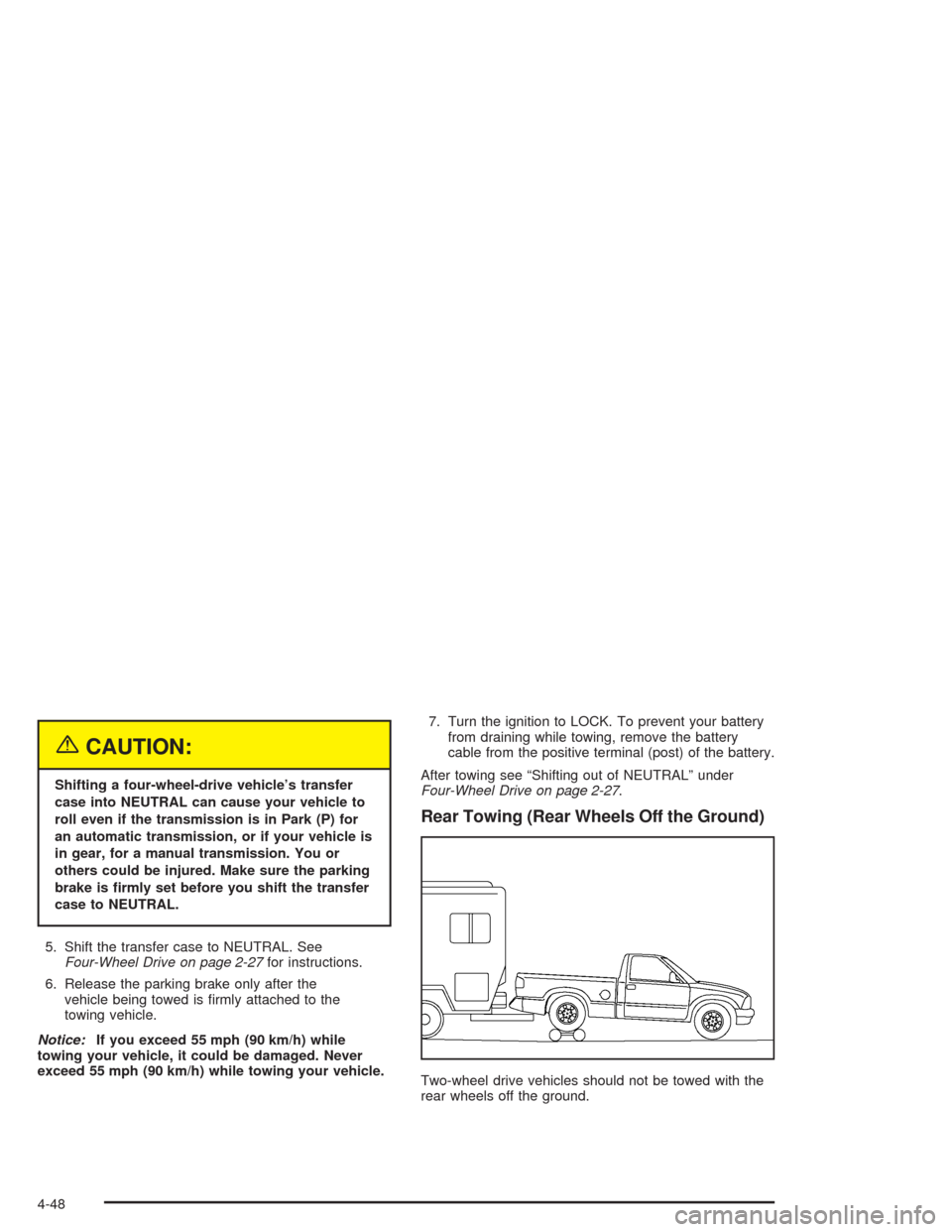
Rear Towing (Rear Wheels Off the Ground)
Two-wheel drive vehicles should not be towed with the
rear wheels off the ground.
4-48