2004 CHEVROLET BLAZER power steering
[x] Cancel search: power steeringPage 86 of 446

C (OFF):This position lets you turn off the engine but
still turn the steering wheel. Use OFF if you must
have your vehicle in motion while the engine is off
(for example, if your vehicle is being towed).
D (RUN):This is the position for driving.
E (START):This position starts your engine.
Key Release Button
The key cannot be
removed from the ignition
of manual transmission
vehicles unless the
key release button is
pressed.
To remove the key, turn the ignition switch to OFF.
Then turn the key to LOCK while pressing the key
release button. Pull the key straight out.
Retained Accessory Power (RAP)
Your vehicle is equipped with a Retained Accessory
Power (RAP) feature which will allow certain features of
your vehicle to continue to work for up to 20 minutes
after the ignition key is turned to OFF.
Your radio, power windows, sunroof and overhead
console will work when the ignition key is in RUN or
ACCESSORY. Once the key is turned from RUN
to OFF, these features will continue to work for up to
20 minutes or until a door is opened.
Starting Your Engine
Automatic Transmission
Move your shift lever to PARK (P) or NEUTRAL (N).
Your engine won’t start in any other position – that’s a
safety feature. To restart when you’re already moving,
use NEUTRAL (N) only.
Notice:Do not try to shift to PARK (P) if your
vehicle is moving. If you do, you could damage the
transmission. Shift to PARK (P) only when your
vehicle is stopped.
2-20
Page 89 of 446

Automatic Transmission Operation
Your automatic transmission may have a shift lever
located on the console between the seats or on
the steering column.
There are several different positions for your shift lever.
If your vehicle is equipped with a column shift lever,
it features an electronic shift position indicator within the
instrument panel cluster. This display must be powered
anytime the shift lever is capable of being moved
out of PARK (P). This means that if your key is in OFF,
but not locked, there will be a small current drain on
your battery which could discharge your battery over
a period of time. If you need to leave your key inthe ignition in OFF for an extended period, it is
recommended that you disconnect the battery cable
from the battery to prevent discharging your battery.
PARK (P):This position locks your rear wheels.
It’s the best position to use when you start your engine
because your vehicle can’t move easily.
{CAUTION:
It is dangerous to get out of your vehicle if the
shift lever is not fully in PARK (P) with the
parking brake rmly set. Your vehicle can roll.
Do not leave your vehicle when the engine is
running unless you have to. If you have left the
engine running, the vehicle can move suddenly.
You or others could be injured. To be sure your
vehicle will not move, even when you are on
fairly level ground, always set your parking
brake and move the shift lever to PARK (P).
SeeShifting Into Park (P) on page 2-36. If you
are pulling a trailer, seeTowing a Trailer on
page 4-60.
2-23
Page 95 of 446
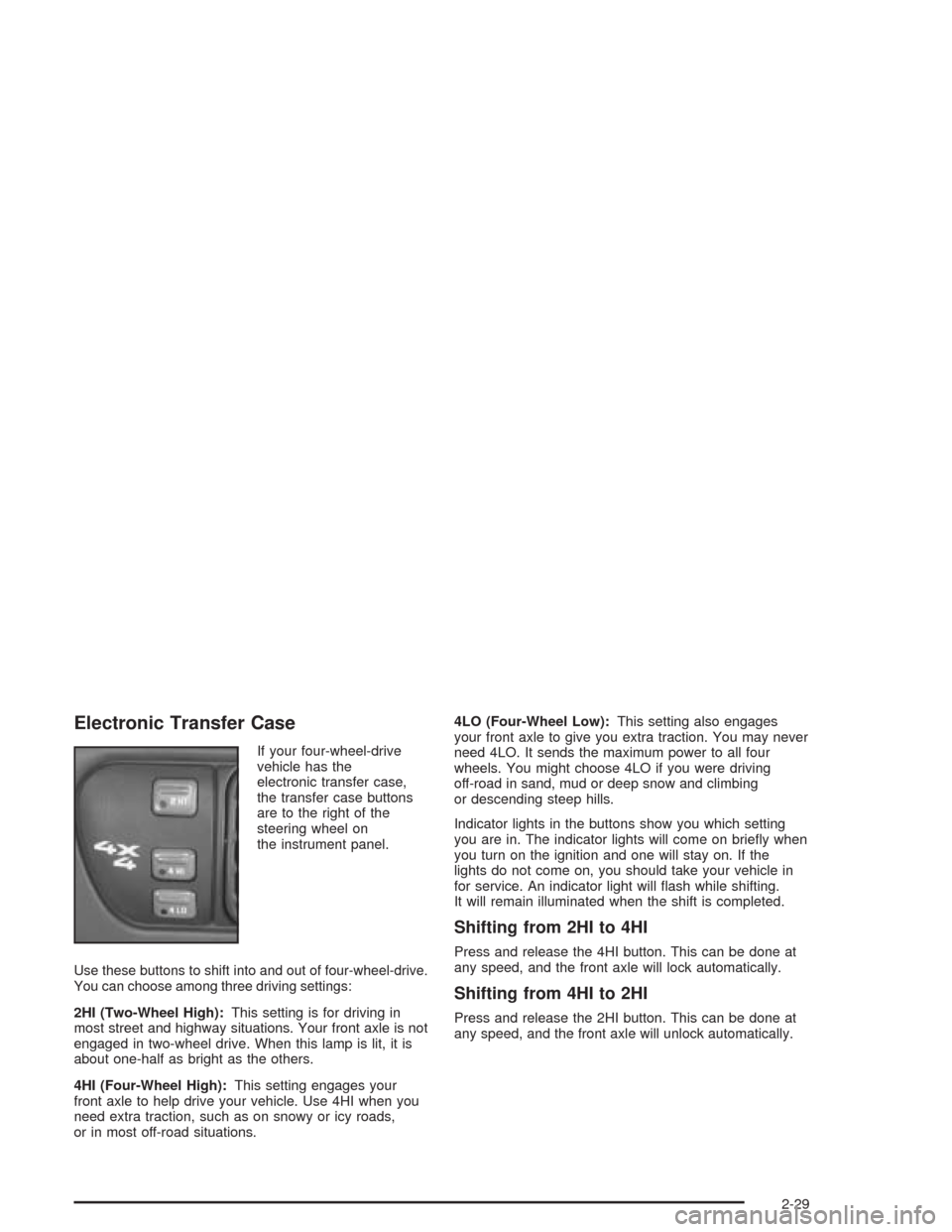
Electronic Transfer Case
If your four-wheel-drive
vehicle has the
electronic transfer case,
the transfer case buttons
are to the right of the
steering wheel on
the instrument panel.
Use these buttons to shift into and out of four-wheel-drive.
You can choose among three driving settings:
2HI (Two-Wheel High):This setting is for driving in
most street and highway situations. Your front axle is not
engaged in two-wheel drive. When this lamp is lit, it is
about one-half as bright as the others.
4HI (Four-Wheel High):This setting engages your
front axle to help drive your vehicle. Use 4HI when you
need extra traction, such as on snowy or icy roads,
or in most off-road situations.4LO (Four-Wheel Low):This setting also engages
your front axle to give you extra traction. You may never
need 4LO. It sends the maximum power to all four
wheels. You might choose 4LO if you were driving
off-road in sand, mud or deep snow and climbing
or descending steep hills.
Indicator lights in the buttons show you which setting
you are in. The indicator lights will come on briey when
you turn on the ignition and one will stay on. If the
lights do not come on, you should take your vehicle in
for service. An indicator light will ash while shifting.
It will remain illuminated when the shift is completed.
Shifting from 2HI to 4HI
Press and release the 4HI button. This can be done at
any speed, and the front axle will lock automatically.
Shifting from 4HI to 2HI
Press and release the 2HI button. This can be done at
any speed, and the front axle will unlock automatically.
2-29
Page 97 of 446
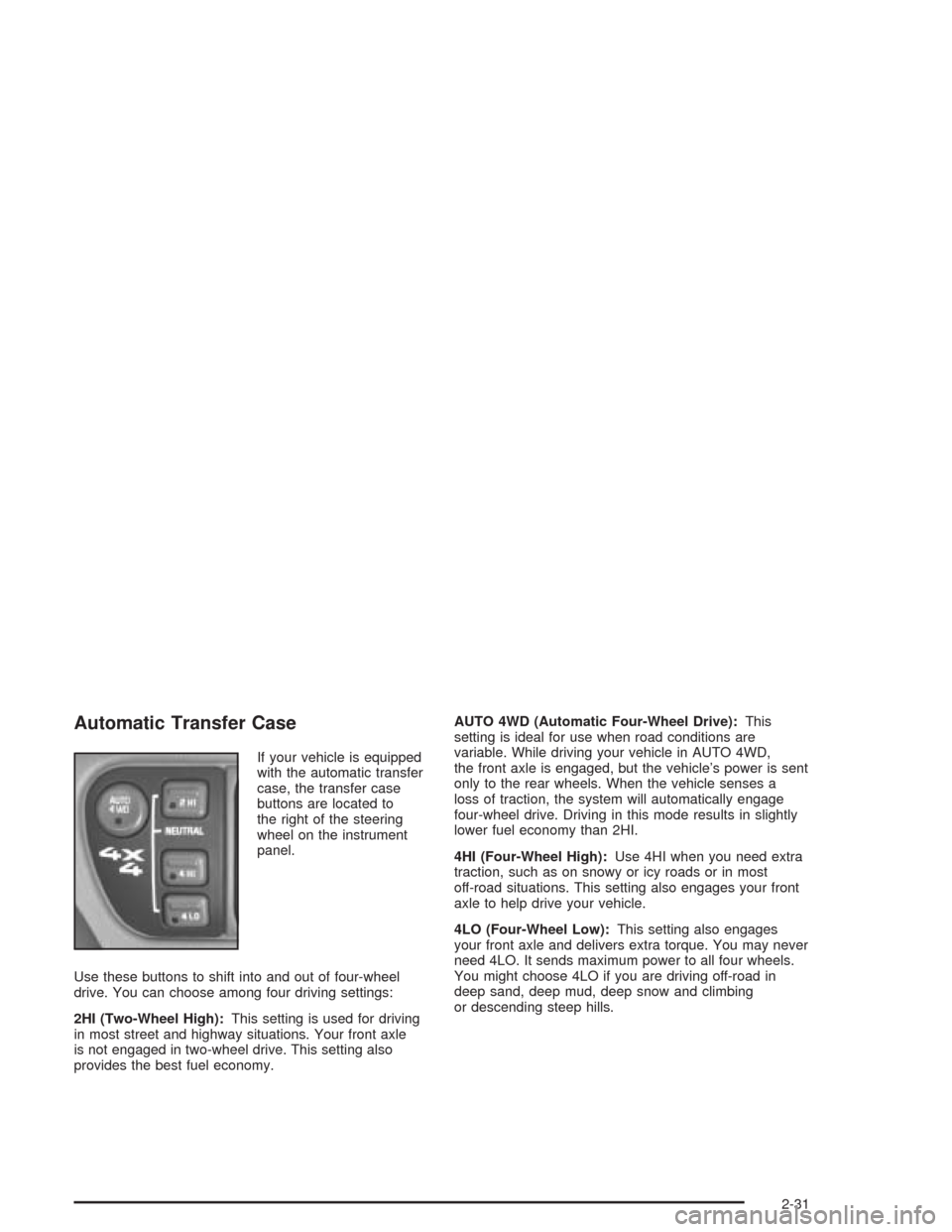
Automatic Transfer Case
If your vehicle is equipped
with the automatic transfer
case, the transfer case
buttons are located to
the right of the steering
wheel on the instrument
panel.
Use these buttons to shift into and out of four-wheel
drive. You can choose among four driving settings:
2HI (Two-Wheel High):This setting is used for driving
in most street and highway situations. Your front axle
is not engaged in two-wheel drive. This setting also
provides the best fuel economy.AUTO 4WD (Automatic Four-Wheel Drive):This
setting is ideal for use when road conditions are
variable. While driving your vehicle in AUTO 4WD,
the front axle is engaged, but the vehicle’s power is sent
only to the rear wheels. When the vehicle senses a
loss of traction, the system will automatically engage
four-wheel drive. Driving in this mode results in slightly
lower fuel economy than 2HI.
4HI (Four-Wheel High):Use 4HI when you need extra
traction, such as on snowy or icy roads or in most
off-road situations. This setting also engages your front
axle to help drive your vehicle.
4LO (Four-Wheel Low):This setting also engages
your front axle and delivers extra torque. You may never
need 4LO. It sends maximum power to all four wheels.
You might choose 4LO if you are driving off-road in
deep sand, deep mud, deep snow and climbing
or descending steep hills.
2-31
Page 214 of 446

Remember: Anti-lock does not change the time you
need to get your foot up to the brake pedal or always
decrease stopping distance. If you get too close to
the vehicle in front of you, you will not have time to apply
your brakes if that vehicle suddenly slows or stops.
Always leave enough room up ahead to stop, even
though you have anti-lock brakes.
Using Anti-Lock
Do not pump the brakes. Just hold the brake pedal
down rmly and let anti-lock work for you. You may feel
the brakes vibrate, or you may notice some noise,
but this is normal.
Braking in Emergencies
With anti-lock, you can steer and brake at the same
time. In many emergencies, steering can help you more
than even the very best braking.
Locking Rear Axle
If your vehicle has this feature, your locking rear axle
can give you additional traction on snow, mud, ice, sand
or gravel. It works like a standard axle most of the
time, but when one of the rear wheels has no traction
and the other does, this feature will allow the wheel with
traction to move the vehicle.
Steering
Power Steering
If you lose power steering assist because the engine
stops or the system is not functioning, you can steer but
it will take much more effort.
Steering Tips
Driving on Curves
It is important to take curves at a reasonable speed.
A lot of the “driver lost control” accidents mentioned on
the news happen on curves. Here is why:
Experienced driver or beginner, each of us is subject to
the same laws of physics when driving on curves.
The traction of the tires against the road surface makes
it possible for the vehicle to change its path when
you turn the front wheels. If there is no traction, inertia
will keep the vehicle going in the same direction. If
you have ever tried to steer a vehicle on wet ice, you
will understand this.
The traction you can get in a curve depends on the
condition of your tires and the road surface, the angle at
which the curve is banked, and your speed. While
you are in a curve, speed is the one factor you
can control.
4-10
Page 225 of 446

Driving Uphill
Once you decide you can safely drive up the hill, you
need to take some special steps.
Use a low gear and get a rm grip on the steering
wheel.
Get a smooth start up the hill and try to maintain
your speed. Do not use more power than you
need, because you do not want your wheels to start
spinning or sliding.
Try to drive straight up the hill if at all possible. If
the path twists and turns, you might want to nd
another route.
{CAUTION:
Turning or driving across steep hills can be
dangerous. You could lose traction, slide
sideways, and possibly roll over. You could be
seriously injured or killed. When driving up
hills, always try to go straight up.
Ease up on your speed as you approach the top of
the hill.
Attach a ag to the vehicle to make you more
visible to approaching traffic on trails or hills.
Sound the horn as you approach the top of the hill
to let opposing traffic know you are there.
Use your headlamps even during the day. They
make you more visible to oncoming traffic.
{CAUTION:
Driving to the top (crest) of a hill at full speed
can cause an accident. There could be a
drop-off, embankment, cliff, or even another
vehicle. You could be seriously injured or
killed. As you near the top of a hill, slow down
and stay alert.
4-21
Page 277 of 446
Service............................................................5-3
Doing Your Own Service Work.........................5-3
Adding Equipment to the Outside
of Your Vehicle...........................................5-4
Fuel................................................................5-4
Gasoline Octane............................................5-4
Gasoline Specications....................................5-5
California Fuel...............................................5-5
Additives.......................................................5-6
Fuels in Foreign Countries...............................5-6
Filling Your Tank............................................5-7
Filling a Portable Fuel Container.......................5-9
Checking Things Under the Hood....................5-10
Hood Release..............................................5-10
Engine Compartment Overview.......................5-12
Engine Oil...................................................5-13
Engine Air Cleaner/Filter................................5-17
Automatic Transmission Fluid.........................5-19
Manual Transmission Fluid.............................5-22
Hydraulic Clutch...........................................5-23
Engine Coolant.............................................5-24
Radiator Pressure Cap..................................5-26
Engine Overheating.......................................5-27
Cooling System............................................5-29
Engine Fan Noise.........................................5-36
Power Steering Fluid.....................................5-36Windshield Washer Fluid................................5-38
Brakes........................................................5-39
Battery........................................................5-42
Jump Starting...............................................5-43
Rear Axle.......................................................5-47
Four-Wheel Drive............................................5-48
Front Axle......................................................5-49
Bulb Replacement..........................................5-50
Halogen Bulbs..............................................5-50
Headlamps..................................................5-50
One-Piece Front Turn Signal Lamps................5-52
Two-Piece Front Turn Signal Lamps................5-53
Taillamps.....................................................5-54
Replacement Bulbs.......................................5-54
Windshield Wiper Blade Replacement..............5-55
Tires..............................................................5-57
Ination - Tire Pressure.................................5-67
Tire Inspection and Rotation...........................5-68
When It Is Time for New Tires.......................5-70
Buying New Tires.........................................5-70
Uniform Tire Quality Grading..........................5-71
Wheel Alignment and Tire Balance..................5-72
Wheel Replacement......................................5-73
Tire Chains..................................................5-74
If a Tire Goes Flat........................................5-75
Section 5 Service and Appearance Care
5-1
Page 289 of 446

A. Battery. SeeBattery on page 5-42for more
information.
B. Coolant Recovery Tank. SeeEngine Coolant on
page 5-24for more information.
C. Engine Oil Dipstick. SeeEngine Oil on page 5-13
for more information.
D. Engine Oil Fill. SeeEngine Oil on page 5-13for
more information.
E. Automatic Transmission Dipstick (If Equipped).
SeeAutomatic Transmission Fluid on page 5-19for
more information.
F. Power Steering Reservoir. SeePower Steering Fluid
on page 5-36for more information.
G. Brake Master Cylinder Reservoir. SeeBrakes on
page 5-39for more information.
H. Engine Air Cleaner/Filter. SeeEngine Air
Cleaner/Filter on page 5-17for more information.
I. Clutch Master Cylinder Reservoir. SeeHydraulic
Clutch on page 5-23for more information.
J. Engine Compartment Fuse Block. SeeFuses and
Circuit Breakers on page 5-99for more information.
K. Windshield Washer Fluid Reservoir. SeeWindshield
Washer Fluid on page 5-38for more information.Engine Oil
Checking Engine Oil
It is a good idea to check your engine oil every time you
get fuel. In order to get an accurate reading, the oil
must be warm and the vehicle must be on level ground.
The engine oil dipstick handle is a yellow loop. See
Engine Compartment Overview on page 5-12for
the location of the engine oil dipstick.
Turn off the engine and give the oil several minutes to
drain back into the oil pan. If you don’t, the oil
dipstick might not show the actual level.
Pull out the dipstick and clean it with a paper towel or
cloth, then push it back in all the way. Remove it again,
keeping the tip down, and check the level.
5-13