2004 CADILLAC ESCALADE EXT door lock
[x] Cancel search: door lockPage 116 of 478

OnStaržSystem
OnStaržuses global positioning system (GPS) satellite
technology, wireless communications, and state of
the art call centers to provide you with a wide range of
safety, security, information and convenience services.
A complete OnStar
žuser's guide and the terms
and conditions of the OnStaržSubscription Service
Agreement are included in your OnStarž-equipped
vehicle's glove box literature. For more information, visit
www.onstar.com, contact OnStar
žat 1-888-4-ONSTAR
(1-888-466-7827), or press the blue OnStaržbutton
to speak to an OnStaržadvisor 24 hours a day, 7 days
a week.
A completed Subscription Service Agreement is required
prior to delivery of OnStar
žservices and prepaid
calling minutes are also required for OnStaržPersonal
Calling and OnStaržVirtual Advisor use. Terms and
conditions of the Subscription Service Agreement can be
found at www.onstar.com.
OnStaržServices
One of the following plans is normally included for a
speci®c duration with each vehicle equipped with
OnStar
ž. You can upgrade or extend your OnStarž
service plan to meet your needs.
Safe and Sound Plan
·
Automatic Noti®cation of Air Bag Deployment
·Emergency Services
·Roadside Assistance
·Stolen Vehicle Assistance
·AccidentAssist
·Remote Door Unlock
·Remote Diagnostics
·Online Concierge
Directions and Connections Plan
·
All Safe and Sound Plan services
·Route Support
·RideAssist
·Information and Convenience Services
2-48
Page 118 of 478

HomeLinkžTransmitter
HomeLinkža combined universal transmitter and
receiver, provides a way to replace up to three
hand-held transmitters used to activate devices such as
gate operators, garage door openers, entry door
locks, security systems and home lighting. Additional
HomeLink
žinformation can be found on the internet at
www.homelink.com or by calling 1-800-355-3515.
If your vehicle is equipped with the HomeLink
ž
Transmitter, it complies with Part 15 of the FCC Rules.
Operation is subject to the following two conditions:
(1) this device may not cause harmful interference, and
(2) this device must accept any interference received,
including interference that may cause undesired
operation.This device complies with RSS-210 of Industry Canada.
Operation is subject to the following two conditions:
(1) this device may not cause interference, and (2) this
device must accept any interference, including
interference that may cause undesired operation of the
device.
Changes and modi®cations to this system by other than
an authorized service facility could void authorization
to use this equipment.
Programming the HomeLinkž
Transmitter
Do not use the HomeLinkžTransmitter with any garage
door opener that does not have the ªstop and reverseº
feature. This includes any garage door opener model
manufactured before April 1, 1982. If you have a newer
garage door opener with rolling codes, please be
sure to follow steps 6 through 8 to complete the
programming of your HomeLink
žTransmitter.
Read the instructions completely before attempting to
program the HomeLink
žTransmitter. Because of
the steps involved, it may be helpful to have another
person available to assist you in programming the
transmitter.
2-50
Page 124 of 478
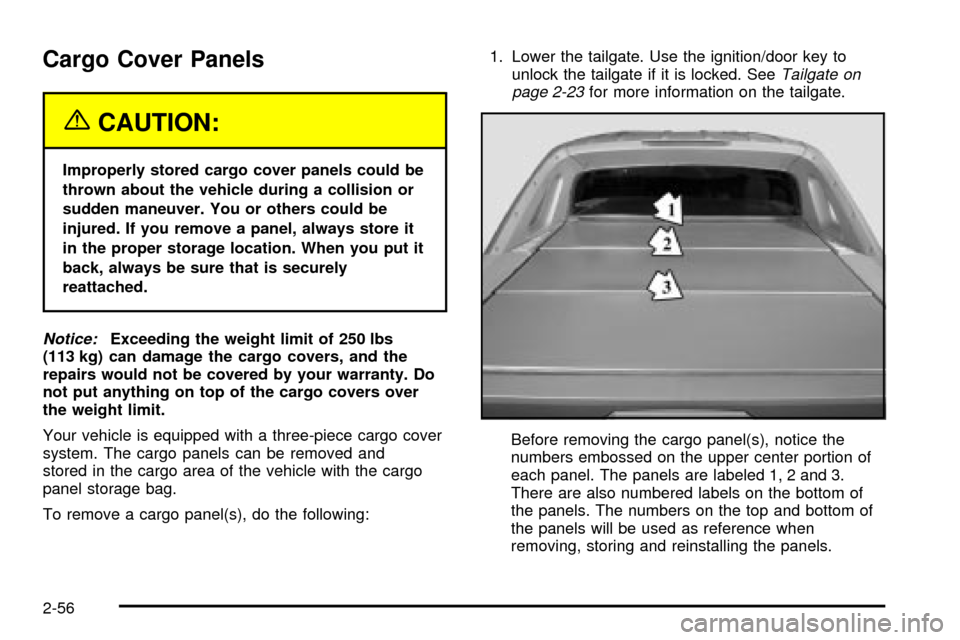
Cargo Cover Panels
{CAUTION:
Improperly stored cargo cover panels could be
thrown about the vehicle during a collision or
sudden maneuver. You or others could be
injured. If you remove a panel, always store it
in the proper storage location. When you put it
back, always be sure that is securely
reattached.
Notice:Exceeding the weight limit of 250 lbs
(113 kg) can damage the cargo covers, and the
repairs would not be covered by your warranty. Do
not put anything on top of the cargo covers over
the weight limit.
Your vehicle is equipped with a three-piece cargo cover
system. The cargo panels can be removed and
stored in the cargo area of the vehicle with the cargo
panel storage bag.
To remove a cargo panel(s), do the following:1. Lower the tailgate. Use the ignition/door key to
unlock the tailgate if it is locked. See
Tailgate on
page 2-23for more information on the tailgate.
Before removing the cargo panel(s), notice the
numbers embossed on the upper center portion of
each panel. The panels are labeled 1, 2 and 3.
There are also numbered labels on the bottom of
the panels. The numbers on the top and bottom of
the panels will be used as reference when
removing, storing and reinstalling the panels.
2-56
Page 139 of 478

Cargo Area Floor Drains
Your vehicle also has four cargo-area ¯oor drains
located under the cargo mat near the sides of the cargo
area. These drains should be cleaned periodically to
allow water to exit the cargo area.
The cargo mat has cutouts for the drains. You can ¯ush
the drains through the cutouts, but if the cargo area
is extremely dirty you can lift up the edges of the cargo
¯oor mat or take the whole mat out and ¯ush the
drains with water.
Top-Box Storage
Your vehicle is equipped with top-box storage units
on both side of the vehicle. The passenger side top
box contains the tools you will need to change a
¯at tire.
Use the ignition/door key to unlock the top box if it is
locked. Press the key cylinder button and swing the lid
open. Turn on the cargo lamps (if equipped) if you
need more light inside the top boxes. See ªCargo
Lampsº under
Exterior Lamps on page 3-15for more
information on cargo lamps. Use the ignition/door key to
lock the top-box storage units.
2-71
Page 141 of 478

Vehicle Personalization
Memory Seat
If your vehicle has
this feature, then the
controls for the memory
function are located on the
driver's door.
These buttons are used to program and recall memory
settings for the driver's seat, throttle and brake
pedals, both the driver's and passenger's outside mirror,
the radio station presets and the previously used
climate control system settings. The settings for these
features can be personalized for both driver 1 and
driver 2. Driver 1 or driver 2 corresponds to the memory
buttons labeled 1 and 2 on the driver's door and the
numbers on the back of the remote keyless entry
transmitters.To store the memory settings, do the following:
1. Adjust the driver's seat (including the seatback
recliner, lumbar, and side wing area), throttle
and brake pedals, both of the outside mirrors, and
the radio station presets to your preference.
2. Press and hold the 1 or 2 (for driver 1 or 2) button
of the memory control for three seconds. A double
chime will sound to let you know that the position
has been stored.
To repeat the procedure for a second driver, follow the
preceding steps, but press the other numbered
memory control button.
Each time button 1 or 2 is pressed and released while
the vehicle is in PARK (P), a single chime will sound and
the memory position will be recalled.
If you use the unlock button on the remote keyless entry
transmitter to enter your vehicle, the preset driver's
seat, throttle and brake pedal, mirror positions, radio
station presets and the last choosen climate control
settings will be recalled if programmed to do so through
the Driver Information Center (DIC). See
DIC Operation
and Displays on page 3-49. The numbers on the
back of the transmitters, 1 or 2, correspond to the
numbers on the memory controls.
2-73
Page 142 of 478

The seat, throttle and brake pedals and mirror positions
can also be recalled when placing the key in the
ignition if programmed to do so through the Driver
Information Center (DIC). See
DIC Operation and
Displays on page 3-49.
To stop recall movement of the memory seat feature at
any time, press one of the memory buttons or power
seat controls.
Easy Exit Seat
The controls for this memory function are located on the
driver's door.
B(Easy Exit Seat):This button is used to program
and recall the desired driver's seat position when
exiting/entering the vehicle. The seat position, can be
personalized for both driver 1 and driver 2.To store the seat exit position for driver 1 or 2, do the
following:
1. Press and release the 1 or 2 button or press the
unlock button on the desired remote keyless entry
transmitter. The seat will move to the stored
memory position.
2. Adjust the seat to the desired exit position.
3. Press and hold the exit button of the memory
control for three seconds. A double chime will sound
to let you know that the position has been stored
for the identi®ed driver (1 or 2).
To use the seat exit position, do one of the following:·Press the exit button on the memory control.
·Or, if this feature is activated in the DIC, remove
the key from the ignition; the seat will then move
to the exit position.
2-74
Page 159 of 478

Lamps On Reminder
If a door is open, a reminder chime will sound when
your headlamps or parking lamps are manually turned
on and your key is out of the ignition. To turn off
the chime, turn the headlamp switch to off or AUTO and
then back on. In the automatic mode, the headlamps
turn off once the ignition is in LOCK and the headlamps
on at exit delay ends (if enabled in the DIC).
Daytime Running Lamps
Daytime Running Lamps (DRL) can make it easier for
others to see the front of your vehicle during the
day. DRL can be helpful in many different driving
conditions, but they can be especially helpful in the short
periods after dawn and before sunset. Fully functional
daytime running lamps are required on all vehicles
®rst sold in Canada.
The DRL system will come on when the following
conditions are met:
·The ignition is on,
·the exterior lamps control is in AUTO,
·the transmission is not in PARK (P), and
·the light sensor determines it is daytime.
When the DRL are on, only your DRL lamps will be on.
The taillamps, sidemarker and other lamps won't be
on. The instrument panel won't be lit up either.
When it begins to get dark, the automatic headlamp
system will switch from DRL to the headlamps.
As with any vehicle, you should turn on the regular
headlamp system when you need it.
Puddle Lamps
Your vehicle is equipped with puddle lamps to help you
see the area near the base of the front doors when it
is dark out. The puddle lamps will illuminate when a door
is opened or when you press the unlock button on the
keyless entry transmitter. The lamps will time out or turn
off once the engine is started.
You can program the puddle lamps not to come on if
you choose. See
Driver Information Center (DIC)
on page 3-49.
3-17
Page 174 of 478

Outlet Adjustment
Your vehicle has air outlets located in the center and on
the side of your instrument panel that allow you to
adjust the direction and amount of air¯ow inside the
vehicle. Move the louvers up or down. Use the
thumbwheel next to or underneath the outlet to close
the louvers. For the most efficient air¯ow and
temperature control, keep the outlet in the fully opened
position.
Operation Tips
·
Keep the hood and front air inlets free of ice, snow,
or any other obstruction (such as leaves). The
heater and defroster will work far better, reducing
the chance of fogging the inside of your windows.
·Keep the air path under the front seats clear
of objects. This helps air to circulate throughout your
vehicle.
·Adding outside equipment to the front of your
vehicle, such as hood-air de¯ectors, etc., may affect
the performance of the heating and air conditioning
system. Check with your dealer before adding
equipment to the outside of your vehicle.
Climate Controls Personalization
You can store and recall the climate control settings for
temperature, air delivery mode and fan speed for
two different drivers. The personal choice settings
recalled are determined by the transmitter used to enter
the vehicle.
After the button with the unlock symbol on a remote
keyless entry transmitter is pressed, the climate control
will adjust to the last settings of the identi®ed driver.
The settings can also be changed by pressing one of the
memory buttons (1 or 2) located on the driver's door.
When adjustments are made, the new settings are
automatically saved for that driver.
3-32