2004 BUICK PARK AVENUE radio controls
[x] Cancel search: radio controlsPage 119 of 410

Instrument Panel Overview...............................3-2
Hazard Warning Flashers................................3-4
Other Warning Devices...................................3-4
Horn.............................................................3-5
Tilt Wheel.....................................................3-5
Turn Signal/Multifunction Lever.........................3-5
Exterior Lamps.............................................3-12
Interior Lamps..............................................3-15
Head-Up Display (HUD).................................3-18
Ultrasonic Rear Parking Assist (URPA)............3-20
Accessory Power Outlets...............................3-22
Ashtrays and Cigarette Lighter........................3-23
Climate Controls............................................3-24
Dual Automatic Climate Control System...........3-24
Outlet Adjustment.........................................3-29
Passenger Compartment Air Filter...................3-30
Steering Wheel Climate Controls.....................3-30
Climate Controls Personalization.....................3-31
Warning Lights, Gages and Indicators.............3-32
Instrument Panel Cluster................................3-33
Speedometer and Odometer...........................3-35
Tachometer.................................................3-35
Safety Belt Reminder Light.............................3-36
Air Bag Readiness Light................................3-36
Battery Warning Light....................................3-37
Brake System Warning Light..........................3-38Anti-Lock Brake System Warning Light.............3-39
Traction Control System (TCS) Warning Light......3-39
Engine Coolant Temperature Gage..................3-40
Malfunction Indicator Lamp.............................3-41
Oil Pressure Light.........................................3-44
Security Light...............................................3-45
Cruise Control Light......................................3-45
Service Vehicle Soon Light............................3-45
Fuel Gage...................................................3-46
Driver Information Center (DIC).......................3-47
DIC Controls and Displays.............................3-47
DIC Warnings and Messages.........................3-50
DIC Vehicle Personalization............................3-51
Audio System(s).............................................3-57
Setting the Time...........................................3-58
Radio with Cassette......................................3-58
Radio with Cassette and CD..........................3-63
Trunk-Mounted CD Changer...........................3-71
Personal Choice Radio Controls......................3-75
Theft-Deterrent Feature..................................3-75
Audio Steering Wheel Controls.......................3-78
Understanding Radio Reception......................3-78
Care of Your Cassette Tape Player.................3-79
Care of Your CDs.........................................3-80
Care of Your CD Player................................3-80
Heated Backlite Antenna................................3-80
Section 3 Instrument Panel
3-1
Page 169 of 410

When the STABILITY SYSTEM ACTIVE message is on,
you should continue to steer in the direction you want
to go. The system is designed to help you in bad
weather or other difficult driving situations by making the
most of whatever road conditions will permit. If the
STABILITY SYSTEM ACTIVE message comes on, you
will know that something has caused your vehicle to
start to spin, so you should consider slowing down.
Tire Pressure Status – 140:If you see the TIRE
PRESSURE LOW message, you should stop as soon
as you can and check all your tires for damage. If a tire
is at, seeIf a Tire Goes Flat on page 5-79. Also check
the tire pressure in all four tires as soon as you can.
SeeInation - Tire Pressure on page 5-69andCheck
Tire Pressure System on page 5-70.
There are times when you will have to reset (calibrate)
the Check Tire Pressure System. SeeCheck Tire
Pressure System on page 5-70.DIC Vehicle Personalization
The DIC is used to program personal choices for up to
two drivers. The drivers are recognized as DRIVER #1
and DRIVER #2. The DIC will identify a person as
UNKNOWN DRIVER if neither DRIVER #1 nor
DRIVER #2 is identied by the system. You will let the
DIC know which driver you are by using your remote
keyless entry transmitter or by pressing one of the
MEMORY buttons located on the driver’s door. Each
remote keyless entry transmitter was pre-programmed to
belong to DRIVER #1 or DRIVER #2 and is numbered
on the back. Each transmitter may be programmed
differently.
After you press the unlock button on your transmitter
with the ignition in RUN, the DIC will display the
identied driver number. The vehicle will recall the
personal choice settings that were last made to
correspond to your transmitter, including your radio
and climate control settings. SeeClimate Controls
Personalization on page 3-31.
3-51
Page 175 of 410
Window Lock Out
The number of passenger windows locked out by the
WINDOW LOCK button can be programmed through
the DIC.
If you choose ALL PASS, all three passenger window
switches will be inactive when the WINDOW LOCK
button is enabled.
If you choose REAR, only the two rear passenger
window switches will be locked out when the WINDOW
LOCK button is enabled.
To change modes do the following:
1. Move the arrow on the display between ALL PASS
and REAR by pressing the ENG/MET button.
2. Once you have made your selection, press the
RESET button. Your choice will be retained in
memory.
For more information on this feature, see “Window
Lock Out” underPower Windows on page 2-18.
Audio System(s)
Notice:Before you add any sound equipment to
your vehicle – like a tape player, CB radio, mobile
telephone or two-way radio – be sure you can add
what you want. If you can, it’s very important to do it
properly. Added sound equipment may interfere with
the operation of your vehicle’s engine, radio or other
systems, and even damage them. Your vehicle’s
systems may interfere with the operation of sound
equipment that has been added improperly.
So, before adding sound equipment, check with
your dealer and be sure to check federal rules
covering mobile radio and telephone units.
Your audio system has been designed to operate easily
and to give years of listening pleasure. You will get
the most enjoyment out of it if you acquaint yourself with
it rst. Figure out which radio you have in your vehicle,
nd out what your audio system can do and how to
operate all of its controls to be sure you’re getting the
most out of the advanced engineering that went into it.
Your vehicle may have a feature called Retained
Accessory Power (RAP). With RAP, you can play your
audio system even after the ignition is turned off.
See “Retained Accessory Power (RAP)” underIgnition
Positions on page 2-24.
3-57
Page 179 of 410
Adjusting the Speakers (Balance/Fade)
BAL (Balance):Press this knob lightly so it extends.
Turn the knob to move the sound toward the left or the
right speakers. The middle position balances the
sound between the speakers.
FADE:Press this knob lightly so it extends. Turn the
knob to move the sound toward the front or the rear
speakers. The middle position balances the sound
between the speakers.
Return these knobs to their stored positions when you
are not using them.
Playing a Cassette Tape
Your tape player is built to work best with tapes that
are up to 30 to 45 minutes long on each side. Tapes
longer than that are so thin they may not work well
in this player. The longer side with the tape visible
should face to the right. If the ignition is on and the radio
is off, the tape can be inserted and will begin playing.
If you hear nothing but a garbled sound, the tape
may not be in squarely. Press EJECT to remove the
tape and start over.While the tape is playing, use the VOLUME, SEEK,
FADE, BAL, BASS, and TREB controls just as you do
for the radio. The display will show an arrow to show
which side of the tape is playing.
The tape player automatically begins playing the other
side when it reaches the end of the tape.
If you want to insert a tape while the ignition or radio is
off, rst press EJECT or RECALL. Cassette tape
adapter kits for portable compact disc players will work
in your cassette tape player.
Your tape bias is set automatically when a metal or
chrome tape is inserted.
If an error appears on the display, see “Cassette Tape
Messages” later in this section.
1 PREV (Previous):Press this pushbutton to search
for the previous selection on the tape. Your tape
must have at least three seconds of silence between
each selection for previous to work.
2 NEXT:Press this pushbutton to search for the next
selection on the tape. Your tape must have at least
three seconds of silence between each selection for
next to work.
3-61
Page 184 of 410
Adjusting the Speakers (Balance/Fade)
BAL (Balance):Press this knob lightly so it extends.
Turn the knob to move the sound toward the left or the
right speakers. The middle position balances the
sound between the speakers.
FADE:Press this knob lightly so it extends. Turn the
knob to move the sound toward the front or the rear
speakers. The middle position balances the sound
between the speakers.
Return these knobs to their stored positions when you
are not using them.
Playing a Cassette Tape
Your tape player is built to work best with tapes that are
up to 30 to 45 minutes long on each side. Tapes
longer than that are so thin they may not work well in
this player. The longer side with the tape visible should
face to the right. If the ignition is on and the radio is
off, the tape can be inserted and will begin playing. If
you hear nothing but a garbled sound, the tape may not
be in squarely. Press EJECT to remove the tape and
start over.While the tape is playing, use the VOLUME, SEEK,
FADE, BAL, BASS, and TREB controls just as you do
for the radio. The display will show an arrow to show
which side of the tape is playing.
The tape player automatically begins playing the other
side when it reaches the end of the tape.
If you want to insert a tape while the ignition or radio is
off, rst press EJECT or RECALL. Cassette tape
adapter kits for portable CD players will work in your
cassette tape player.
Your tape bias is set automatically when a metal or
chrome tape is inserted.
If an error appears on the display, see “Cassette Tape
Messages” later in this section.
1 PREV (Previous):Press this pushbutton to search
for the previous selection on the tape. Your tape
must have at least three seconds of silence between
each selection for previous to work.
2 NEXT:Press this pushbutton to search for the next
selection on the tape. Your tape must have at least
three seconds of silence between each selection for
next to work.
3-66
Page 193 of 410

Personal Choice Radio Controls
If your vehicle has this feature it will enable two drivers
to store and recall personal settings for radio presets,
last tuned station, volume, tone, and audio source
(radio, cassette, or CD).
The memory buttons 1 and 2 for this feature are located
on the driver’s door panel and correspond to the
numbers 1 and 2 found on the back of each remote
keyless entry transmitter.
To recall audio sources, press the unlock button on the
remote keyless entry transmitter and turn the ignition
on. The source last listened to will be recalled for
the identied driver 1 or 2.
To program this feature, do the following:
1. Set all radio preferences. For more information see
“Setting Preset Stations” and “Setting the Tone”
listed for your particular radio.
2. Locate the memory buttons on the driver’s door
panel.
3. Press one of the memory buttons 1 or 2 until you
hear two beeps. The beeps conrm that your
selection has been saved and can now be recalled.
Follow these steps each time you want to change the
stored settings.
Theft-Deterrent Feature
THEFTLOCK®is designed to discourage theft of your
radio. It works by using a secret code to disable all radio
functions whenever battery power is interrupted.
If THEFTLOCK
®is active, the THEFTLOCK®indicator
will ash when the ignition is off.
The THEFTLOCK
®feature for the radio may be used or
ignored. If ignored, the system plays normally and the
radio is not protected by the feature. If THEFTLOCK
®is
activated, your radio will not operate if stolen.
When THEFTLOCK
®is activated, the radio will display
LOC to indicate a locked condition anytime battery
power is removed. If your battery loses power for any
reason, you must unlock the radio with the secret
code before it will operate.
Activating the Theft-Deterrent Feature
The instructions which follow explain how to enter
your secret code to activate the THEFTLOCK®system.
Read through all nine steps before starting the
procedure.
If you allow more than 15 seconds to elapse between
any steps, the radio automatically reverts to time
and you must start the procedure over at Step 4.
3-75
Page 196 of 410
Audio Steering Wheel Controls
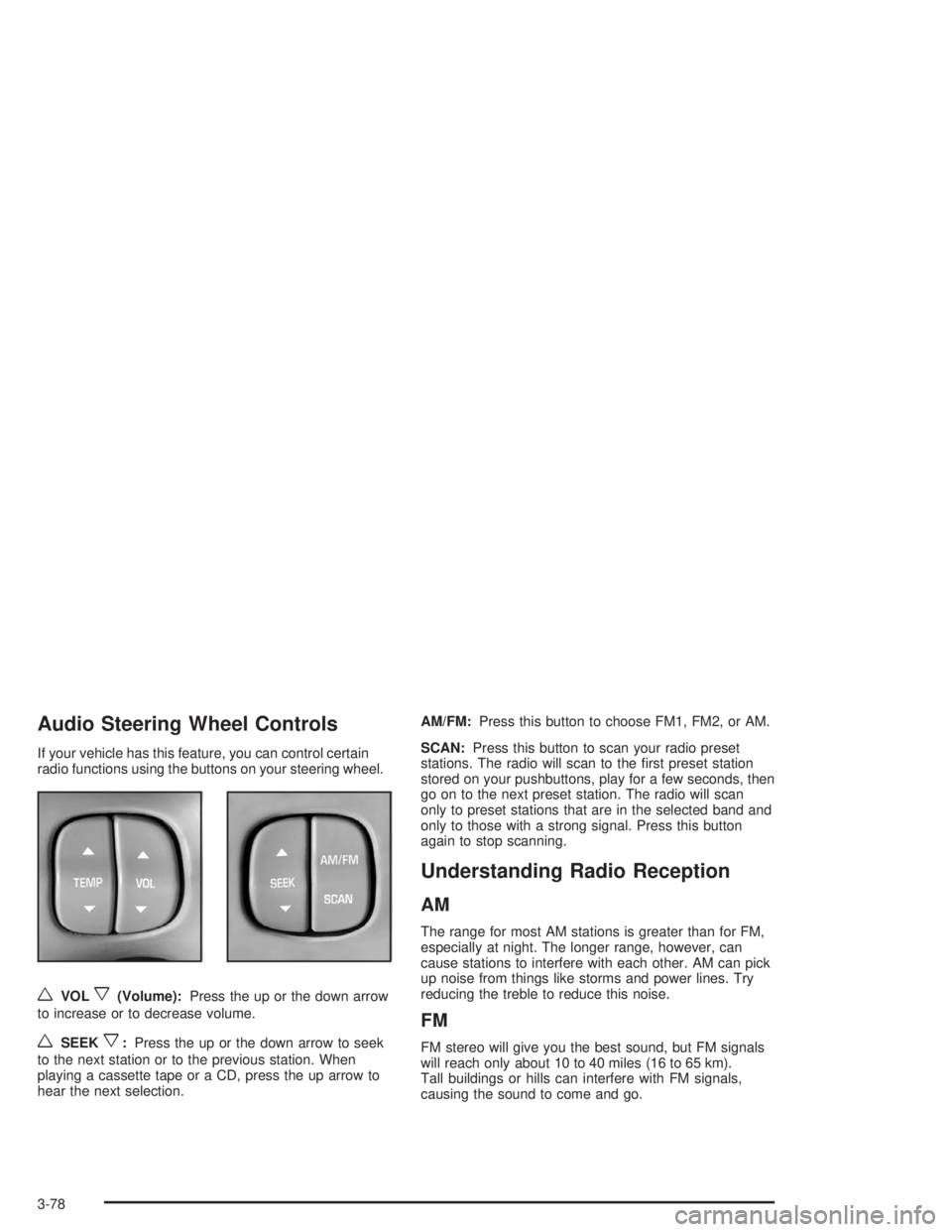
If your vehicle has this feature, you can control certain
radio functions using the buttons on your steering wheel.
wVOLx(Volume):Press the up or the down arrow
to increase or to decrease volume.
wSEEKx:Press the up or the down arrow to seek
to the next station or to the previous station. When
playing a cassette tape or a CD, press the up arrow to
hear the next selection.AM/FM:Press this button to choose FM1, FM2, or AM.
SCAN:Press this button to scan your radio preset
stations. The radio will scan to the rst preset station
stored on your pushbuttons, play for a few seconds, then
go on to the next preset station. The radio will scan
only to preset stations that are in the selected band and
only to those with a strong signal. Press this button
again to stop scanning.
Understanding Radio Reception
AM
The range for most AM stations is greater than for FM,
especially at night. The longer range, however, can
cause stations to interfere with each other. AM can pick
up noise from things like storms and power lines. Try
reducing the treble to reduce this noise.
FM
FM stereo will give you the best sound, but FM signals
will reach only about 10 to 40 miles (16 to 65 km).
Tall buildings or hills can interfere with FM signals,
causing the sound to come and go.
3-78
Page 395 of 410

A
Accessory Power Outlets.................................3-22
Activating the Theft-Deterrent Feature................3-75
Adding Washer Fluid.......................................5-39
Additional Program Information........................... 7-9
Additives, Fuel................................................. 5-5
Add-On Electrical Equipment............................5-98
Adjusting the Speakers (Balance/Fade)......3-61, 3-66
Air Bag
Readiness Light..........................................3-36
Air Bag Systems.............................................1-49
How Does an Air Bag Restrain?....................1-55
Servicing Your Air Bag-Equipped Vehicle.........1-58
What Makes an Air Bag Inate?....................1-55
What Will You See After an
Air Bag Inates?......................................1-56
When Should an Air Bag Inate?...................1-54
Where Are the Air Bags?..............................1-51
Air Cleaner/Filter, Engine.................................5-20
Airbag Sensing and Diagnostic Module (SDM)......... 7-9
AM ...............................................................3-78
Antenna, Heated Backlite.................................3-80
Anti-lock Brake System (ABS)............................ 4-7
Anti-Lock Brake, System Warning Light..............3-39
Appearance Care............................................5-90
Care of Safety Belts....................................5-93
Chemical Paint Spotting...............................5-96
Cleaning the Inside of Your Vehicle................5-90
Cleaning the Outside of Your Vehicle..............5-93Appearance Care (cont.)
Finish Damage............................................5-96
Sheet Metal Damage...................................5-95
Underbody Maintenance...............................5-96
Vehicle Care/Appearance Materials................5-96
Weatherstrips..............................................5-93
Ashtrays........................................................3-23
Assist Handles...............................................2-49
Audio System(s).............................................3-57
Audio Steering Wheel Controls......................3-78
Care of Your Cassette Tape Player................3-79
Care of Your CD Player...............................3-80
Care of Your CDs........................................3-80
Heated Backlite Antenna...............................3-80
Personal Choice Radio Controls....................3-75
Radio with Cassette.....................................3-58
Radio with Cassette and CD.........................3-63
Setting the Time..........................................3-58
Theft-Deterrent Feature................................3-75
Trunk-Mounted CD Changer..........................3-71
Understanding Radio Reception.....................3-78
Automatic Level Control...................................4-38
Automatic Operation........................................3-24
Automatic Transaxle
Fluid..........................................................5-23
Operation...................................................2-27
Automatic Transaxle Check..............................6-20
Automatic Transaxle Shift Lock Control
System Check.............................................6-21
Auxiliary Instrument Panel Fuse Block..............5-101
1