2004 BUICK PARK AVENUE buttons
[x] Cancel search: buttonsPage 191 of 410
All of the CD functions are controlled by the radio
buttons except for ejecting the magazine. Whenever a
CD magazine with CDs is loaded in the changer,
CHNGR will appear on the display. If the CD changer is
checking the magazine for CDs, CHNGR will ash on
the display until the changer is ready to play. When a
CD begins playing, the CD and track number will appear
on the display. The CD numbers are listed on the
front of the magazine.
Playing a CD
If an error appears on the display, see “CD Messages”
later in this section.
1 PREV (Previous):Press this pushbutton to go to the
start of the current track, if more than eight seconds
have played. If you hold this button or press it more than
once, the player will continue moving back through
the CD.
2 NEXT:Press this pushbutton to go to the next track
on the CD. If you hold this button or press it more
than once, the player will continue moving forward
through the CD.3
r(Reverse):Press and hold this pushbutton to
reverse quickly within a track. You will hear sound at
a reduced level. Release the pushbutton to play
the passage.
4
[(Forward):Press and hold this pushbutton to
advance quickly within a track. You will hear sound
at a reduced level. Release the pushbutton to play the
passage.
5 SIDE:Press this pushbutton to select the next CD
in the magazine. Each time you press this button,
the CD number on the radio display will go to that of the
next available CD. If a CD cannot be played, the number
will be skipped when selecting CDs while using this
button.
6 RAND (Random):Press this pushbutton to hear
tracks and CDs in random, rather than sequential, order.
RAND will appear on the display. Press RAND again
to turn off random play.
RECALL:Press this button to see what track is
currently playing. Press it again within ve seconds to
see how long the track has been playing. EL TM
will appear on the display when in elapsed time mode.
When a new track starts to play, the track number
will appear on the display. Press this button a third time
and the time of day will appear on the display.
3-73
Page 193 of 410

Personal Choice Radio Controls
If your vehicle has this feature it will enable two drivers
to store and recall personal settings for radio presets,
last tuned station, volume, tone, and audio source
(radio, cassette, or CD).
The memory buttons 1 and 2 for this feature are located
on the driver’s door panel and correspond to the
numbers 1 and 2 found on the back of each remote
keyless entry transmitter.
To recall audio sources, press the unlock button on the
remote keyless entry transmitter and turn the ignition
on. The source last listened to will be recalled for
the identied driver 1 or 2.
To program this feature, do the following:
1. Set all radio preferences. For more information see
“Setting Preset Stations” and “Setting the Tone”
listed for your particular radio.
2. Locate the memory buttons on the driver’s door
panel.
3. Press one of the memory buttons 1 or 2 until you
hear two beeps. The beeps conrm that your
selection has been saved and can now be recalled.
Follow these steps each time you want to change the
stored settings.
Theft-Deterrent Feature
THEFTLOCK®is designed to discourage theft of your
radio. It works by using a secret code to disable all radio
functions whenever battery power is interrupted.
If THEFTLOCK
®is active, the THEFTLOCK®indicator
will ash when the ignition is off.
The THEFTLOCK
®feature for the radio may be used or
ignored. If ignored, the system plays normally and the
radio is not protected by the feature. If THEFTLOCK
®is
activated, your radio will not operate if stolen.
When THEFTLOCK
®is activated, the radio will display
LOC to indicate a locked condition anytime battery
power is removed. If your battery loses power for any
reason, you must unlock the radio with the secret
code before it will operate.
Activating the Theft-Deterrent Feature
The instructions which follow explain how to enter
your secret code to activate the THEFTLOCK®system.
Read through all nine steps before starting the
procedure.
If you allow more than 15 seconds to elapse between
any steps, the radio automatically reverts to time
and you must start the procedure over at Step 4.
3-75
Page 194 of 410
1. Write down any three or four-digit number from 000
to 1999 and keep it in a safe place separate from
the vehicle.
2. Turn the ignition on.
3. Turn the radio off.
4. Press the 1 and 4 pushbuttons at the same time.
Hold them down until --- shows on the display.
Next you will use the secret code number which you
have written down.
5. Press MIN and 000 will appear on the display.
6. Press MIN again to make the last two digits agree
with your code.
7. Press HRS to make the rst one or two digits agree
with your code.
8. Press AM-FM after you have conrmed that the
code matches the secret code you have written
down. The display will show REP to let you know
that you need to repeat Steps 5 through 7 to conrm
your secret code.
9. Press AM-FM again, SEC will appear on the display
indicating that your radio is secure.Unlocking the Theft-Deterrent Feature
After a Power Loss
Enter your secret code as follows; pause no more than
15 seconds between steps:
1. Turn the ignition on. LOC will appear on the
display.
2. Press MIN and 000 will appear on the display.
3. Press MIN again to make the last two digits agree
with your code.
4. Press HRS to make the rst one or two digits agree
with your code.
5. Press AM-FM after you have conrmed that the
code matches the secret code you have written
down. SEC will appear on the display, indicating the
radio is now operable and secure.
If you enter the wrong code eight times, INOP will appear
on the display. You will have to wait an hour with the
ignition on before you can try again. When you try again,
you will only have three more chances (eight tries per
chance) to enter the correct code before INOP appears.
If you lose or forget your code, contact your dealer.
3-76
Page 195 of 410
Disabling the Theft-Deterrent Feature
Enter your secret code as follows; pause no more than
15 seconds between steps:
1. Turn the ignition on.
2. Turn the radio off.
3. Press the 1 and 4 pushbuttons at the same time.
Hold them down until SEC appears on the display.
4. Press MIN and 000 will appear on the display.
5. Press MIN again to make the last two digits agree
with your code.
6. Press HRS to make the rst one or two digits agree
with your code.
7. Press AM-FM after you have conrmed that the
code matches the secret code you have written
down. --- will appear on the display, indicating that
the radio is no longer secured.If the code entered is incorrect, SEC will appear on the
display. The radio will remain secured until the correct
code is entered.
When battery power is removed and later applied to a
secured radio, the radio will not turn on and LOC
will appear on the display.
To unlock a secured radio see “Unlocking the
Theft-Deterrent Feature After a Power Loss” earlier in
this section.
3-77
Page 196 of 410
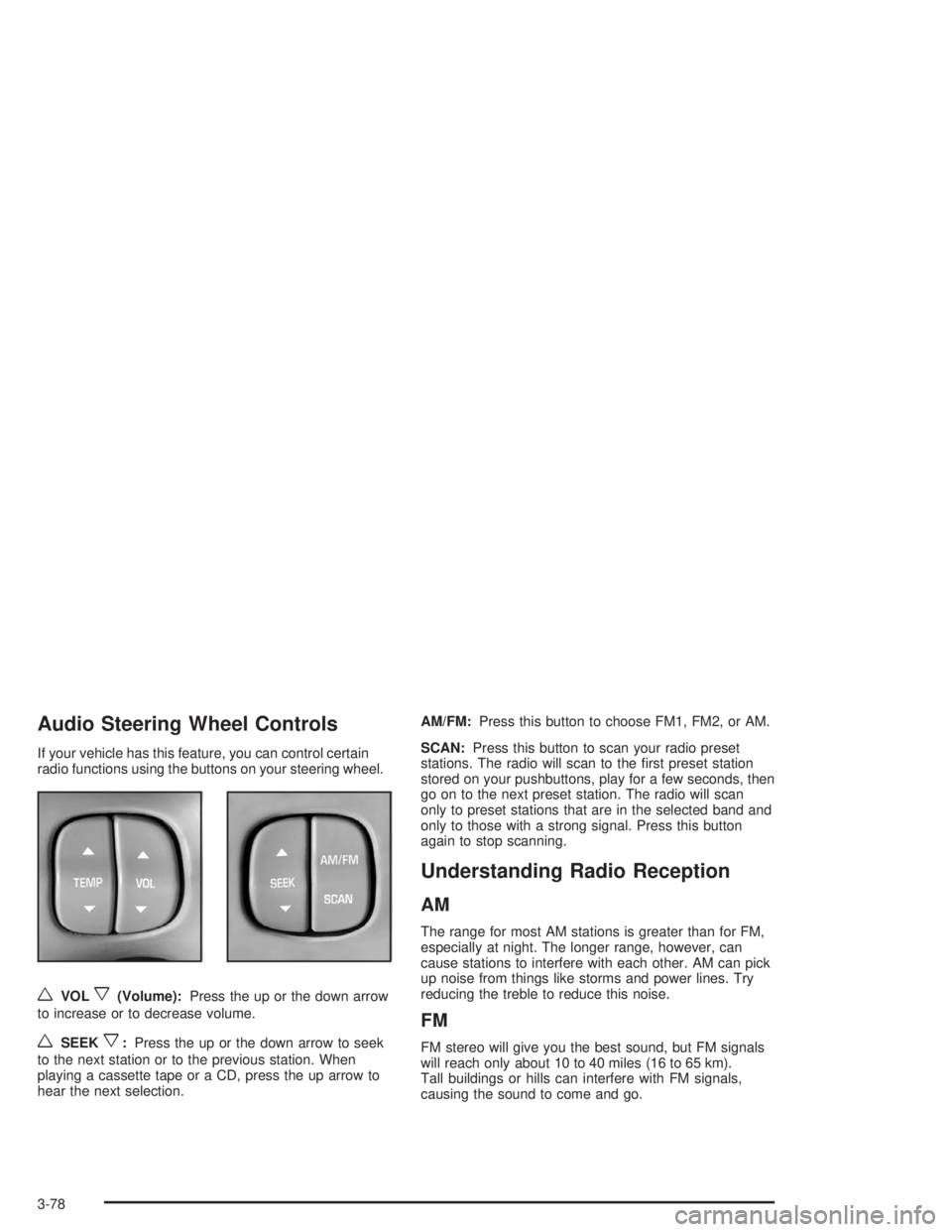
Audio Steering Wheel Controls
If your vehicle has this feature, you can control certain
radio functions using the buttons on your steering wheel.
wVOLx(Volume):Press the up or the down arrow
to increase or to decrease volume.
wSEEKx:Press the up or the down arrow to seek
to the next station or to the previous station. When
playing a cassette tape or a CD, press the up arrow to
hear the next selection.AM/FM:Press this button to choose FM1, FM2, or AM.
SCAN:Press this button to scan your radio preset
stations. The radio will scan to the rst preset station
stored on your pushbuttons, play for a few seconds, then
go on to the next preset station. The radio will scan
only to preset stations that are in the selected band and
only to those with a strong signal. Press this button
again to stop scanning.
Understanding Radio Reception
AM
The range for most AM stations is greater than for FM,
especially at night. The longer range, however, can
cause stations to interfere with each other. AM can pick
up noise from things like storms and power lines. Try
reducing the treble to reduce this noise.
FM
FM stereo will give you the best sound, but FM signals
will reach only about 10 to 40 miles (16 to 65 km).
Tall buildings or hills can interfere with FM signals,
causing the sound to come and go.
3-78
Page 399 of 410

E
Electrical System
Add-On Equipment......................................5-98
Fuses and Circuit Breakers...........................5-99
Removing the Rear Seat Cushion................5-104
Emergency Trunk Release Handle.....................2-16
Emissions Inspection and
Maintenance Programs.................................3-43
Engine
Air Cleaner/Filter.........................................5-20
Battery.......................................................5-43
Check and Service Engine Soon Light............3-41
Coolant......................................................5-25
Coolant Heater............................................2-26
Coolant Temperature Gage...........................3-40
Cooling System Inspection............................6-24
Engine Compartment Overview......................5-12
Exhaust.....................................................2-34
Oil .............................................................5-14
Overheating................................................5-28
Starting......................................................2-25
Supercharger Oil.........................................5-19
Engine Coolant Level Check.............................6-19
Engine Cooling When Trailer Towing..................4-45
Engine Oil Additives........................................5-17
Engine Oil Level Check...................................6-19
Entry Lighting.................................................3-15
Erasing HomeLink
®Buttons..............................2-46Event Data Records (EDR)................................ 7-9
Express-Down Window....................................2-18
Extender, Safety Belt.......................................1-26
Exterior Lamps...............................................3-12
F
Filter
Engine Air Cleaner......................................5-20
Finding a Station....................................3-59, 3-64
Finish Care....................................................5-94
Finish Damage...............................................5-96
Flash-To-Pass.................................................. 3-7
Flat Tire........................................................5-79
Flat Tire, Changing.........................................5-80
Fluid
Automatic Transaxle.....................................5-23
Power Steering...........................................5-38
Windshield Washer......................................5-39
FM ...............................................................3-78
Following Distance..........................................4-43
Footnotes................................................6-7, 6-14
Front Reading Lamps......................................3-17
Fuel............................................................... 5-4
Additives...................................................... 5-5
California Fuel.............................................. 5-5
Filling a Portable Fuel Container..................... 5-9
Filling Your Tank........................................... 5-6
5