2004 BUICK PARK AVENUE brake light
[x] Cancel search: brake lightPage 288 of 410
Jump Starting
If your battery has run down, you may want to use
another vehicle and some jumper cables to start your
vehicle. Be sure to follow the steps below to do it safely.
{CAUTION:
Batteries can hurt you. They can be dangerous
because:
They contain acid that can burn you.
They contain gas that can explode or
ignite.
They contain enough electricity to burn you.
If you do not follow these steps exactly, some or
all of these things can hurt you.
Notice:Ignoring these steps could result in costly
damage to your vehicle that wouldn’t be covered
by your warranty.
Trying to start your vehicle by pushing or pulling it
won’t work, and it could damage your vehicle.
1. Check the other vehicle. It must have a 12-volt
battery with a negative ground system.Notice:If the other vehicle’s system is not a 12-volt
system with a negative ground, both vehicles can
be damaged. Only use vehicles with 12-volt systems
with negative grounds to jump start your vehicle.
2. Get the vehicles close enough so the jumper cables
can reach, but be sure the vehicles are not touching
each other. If they are, it could cause a ground
connection you do not want. You would not be able
to start your vehicle, and the bad grounding
could damage the electrical systems.
To avoid the possibility of the vehicles rolling, set
the parking brake rmly on both vehicles involved
in the jump start procedure. Put an automatic
transaxle in PARK (P) or a manual transaxle in
NEUTRAL (N) before setting the parking brake.
Notice:If you leave your radio or other accessories
on during the jump starting procedure, they could
be damaged. The repairs would not be covered
by your warranty. Always turn off your radio and
other accessories when jump starting your vehicle.
3. Turn off the ignition on both vehicles. Unplug
unnecessary accessories plugged into the cigarette
lighter or in the accessory power outlet(s). Turn off
the radio and all lamps that are not needed.
This will avoid sparks and help save both batteries.
And it could save your radio!
5-44
Page 314 of 410
When to Check
Check your tires once a month or more.
Don’t forget your compact spare tire. It should be at
60 psi (420 kPa).
How to Check
Use a good quality pocket-type gage to check tire
pressure. You can’t tell if your tires are properly inated
simply by looking at them. Radial tires may look properly
inated even when they’re underinated. Check the tire’s
ination pressure when the tires are cold. Cold means
your vehicle has been sitting for at least three hours or
driven no more than 1 mile (1.6 km).
Remove the valve cap from the tire valve stem.
Press the tire gage rmly onto the valve to get a
pressure measurement. If the cold tire ination pressure
matches the recommended pressure on the Tire and
Loading Information label, no further adjustment is
necessary. If the ination pressure is low, add air until
you reach the recommended amount.
If you overll the tire, release air by pushing on the
metal stem in the center of the tire valve. Recheck the
tire pressure with the tire gage.
Be sure to put the valve caps back on the valve stems.
They help prevent leaks by keeping out dirt and
moisture.
Check Tire Pressure System
If your vehicle has this feature, the check tire pressure
system can alert you to a large change in the
pressure of one tire. The system will not alert you
before you drive that a tire is low or at. You must begin
driving before the system will work properly.
The TIRE PRESSURE LOW message will appear on
the Driver Information Center (DIC) if pressure difference
(low pressure) is detected in one tire. The check tire
pressure system may not alert you if:
More than one tire is low.
The vehicle is moving faster than 65 mph
(105 km/h).
The system is not yet calibrated.
The tire treadwear is uneven.
The compact spare tire is installed.
Tire chains are being used.
The vehicle is being driven on a rough or
frozen road.
If the anti-lock brake system warning light comes on,
the check tire pressure system may not be working
properly. See your dealer for service. Also, see
Anti-Lock Brake System Warning Light on page 3-39.
5-70
Page 395 of 410

A
Accessory Power Outlets.................................3-22
Activating the Theft-Deterrent Feature................3-75
Adding Washer Fluid.......................................5-39
Additional Program Information........................... 7-9
Additives, Fuel................................................. 5-5
Add-On Electrical Equipment............................5-98
Adjusting the Speakers (Balance/Fade)......3-61, 3-66
Air Bag
Readiness Light..........................................3-36
Air Bag Systems.............................................1-49
How Does an Air Bag Restrain?....................1-55
Servicing Your Air Bag-Equipped Vehicle.........1-58
What Makes an Air Bag Inate?....................1-55
What Will You See After an
Air Bag Inates?......................................1-56
When Should an Air Bag Inate?...................1-54
Where Are the Air Bags?..............................1-51
Air Cleaner/Filter, Engine.................................5-20
Airbag Sensing and Diagnostic Module (SDM)......... 7-9
AM ...............................................................3-78
Antenna, Heated Backlite.................................3-80
Anti-lock Brake System (ABS)............................ 4-7
Anti-Lock Brake, System Warning Light..............3-39
Appearance Care............................................5-90
Care of Safety Belts....................................5-93
Chemical Paint Spotting...............................5-96
Cleaning the Inside of Your Vehicle................5-90
Cleaning the Outside of Your Vehicle..............5-93Appearance Care (cont.)
Finish Damage............................................5-96
Sheet Metal Damage...................................5-95
Underbody Maintenance...............................5-96
Vehicle Care/Appearance Materials................5-96
Weatherstrips..............................................5-93
Ashtrays........................................................3-23
Assist Handles...............................................2-49
Audio System(s).............................................3-57
Audio Steering Wheel Controls......................3-78
Care of Your Cassette Tape Player................3-79
Care of Your CD Player...............................3-80
Care of Your CDs........................................3-80
Heated Backlite Antenna...............................3-80
Personal Choice Radio Controls....................3-75
Radio with Cassette.....................................3-58
Radio with Cassette and CD.........................3-63
Setting the Time..........................................3-58
Theft-Deterrent Feature................................3-75
Trunk-Mounted CD Changer..........................3-71
Understanding Radio Reception.....................3-78
Automatic Level Control...................................4-38
Automatic Operation........................................3-24
Automatic Transaxle
Fluid..........................................................5-23
Operation...................................................2-27
Automatic Transaxle Check..............................6-20
Automatic Transaxle Shift Lock Control
System Check.............................................6-21
Auxiliary Instrument Panel Fuse Block..............5-101
1
Page 396 of 410
B
Backing Up....................................................4-43
Battery..........................................................5-43
Battery Replacement......................................... 2-9
Battery Rundown Protection.............................3-18
Battery Warning Light......................................3-37
Before Leaving on a Long Trip.........................4-23
Body Lubrication Service..................................6-20
Brake
Parking......................................................2-29
System Inspection.......................................6-24
System Warning Light..................................3-38
Brake Fluid....................................................5-40
Brake Wear...................................................5-42
Brakes..........................................................5-40
Braking........................................................... 4-6
Braking in Emergencies..................................... 4-9
Break-In, New Vehicle.....................................2-23
Bulb Replacement...........................................5-51
Front Turn Signal Lamps..............................5-54
Halogen Bulbs............................................5-51
Headlamp Aiming........................................5-49
Headlamps.................................................5-51
Rear Quarter Panel Turn Signal and
Stoplamps...............................................5-58
Rear Turn Signal, Stoplamps and
Back-Up Lamps.......................................5-54
Replacement Bulbs......................................5-60
Buying New Tires...........................................5-74
C
California Fuel.................................................. 5-5
Canada – Customer Assistance.......................... 7-4
Canadian Owners................................................ ii
Canadian Roadside Assistance........................... 7-7
Capacities and Specications..........................5-108
Carbon Monoxide...................4-26, 4-38, 2-15, 2-34
Care of
Safety Belts................................................5-93
Your Cassette Tape Player............................3-79
Your CD Player...........................................3-80
Your CDs ...................................................3-80
Care of the HUD............................................3-20
Cassette Tape Messages.........................3-63, 3-68
Cassette Tape Player Service...........................6-19
CD Changer Errors.........................................3-74
CD Changer, Trunk-Mounted............................3-71
CD Messages................................................3-70
Center Console Storage Area...........................2-48
Center Passenger Position, Safety Belts.............1-19
Chains, Tires..................................................5-78
Check
Engine Light...............................................3-41
Tire Pressure System...................................5-70
Checking Coolant............................................5-26
Checking Engine Oil........................................5-14
Checking Things Under the Hood......................5-10
Checking Your Restraint Systems......................1-58
2
Page 401 of 410

How to Check........................................5-23, 5-70
How to Check and Add Oil...............................5-20
How to Check Power Steering Fluid..................5-38
How to Inspect the Engine Air Cleaner/Filter.......5-21
How to Use This Manual...................................... ii
How to Wear Safety Belts Properly...................1-12
Hydroplaning..................................................4-20
I
If No Steam Is Coming From Your Engine..........5-29
If Steam Is Coming From Your Engine...............5-28
If the Light Is Flashing.....................................3-42
If the Light Is On Steady.................................3-42
If You Are Caught in a Blizzard.........................4-28
If You Are Stuck in Sand, Mud, Ice or Snow.......4-30
If You Can’t See The HUD Image When the
Ignition is On..............................................3-20
If You Do Decide To Pull A Trailer.....................4-39
Ignition Positions.............................................2-24
Ignition Transaxle Lock Check..........................6-22
Infants and Young Children, Restraints...............1-30
Ination - Tire Pressure...................................5-69
Inspection
Brake System.............................................6-24
Engine Cooling System................................6-24
Exhaust System..........................................6-23
Fuel System...............................................6-24
Part C - Periodic Maintenance.......................6-23Inspection (cont.)
Steering, Suspension and Front Drive Axle
Boot and Seal.........................................6-23
Throttle System...........................................6-24
Instrument Panel
Cluster.......................................................3-33
Overview..................................................... 3-2
Instrument Panel Brightness.............................3-15
Interior Lamps................................................3-15J
Jump Starting.................................................5-44
K
Key Lock Cylinders Service..............................6-20
Key Reminder Warning....................................2-25
Keyless Entry System....................................... 2-5
Keys............................................................... 2-3
L
Lamps
Exterior......................................................3-12
Interior.......................................................3-15
Lap Belt........................................................1-19
Lap-Shoulder Belt...................................1-12, 1-21
7
Page 402 of 410
LATCH System
Child Restraints...........................................1-40
Securing a Child Restraint Designed for
the LATCH System...................................1-42
Leaving Your Vehicle.......................................2-14
Leaving Your Vehicle With the Engine
Running.....................................................2-32
Light
Air Bag Readiness.......................................3-36
Anti-Lock Brake System Warning...................3-39
Battery Warning..........................................3-37
Brake System Warning.................................3-38
Cruise Control.............................................3-45
Malfunction Indicator....................................3-41
Oil Pressure...............................................3-44
Safety Belt Reminder...................................3-36
Security.....................................................3-45
Service Vehicle Soon...................................3-45
TCS Warning Light......................................3-39
Traction Control System (TCS) Warning..........3-39
Lighted Visor Vanity Mirror...............................2-19
Loading Your Vehicle.......................................4-33
Lockout Protection..........................................2-14
Locks
Central Door Unlocking System.....................2-11
Delayed Locking..........................................2-11
Door..........................................................2-10
Leaving Your Vehicle....................................2-14
Lockout Protection.......................................2-14Locks (cont.)
Power Door................................................2-11
Programmable Automatic Door Locks.............2-12
Rear Door Security Locks.............................2-14
Long Trip/Highway Denition.............................. 6-6
Long Trip/Highway Intervals............................... 6-6
Long Trip/Highway Scheduled Maintenance........6-14
Loss of Control...............................................4-15
Lumbar
Power Controls............................................. 1-3
M
Magnetic Speed Variable Assist Steering............4-11
Main and Auxiliary Instrument Panel
Fuse Blocks................................................5-99
Main Instrument Panel Fuse Block...................5-100
Maintenance, Normal Replacement Parts..........5-109
Maintenance Schedule
At Each Fuel Fill.........................................6-19
At Least Once a Month................................6-19
At Least Once a Year..................................6-20
At Least Twice a Year..................................6-20
Brake System Inspection..............................6-24
Engine Cooling System Inspection.................6-24
Exhaust System Inspection...........................6-23
Fuel System Inspection................................6-24
How This Section is Organized....................... 6-3
Introduction.................................................. 6-2
8
Page 404 of 410
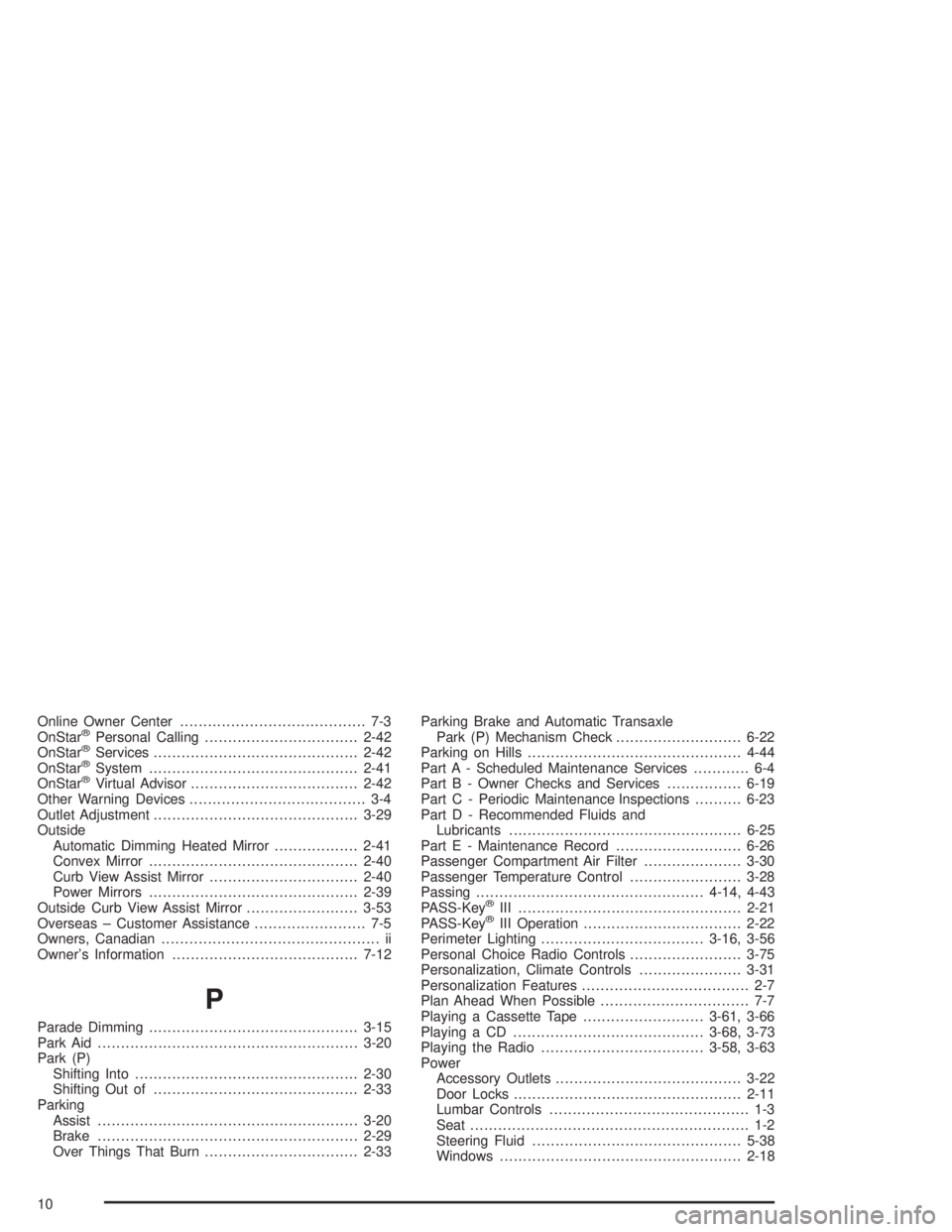
Online Owner Center........................................ 7-3
OnStar®Personal Calling.................................2-42
OnStar®Services............................................2-42
OnStar®System.............................................2-41
OnStar®Virtual Advisor....................................2-42
Other Warning Devices...................................... 3-4
Outlet Adjustment............................................3-29
Outside
Automatic Dimming Heated Mirror..................2-41
Convex Mirror.............................................2-40
Curb View Assist Mirror................................2-40
Power Mirrors.............................................2-39
Outside Curb View Assist Mirror........................3-53
Overseas – Customer Assistance........................ 7-5
Owners, Canadian............................................... ii
Owner’s Information........................................7-12
P
Parade Dimming.............................................3-15
Park Aid........................................................3-20
Park (P)
Shifting Into................................................2-30
Shifting Out of............................................2-33
Parking
Assist........................................................3-20
Brake........................................................2-29
Over Things That Burn.................................2-33Parking Brake and Automatic Transaxle
Park (P) Mechanism Check...........................6-22
Parking on Hills..............................................4-44
Part A - Scheduled Maintenance Services............ 6-4
Part B - Owner Checks and Services................6-19
Part C - Periodic Maintenance Inspections..........6-23
Part D - Recommended Fluids and
Lubricants..................................................6-25
Part E - Maintenance Record...........................6-26
Passenger Compartment Air Filter.....................3-30
Passenger Temperature Control........................3-28
Passing.................................................4-14, 4-43
PASS-Key
®III ................................................2-21
PASS-Key®III Operation..................................2-22
Perimeter Lighting...................................3-16, 3-56
Personal Choice Radio Controls........................3-75
Personalization, Climate Controls......................3-31
Personalization Features.................................... 2-7
Plan Ahead When Possible................................ 7-7
Playing a Cassette Tape..........................3-61, 3-66
Playing a CD.........................................3-68, 3-73
Playing the Radio...................................3-58, 3-63
Power
Accessory Outlets........................................3-22
Door Locks.................................................2-11
Lumbar Controls........................................... 1-3
Seat............................................................ 1-2
Steering Fluid.............................................5-38
Windows....................................................2-18
10
Page 408 of 410
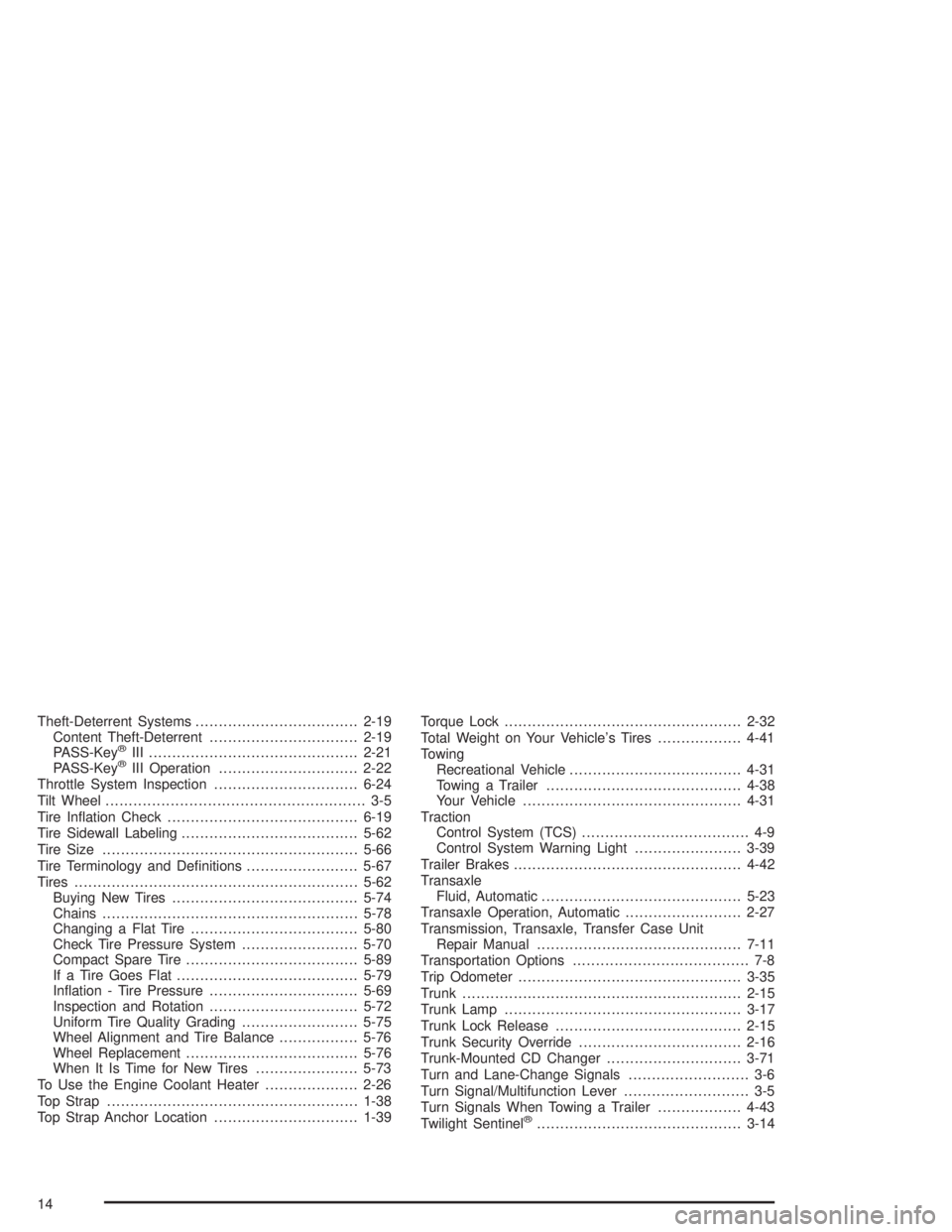
Theft-Deterrent Systems...................................2-19
Content Theft-Deterrent................................2-19
PASS-Key
®III .............................................2-21
PASS-Key®III Operation..............................2-22
Throttle System Inspection...............................6-24
Tilt Wheel........................................................ 3-5
Tire Ination Check.........................................6-19
Tire Sidewall Labeling......................................5-62
Tire Size.......................................................5-66
Tire Terminology and Denitions........................5-67
Tires.............................................................5-62
Buying New Tires........................................5-74
Chains.......................................................5-78
Changing a Flat Tire....................................5-80
Check Tire Pressure System.........................5-70
Compact Spare Tire.....................................5-89
If a Tire Goes Flat.......................................5-79
Ination - Tire Pressure................................5-69
Inspection and Rotation................................5-72
Uniform Tire Quality Grading.........................5-75
Wheel Alignment and Tire Balance.................5-76
Wheel Replacement.....................................5-76
When It Is Time for New Tires......................5-73
To Use the Engine Coolant Heater....................2-26
Top Strap......................................................1-38
Top Strap Anchor Location...............................1-39Torque Lock...................................................2-32
Total Weight on Your Vehicle’s Tires..................4-41
Towing
Recreational Vehicle.....................................4-31
Towing a Trailer..........................................4-38
Your Vehicle...............................................4-31
Traction
Control System (TCS).................................... 4-9
Control System Warning Light.......................3-39
Trailer Brakes.................................................4-42
Transaxle
Fluid, Automatic...........................................5-23
Transaxle Operation, Automatic.........................2-27
Transmission, Transaxle, Transfer Case Unit
Repair Manual............................................7-11
Transportation Options...................................... 7-8
Trip Odometer................................................3-35
Trunk............................................................2-15
Trunk Lamp...................................................3-17
Trunk Lock Release........................................2-15
Trunk Security Override...................................2-16
Trunk-Mounted CD Changer.............................3-71
Turn and Lane-Change Signals.......................... 3-6
Turn Signal/Multifunction Lever........................... 3-5
Turn Signals When Towing a Trailer..................4-43
Twilight Sentinel
®............................................3-14
14