2004 BMW X5 4.4I page 24
[x] Cancel search: page 24Page 74 of 200

72n
Washer/wiper system/rain sensor
*
Deactivate the rain sensor when
passing through an automatic car
wash. Failure to do so could result in
damage caused by undesired wiper
activation.<
Normal wipe The system switches automatically to
intermittent mode when the vehicle is
stationary, not on vehicles with rain
sensor. Fast wipe The wipers operate at normal speed
when the vehicle is stationary, not on
vehicles with rain sensor. Cleaning the windshield The system sprays washer fluid against
the windshield and activates the wipers
for a brief period.
Special wash program
*
As with 5; several additional wash
cycles are carried out and the head-
lamps are cleaned
*.
This program is recommended after you
have driven on extremely dirty roads.
Cleaning headlamps
*
>With the special wash program 6
>With every actuation of cleaning the
windshield 5 when the vehicle's light-
ing is switched on, the headlamps
will be cleaned at appropriate inter-
vals. Do not use the washers if there
is any danger that the fluid will
freeze on the windshield. If you do so,
your vision could be obscured. There-
fore use antifreeze, refer to page 148.
Do not actuate washer systems when
the fluid reservoir is empty, as other-
wise the washer pump will be dam-
aged.<
Windshield washer nozzlesThe windshield washer jets are warmed
automatically when the ignition key is in
position 2.
Page 75 of 200

73n
OverviewControlsMaintenanceRepairsDataIndex
Washer/wiper system/rain sensor
*
Cruise control
*
Rear window wiper 0Retracted position of the rear window
wiper
1Rear window wiper in intermittent
mode. When reverse gear is
engaged, continuous operation is
switched on automatically
2Cleaning the rear window
You can also program the interval:
>Switch briefly from position 0 to posi-
tion 1
>The time until reactivation, from posi-
tion 0 to 1, is the programmed inter-
val; max. 30 seconds. 530de266
Programming is deleted:
>Approx. 10 seconds after the lever
is placed in position 0 or
>after the engine is switched off.
For changing the wiper blade, refer to
page 158.You can automatically maintain and
store any desired vehicle speed above
approx. 20 mph/30 km/h.
You can use cruise control whenever
the system is active while the engine is
running.
On the sports steering wheel
* the but-
tons +/– for the cruise control are
located on the right-hand side of the
steering wheel.
Activating system As of ignition key position 2:
Press the button; the indicator lamp in
the instrument cluster comes on, refer
to page 22. You are able to use the
cruise control.
Do not use the cruise control
when driving on winding roads, in
heavy traffic or in poor road conditions
– e.g. snow, rain, ice, loose road sur-
face – that do not permit a constant
speed.<
Page 77 of 200

Maintenance
75n
OverviewControlsRepairsDataIndex
1Odometer
2Trip odometer
3Outside temperature displayOdometer You can activate the displays shown in
the illustration with the ignition key in
position 0 by pressing the button in the
instrument cluster, refer to arrow.
The range of available displays varies
according to your individual vehicle's
equipment.Trip odometer To reset the trip odometer to zero,
press the button, refer to arrow, with
the ignition key in position 1 or 2. 530us253
Outside temperature display The outside temperature appears in the
display as of ignition key position 1.
You can change the units of measure-
ment 7/6 by
1. pressing and holding down the but-
ton, refer to arrow, with the ignition
key in position 1 and
2. then turning the ignition key to 0.
At the same time the units of mea-
surement in the temperature display
of the automatic climate control will
be changed, refer to page 109.
Refer also to page 82.
Ice warning If the outside temperature drops to
approx. +37.57/+36, a signal sounds
as a warning and the display flashes for
a brief period.
The ice warning does not alter the
fact that surface ice can form at
temperatures above +37.57/+36, on
bridges or shaded road surfaces, for
instance.<
Odometer, outside temperature display
Page 80 of 200
78n
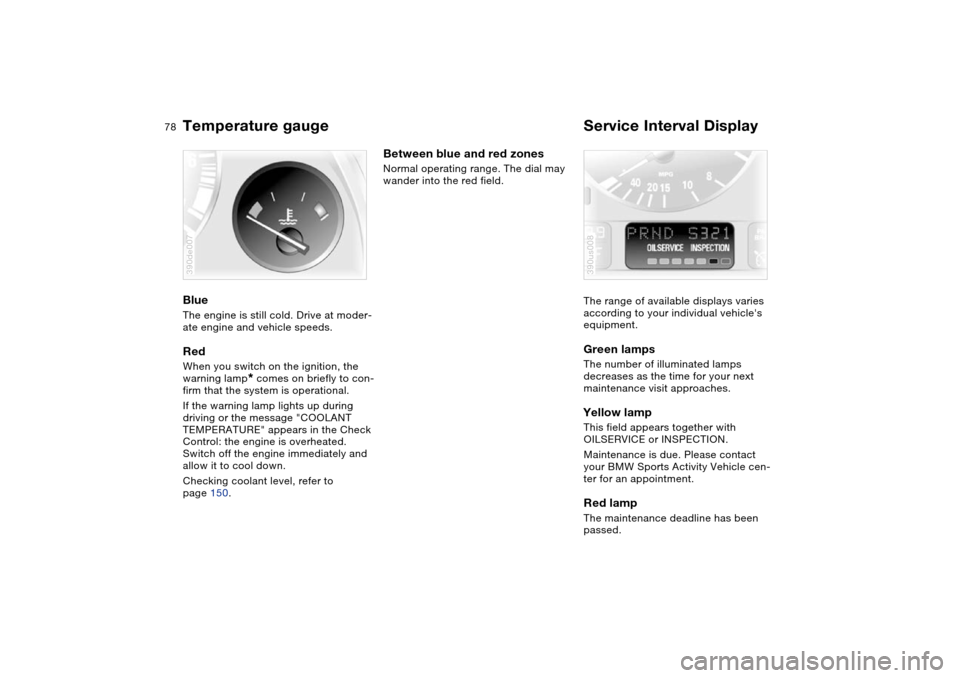
Temperature gauge Service Interval Display Blue The engine is still cold. Drive at moder-
ate engine and vehicle speeds.Red When you switch on the ignition, the
warning lamp
* comes on briefly to con-
firm that the system is operational.
If the warning lamp lights up during
driving or the message "COOLANT
TEMPERATURE" appears in the Check
Control: the engine is overheated.
Switch off the engine immediately and
allow it to cool down.
Checking coolant level, refer to
page 150.
390de007
Between blue and red zones Normal operating range. The dial may
wander into the red field.
The range of available displays varies
according to your individual vehicle's
equipment.
Green lamps The number of illuminated lamps
decreases as the time for your next
maintenance visit approaches.Yellow lamp This field appears together with
OILSERVICE or INSPECTION.
Maintenance is due. Please contact
your BMW Sports Activity Vehicle cen-
ter for an appointment.Red lamp The maintenance deadline has been
passed.390us008
Page 81 of 200

Maintenance
79n
OverviewControlsRepairsDataIndex
Check Control Graphic display
*
The following alerts or status messages
are displayed with icons as of ignition
key position 2 until the defects are cor-
rected:
1Check low beams
2Add washer fluid, goes out after
approx. 1 minute
3Door open
4Tailgate open
5Check brake and tail lamps. A defec-
tive center brake lamp is indicated by
the upper symbol
When you open the door after stopping,
a warning signal sounds without a
visual indicator for:
>LIGHTS ON
>KEY IN IGNITION LOCK. 390de121
Alphanumeric display
*
Text messages are used to alert the
driver to system malfunctions as of igni-
tion key position 2. The alert is accom-
panied by an acoustic signal.
1Status messages symbol
2Display
3CHECK button
Messages concerning system faults are
differentiated based on two priorities: 530de254
Priority 1
These defects are immediately indi-
cated by an acoustic signal and a flash-
ing warning symbol 1. Simultaneous
defects will be displayed consecutively.
These status messages remain in the
display until the defects are corrected.
They cannot be deleted by pressing the
CHECK button 3:
>RELEASE PARKINGBRAKE
>COOLANT TEMPERATURE
Temperature too high. Stop the vehi-
cle immediately and switch off the
engine, refer to pages 78 and 150
>STOP! ENGINE OILPRESS
Oil pressure too low. Stop the vehicle
immediately and switch off the
engine, refer to pages 19, 148
Page 82 of 200

80n
Check Control >CHECK BRAKE FLUID
Level has dropped approx. to mini-
mum. Have the brake fluid topped up
as soon as possible, refer to
page 151. Have the reason for the
brake fluid loss eliminated by your
BMW Sports Activity Vehicle center
>DSC/4x4 INACTIVE
DSC and/or 4-wheel drive system
xDrive has failed.
The stabilizing interventions of DSC
and/or the 4-wheel drive system
xDrive are no longer available. Drive
may then only be carried out via the
rear axle.
Have the system checked at the
nearest BMW Sports Activity Vehicle
center.
For additional information, refer to
page 95
>SELFLEVEL SUSP.INACT
*
Please consult the nearest BMW
Sports Activity Vehicle center
>SELFLEVEL SUSP.INACT*
MAX. 35 MPH/MAX. 60 KM/H
*
These messages are displayed con-
secutively.
Do not exceed a maximum speed of
35 mph/60 km/h.
Please consult the nearest BMW
Sports Activity Vehicle center>TRANSMISS'N OVERHEAT
*
Reduce speed immediately and stop
at a suitable location so that the sys-
tem can cool down again. Please
contact the nearest BMW Sports
Activity Vehicle center
>LIMIT
*
Display when the programmed road-
speed limit is exceeded, refer to
page 87.
Priority 2
These displays appear for 20 seconds
as of ignition key position 2. The warn-
ing symbols remain after the message
disappears. You can open the mes-
sages again for display by pressing the
CHECK button.
>TRUNKLID OPEN
This message only appears when
starting off
>DOOR OPEN
This message appears after a mini-
mal defined road speed has been
exceeded
>FASTEN SEAT BELTS
*
In addition, the indicator lamp with
the belt symbol lights up and an
acoustic signal sounds
>WASHER FLUID LOW
Too low, top up at the next opportu-
nity, refer to page 148>CHECK ENGINE OIL LEV
The oil level is at the absolute mini-
mum point. Therefore, have the
engine oil topped up as soon as pos-
sible, refer to page 148. Until then,
do not drive more than approx.
30 miles/50 km
>CHECK GAS CAP
Check to see whether the fuel filler
cap has been closed properly, refer
to page 25
>OUTSIDE TEMP. +237/–56
This display is only an example. The
current temperature is displayed at
outside temperatures of +37.57/
+36 and below, refer also to
page 75
>CHECK BRAKE LIGHTS
A lamp has failed or the electrical
circuit has a fault, refer to page 161
or consult a BMW Sports Activity
Vehicle center
>CHECK LOWBEAM LIGHTS
CHECK SIDE LIGHTS
CHECK REAR LIGHTS
CHECK FRONT FOGLAMPS
CHECK LICPLATE LIGHT
CHECK HIGHBEAM LIGHT
CHECK BACK UP LIGHTS
The respective lamp may have failed
or the electrical circuit may be defec-
Page 83 of 200

Maintenance
81n
OverviewControlsRepairsDataIndex
Check Controltive, refer to page 159 or consult a
BMW Sports Activity Vehicle center
>TRANS. FAILSAFE PROG
*
Please consult the nearest BMW
Sports Activity Vehicle center, refer
to page 69
>CHECK BRAKE LININGS
Have the brake pads inspected by
your BMW Sports Activity Vehicle
center, refer to page 139
>CHECK COOLANT LEVEL
Coolant too low, top off at the next
opportunity, refer to page 150
>ENGINE FAILSAFE PROG
Fault in the engine electronics.
You can continue to drive with
reduced engine output or engine
speed.
Please have the system inspected by
your BMW Sports Activity Vehicle
center.
Displays after completion of trip All of the malfunctions registered during
the trip appear consecutively when the
ignition key is turned to position 0.
The following displays will appear when
appropriate:
>LIGHTS ON
>KEY IN IGNITION LOCK >CHECK ENGINE OIL LEV
Top up engine oil at the next opportu-
nity, e.g. while refueling, refer to
page 148.
This display appears when you open
the driver's door after parking the vehi-
cle. A supplementary acoustic signal is
also heard.
Status messages remain available with
the CHECK button 3 for a period of
approx. three minutes after the display
goes out and the key is removed from
the ignition lock. If there were multiple
messages, press the CHECK button
repeatedly to view them all in
sequence.
Checking Check Control Press the CHECK button 3 with the
ignition key in position 2:
"CHECK CONTROL OK" appears in the
display.
No malfunctions are present in the
monitored systems. Computer You can find a description of the com-
puter on pages 82 and 87 as well as in
the Owner's Manual for Onboard Com-
puter.You can have the Check Control
and computer messages dis-
played in a different language.<
Page 84 of 200

82n
ComputerMode selection As of ignition key position 1, you can
call up information from the computer
using the computer button in the turn
signal lever.
A new function appears each time you
briefly press the computer button.
The display sequence:
>Outside temperature
>Average fuel consumption
>Cruising range
>Average speed.
As of ignition key position 1, the last
active setting is displayed.
The range of available displays varies
according to your individual vehicle's
equipment.530de228
Outside temperature and average
fuel consumption You can change the units of measure-
ment 7/6 for the outside temperature
display by
1. pressing and holding the trip odome-
ter reset button with the ignition
key in position 1 and
2. then turning the ignition key to 0.
At the same time the units of mea-
surement in the temperature display
of the automatic climate control will
be changed, refer to page 109.
Refer also to page 75.
The average fuel consumption is calcu-
lated for the time during which the
engine is running.390us126
Cruising range and average speed Displays the estimated cruising range
available with the remaining fuel. The
fuel level is measured and the range is
calculated taking the driving style over
the last 20 miles/30 km into account.
Periods with the vehicle parked and the
engine off are not included in the calcu-
lations of average speed.Canceling display If the button in the turn signal lever is
pressed briefly while the average speed
is displayed, the computer display can
be masked out. Restarting calculations If you continue to press the computer
button in the turn signal lever, the aver-
age values which were just displayed
for fuel consumption and speed will be
recalculated from that point. The engine
must be running for this calculation.Computer with alphanumeric
display
*
If your vehicle has Check Control with
alphanumeric display, the system's
computer is described beginning on
page 87 and in the Owner's Manual for
Onboard Computer.