2004 BMW M3 COUPE key
[x] Cancel search: keyPage 67 of 170

67
Sequential M gearbox with Drivelogic*The conceptThe sequential M gearbox with
Drivelogic is an automated manual
gearbox with which clutching and shift-
ing is assumed by an electro-hydraulic
system.
The SMG Drivelogic is operated via two
shift paddles on the steering wheel and
the selector lever in the center console.
It offers the following functions:
>Sequential and automated shifting
mode
>Ability to choose between different
driving programs – Drivelogic
>Gradient assistance, refer to page 70
>Upshift display and shift lights, refer
to page 71
>RPM matching on downshifts
>Driving dependent functions:
The respective driving situation, e.g.
cornering, mountain driving or brak-
ing, is detected by sensors and taken
into account for shifting, e.g. to
achieve optimum gear selection dur-
ing deceleration and subsequent
acceleration
>Slip recognition at the rear axle for
increasing driving stability, e.g. dur-
ing downshifting on slippery road
surfaces>Operating safety through protection
against misshifting.
Under normal operating conditions, fuel
consumption is lowest when driving in
the first driving program of the auto-
mated shifting mode.
Selector lever positionsR: Reverse position
N: Neutral position
Forward position with one-touch mode:
>S: sequential mode
>D: automated mode
>+: upshifting in sequential mode
>–: downshifting in sequential mode.
The SMG Drivelogic is ready for opera-
tion from ignition key position two or
higher.
For your safety, it is only possible to
engage a driving position with the vehi-
cle stopped approx. two seconds after
engaging position 0 with the footbrake
depressed – shift-lock function.
OverviewControlsMaintenanceRepairsDataIndex
Page 70 of 170

70
DrivelogicDrivelogic makes various driving pro-
grams available to you.
Press the Drivelogic repeatedly until the
desired driving program is shown in the
SMG display of the instrument cluster,
refer to page 68.
In the automated mode you can select
from five driving programs ranging from
convenience mode/winter operation to
sporty and highly dynamic.
In the first automated driving program,
starting off takes place in second gear,
which is advisable under winter road
conditions with ice and snow.
In the sequential mode you can choose
from six driving programs ranging from
balanced, dynamic driving – 1 – to
sporty, puristic driving – 6. The sporty,
puristic driving program can only be
activated with the Dynamic Stability
Control (DSC) deactivated, refer to
page 83.
To maintain vehicle stability,
always drive with the DSC acti-
vated on whenever possible.<
Following each change between the
sequential and the automated mode,
the last driving program selected in the
respective mode is active. Exception:
instead of the last selected sequential
driving program 6, program 5 is acti-
vated only after the engine has been
started again.
Your vehicle is set so that when
the engine is started, the last
selected driving program saved in your
key is activated for each shifting
mode.<
Gradient assistanceThe gradient assistance enables start-
ing off on grades with virtually no roll-
back. It can be activated in the sequen-
tial and automated mode with the vehi-
cle stopped and can be used for both
forward and reverse driving.
The vehicle may roll slightly before
it is held by the gradient assis-
tance after releasing the footbrake.
Two seconds after the footbrake is
released, the vehicle begins to roll, as it
is no longer held with the gradient
assistance.<
1. Depress footbrake with vehicle
stopped
2. Activate the gradient assistance by
pulling the left paddle for at least
0.5 seconds. An increase in the
engine speed indicates that the gra-
dient assistance is activated
Briefly pulling the left paddle again
deactivates the gradient assis-
tance again.<
3. Release the footbrake and start off
within 2 seconds.
The gradient assistance must be reacti-
vated before each use.
Sequential M gearbox with Drivelogic*
Page 73 of 170

73
Washer/wiper system/Rain sensor*0Wipers retracted
1Intermittent operation or rain sensor
2Normal wiper speed
3Fast wiper speed
4Brief wipe
5Rotary dial for control of the wipe
interval or the sensitivity of the rain
sensorIntermittent modeNot on vehicles with rain sensor.
You can set the wipe interval at four
stages with rotary dial 5. In addition, the
wipe interval is varied automatically
depending on road speed.
Rain sensor*The rain sensor is positioned on the
windshield, directly behind the interior
rearview mirror.
To activate the rain sensor:
>With the ignition key in position 1 or
higher, move the lever to position 1.
The wipers travel once across the
windshield, regardless of the weather
>You can leave the lever permanently
in position 1. It is then only necessary
to activate the rain sensor when the
ignition key in position 1 or higher.
Activate by briefly turning rotary
dial 5.
To adjust the sensitivity of the rain sen-
sor: turn rotary dial 5.
To deactivate the rain sensor: put lever
in position 0.
Turn the rain sensor off in auto-
matic car washes. Failure to do so
could result in damage caused by
undesired wiper activation.
wipe – not on vehicles with rain sensor.
Fast wiper speedWhen the vehicle is stationary, the wip-
ers operate at normal speed – not on
vehicles with rain sensor.
OverviewControlsMaintenanceRepairsDataIndex
Page 74 of 170
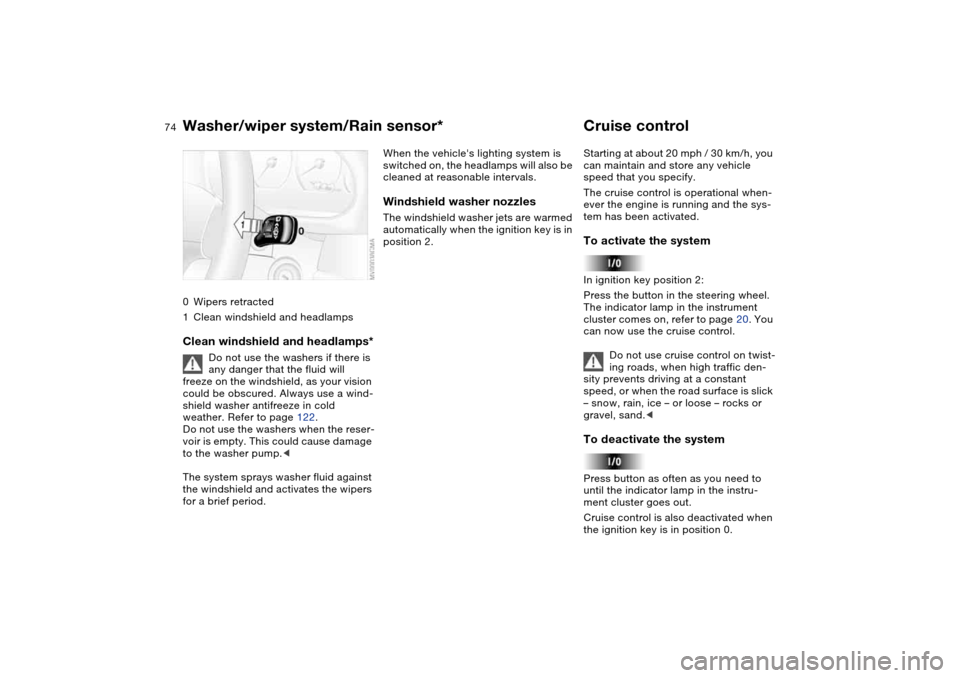
74
0Wipers retracted
1Clean windshield and headlampsClean windshield and headlamps*
Do not use the washers if there is
any danger that the fluid will
freeze on the windshield, as your vision
could be obscured. Always use a wind-
shield washer antifreeze in cold
weather. Refer to page 122.
Do not use the washers when the reser-
voir is empty. This could cause damage
to the washer pump.<
The system sprays washer fluid against
the windshield and activates the wipers
for a brief period.
When the vehicle's lighting system is
switched on, the headlamps will also be
cleaned at reasonable intervals.Windshield washer nozzlesThe windshield washer jets are warmed
automatically when the ignition key is in
position 2.
Cruise controlStarting at about 20 mph / 30 km/h, you
can maintain and store any vehicle
speed that you specify.
The cruise control is operational when-
ever the engine is running and the sys-
tem has been activated.To activate the systemIn ignition key position 2:
Press the button in the steering wheel.
The indicator lamp in the instrument
cluster comes on, refer to page 20. You
can now use the cruise control.
Do not use cruise control on twist-
ing roads, when high traffic den-
sity prevents driving at a constant
speed, or when the road surface is slick
– snow, rain, ice – or loose – rocks or
gravel, sand.
ment cluster goes out.
Cruise control is also deactivated when
the ignition key is in position 0.
Washer/wiper system/Rain sensor*
Page 76 of 170

76Everything under control
Odometer1Odometer
2Trip odometerOdometerYou can activate the displays shown in
the illustration with the ignition key in
position 0 by pressing the left button in
the instrument cluster.Trip odometerTo reset the trip odometer to zero,
press the left button with the ignition
key in position 1 or higher.
TachometerVariable pre-warning zoneThe yellow pre-warning zone displays
current permissible engine speeds,
depending on the engine temperature.
As the engine temperature climbs,
some of the sectors for this pre-warning
zones will go out one after the other.
Avoid engine speeds in the early warn-
ing zone if possible.
Never allow the engine to operate with
the needle in the red overspeed zone of
the gauge.
To protect the engine, the fuel supply is
interrupted when you approach this
sector.
Engine oil temperatureThe general operating temperature lies
between 1757/806 and 2507/
1206. During high-performance driv-
ing, do not exceed a maximum value of
3007/1506.
Page 78 of 170

78
Service interval displayRemaining distance to next
serviceThe displays shown in the illustration
appear for a few seconds when the
ignition key is in position 1 or higher or
after the engine is started.
The next service due appears with the
message OIL SERVICE or
INSPECTION, together with the dis-
tance remaining in miles – in kilometers
in Canada – before the next scheduled
service.
The computer bases its calculations of
the remaining distance on the preced-
ing driving style.
A flashing message and a '–' in front of
the number mean that the service inter-
val has already been exceeded by the
distance shown on the display. Please
contact your BMW center for an
appointment.
Check ControlDisplayWhen the ignition key is in position 2,
the following information and/or condi-
tions are indicated using symbols until
the conditions have been corrected.
1Inspect the low-beam and high-beam
headlamps, as well as the parking
lamps
2Door open
3Luggage compartment lid open
4Check tail or brake lamps
When you open the driver's door, after
having turned the ignition key to posi-
tion 0, you will hear an acoustic signal
for a few seconds to remind you that
the lamps have not been switched off.
Page 79 of 170

79
ClockIf you wish to have a permanent time
display, you can make this adjustment
in the car radio display, refer to the
Owner's Manual for Radio.
You can set the time of day, and the
display for the car radio, as follows.
Setting
Before the clock can be set, the
time must be showing in the
instrument cluster display.<
With the ignition key in position 1 or
higher
To set ahead: turn the right button to
the right.
To set back: turn the right button to the
left.
The adjustment speed will increase the
longer you continue to hold the right
button.
To change the display mode: press the
right button briefly.
Every time you press the button, the
clock display alternates between the
12-hour and 24-hour mode.
In ignition key position 0: the time is
displayed for a few seconds after you
press the left button, refer to Odometer
on page 76.
OverviewControlsMaintenanceRepairsDataIndex
Page 80 of 170

80
ComputerMode selectionWith the ignition key in position 1 and
higher, you can use the button in the
turn signal lever to retrieve information
from the computer for display in the
instrument cluster. Each time you press
the button briefly in the direction of the
steering column, a new function is
called up in the display.
The displays appear in the following
order:
Time of day, outside temperature, aver-
age fuel consumption, cruising range,
average vehicle speed.
When the ignition key is in position 1 or
higher, the last active setting is dis-
played.
Outside temperatureYou can change the units of measure
6/7 for the outside temperature dis-
play by pressing the right-hand reset
button in the instrument cluster while
the temperature display is active. The
units of measure 6/7 in the tempera-
ture display of the automatic climate
control change automatically, refer to
page 92.Ice warningIf the outside temperature drops to
about 37.57/+36, then the computer
will automatically switch to a display of
the outside temperature. In addition, a
signal sounds as a warning and the dis-
play flashes for a brief period.
After giving an ice warning, the
display returns to the previous
setting.<
The ice warning does not alter the
fact that surface ice can form at
temperatures above 37.57/+36, on
bridges or shaded road surfaces, for
instance.<