Page 137 of 170
137
Using the M Mobility systemTo repair a flat tire using the M Mobility
system, proceed as follows:
>Preparing the M Mobility system for
use, refer to the next column
>Components of the M Mobility sys-
tem, refer to page 138
>Filling with sealant, refer to page 138
>Distributing sealant, refer to
page 139
>Inflating tire to correct pressure, refer
to page 139.
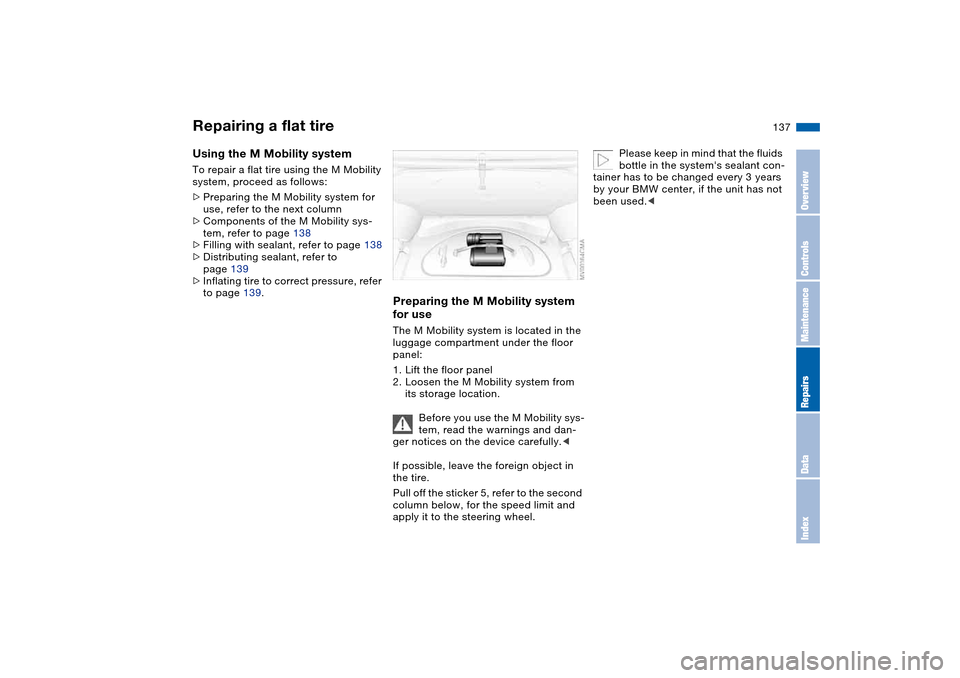
Preparing the M Mobility system
for useThe M Mobility system is located in the
luggage compartment under the floor
panel:
1. Lift the floor panel
2. Loosen the M Mobility system from
its storage location.
Before you use the M Mobility sys-
tem, read the warnings and dan-
ger notices on the device carefully.<
If possible, leave the foreign object in
the tire.
Pull off the sticker 5, refer to the second
column below, for the speed limit and
apply it to the steering wheel.
Please keep in mind that the fluids
bottle in the system's sealant con-
tainer has to be changed every 3 years
by your BMW center, if the unit has not
been used.<
Repairing a flat tire
OverviewControlsMaintenanceRepairsDataIndex
Page 157 of 170

Everything from A to Z
157
Blower
automatic climate
control 94
BMW Maintenance
System 126
BMW sports seat 45
Bore, refer to Engine
data 150
Bottle holders, see Bever-
age holders 98, 99
Brake fluid 125
indicator lamp 18, 125
level 125
Brake force display 87
Brake hydraulic system 112
Brake lamps
bulb replacement 135
indicator lamp, defective
lamp 78
Brake lights
brake force display 87
Brake pads 113
brake fluid level
18, 112, 125
breaking in 110
disc brakes 112
Brake rotors
brake system 112
breaking in 110
Brake system
brake pads, indicator
lamp 19Brake wear warning
indicator lamp 19
Brakes
ABS 112
brake fluid 125
breaking in 110
indicator/warning lamp
18, 19
parking brake 65
Break-in procedures 110
Bulb replacement 133
Bulb replacement, refer to
Lamps and bulbs 133
Buttons in steering wheel 22
C
California Proposition
65 warning 128
Can holders, see Beverage
holders 98, 99
Capacities 153
Car battery 140
Car care, refer to the Caring
for your vehicle brochure
Car keys, refer to Keys 30
Car radio, refer to the
Owner's Manual for Radio
Car telephone
preparation 99
Car telephone, refer to the
separate Owner's ManualCar vacuum cleaner, con-
necting 100
Car wash, refer to the Caring
for your vehicle brochure
Caring for headlamp cov-
ers, refer to the Caring for
your vehicle brochure 133
Carpet care, refer to the
Caring for your vehicle
brochure
Cassette operation, refer to
the Owner's Manual for
Radio/Onboard Computer
CBC Cornering Brake Con-
trol 112
warning lamp 19
CD changer, refer to the
Owner's Manual for
Radio/Onboard Computer
CD operation, refer to the
Owner's Manual for
Radio/Onboard Computer
Cellular phone 99
Center high-mount brake
lamp
bulb replacement 136
Central locking system 30
button 34
passenger
compartment 34
Charge indicator lamp 18
Check Control 78Check Gas Cap
indicator lamp 19
Child seats, refer to Child-
restraint systems 56
Child-restraint systems 56
Cigarette lighter 100
Cigarette lighter socket 100
Cleaning chrome parts, refer
to the Caring for your vehi-
cle brochure
Cleaning light alloy wheels,
refer to the Caring for your
vehicle brochure
Cleaning the vehicle, refer to
the Caring for your vehicle
brochure
Cleaning windshield 74
Clock 79
12-/24-hour mode 79
setting, refer also to the
Owner's Manual for
Radio/Onboard Computer
Closing
from inside 34
from outside 31
Clothes hooks 101, 111
Clutch
breaking in 110
Cockpit 14
Code, refer to the Owner's
Manual for Radio/Onboard
Computer
OverviewControlsMaintenanceRepairsDataIndex
Page 162 of 170

Everything from A to ZMaximum speed
with winter tires 118
MC operation, refer to the
Owner's Manual for
Radio/Onboard Computer
MD operation, refer to the
Owner's Manual for
Radio/Onboard Computer
Mechanical seats 44
Memory, refer to Seat and
mirror memory 49
Memory, refer to Vehicle
Memory, Key Memory 60
Microfilter
automatic climate
control 96
Microphone, refer to Cellular
phone 99
Mini disc operation, refer to
the Owner's Manual for
Radio/Onboard Computer
Mirrors 51
automatic curb monitor 50
heated 51
memory, refer to Seat and
mirror memory 49
Mobile Service 142
Mobility system 136
Modifications, technical,
refer to For your own
safety 5Multifunction steering
wheel 22
Multifunction switch
turn signal indicator/head-
lamp flasher 72
washer/wiper system 73
N
Navigation system, refer to
the Owner's Manual for
Radio/Onboard Computer
Neck restraints, refer to
Head restraints 46
Nets 98
Nozzles, refer to
Ventilation 92
Nylon rope, refer to Towing
the vehicle 145
O
OBD interface socket 128
Odometer 76
Oil
additives, refer to Adding
engine oil 123
alternative oils 123
capacity 153
dipstick 122
quality 123
specified engine oils 123Oil change interval, refer
to Service interval
display 126
Oil change intervals, refer to
the Service and Warranty
Information Booklet for US
models / Warranty and
Service Guide Booklet for
Canadian models
Oil filter change 153
Oil level
checking 122
indicator lamp 18
Oil pressure
indicator lamp 18
OIL SERVICE 78
Oil types 123
Old batteries, refer to Dis-
posal 140
Onboard computer 80
Onboard computer, refer to
the Owner's Manual for
Onboard Computer
Onboard tool kit 132
Opening and closing
from inside 34
from outside 31
via remote control 31
via the door lock 33
Outlets, ventilation 92Outside temperature dis-
play 80
changing unit of
measure 80
P
Paintwork care, refer to the
Caring for your vehicle
brochure
Panic mode, trigger
alarm 32
Park Distance Control
(PDC) 82
Parking aid, refer to Park
Distance Control (PDC) 82
Parking brake 65
indicator lamp 18
Parking lamps 88
bulb replacement 133
Parking lamps/Low
beams 88
Parts and accessories, refer
to Your individual vehicle 5
Passenger-side exterior mir-
ror tilt function 50
PDC Park Distance
Control 82
Pinch protection
glass sunroof 41
Plastic, refer to the Caring
for your vehicle brochure