2004 BMW 645CI COUPE remove cd
[x] Cancel search: remove cdPage 110 of 216
Starting navigation system
108
Starting navigation system
Your navigation system can use satellites
to ascertain the precise position of your
vehicle and guide you reliably to any desti-
nation you enter.
Navigation DVD
Special navigation DVDs are required;
these are available from your BMW center.
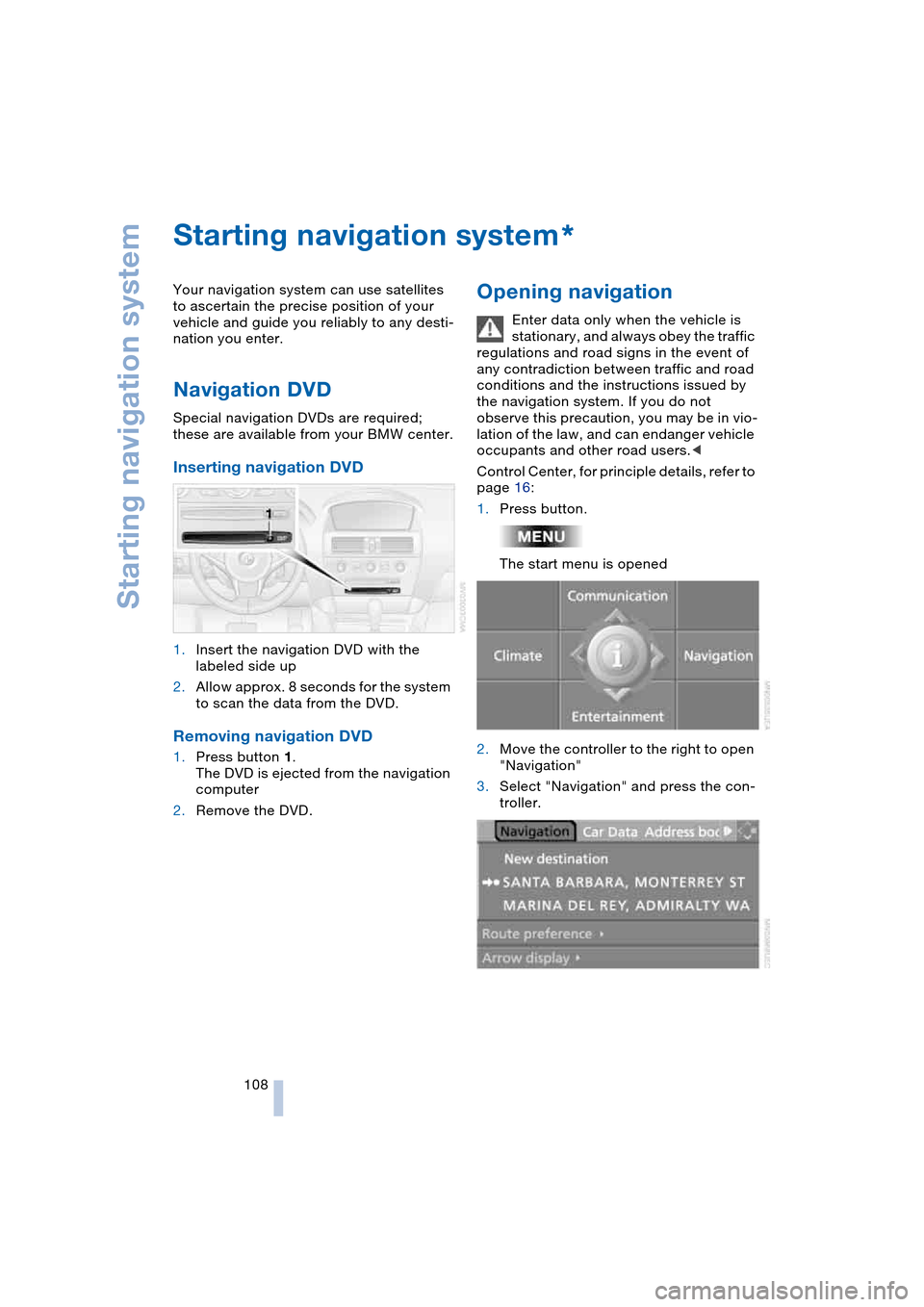
Inserting navigation DVD
1.Insert the navigation DVD with the
labeled side up
2.Allow approx. 8 seconds for the system
to scan the data from the DVD.
Removing navigation DVD
1.Press button 1.
The DVD is ejected from the navigation
computer
2.Remove the DVD.
Opening navigation
Enter data only when the vehicle is
stationary, and always obey the traffic
regulations and road signs in the event of
any contradiction between traffic and road
conditions and the instructions issued by
the navigation system. If you do not
observe this precaution, you may be in vio-
lation of the law, and can endanger vehicle
occupants and other road users.<
Control Center, for principle details, refer to
page 16:
1.Press button.
The start menu is opened
2.Move the controller to the right to open
"Navigation"
3.Select "Navigation" and press the con-
troller.
*
Page 142 of 216
CD player and CD changer
140
Random play sequence
In this mode, the music tracks on the cur-
rent CD are played once in a random
sequence.
Control Center, for principle details, refer to
page 16:
1.Select "Set" and press the controller.
Other menu items are displayed
2.Select "Random" and press the control-
ler.
To stop the random mode:
Press the controller, select "Random" and
press the controller.
If you have a CD with MP3 content:
1.Select the current music track and
press the controller
2.Select "random directory" and press
the controller.
In this mode, the music tracks in the current
directory are played once in a random
sequence.
To stop the random mode:
Press the controller, select "random direc-
tory" and press the controller.
Fast forward/reverse
Buttons on the CD player:
Press and hold the button for the corre-
sponding direction.
The tracks can be heard, but the sound is
distorted.
CD magazine
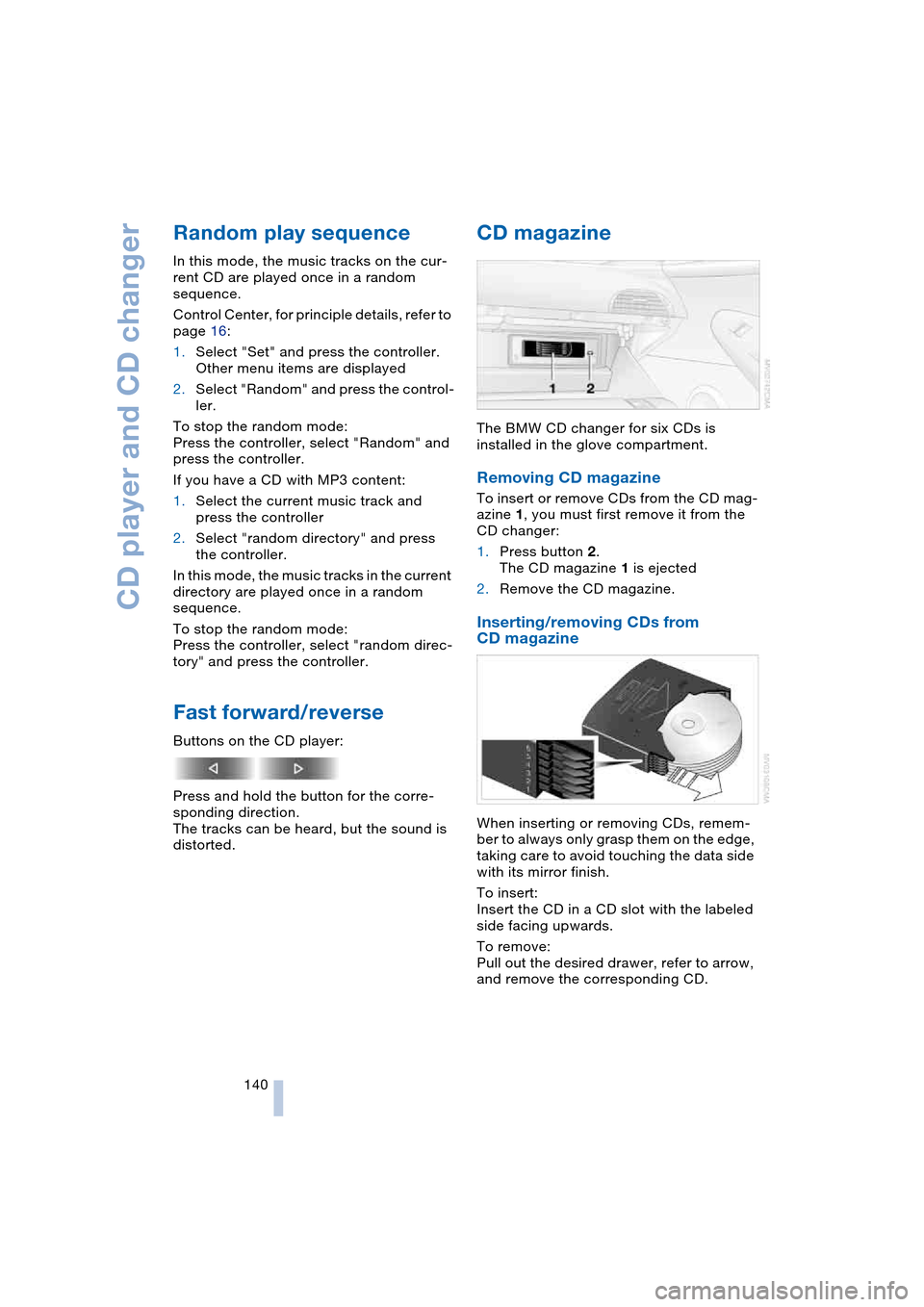
The BMW CD changer for six CDs is
installed in the glove compartment.
Removing CD magazine
To insert or remove CDs from the CD mag-
azine 1, you must first remove it from the
CD changer:
1.Press button 2.
The CD magazine 1 is ejected
2.Remove the CD magazine.
Inserting/removing CDs from
CD magazine
When inserting or removing CDs, remem-
ber to always only grasp them on the edge,
taking care to avoid touching the data side
with its mirror finish.
To insert:
Insert the CD in a CD slot with the labeled
side facing upwards.
To remove:
Pull out the desired drawer, refer to arrow,
and remove the corresponding CD.
Page 147 of 216

145
Entertainment
Reference
At a glance
Controls
Driving tips Communications
Navigation
Mobility
Batteries
Never attempt to dismantle your
BMW portable phone or its battery.
Use only approved battery types – the
wrong battery can destroy your portable
phone.
To avoid possible short circuits, after
removing a battery you should never allow
it to come into contact with metallic sur-
faces of any kind.<
Disposing of used batteries
Return used batteries to a recycling
collection point or to your BMW cen-
ter.<
Care instructions
You can find what you need to know about
caring for your portable phone in the Caring
for your vehicle brochure and in the sepa-
rate portable phone Owner's Manual.
Operating options
You can operate the BMW portable phone*
with:
>The steering wheel, refer to page 11
>The Control Center, refer to page 146
>Voice control, refer to page 151.
Telephoning with car phone:
BMW Assist calls
You can use the car phone via the hands-
free system for BMW Assist calls.
When the status information "Car Phone" is
displayed in "Communication", only BMW
Assist calls are possible.
Activating the
BMW portable phone*
Requirements for portable phones with
SIM card:
>Enter a Personal Identification Number,
PIN, if necessary
>Remove all keypad locks, refer to sepa-
rate Owner's Manual.
Before starting off, place the BMW portable
phone in the cradle. If a connection to
BMW Assist has been established, you
cannot use the BMW portable phone until
this connection has been terminated.
Inserting portable phone
1.Press button 1
2.To adjust the cradle to the portable
phone:
Slide the switch 2 toward the front or
rear if necessary
3.If necessary, remove the protective cap
from the antenna connector on the back
of the portable phone
4.Insert the portable phone with the
antenna completely retracted
5.Press the cradle downwards.
When the status information "Portable" is
displayed in "Communication", you can
operate the BMW portable phone via the
vehicle.
Removing portable phone
Press button 1.
For information on operating your
portable phone, please consult the
separate Owner's Manual.<
Page 153 of 216

151
Entertainment
Reference
At a glance
Controls
Driving tips Communications
Navigation
Mobility
To close the text message:
Move the controller forwards to select
and press the controller.
Calling sender
1.Select the desired text message and
press the controller.
The text message is displayed
2.Select "Options" and press the control-
ler
3.Select "Call sender" and press the con-
troller.
The selected sender is called.
Deleting text messages/SMS
1.Select the desired text message and
press the controller.
The text message is displayed
2.Select "Options" and press the control-
ler
3.Select "Delete" and press the control-
ler.
The text message of the portable phone
is deleted.
Operation by voice control*
The concept
You can operate your portable phone with-
out having to remove your hands from the
steering wheel. The system operates on
the basis of voice commands that you learn
easily after using them a few times. In addi-
tion, you are also supported by instructions
or questions.
Symbols usedVoice commands
In ignition key position 2:
1.Briefly press the button on the steer-
ing wheel.
A sound signal indicates operating
readiness
2.Speak voice commands.
To have the system list the voice com-
mands possible in each case:
Canceling operation via voice
control
Briefly press the button on the steering
wheel
or
In dialogs where text of any kind can be
spoken, e.g. a name, canceling is only pos-
sible using the button. Voice control dia-
log is automatically interrupted when an
incoming call is received.
Voice commands
In addition to the commands described in
this Owner's Manual, alternative com-
mands are often possible for the same
functions, e.g.:
Digits from zero to nine are understood.
You can say each digit individually or group
them into a sequence of three to five digits
to speed up the process.
{...} Identifies voice commands.
{{...}} Identifies instructions generated
by the system.
{Help}.
{Cancel}.
{Dial name} or {Name}.
Page 181 of 216

Mobility
179Reference
At a glance
Controls
Driving tips
Communications
Navigation
Entertainment
High beams, parking lamps
The illustration shows the front left side of
the engine compartment.
High beams
Bulb 55 watts, H 7
1.Remove the cover cap 1 by pressing
the tab and removing the cover cap
upward
2.Press the bulb holder from above to
release it
3.Remove the bulb holder
4.Remove and replace the bulb.
Parking lamps
Bulb 10 watts
Bulb holder and reflector are one unit
and are replaced together.<
1.Turn the bulb holder 2 to the right and
remove
2.Press the detent on the plug connector,
pull off the bulb holder and replace.
Front turn signal, sidemarker
Your BMW is equipped with two turn signal
lamps per side in the front. Turn signal
lamp 1 can be replaced via the engine
compartment, and turn signal lamp 2 via
the wheel well.
Turn signal lamp 1
Bulb 21 watts, WY 21 SV
The illustration shows the front right side of
the engine compartment.
1.The lever shown:
>Right turn signal: press downwards
>Left turn signal: press upwards
2.Remove the bulb holder towards the
rear
3.Remove and replace the bulb.
Turn signal lamp 2
Bulb 21 watts, WY 21 SV
The bulb of the turn signal lamp 2 can be
replaced via a cover at the front of the
wheel well.
The illustration shows the left side of the
vehicle.
1.Turn the steering all the way to lock to
obtain access to the cover, refer to
illustration
2.Remove the cover by unscrewing the
two bolts with an open-end wrench
from the onboard tool kit
3.Location of the bulb holder of turn sig-
nal lamp 2, refer to arrow
Page 182 of 216

Replacing components
180 4.Turn the bulb holder to the left and pull
out
5.Remove and replace the bulb.
Sidemarker
Bulb 5 watts, WY5W ST
The bulb can be replaced via a cover at the
front of the wheel well, refer to the descrip-
tion for turn signal lamp 2.
1.The bulb holder of the sidemarker lamp
is located toward the outside of the
vehicle next to the bulb holder of turn
signal lamp 2
2.Turn the bulb holder to the left and pull
out
3.Remove and replace the bulb.
Side turn signals
Bulb 5 watts, WY 5 W
1.Press against the front edge of the lamp
with the tip of your finger, then push it to
the rear, release the detent at the front
and take it off the trim strip
2.Turn the bulb holder 905 to the left and
remove
3.Remove and replace the bulb.
Tail lamps
The roadside parking, rear and brake
lamps are LEDs. The backup lamps
are fitted with longlife bulbs. Please con-
tact a BMW center in case of a malfunc-
tion.<1Turn signal
2Roadside parking, rear and brake lamp
3Backup lamp
4Reflector
Rear turn signals
Bulb 21 watts, PY 21 W
The illustration shows the recess on the left
side of the luggage compartment.
1.Remove the cover
2.Unclip the bulb holder and remove
3.Apply gentle pressure to the bulb while
turning it to the left for removal and
replacement.
License plate lamps
Bulb 5 watts, WY 5 W
Page 183 of 216

Mobility
181Reference
At a glance
Controls
Driving tips
Communications
Navigation
Entertainment
1.Push a screwdriver from the left under
the lamp and lever up the lamp to the
right
2.Turn the bulb holder 905 to the left and
remove
3.Remove and replace the bulb.
Light-emitting diodes LEDs
Light-emitting diodes installed behind
translucent lenses serve as the light source
for many of the controls and displays in
your vehicle. These light-emitting diodes,
which operate using a concept similar to
that applied in conventional lasers, are offi-
cially designated as Class 1 light-emitting
diodes.
Do not remove the covers, and never
stare into the unfiltered light several
hours, as irritation of the retina could
result.<
Changing a wheel
Your BMW is equipped with run-flat tires as
standard. An immediate wheel change in
the event of a flat tire is therefore no longer
required.
You will recognize run-flat tires by a circular
symbol containing the letters RSC on the
side of the tire, refer to Run-flat tires on
page 167.
If you switch from summer to winter tires,
or vice versa, use only run-flat tires, as in
the event of a flat there is no spare tire
available. Your BMW center will be glad to
advise you.
Also refer to New wheels and tires,
page 168.
Car jacking points
The jacking points for the car jack are
located in the positions shown.
You can obtain a suitable car jack as
an accessory at your BMW center.<
Battery
Battery care
The battery is 100 % maintenance-free, i.e.,
the electrolyte will last for the life of the bat-
tery when the vehicle is operated in a tem-
perate climate.
Your BMW center will be glad to advise in
all matters concerning the battery.
Charging battery
Only charge the battery in the vehicle via
the terminals in the engine compartment
with the engine switched off. For the con-
nections, refer to Jump-starting on
page 184.
Disposal
Have old batteries disposed of by
your BMW center or hand them in to a
recycling center. Maintain the battery in an
upright position for transport and storage.
Always restrain the battery to prevent it
from tipping over during transport.<
Power cut
After a temporary power cut, e.g. with a
discharged battery, the features of some
equipment are limited and it has to be rein-
itialized. Individual settings are also lost
and have to be updated:
Page 184 of 216

Replacing components
182 >Active steering
The system is deactivated and has to be
initialized, refer to page 80. Until then,
greater steering wheel movement is
required
>Seat, mirror and steering wheel
memory
The position must be newly stored,
refer to page 44
>Time and date
The settings must be updated, refer to
page 73
>Radio
Radio stations have to be stored again,
refer to page 132
>Navigation system
Wait to see what happens with the
functional capability, refer to page 122.
Fuses
Never attempt to repair a blown fuse,
and do not replace a defective fuse
with a substitute of another color or amper-
age rating, as this could lead to overloading
of the wiring, ultimately resulting in a fire in
the vehicle.<
Information on the fuse assignment is
located below the bracket for the onboard
tool kit, see below.
In glove compartment
1.Press the button on the back in the cen-
ter of partition 1 and pull out the parti-
tion upwards, arrow 2
2.Press the coupling downwards,
arrow 3, and fold the lid 4 forwards.
In luggage compartment
Fold up the cover under the floor mat and
remove the bracket for the onboard tool kit.
Information on the fuse assignment 1 and
additional fuses 2 are provided there.