2004 BMW 645CI COUPE mirror
[x] Cancel search: mirrorPage 104 of 216

Things to remember when driving
102
Things to remember when driving
Break-in procedures
To ensure that your vehicle continues to
provide optimized economy of operation
throughout an extended service life, we
request that you devote careful attention to
the following section.
Engine and differential
Up to 1,200 miles/2,000 km:
You should attempt to vary both vehicle
and engine speeds. Until the break-in
period has been completed, you should
also refrain from exceeding an engine
speed of 4500 rpm or a driving speed of
100 mph/160 km/h.
Always obey all official speed limits.
Avoid full-throttle operation and use of the
transmission's kickdown mode during
these initial miles.
Once you have driven 1,200 miles/
2,000 km, the engine and vehicle speeds
can be gradually increased.
SMG Sequential manual
transmission
Do not use the acceleration assistant dur-
ing the break-in period, refer to page 60.
Tires
Due to technical factors associated with
their manufacture, tires do not achieve their
full traction potential until after an initial
break-in period. Therefore, drive reservedly
during the first 200 miles/300 km.
Brake system
Brakes require an initial break-in period of
approx. 300 miles/500 km to achieve opti-
mized contact and wear patterns between
brake pads and rotors.
Clutch
The function of the clutch is only at its opti-
mized level after a distance driven of
approx. 300 miles/500 km. During this
break-in period, engage the clutch gently.
After component replacement
You should also comply with these break-in
procedures should the components men-
tioned above need to be replaced at a later
point.
General driving notes
Hot exhaust system
Extreme temperatures occur at the
catalytic converter on this and every
catalyst-equipped vehicle. Do not remove
the heat shields installed adjacent to vari-
ous sections of the exhaust system, and
never apply undercoating to them. When
driving, standing at idle and while parking,
take care to avoid possible contact
between the hot exhaust system and any
highly flammable materials such as hay,
leaves, grass, etc. Such contact could lead
to a fire, and with it the risk of serious prop-
erty damage as well as personal injury.<
Parking vehicle
Condensation forms in the air conditioner
system during operation, and then exits
under the vehicle. Traces of condensed
water under the vehicle are thus normal.
Before driving into a car wash
Fold in the exterior mirrors manually, as
otherwise they could be damaged due to
the width of the vehicle.
Hydroplaning
When driving on wet or slushy roads,
reduce road speed. If you do not, a
wedge of water can form between tires and
Page 142 of 216
CD player and CD changer
140
Random play sequence
In this mode, the music tracks on the cur-
rent CD are played once in a random
sequence.
Control Center, for principle details, refer to
page 16:
1.Select "Set" and press the controller.
Other menu items are displayed
2.Select "Random" and press the control-
ler.
To stop the random mode:
Press the controller, select "Random" and
press the controller.
If you have a CD with MP3 content:
1.Select the current music track and
press the controller
2.Select "random directory" and press
the controller.
In this mode, the music tracks in the current
directory are played once in a random
sequence.
To stop the random mode:
Press the controller, select "random direc-
tory" and press the controller.
Fast forward/reverse
Buttons on the CD player:
Press and hold the button for the corre-
sponding direction.
The tracks can be heard, but the sound is
distorted.
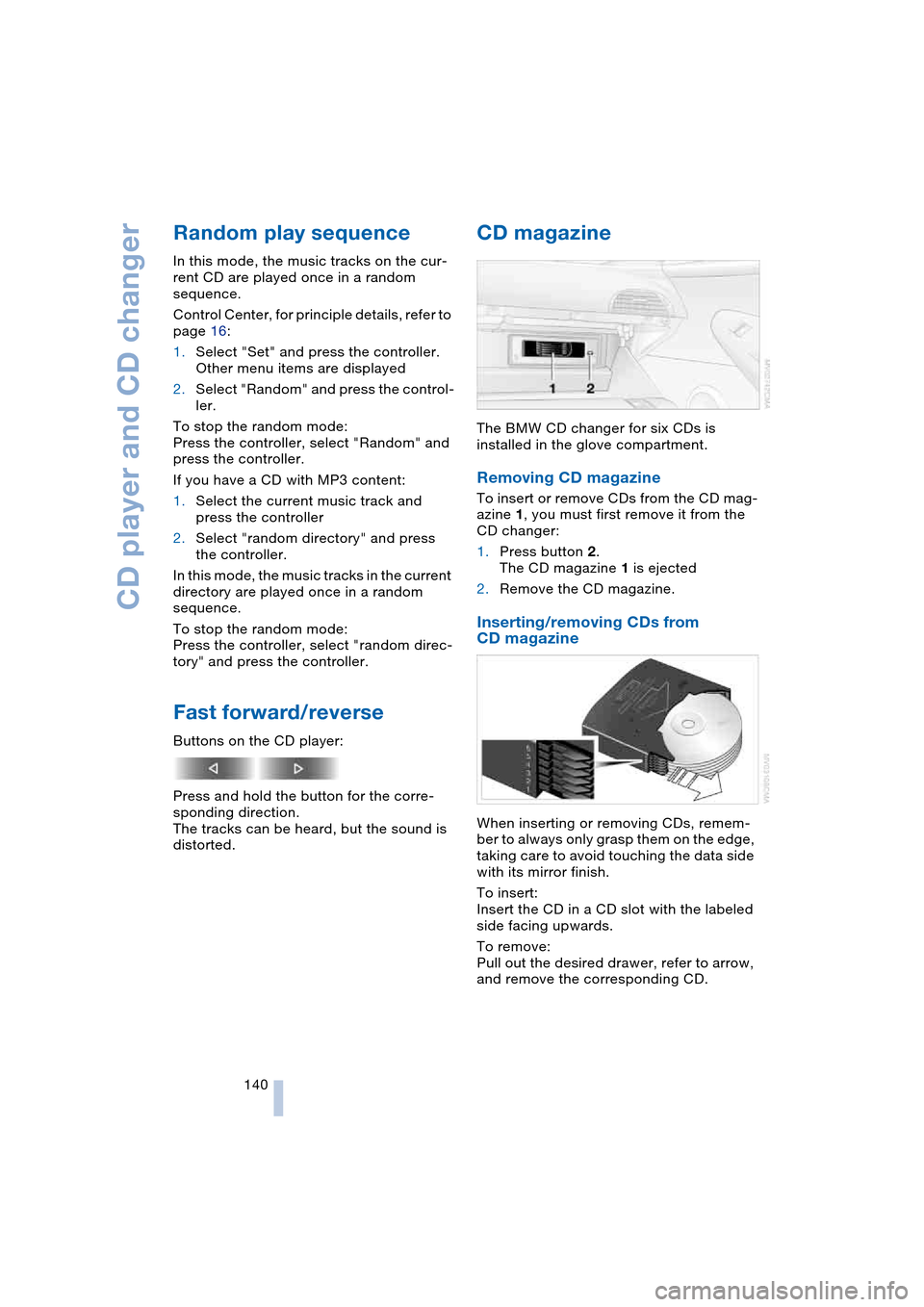
CD magazine
The BMW CD changer for six CDs is
installed in the glove compartment.
Removing CD magazine
To insert or remove CDs from the CD mag-
azine 1, you must first remove it from the
CD changer:
1.Press button 2.
The CD magazine 1 is ejected
2.Remove the CD magazine.
Inserting/removing CDs from
CD magazine
When inserting or removing CDs, remem-
ber to always only grasp them on the edge,
taking care to avoid touching the data side
with its mirror finish.
To insert:
Insert the CD in a CD slot with the labeled
side facing upwards.
To remove:
Pull out the desired drawer, refer to arrow,
and remove the corresponding CD.
Page 148 of 216

Telephoning
146
Hands-free system
Coupe:
Convertible:
The hands-free microphone is located near
the interior rearview mirror or on the steer-
ing column.
The hands-free system is activated when-
ever you establish or receive a call using:
>The button on the steering wheel
>The Control Center
>Voice control.
Volume adjustment
Turn the button during a call to select the
desired volume.This volume for the hands-free system is
maintained, even if the other audio sources
are set to minimum volume.
Depending on which key you have used to
open the vehicle, the last adjustment is
applied.
Operation using Control
Center
The following functions can be used via the
Control Center as soon as the BMW porta-
ble phone has been laid in the cradle:
>Entering unlock code
>Dialing a phone number
>Phone book
>Top 8
>Redialing
>Displaying accepted calls
>Displaying missed calls
>Text messages/SMS.
Control Center, for principle details, refer to
page 16:
1.Press button.
The start menu is opened
2.Move the controller forwards to open
"Communication".
Page 184 of 216

Replacing components
182 >Active steering
The system is deactivated and has to be
initialized, refer to page 80. Until then,
greater steering wheel movement is
required
>Seat, mirror and steering wheel
memory
The position must be newly stored,
refer to page 44
>Time and date
The settings must be updated, refer to
page 73
>Radio
Radio stations have to be stored again,
refer to page 132
>Navigation system
Wait to see what happens with the
functional capability, refer to page 122.
Fuses
Never attempt to repair a blown fuse,
and do not replace a defective fuse
with a substitute of another color or amper-
age rating, as this could lead to overloading
of the wiring, ultimately resulting in a fire in
the vehicle.<
Information on the fuse assignment is
located below the bracket for the onboard
tool kit, see below.
In glove compartment
1.Press the button on the back in the cen-
ter of partition 1 and pull out the parti-
tion upwards, arrow 2
2.Press the coupling downwards,
arrow 3, and fold the lid 4 forwards.
In luggage compartment
Fold up the cover under the floor mat and
remove the bracket for the onboard tool kit.
Information on the fuse assignment 1 and
additional fuses 2 are provided there.
Page 204 of 216

Everything from A to Z
202 Emergency services, refer
to Roadside
Assistance 184
"Emission inspect." 66
"Enable services" 156
"End call" 148
Engine
– break-in procedure 102
– data 190
– speed 190
– starting 54
– starting difficulties 54
– switching off 55
Engine compartment 171
Engine coolant 172
Engine hood 170
Engine oil
– checking the oil level 171
– specified engine oils 172
– temperature 65
– temperature gauge 65
– topping up 172
Engine output, refer to
Engine data 190
Engine speed, refer to
Engine specifications 190
Engine starting, refer to
Starting engine 54
"Enter address" for
navigation 110
Entering activation times of
independent ventilation/
heating 93
Entering destination 111
Entering the address 110
Entering the
intersection 111
Entering the town/city for
navigation 111
Entering zip code for
navigation 111
"Entertainment" 127
"Entertainment
settings" 127
Entry map for
destination 112
Entry to the rear 46
"Equalizer", refer to
Adjusting the tone 129
"ESN" 134ESP Electronic Stability
Program, refer to DSC
Dynamic Stability
Control 77
Exhaust system 102
Exterior mirrors 48
– automatic dimming
feature 48
– automatic heating 48
Eye for towing, refer to
Tow fitting 186
F
Fader, refer to
Adjusting the tone 128
Failure messages, refer to
Check Control 66
False alarms, refer to
Avoiding unintentional
alarms 33
False alarms with Flat Tire
Monitor 79
Fastening safety belts, refer
to Safety belts 47
Fastest route for
navigation 116
"Fast route" for
navigation 116
First aid, refer to
First-aid kit 184
First-aid kit 184
First-aid pouch, refer to
First-aid kit 184
Flashing on locking/
unlocking 28
Flashlight, refer to
Rechargeable
flashlight 95
Flat tire
– Flat Tire Monitor 79
– run-flat tires 80, 168
Flat Tire Monitor 79
– false alarms 79
– initializing the system 79
– limits of system 79
– malfunction 80
– warning lamp 80
Flooding, refer to
Water on roads 103"FM", reception
range 127, 130
FM, waveband 130
Fog lamps 86
– indicator lamp 86
Folding up the convertible
top compartment floor,
convertible 32
Footwell lamps 87
Forward, fast
– CD changer 140
– CD player 140
For your own safety 6
Front airbags 81
Front head restraints 45
Front seat adjustment 43
"FTM" 79
Fuel
– average consumption 69
– display 65
– fuel specifications 163
– high-quality brands 163
– quality 163
– tank capacity 162
Fuel display, refer to
Fuel gauge 65
Fuel filler door 162
– releasing in the event of
an electrical
malfunction 162
Fuel gauge 65
Fuel specifications 163
Fuses 182
G
Garage-door opener, refer
to Integrated universal
remote control 94
Gasoline
– refer to Fuel
specifications 163
– refer to Required fuel 163
Gasoline display, refer to
Fuel gauge 65
Gear changes
– automatic transmission
with Steptronic 58
– SMG Sequential manual
transmission 57
Page 205 of 216

Reference 203
At a glance
Controls
Driving tips
Communications
Navigation
Entertainment
Mobility
Gear display
– automatic transmission
with Steptronic 58
– SMG Sequential manual
transmission 57
Gearshift lever
– automatic transmission
with Steptronic 58
– manual transmission 56
– SMG Sequential manual
transmission 56
General driving notes 102
Glass roof, electric with
raise function 35
– closing in the event of an
electrical malfunction 36
– convenience operation 29
– remote control 27
Glove compartment 95
GPS navigation, refer to
Navigation system 108
Grills, refer to
Ventilation 88
Gross vehicle weight, refer
to Weights 190
H
Handbrake 55
– indicator lamp 13, 55
Hands-free system 14, 146
Hazard warning flashers 15
Head airbags 81
Headlamp control,
automatic 85
Headlamp flasher 60
Headlamps
– care, refer to the Caring
for your vehicle brochure
– cleaning, refer to
Wiper system 61
– replacing the bulbs 178
Head Light, refer to
Adaptive Head Light 86
Head-Up Display 83
Heated mirrors 48
Heated rear window 89
Heated seats 47
Heated steering wheel 49Heating
– exterior mirrors 48
– interior 88
– rear window 89
– residual heat mode 90
– seats 47
– steering wheel 49
Heating with engine
switched off, refer to
Residual heat mode 90
Heavy cargo, refer to
Securing the load 105
Height, refer to
Dimensions 191
Height adjustment
– seats 43
– steering wheel 48
High beams 86
– headlamp flasher 86
– indicator lamp 13
– replacing the bulbs 178
Hills 103
Holder for cups 97
Horn 10
Hotel function 30
Hot exhaust system 102
"Hour memo" 73
"House number" for desti-
nation entry 111
Hydraulic Brake Assistant,
refer to DBC Dynamic
Brake Control 78
Hydroplaning 102
– also refer to Minimum
tread depth 167
I
Ice warning 64
iDrive, refer to
Control Center 16
Ignition key 26
Ignition key positions, refer
to Ignition lock 54
Ignition lock 54
Increasing luggage
compartment capacity,
Convertible 32Independent ventilation
– activating activation
timer 93
– setting the activation
time 93
– switching on and off
directly 92
Indicator/warning lamps
– ABS Antilock Brake
System 13, 78
– active steering 13, 80
– airbags 13, 82
– brake system 13, 78
– DSC Dynamic Stability
Control 13, 77
– DTC Dynamic Traction
Control 13, 77
– fastening safety
belts 13, 47
– Flat Tire Monitor 80
– fog lamps 11, 86
Indicator and warning
lamps, overview 13
Individual button
assignment options on
the steering wheel 49
Individual settings, refer to
Key Memory 26
Inflation pressure, refer to
Tire inflation
pressure 164
Inflation pressure
monitoring, refer to Flat
Tire Monitor 79
Information
– on another location 113
– on current location 113
– on destination
location 113
"Information" for
navigation 113
"Information on
destination" 114
Initiating an emergency
call 183
"Input map" 112
Installation location
– CD changer 140
– portable phone 145
Page 206 of 216

Everything from A to Z
204 Instructions for navigation
system, refer to
Voice instructions 119
Instrument cluster 12
Instrument illumination,
refer to Instrument
lighting 87
Instrument lighting 87
Instrument panel, refer to
Instrument cluster 12
Instrument panel lighting,
refer to Instrument
lighting 87
Integrated universal remote
control 94
Interesting destination 113
"Interim time" 72
Interior lamps 87
– remote control 28
Interior mirror, automatic
dimming feature 48
Interior rearview mirror 48
Interlock, refer to
Steering locked 54
Interlock on automatic
transmission 54
Intermittent mode of the
wipers 61
J
Jacking points 181
Joystick, refer to
Control Center 16
Jump-starting 184
K
Key Memory 26
"Keypad" 150
Keys 26
Kickdown
– automatic transmission
with Steptronic 59
– SMG Sequential manual
transmission 57
Knock control 163
L
Lamps, refer to Parking
lamps/low beams 85
Lamps and bulbs 178
"Languages" 73
– for navigation 119
Lashing down loads, refer
to Securing the load 105
Lashing eyes, refer to
Securing the load 105
Last destinations, refer to
Destination list 113
"Last seat pos." 44
LATCH child-restraint
fixing 52
LEDs light-emitting
diodes 181
Length, refer to
Dimensions 191
Letter symbol with portable
phone 150
License plate lamps,
replacing bulbs 180
Light-emitting diodes
LEDs 181
Lighter 97
Lighter socket 97
"Lighting" 60, 85
Lighting
– instruments 87
– vehicle, refer to Lamps 85
Lights on warning 85
Light switch 85
"Limit" 71
Loading
– securing the load 105
– stowing cargo 105
– vehicle 104
Location, navigation
drive 108
"Lock after driving" 29
Lock buttons in the doors,
refer to Locking 30
Locking
– from inside 30
– from outside 28
Locking and unlocking
doors
– from inside 29
– from outside 27"LOGIC7", refer to
Adjusting the tone 128
Low beams 85
– automatic 85
– replacing the bulbs 178
Lower back support, refer
to Lumbar support 43
Luggage compartment
– capacity 190
– emergency release 31
– hotel function 30
– increasing the capacity,
Convertible 32
– opening/closing, refer to
Luggage compartment
lid 31
– opening from inside 31
– opening from outside 31
– opening with remote
control 28
Luggage compartment
lid 30
– emergency operation 31
– emergency release 31
– opening from inside 31
– opening from outside 31
– opening with remote
control 28
– unlocking manually 31
Lumbar support 43
LW, waveband 130
M
M+S tires, refer to
Winter tires 169
Maintenance, refer to the
Service and Warranty
Information Booklet for
US models or to the
Warranty and Service
Guide Booklet for
Canadian models 174
Maintenance system 174
Malfunction warnings, refer
to Check Control 66
Manual air distribution 90
Manual mode with
automatic transmission
with Steptronic 59
"Manual" on the radio 131
Page 207 of 216

Reference 205
At a glance
Controls
Driving tips
Communications
Navigation
Entertainment
Mobility
Manual operation
– convertible top 39
– door lock 29
– driver's door 29
– fuel filler door 162
– glass roof 36
– luggage compartment
lid 30, 31
Manual transmission 56
Map
– changing scale 120
– destination entry 112
– facing north 120
"Map, direction of
travel" 120
"Map, facing north" 120
Master key with remote
control 26
Maximum cooling 89
Maximum speed with
winter tires 169
Memory
– refer to Key Memory 26
– refer to Seat, mirror and
steering wheel
memory 44
Menus, refer to
Control Center 16
Microfilter 92
Microphone
– for hands-free
system 146
– for portable phone 14
– for voice command
system 14
Mirrors 48
– automatic curb
monitor 45
– dimming feature 48
– heating 48
– memory, refer to Seat,
mirror and steering wheel
memory 44
"Missed calls" 149
Missed calls 149
Mobile communication
devices in vehicle 104
Monitor, refer to
Control Center 16
"Monitor display on" 76Most recent portable phone
numbers 149
Multifunction steering
wheel MFL 11
Multifunction switch
– refer to Turn signals/
headlamp flasher 60
– refer to Wiper/washer
system 61
Music track, finding 139
"Mute on / off" 49
MW, waveband 130
N
"Navigation" 108
Navigation destination
– manual entry 110
– selecting via map 112
Navigation drive,
location 108
Navigation DVD 108
Navigation system 108
– address book 114
– bypassing route
sections 120
– destination entry 110
– destination guidance in
assistance window 109
– destination list 113
– displaying current
position 109
– entering a destination
manually 110
– looking for interesting
destination 113
– navigation DVD 108
– route display 119
– route list 120
– selecting destination
using information 113
– selecting destination
using map 112
– selecting route
criteria 116
– starting 108
– starting destination
guidance 118
– terminating/continuing
destination guidance 118
– voice instructions 119
– volume adjustment 119"Navigation voice instruc-
tions on" 119
Neck support, refer to
Front head restraints 45
"New address" for
navigation 114
"New destination" 110, 112
"New route" 120
New wheels and tires 168
"Next entertainment
source" 49
Nozzles
– refer to Ventilation 88
– refer to Windshield
washer nozzles 61
Nylon rope, refer to Tow-
starting and towing 185
O
OBD connector 176
Octane numbers, refer to
Fuel specifications 163
Odometer 64
Oil
– additives 172
– capacity 193
– consumption 171
– dipstick 171
– level 171
– specified engine oils 172
Oil change intervals
– refer to Service
requirement display 65
– refer to the Service and
Warranty Information
Booklet for US models or
to the Warranty and
Service Guide Booklet for
Canadian models 174
Old batteries, refer to
Disposal 181
"On a new destination" for
navigation 113
Onboard computer, refer to
Control Center 16
"Onboard information" 70
Onboard tool kit 178
"On destination" 113
"On location" 113