2004 BMW 645CI COUPE Lock unlock
[x] Cancel search: Lock unlockPage 41 of 216
Controls
39Reference
At a glance
Driving tips
Communications
Navigation
Entertainment
Mobility
If the opening or closing action is inter-
rupted, it can happen that the luggage
compartment lid cannot be opened.<
Convenience operation using remote
control and driver's door lock
Refer to pages 27 and 29.
Manual closing in the event of an
electrical malfunction
Only close the convertible top manu-
ally if absolutely necessary; never
open it manually. The convertible top com-
partment lid cannot be locked in the event
of an electrical malfunction and would
open while the vehicle is being driven.
Improper handling can lead to damage.<
Before closing
1.Open the luggage compartment lid
2.Take the Allen wrench and screwdriver
from the onboard tool kit
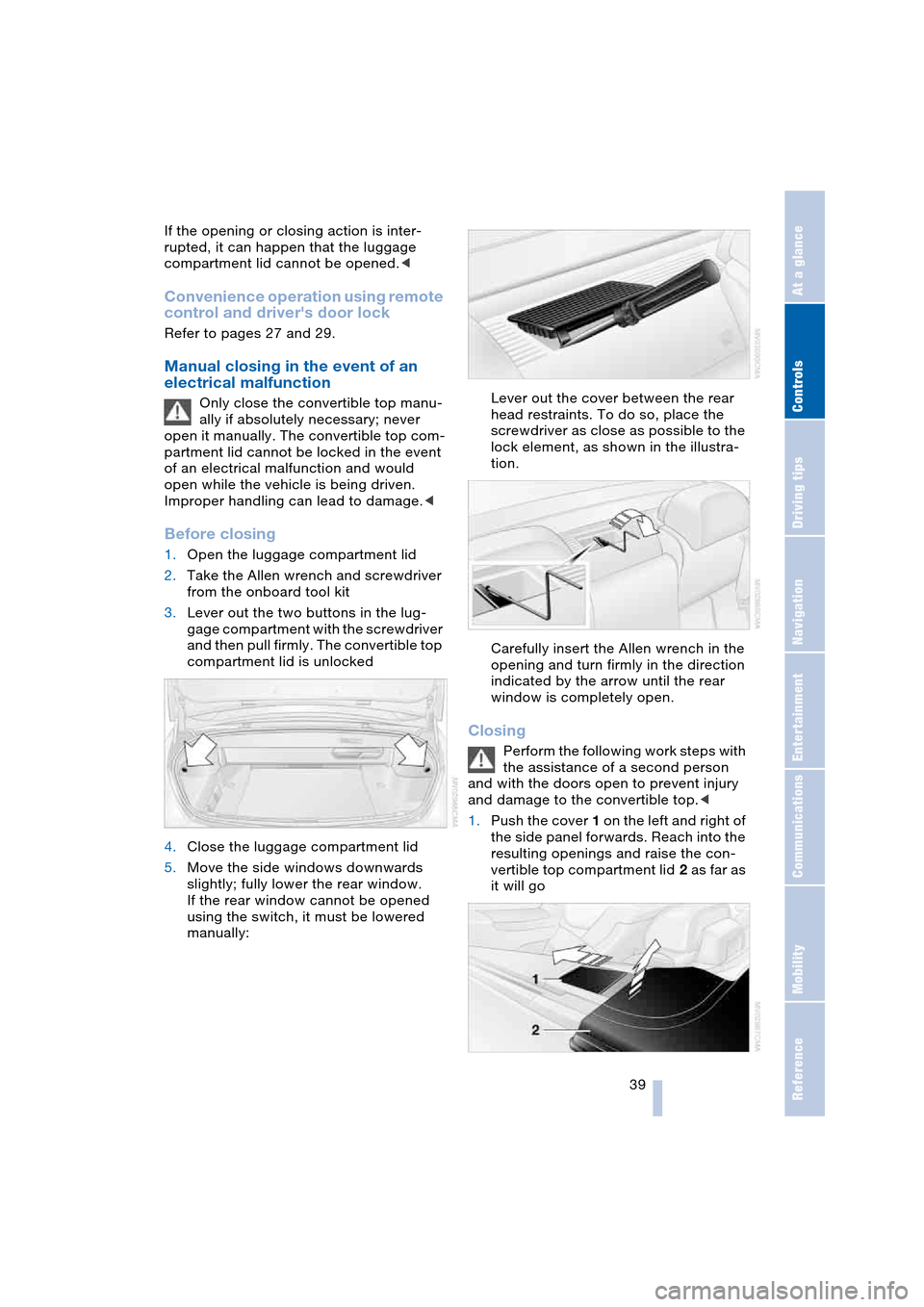
3.Lever out the two buttons in the lug-
gage compartment with the screwdriver
and then pull firmly. The convertible top
compartment lid is unlocked
4.Close the luggage compartment lid
5.Move the side windows downwards
slightly; fully lower the rear window.
If the rear window cannot be opened
using the switch, it must be lowered
manually:Lever out the cover between the rear
head restraints. To do so, place the
screwdriver as close as possible to the
lock element, as shown in the illustra-
tion.
Carefully insert the Allen wrench in the
opening and turn firmly in the direction
indicated by the arrow until the rear
window is completely open.
Closing
Perform the following work steps with
the assistance of a second person
and with the doors open to prevent injury
and damage to the convertible top.<
1.Push the cover 1 on the left and right of
the side panel forwards. Reach into the
resulting openings and raise the con-
vertible top compartment lid 2 as far as
it will go
Page 46 of 216

Adjustments
44
Seat, mirror and steering
wheel memory
You can store and select three different
adjustment settings for the driver's seat,
exterior mirrors and steering wheel.
The adjustment of the lumbar support is not
stored in the memory.
Storing
Ignition key as of position 1:
1.Adjust the desired seat, exterior mirror
and steering-wheel positions
2.Press
MEMORY button:
The indicator lamp in the button lights
up
3.Press the desired memory button 1, 2
or 3:
The indicator lamp goes out.
Calling up automatically
You have two possibilities:
>Calling up on unlocking the vehicle
>Calling up on opening the driver's door.
If you want to call up the last driver's seat,
exterior mirror and steering wheel position,
proceed as follows:
Control Center, for principle details, refer to
page 16:
1.Open the menu
2.Select "Vehicle settings" and press the
controller
3.Select "Door locks" and press the con-
troller
4.Select "Central locking" and press the
controller5.Select "Last seat pos." and press the
controller
6.Select "After unlocking" or "After open-
ing door"
7.Press the controller.
Depending on which key you have used to
open the vehicle, the last adjustment is
applied.
When using this Key Memory feature,
always make sure that the footwell
behind the driver's seat is empty and unob-
structed. If you fail to do so, any persons or
objects behind the seat could be injured or
damaged by a rearward movement of the
seat.<
Calling up manually
Do not call up a position from the
memory while the vehicle is moving.
There is a risk of accident from unexpected
movement of the seat or steering wheel.<
Convenience mode
1.Open the driver's door after unlocking
or turn the ignition key to position 1
2.Briefly press the desired memory but-
ton 1, 2 or 3.
The system immediately cancels the
adjustment procedure when you press one
of the seat adjustment switches or use one
of the memory buttons.
The adjusting procedure for the steering
wheel is immediately interrupted if you
operate the switch for the steering wheel
adjustment in any direction, refer to
page 48.
Page 54 of 216
Transporting children safely
52
Child seat security
All of the rear belt retractors and the front
passenger's safety belt can be locked for
mounting and securing child-restraint sys-
tems.
Information regarding this is located near
the buckle latch of each safety belt.
To lock safety belt
Pull the entire length of the belt from the
belt retractor. Allow the reel to retract the
belt somewhat and engage the buckle,
then tighten the belt against the child-
restraint system. The retraction mechanism
is now locked.
To unlock safety belt
Release the buckle, remove the child-
restraint system and allow the belt retractor
to reel the belt completely in.
Coupe: child-restraint system with
tether strap
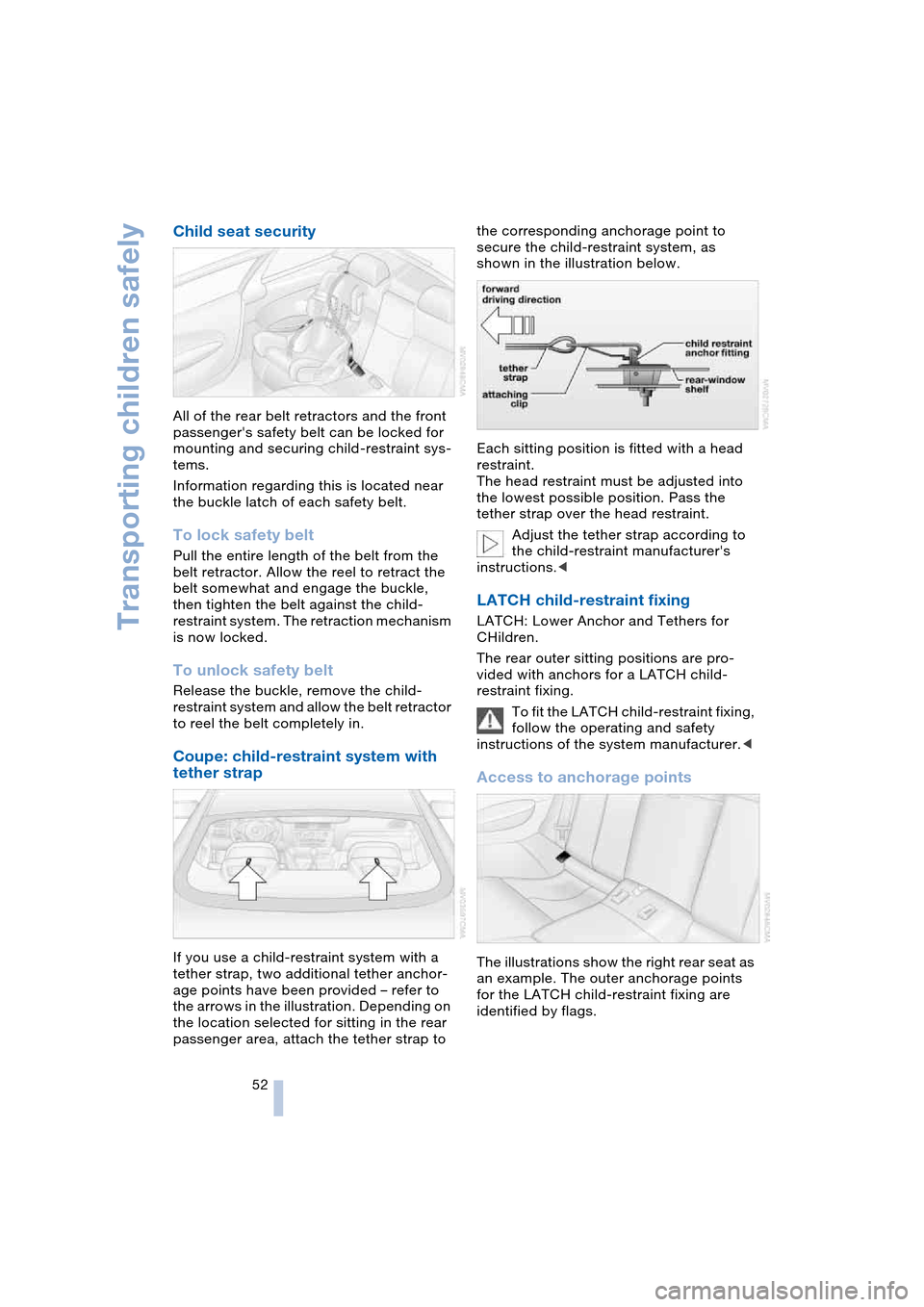
If you use a child-restraint system with a
tether strap, two additional tether anchor-
age points have been provided – refer to
the arrows in the illustration. Depending on
the location selected for sitting in the rear
passenger area, attach the tether strap to the corresponding anchorage point to
secure the child-restraint system, as
shown in the illustration below.
Each sitting position is fitted with a head
restraint.
The head restraint must be adjusted into
the lowest possible position. Pass the
tether strap over the head restraint.
Adjust the tether strap according to
the child-restraint manufacturer's
instructions.<
LATCH child-restraint fixing
LATCH: Lower Anchor and Tethers for
CHildren.
The rear outer sitting positions are pro-
vided with anchors for a LATCH child-
restraint fixing.
To fit the LATCH child-restraint fixing,
follow the operating and safety
instructions of the system manufacturer.<
Access to anchorage points
The illustrations show the right rear seat as
an example. The outer anchorage points
for the LATCH child-restraint fixing are
identified by flags.
Page 56 of 216

Driving
54
Driving
Ignition lock
0 Steering locked
The key can only be inserted or removed in
this position.
After removing the key, turn the steering
wheel slightly until it locks.
Interlock on automatic transmission
>Only move the selector lever from
position P with the engine running
>To turn the key back to position 0 or to
remove it, first select the selector lever
position P.
1 Steering unlocked
A slight steering wheel movement often
makes it easier to turn the key from 0 to 1.
Individual current consumers are ready for
operation.
2 Ignition switched on
All vehicle systems are ready for operation.
3 Start engine
Starting engine
Do not run the engine in closed
rooms, as otherwise the inhaling of
toxic exhaust gases can cause uncon-
sciousness and death. The exhaust gases
contain carbon monoxide, an odorless and
colorless, but highly toxic gas.Never leave an unattended vehicle with the
engine running, as such a vehicle repre-
sents a potential safety hazard.
To prevent the vehicle from rolling, always
select idle position or position N and apply
the handbrake before leaving the vehicle
with the engine running.<
When starting the engine, do not press the
accelerator pedal.
Do not allow the engine to warm up by
leaving it running while the vehicle remains
stationary. Instead, begin to drive immedi-
ately at a moderate engine speed.
Special starting conditions
Press the accelerator pedal halfway down
when starting if
>the engine fails to start on the first
attempt, for instance, if it is very hot or
cold
>the engine is started at very low tem-
peratures, below approx. + 57/–156,
at high altitudes, over 3,300 ft/1,000 m.
Avoid frequent starting in quick suc-
cession or repeated start attempts in
which the engine does not start. Otherwise,
the fuel is not burned or inadequately
burned and there is a danger of overheat-
ing and damaging the catalytic converter.<
Manual transmission
1.Apply the handbrake
2.Gearshift lever in idle position
3.Press the clutch pedal
If the clutch pedal is not
depressed, the engine will not
start.<
4.Start the engine.
Do not terminate the starting operation
too early, but after approx. 20 seconds
at the latest. When the engine starts, let
go of the ignition key immediately.
Page 148 of 216

Telephoning
146
Hands-free system
Coupe:
Convertible:
The hands-free microphone is located near
the interior rearview mirror or on the steer-
ing column.
The hands-free system is activated when-
ever you establish or receive a call using:
>The button on the steering wheel
>The Control Center
>Voice control.
Volume adjustment
Turn the button during a call to select the
desired volume.This volume for the hands-free system is
maintained, even if the other audio sources
are set to minimum volume.
Depending on which key you have used to
open the vehicle, the last adjustment is
applied.
Operation using Control
Center
The following functions can be used via the
Control Center as soon as the BMW porta-
ble phone has been laid in the cradle:
>Entering unlock code
>Dialing a phone number
>Phone book
>Top 8
>Redialing
>Displaying accepted calls
>Displaying missed calls
>Text messages/SMS.
Control Center, for principle details, refer to
page 16:
1.Press button.
The start menu is opened
2.Move the controller forwards to open
"Communication".
Page 149 of 216
147
Entertainment
Reference
At a glance
Controls
Driving tips Communications
Navigation
Mobility
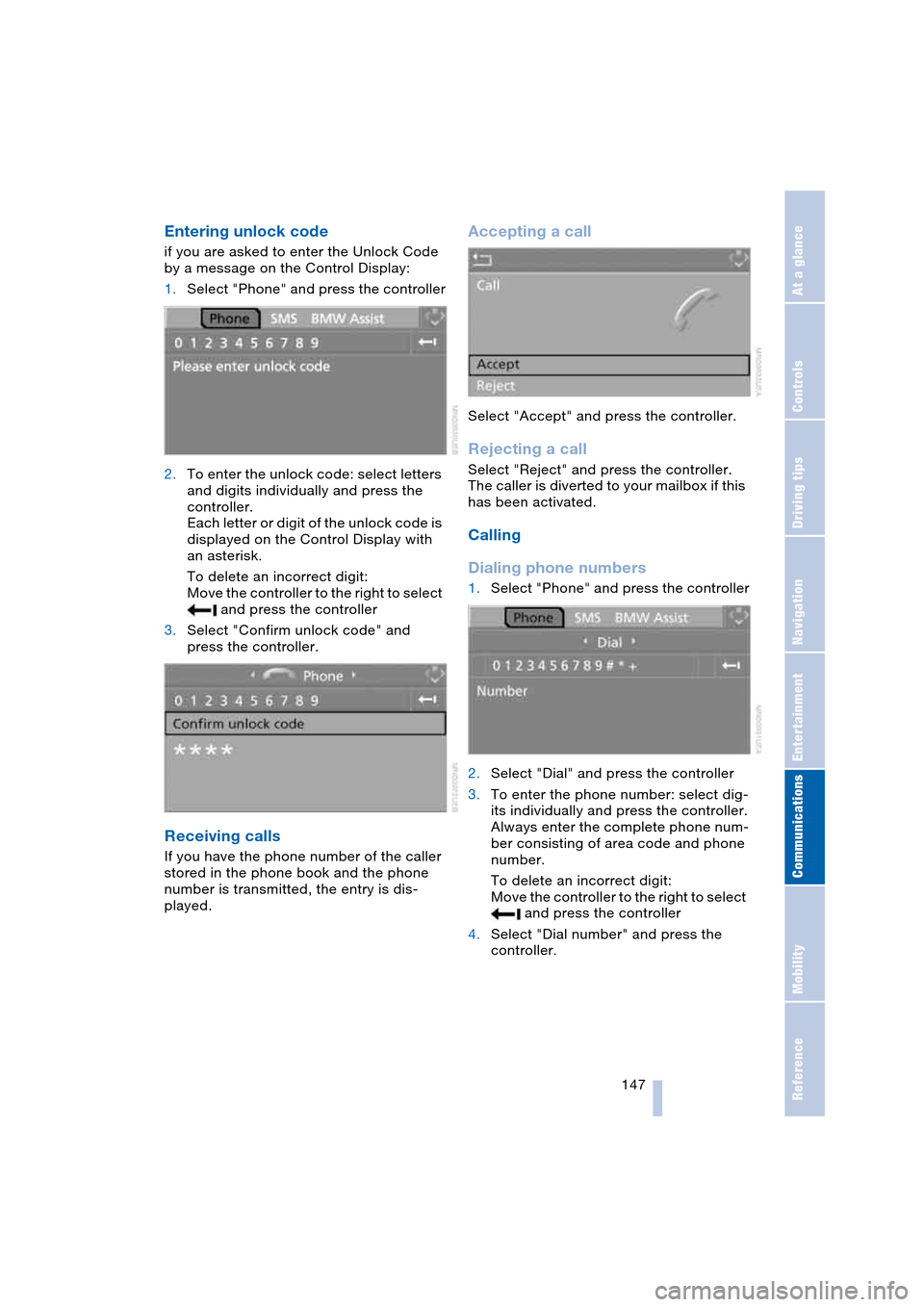
Entering unlock code
if you are asked to enter the Unlock Code
by a message on the Control Display:
1.Select "Phone" and press the controller
2.To enter the unlock code: select letters
and digits individually and press the
controller.
Each letter or digit of the unlock code is
displayed on the Control Display with
an asterisk.
To delete an incorrect digit:
Move the controller to the right to select
and press the controller
3.Select "Confirm unlock code" and
press the controller.
Receiving calls
If you have the phone number of the caller
stored in the phone book and the phone
number is transmitted, the entry is dis-
played.
Accepting a call
Select "Accept" and press the controller.
Rejecting a call
Select "Reject" and press the controller.
The caller is diverted to your mailbox if this
has been activated.
Calling
Dialing phone numbers
1.Select "Phone" and press the controller
2.Select "Dial" and press the controller
3.To enter the phone number: select dig-
its individually and press the controller.
Always enter the complete phone num-
ber consisting of area code and phone
number.
To delete an incorrect digit:
Move the controller to the right to select
and press the controller
4.Select "Dial number" and press the
controller.
Page 154 of 216

Telephoning
152
An example: dialing a phone number
Start the dialog:
Briefly press the button on the steering
wheel.
Volume adjustment
You can adjust the volume for the instruc-
tions from the system:
Turn the button during an instruction to
select the desired volume.
This volume for the instructions is main-
tained, even if the other audio sources are
set to minimum volume.
Depending on which key you have used to
open the vehicle, the last adjustment is
applied.
First steps
Entering unlock code
You can protect your BMW portable phone
against misuse with a four-digit unlock
code.
Correcting unlock code
After the sequence of digits has been
repeated by the system, the unlock code
can be corrected.
Deleting unlock code
Canceling operation
Calling
Dialing a phone number
Voice commandResponse
{Dial number}{{Please say the number}}
e.g. {123 456 7890}{{123 456 7890. Continue?}}
{Dial}{{Dialing number}}
1.{Input unlock code}.
The dialog for entering the unlock
code is started
2.Speak unlock code
3.{Send unlock code}.
1.{Correct number}.
The block of digits is deleted
2.Speak the new unlock code on
request
3.{Send unlock code}.
{Delete number}.
{Cancel}.
1.{Dial number}.
The dialog for establishing a tele-
phone connection is called up
2.Say the phone number.
For telephone calls abroad, say
{Plus} and then the country code
3.{Dial}.
The connection to the desired sub-
scriber is established.
Page 199 of 216

197Reference
At a glance
Controls
Driving tips
Communications
Navigation
Entertainment
Mobility
Everything from A to Z
Index
"..." Indicates texts on the
Control Display for the
selection of functions,
pointing out where these
are located.
A
ABS Antilock Brake
System 76
– malfunction 78
– warning lamp 13, 78
Acceleration assistant with
SMG 60
Accessories, refer to
Your individual vehicle 5
Activated-charcoal filter 92
"Activation time" for
independent
ventilation 93
Activation times 93
– entering 93
Active roll stabilization 78
Active steering 80
– initializing the system 80
– warning lamp 13, 80
Adapting the temperature
in the upper body
region 91
Adaptive brake lamps, refer
to Brake Force Display 80
Adaptive Head Light 86
"Add digits" for portable
phone 149
"Address book" for
navigation 114
Address for navigation
– deleting 115
– entering 110
– selecting 115
– storing current
location 114
"Add to destination
list" 111Adjusting the temperature
with automatic climate
control 89
Adjusting the thigh
support 43
"After opening door" 44
"After unlocking" 44
Airbags 81
– deactivating, Coupe 51
– indicator lamp 82
– sitting safely 42
Air distribution
– automatic 89
– manual 90
Airing, refer to
Ventilation 92
Air recirculation, refer to
Automatic recirculated-
air control 89
"Air recirculation on /
off" 49
Air vents, refer to
Ventilation 88
Air volume 89
AKI, refer to Fuel
specifications 163
Alarm system 32
– avoiding unintentional
alarms 33
– interior motion sensor 33
– switching off alarm 32
– switching off tilt alarm
sensor and interior
motion sensor 33
– tilt alarm sensor 33
All around the center
console 14
All around the steering
wheel 10
"All channels" 135
"All doors" 27
All-season tires, refer to
Winter tires 169
Altering stretch of road 120"AM", reception
range 127, 130
Antenna for portable
phone 144
Antifreeze
– coolant 172
– washer fluid 62
Antilock Brake System,
ABS 76
Anti-theft alarm system,
refer to Alarm system 32
Anti-theft system 27
Anti-trapping mechanism
– glass roof 36
– power windows 35
Approved axle loads, refer
to Weights 190
Approved gross vehicle
weight, refer to
Weights 190
Armrest, refer to
Center armrest 96
Arrival time, refer to
Computer 70
Arrival time, refer to
Starting destination
guidance 118
"Arrow display" 119
Ashtray 97
Assistance systems, refer
to Driving stability control
systems 76
Assistance window 19
AUC Automatic recircu-
lated-air control 89
"Audio" 128
Audio 126
– adjusting the tone 127
– controls 126
– switching on/off 126
– volume 127