2004 BMW 645CI COUPE CD player
[x] Cancel search: CD playerPage 140 of 216
CD player and CD changer
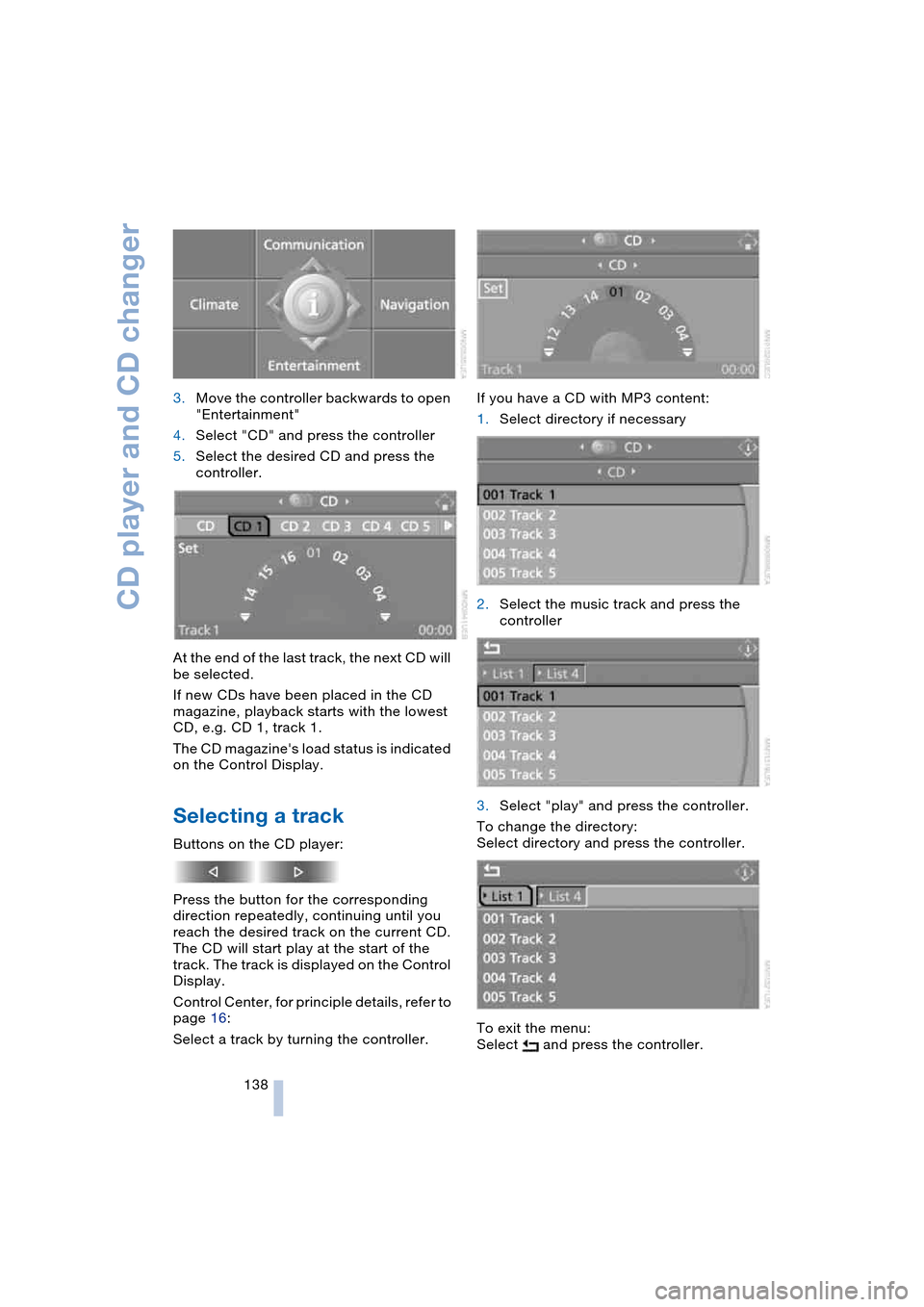
138 3.Move the controller backwards to open
"Entertainment"
4.Select "CD" and press the controller
5.Select the desired CD and press the
controller.
At the end of the last track, the next CD will
be selected.
If new CDs have been placed in the CD
magazine, playback starts with the lowest
CD, e.g. CD 1, track 1.
The CD magazine's load status is indicated
on the Control Display.
Selecting a track
Buttons on the CD player:
Press the button for the corresponding
direction repeatedly, continuing until you
reach the desired track on the current CD.
The CD will start play at the start of the
track. The track is displayed on the Control
Display.
Control Center, for principle details, refer to
page 16:
Select a track by turning the controller.If you have a CD with MP3 content:
1.Select directory if necessary
2.Select the music track and press the
controller
3.Select "play" and press the controller.
To change the directory:
Select directory and press the controller.
To exit the menu:
Select and press the controller.
Page 142 of 216
CD player and CD changer
140
Random play sequence
In this mode, the music tracks on the cur-
rent CD are played once in a random
sequence.
Control Center, for principle details, refer to
page 16:
1.Select "Set" and press the controller.
Other menu items are displayed
2.Select "Random" and press the control-
ler.
To stop the random mode:
Press the controller, select "Random" and
press the controller.
If you have a CD with MP3 content:
1.Select the current music track and
press the controller
2.Select "random directory" and press
the controller.
In this mode, the music tracks in the current
directory are played once in a random
sequence.
To stop the random mode:
Press the controller, select "random direc-
tory" and press the controller.
Fast forward/reverse
Buttons on the CD player:
Press and hold the button for the corre-
sponding direction.
The tracks can be heard, but the sound is
distorted.
CD magazine
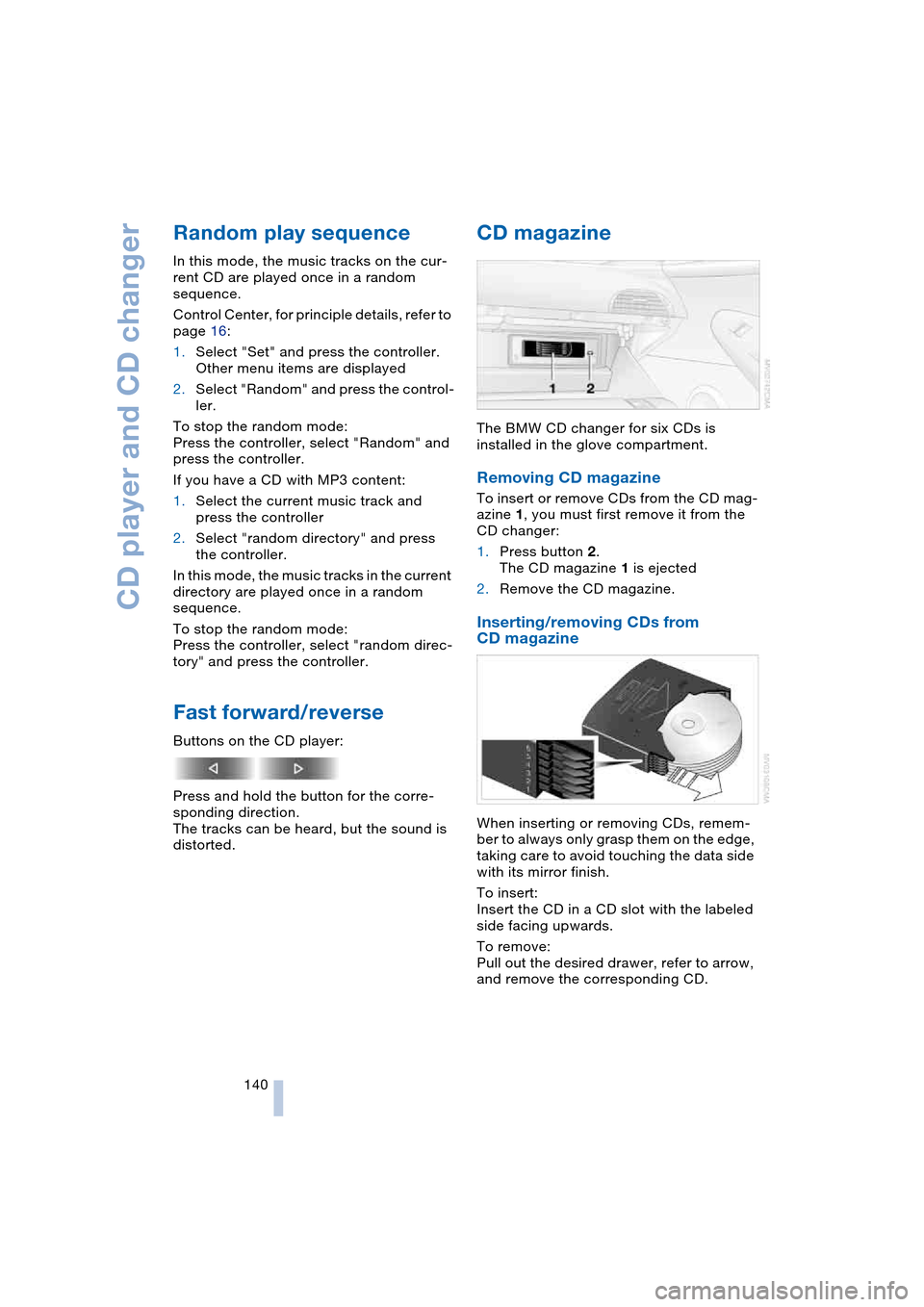
The BMW CD changer for six CDs is
installed in the glove compartment.
Removing CD magazine
To insert or remove CDs from the CD mag-
azine 1, you must first remove it from the
CD changer:
1.Press button 2.
The CD magazine 1 is ejected
2.Remove the CD magazine.
Inserting/removing CDs from
CD magazine
When inserting or removing CDs, remem-
ber to always only grasp them on the edge,
taking care to avoid touching the data side
with its mirror finish.
To insert:
Insert the CD in a CD slot with the labeled
side facing upwards.
To remove:
Pull out the desired drawer, refer to arrow,
and remove the corresponding CD.
Page 201 of 216

Reference 199
At a glance
Controls
Driving tips
Communications
Navigation
Entertainment
Mobility
C
California laws
– Event Data
Recorders 176
– Proposition 65
Warning 176
"Call" 148
Call
– accepting 147
– display accepted 149
– ending 148
– in absence 149
– starting 147
Calling
– from phone book 148
– from the Top 8 list 149
– redialing 149
– refer to telephone
Owner's Manual 96
"Call sender" 151
Can holder, refer to
Cup holders 97
Capacities 193
Car battery, refer to
Battery 181
Car care, refer to the Caring
for your vehicle brochure
Car-care products, refer to
the Caring for your
vehicle brochure
"Car data" 69
Care 175
Cargo, securing 105
Caring for artificial leather,
refer to the Caring for
your vehicle brochure
Caring for leather, refer to
the Caring for your
vehicle brochure
Caring for light-alloy
wheels, refer to the
Caring for your vehicle
brochure'
Caring for plastic, refer to
the Caring for your
vehicle brochure
Caring for the carpet, refer
to the Caring for your
vehicle brochureCaring for the vehicle finish,
refer to the Caring for
your vehicle brochure'
Car jacking points 181
Car keys, refer to
Key set 26
Car phone 145
– location, refer to
Center armrest 96
– refer to
Portable phone 144
– refer to separate
Owner's Manual
Car radio, refer to
Radio 130
Car wash 102
– also refer to the Caring for
your vehicle brochure
Catalytic converter, refer to
Exhaust system 102
"Categories" 135
CBC Cornering Brake
Control 76
CBS Condition Based
Service 174
"CD" 127, 137
CD changer 137
– adjusting the tone 127
– controls 126
– fast forward/reverse 140
– installation location 140
– playing a track 139
– random play
sequence 140
– repeating a track 139
– selecting a CD 137
– selecting a track 138
– switching on/off 126
– volume 127
CD player 137
– adjusting the tone 127
– controls 126
– fast forward/reverse 140
– playing a track 139
– random play
sequence 140
– repeating a track 139
– selecting a track 138
– switching on/off 126
– volume 127Center armrest
– adjusting the height 96
– front 96
Center console 14
"Central locking" 27
Central locking system 26
– from inside vehicle 29
Changes, technical, refer to
For your own safety 6
Changing a wheel 181
Changing the language on
Control Display 73
Changing the
measurement units on the
Control Display 72
Changing wheels 181
CHECK button 68
Check Control 66
"Check Control
messages" 68
Check Gas Cap 162
Checking the air pressure,
refer to Tire inflation
pressure 164
Child's seats, refer to
Child-restraint
systems 52
Child-restraint system 51
Chrome parts, care, refer
to the Caring for your
vehicle brochure
Cigarette lighter 97
Cleaning, refer to the
Caring for your vehicle
brochure
Cleaning windshield, refer
to Wiper system 61
"Climate" 90
"Climate control" 91
Clock 64
– 12/24 hour mode 73
– setting time and date 73
Closing
– from inside 29
– from outside 27
Clothes hooks, Coupe 96
Cockpit 10
Cold start, refer to
Starting the engine 54
"Communication" 146
Page 202 of 216

Everything from A to Z
200 "Communication
interface" 155
Compact disc
– refer to CD changer 137
– refer to CD player 137
Computer 69
– clock, 12/24 hour
mode 73
– displays on Control
Display 69
– hour signal 73
"Concert hall" 128
Condition Based Service,
CBS 174
"Confirmation" 28
Confirmation signals for
locking and unlocking 28
"Confirm unlock code" 147
Connecting a vacuum
cleaner
– refer to Lighter socket 97
– refer to Power socket 97
Consumption display, refer
to Average fuel
consumption 69
"Continue guidance to
dest.?" 119
Control Center 16
– adjusting the
brightness 72
– assistance window 19
– automatic climate
control 90
– changing settings 18, 72
– changing the menu
page 18
– confirming selection or
entry 18
– controller 16
– display, menus 16
– language selection 73
– menu guidance 17
– menu item selection 18
– operating elements 16
– selecting units of
measurement and display
format 72
– setting time and date 73
– start menu 17
– status information 19
– symbols 17Control Display 16
Controller, refer to
Control Center 16
Controls, refer to
Cockpit 10
Convenience operation
– convertible top 27, 29
– glass roof 27, 29
– windows 27, 29
Convenience start, refer to
Starting engine 54, 55
Convertible program for
automatic climate
control 91
Convertible top 37
– care, refer to the Caring
for your vehicle brochure
– convenience operation 29
– emergency closing 39
– manual closing in the
event of an electrical
malfunction 39
– opening and closing 38
Coolant 172
– level 172
Cooling, maximum 89
Cornering Brake Control,
CBC 76
Country of destination for
navigation 110
Courtesy lamps 87
Cruise control 62
Cruising range 69
Cup holders 97
Curb weight, refer to
Weights 190
"Current position" 109
Current position
– displaying 109
– entering 114
– storing 114
"Customer Relations" 157
Cylinders, refer to
Engine data 190
D
Dashboard, refer to
Cockpit 10
Data 190
– capacities 193
– dimensions 191
– engine 190
– weights 190
"Date" 74
Date 64
– setting 74
"Date format" 74
Daytime driving lamps 85
DBC Dynamic Brake
Control 78
Deactivating front
passenger airbag,
Coupe 51
Decommissioning the
vehicle, refer to the
Caring for your vehicle
brochure
Defect
– convertible top 39
– door lock 29
– fuel filler door 162
– glass roof 36
– luggage compartment
lid 30, 31
– SMG Sequential manual
transmission 58
Defrosting windows 89
Defrosting windows and
removing
condensation 89
Defrosting windshield, refer
to Defrosting windows 89
Defrost position, refer to
Defrosting windows 89
"Delete address book" for
navigation 116
"Delete address" for
navigation 115
"Delete all numbers" for
portable phone 150
"Delete data" for
navigation 116
"Delete" for portable
phone 149
Page 203 of 216
Reference 201
At a glance
Controls
Driving tips
Communications
Navigation
Entertainment
Mobility
Destination address
– deleting 115
– entering 110
Destination for navigation
– destination list 113
– entry 110
– selecting from address
book 115
– selecting using
information 113
– storing 114
Destination guidance 118
– bypassing route
sections 120
– canceling voice
instructions 50
– changing specified
route 116
– displaying route 119
– distance and arrival 118
– interrupting 118
– starting 118
– terminating/
continuing 118
– voice instructions 119
– volume of voice
instructions 119
Destination list 113
Destinations recently
driven to 113
"Dial" for portable
phone 147
"Dial number" 147
Digital clock 64
Dimensions
– Convertible 192
– Coupe 191
Dipstick for engine oil 171
Directional indicators, refer
to Turn signals 60
Direction announcements,
refer to Voice
instructions 119
Direction instructions, refer
to Voice instructions 119
Directory, refer to
Phone book 148
Directory for navigation,
refer to Address
book 114
Disc brakes 103Displacement, refer to
Engine data 190
Display, refer to
Control Center 16
"Display off" 19
Displays, refer to
Instrument cluster 12
"Display settings" 72
Displays on the windshield,
refer to Head-Up
Display 83
Disposal, vehicle
battery 181
Distance, refer to
Computer 70
Distance to destination,
refer to Computer 70
Distance warning, refer to
PDC Park Distance
Control 75
"Dist. to destination" 70
Door entry lighting 87
Door keys 26
Door lock 29
"Door locks" 27
Doors
– manual operation 29
– remote control 27
DOT Quality Grades 166
Draft-free ventilation 92
"Driver's door only" 27
Driving lamps, refer to
Parking lamps/
low beams 85
Driving notes 102
Driving route, refer to
Displaying the route 119
Driving stability control
systems 77
Driving through water 103
Driving tips, refer to
Driving notes 102
Drying the air, refer to
Cooling function 89
DSC Dynamic Stability
Control 77
– indicator lamp 13, 77
DTC Dynamic Traction
Control 77
– activating 77
– indicator lamp 13, 77DVD for navigation 108
Dynamic Brake Control,
DBC 78
Dynamic Driving Control 59
"Dynamic route" for
navigation 116
Dynamic Stability Control,
DSC 77
Dynamic Traction Control,
DTC 77
E
Easy Entry, refer to
Entry to the rear 46, 52
EBV Electronic brake-force
distribution 76
"Edit address" for
navigation 115
Eject button, refer to
Buttons on CD player 126
Electrical malfunction
– automatic transmission
with Steptronic 59
– convertible top 39
– door lock 29
– driver's door 29
– fuel filler door 162
– glass roof 36
– luggage compartment
lid 31
– SMG Sequential manual
transmission 58
Electric steering wheel
adjustment 48
Electronic brake-force
distribution, EBV 76
Emergency assistance,
refer to Roadside
Assistance 184
Emergency call 183
Emergency operation, refer
to Manual operation
– convertible top 39
– door lock 29
– driver's door 29
– fuel filler door 162
– glass roof 36
– luggage compartment
lid 30, 31
Page 204 of 216

Everything from A to Z
202 Emergency services, refer
to Roadside
Assistance 184
"Emission inspect." 66
"Enable services" 156
"End call" 148
Engine
– break-in procedure 102
– data 190
– speed 190
– starting 54
– starting difficulties 54
– switching off 55
Engine compartment 171
Engine coolant 172
Engine hood 170
Engine oil
– checking the oil level 171
– specified engine oils 172
– temperature 65
– temperature gauge 65
– topping up 172
Engine output, refer to
Engine data 190
Engine speed, refer to
Engine specifications 190
Engine starting, refer to
Starting engine 54
"Enter address" for
navigation 110
Entering activation times of
independent ventilation/
heating 93
Entering destination 111
Entering the address 110
Entering the
intersection 111
Entering the town/city for
navigation 111
Entering zip code for
navigation 111
"Entertainment" 127
"Entertainment
settings" 127
Entry map for
destination 112
Entry to the rear 46
"Equalizer", refer to
Adjusting the tone 129
"ESN" 134ESP Electronic Stability
Program, refer to DSC
Dynamic Stability
Control 77
Exhaust system 102
Exterior mirrors 48
– automatic dimming
feature 48
– automatic heating 48
Eye for towing, refer to
Tow fitting 186
F
Fader, refer to
Adjusting the tone 128
Failure messages, refer to
Check Control 66
False alarms, refer to
Avoiding unintentional
alarms 33
False alarms with Flat Tire
Monitor 79
Fastening safety belts, refer
to Safety belts 47
Fastest route for
navigation 116
"Fast route" for
navigation 116
First aid, refer to
First-aid kit 184
First-aid kit 184
First-aid pouch, refer to
First-aid kit 184
Flashing on locking/
unlocking 28
Flashlight, refer to
Rechargeable
flashlight 95
Flat tire
– Flat Tire Monitor 79
– run-flat tires 80, 168
Flat Tire Monitor 79
– false alarms 79
– initializing the system 79
– limits of system 79
– malfunction 80
– warning lamp 80
Flooding, refer to
Water on roads 103"FM", reception
range 127, 130
FM, waveband 130
Fog lamps 86
– indicator lamp 86
Folding up the convertible
top compartment floor,
convertible 32
Footwell lamps 87
Forward, fast
– CD changer 140
– CD player 140
For your own safety 6
Front airbags 81
Front head restraints 45
Front seat adjustment 43
"FTM" 79
Fuel
– average consumption 69
– display 65
– fuel specifications 163
– high-quality brands 163
– quality 163
– tank capacity 162
Fuel display, refer to
Fuel gauge 65
Fuel filler door 162
– releasing in the event of
an electrical
malfunction 162
Fuel gauge 65
Fuel specifications 163
Fuses 182
G
Garage-door opener, refer
to Integrated universal
remote control 94
Gasoline
– refer to Fuel
specifications 163
– refer to Required fuel 163
Gasoline display, refer to
Fuel gauge 65
Gear changes
– automatic transmission
with Steptronic 58
– SMG Sequential manual
transmission 57
Page 209 of 216

Reference 207
At a glance
Controls
Driving tips
Communications
Navigation
Entertainment
Mobility
Random play
– CD changer 140
– CD player 140
Reading lamps 87
Rear lamps, refer to
Tail lamps 180
Rearview mirror 48
Rear window defroster 89
"Received calls" 149
Receiving level of portable
phone, refer to Status
information 19
Reception
– quality 133
– radio stations 133
– regional station 132
Rechargeable flashlight 95
Recirculated-air mode,
refer to AUC Automatic
recirculated-air
control 89
Recirculation of air, refer to
AUC Automatic recircu-
lated-air control 89
Reclining seat, refer to
Backrest 43
Recording times, refer to
Stopwatch 72
"Redial" for portable
phone 149
Redialing with portable
phone 149
Refueling 162
Releasing, engine
hood 170
"Relock door if not
opened" 29
Remaining distance
– refer to Computer 70
– refer to Cruising range 69
Remote control 26
– garage-door opener 94
– luggage compartment
lid 28
– malfunctions 28
"Repeat" in audio
mode 139
"repeat track" in audio
mode 139
Replacement fuses 182Replacement of tires,
changing a wheel 181
Replacing bulbs, refer to
Lamps and bulbs 178
Replacing wheels/tires 168
Reporting an accident,
refer to Initiating an
emergency call 183
Reporting safety defects 7
Reserve warning, refer to
Fuel gauge 65
"Reset"
– for stopwatch 72
– in audio mode 129
Residual heat mode 90
Restraint systems
– for children 51
– refer to Safety belts 47
Retreaded tires 168
Reverse, fast
– CD changer 140
– CD player 140
Reverse gear
– automatic transmission
with Steptronic 59
– manual transmission 56
– SMG Sequential manual
transmission 57
Road map 120
"Roadside Assistance" 157
Roadside Assistance 184
Roadside parking lamps 86
"Roaming" 158
Rollover protection system
on Convertible 82
– lowering 82
Rope, refer to Towing and
tow-starting 185
Rotary pushbutton, refer to
Control Center 16
Route
– bypassing sections 120
– changing 116, 120
– display 120
– displaying map 120
– displaying the arrow
view 119
– list 120
– selecting 116
– selecting criteria 116"Route list" for
navigation 120
Route map 119
"Route preference" 116
Route selection 116
Run-flat tires 168
– continuing driving with a
damaged tire 168
– flat tire 80
– tire inflation
pressure 164, 168
– tire replacement 168, 169
– winter tires 169
S
Safety belts 47
– damage 47
– sitting safely 42
– warning lamp 47
Safety belt tensioners, refer
to Safety belts 47
Safety systems
– ABS Antilock Brake
System 76
– airbags 81
– DSC Dynamic Stability
Control 77
– rollover protection
system, convertible 82
– safety belts 47
Satellite radio 133
– activating 134
– selecting channel 134
– storing channel 134
"SAT" on the radio 134
"Scan"
– playing stations 131
– playing tracks 139
Scan
– CD changer 139
– CD player 139
– radio 131
"scan directory" in audio
mode 139
Screen, refer to
Control Center 16
"Screen on / off" 49
Screw-on valve caps 181
Page 211 of 216

Reference 209
At a glance
Controls
Driving tips
Communications
Navigation
Entertainment
Mobility
Starting difficulties
– jump-starting 184
– refer to Starting engine 54
Starting engine 54
Start menu 17
"Start route guidance" 112
"Start service" 157
"State / Province" for desti-
nation entry 110
"State inspection" 66
Station, refer to Radio 130
"Status" 65
Status of this Owner's
Manual at time of
printing 5
Steering wheel 11
– adjustment 48
– automatic adjustment 49
– buttons on steering
wheel 11
– heating 49
– individual button
assignment options 49
– memory 44
"Steering wheel
buttons" 49
Steering with variable ratio,
refer to Active steering 80
Steptronic, refer to
Automatic transmission
with Steptronic 58
"Stop" for stopwatch 72
"Stopwatch" 72
Stopwatch 72
Storage compartments 96
"Store in address book" for
navigation 114
"Store" on the
radio 132, 135
Storing current
position 114
Storing sitting position,
refer to Seat, mirror and
steering wheel
memory 44
Storing tires 169
Straps, refer to
Loading 105
"Street" for destination
entry 111Stroke, refer to
Engine data 190
Summer tires, refer to
Wheels and tires 164
SW, waveband 130
Switches, refer to
Cockpit 10
Switching navigation voice
instructions on/off 119
Switching off
– engine 55
– interior motion sensor 33
– tilt alarm sensor 33
Switching on
– audio 126
– CD changer 126
– CD player 126
– portable phone 145
– radio 126
Switching on hour signal 73
Switching the cooling
function on and off 89
Swiveling headlamps, refer
to Adaptive Head Light 86
Symbols 4
T
Tachometer 64
Tail lamps 180
– replacing the bulbs 180
Tank capacity, refer to
Fuel tank capacity 162
Target cursor for
navigation 112
Technical changes, refer to
For your own safety 6
Technical data 190
Telematic 155
Telephone
– refer to Portable
phone 144
– refer to separate
Owner's Manual
TeleService 155
– enabling 155
– services offered 156
Temperature
adjustment 89Temperature display
– ice warning 64
– outside temperature 64
– setting measurement
units 64
Temperature gauge,
engine oil 65
Tempomat, refer to
Cruise control 62
"Terminate services" 158
"Text language" 73
The individual vehicle 5
Tilt function, passenger-
side mirror 45
"Time" 73
"Time 1" for independent
ventilation 93
"Time 2" for independent
ventilation 93
"Time format" 73
Timer, refer to Preselecting
activation time 93
Tire pressure monitoring,
refer to Flat Tire
Monitor 79
Tire Quality Grading 166
Tires
– age 166
– air loss 80
– break-in procedure 102
– changing 168
– condition 167
– damage 167
– flat 168
– inflation pressure 164
– new wheels and tires 168
– pressure monitoring, refer
to Flat Tire Monitor 79
– replacing 168
– retreaded tires 168
– run-flat tires 168
– size 168
– tread 167
– wear indicators 167
– wheel/tire
combination 168
– winter tires 169
"Tone" 128
Tone in audio mode
– adjusting 127
– middle setting 129