Page 201 of 242
2003 VOLVO XC90
2 0 0 3
VOLVO XC90
Audio
pg. 159 Audio
Audio system160
Audio system controls161
Audio functions164
Radio functions168
Menu settings and selections174
CD player175
CD changer (option)177
CD player179
HomeLink® Universal Transceiver180
pg. 160 Audio
Audio system
file:///K|/ownersdocs/2003/2003_XC90/03xc90_11a.htm (1 of 17)12/30/200\
6 4:19:06 PM
Page 202 of 242
2003 VOLVO XC90
1. On/Off
2. Volume
3. CD player
4. AM/FM - for switching between FM1, FM2 and AM
5. Display
6. ENTER - select in the menu or activate a selection
7. MY KEY - programmable key for your favorite function
8. SELECTOR - select sound source
9. SOUND - make sound settings
10. EXIT/CLEAR - step back in the menu or cancel a selection
11. Menu selections
12. CD eject
13. CD player, CD changer (option)
14. MY KEY - programmable keys for your favorite functions
15. Station preset buttons/CD changer discs (1-6)
16. Infrared (IR) port - for the optional audio/navigation system remo\
te control
17. Seek/change tracks or stations
pg. 161 Audio
Audio system controls
file:///K|/ownersdocs/2003/2003_XC90/03xc90_11a.htm (2 of 17)12/30/200\
6 4:19:06 PM
Page 205 of 242

2003 VOLVO XC90
for 3.5 mm contacts and are located under the lower edge of the socket.
All headphones are automatically turned off when the ignition is switche\
d off. They must be manually
restarted when the ignition is switched on again.
Headphones - limitations
l The headphones will only work when the ignition key is in position I or \
higher.
l If a set of headphones is connected to the same source that is being sen\
t through the speakers, the
headphone controls cannot be used to change track or station. This is to\
prevent the driver from being
distracted by an unexpected change in music.
l If the driver selects the same sound source as someone listening to this\
source through headphones,
the driver takes control of the sound source.
l Only one disc in the optional CD changer, and one track on the CD can be\
played at a time.
l Headphone users can choose from among the preset radio stations (AM, FM\
1, FM2) previously set by
the driver.
l If FM is played in the speakers, AM is not available and vice versa.
pg. 163 Audio
Remote control (option)
1. Memory - stores radio stations that have been found by a search
To store a station: - Press the memory button (1). The preset station number will flash 4\
times in the
display
- While the preset number is flashing, use the + or - buttons (5) to s\
elect a position at which to store the
station
- Press button 1 again to store the station
file:///K|/ownersdocs/2003/2003_XC90/03xc90_11a.htm (5 of 17)12/30/200\
6 4:19:06 PM
Page 206 of 242
2003 VOLVO XC90
2. Volume
3. Forward/back - fast forward or back
4. Source - step between sound sources
5. Preset/disc - selects among CD's (in the optional CD changer) or pr\
eset radio stations
6. Auto store - searches for and stores the strongest radio stations
7. Not in use
8. Not in use
9. Power - off/on
Point the remote control toward the IR port on the radio panel (see the\
illustration on
page 160).
NOTE: If the remote control does not function properly, check the batteries (\
AAA or R03).
pg. 164 Audio
Audio functions
On/Off button
To activate the system:
1. Turn the ignition key to position I.
2. Press the POWER button (1) to switch the audio system on or off.
NOTE: If you switch off the ignition while the audio system is on, the system \
will be on when the
ignition is switched on again.
file:///K|/ownersdocs/2003/2003_XC90/03xc90_11a.htm (6 of 17)12/30/200\
6 4:19:06 PM
Page 207 of 242
 clockwise or counterclockwise to raise or lower the \
volume. The volume control is
electronic and has no end position. Volume can also be raised (+")
2003 VOLVO XC90
Volume control
Turn the knob (2) clockwise or counterclockwise to raise or lower the \
volume. The volume control is
electronic and has no end position. Volume can also be raised (+) or l\
owered (-) using the optional
steering wheel keypad.
Pause mode
If the volume is turned off, the CD player will go into pause mode. Re-a\
ctivate the player by turning up
the volume.
Selecting a sound source
A sound source can be selected either with the the function buttons (3)\
- CD, AM/FM, or with the
SELECTOR control (4). To select a sound source:
l Turn the SELECTOR control to choose FM1, FM2, AM, CD, CD changer (optio\
n)
l Press the AM/FM button repeatedly to choose between FM1, FM2, AM
l Press the CD button to change to the CD player or optional CD changer
The selected sound source will be shown in the display.
pg. 165 Audio
Sound settings
1. Press the SOUND button (1) repeatedly until you come to the setting\
that you wish to change. Choose
BASS, TREBLE, FADER, BALANCE, SUBWOOFER (option), CENTER (option) or\
SURROUND
(option).
2. Use the SELECTOR control (2) to adjust the level of the setting you\
have selected. The display shows
a scale from min. to max. position. The center indicates the normal posi\
tion.
file:///K|/ownersdocs/2003/2003_XC90/03xc90_11a.htm (7 of 17)12/30/200\
6 4:19:06 PM
Page 219 of 242
2003 VOLVO XC90
CD (single disc)
1. RANDOM*
2. SCAN*
3. AUDIO SETTINGS*
3.1. SURROUND MODE* (option)
3.1.1. Pro Logic II (default)
3.1.2. 3CH
3.1.3. OFF
3.2. SUBWOOFER* (option)
3.3. EQ FRONT (option)
3.4. EQ REAR (option)
3.5. RESET ALL
CDX (CD changer - option)
1. RANDOM*
1.1. OFF
1.2. SINGLE DISC
1.3. ALL DISCS
2. SCAN*
3. DISC TEXT
4. AUDIO SETTINGS*
4.1. SURROUND MODE* (option)
4.1.1. Pro Logic II (default)
4.1.2. 3CH
4.1.3. OFF
4.2. SUBWOOFER* (option)
4.3. EQ FRONT (option)
4.4. EQ REAR (option)
4.5. RESET ALL
* These functions can be programmed with MY KEY (see
page 169).
pg. 175 Audio
CD player
file:///K|/ownersdocs/2003/2003_XC90/03xc90_11b.htm (2 of 11)12/30/200\
6 4:19:07 PM
Page 221 of 242
2003 VOLVO XC90
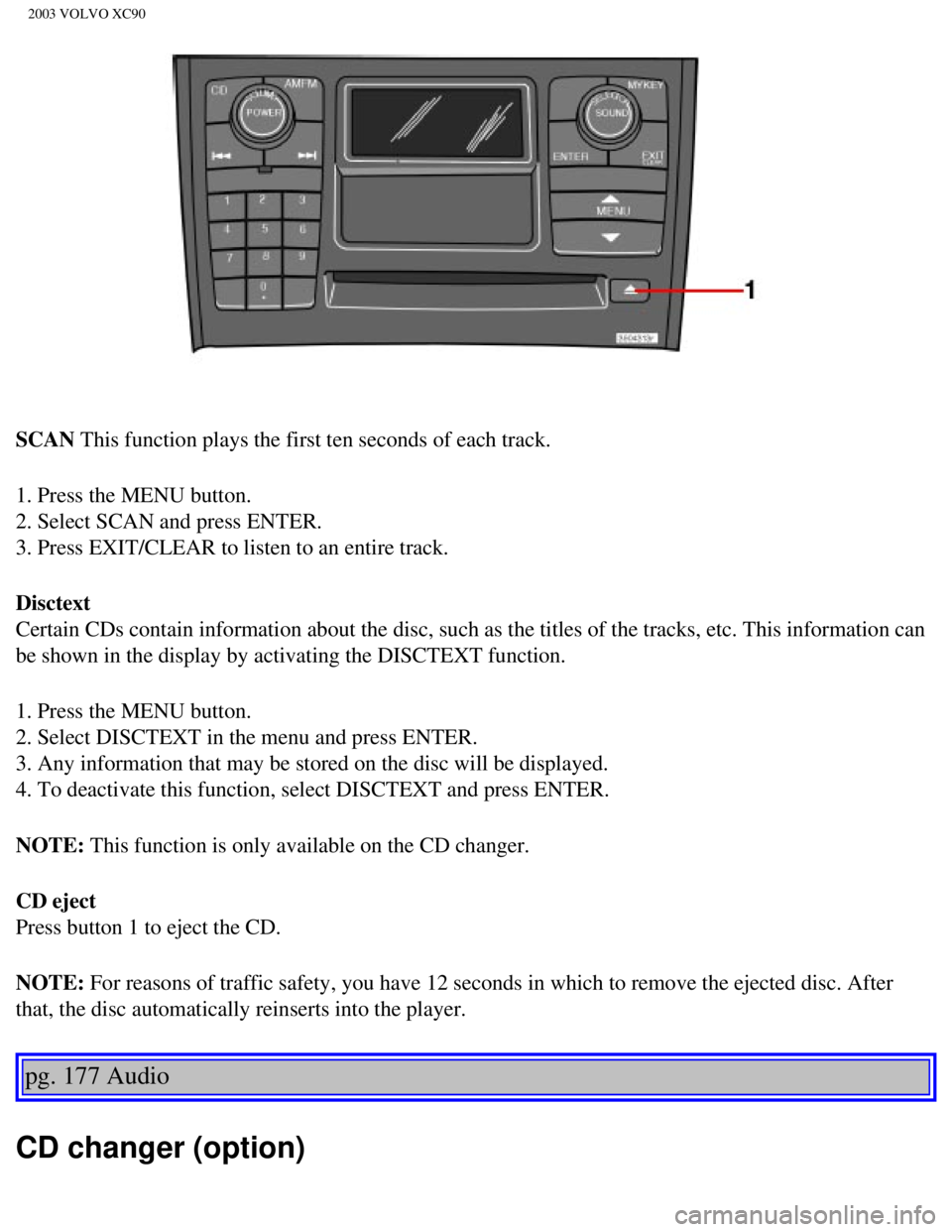
SCAN This function plays the first ten seconds of each track.
1. Press the MENU button.
2. Select SCAN and press ENTER.
3. Press EXIT/CLEAR to listen to an entire track.
Disctext
Certain CDs contain information about the disc, such as the titles of th\
e tracks, etc. This information can
be shown in the display by activating the DISCTEXT function.
1. Press the MENU button.
2. Select DISCTEXT in the menu and press ENTER.
3. Any information that may be stored on the disc will be displayed.
4. To deactivate this function, select DISCTEXT and press ENTER.
NOTE: This function is only available on the CD changer.
CD eject
Press button 1 to eject the CD.
NOTE: For reasons of traffic safety, you have 12 seconds in which to remove th\
e ejected disc. After
that, the disc automatically reinserts into the player.
pg. 177 Audio
CD changer (option)
file:///K|/ownersdocs/2003/2003_XC90/03xc90_11b.htm (4 of 11)12/30/200\
6 4:19:07 PM
Page 222 of 242

2003 VOLVO XC90
CD changer (option)
The CD changer can hold up to six discs.
1. Choose CD mode using the SELECTOR control or the CD button.
2. Select an empty slot with the number keys 1-6 (1). The display indi\
cates which slots are empty.
3. Insert a disc into the changer.
To insert a new disc, you must first select an available empty slot in t\
he CD changer. Make sure
INSERT DISC is displayed before inserting a new disc.
Selecting disc number
Use the station setting buttons 1-6 (1) to select which disc is to be \
played. The number of the disc and
the track are shown in the display.
SCAN
This function plays the first ten seconds of each track and only functio\
ns on the currently selected disc.
1. Press the MENU button.
2. Select SCAN and press ENTER.
Press EXIT/CLEAR to listen to an entire track.
Changing tracks
Press
to go to the next track or to go to the previous track. The track number is shown in
the display. If you have a keypad in the steering wheel, you can use the\
arrow keys in the same way.
Searching within a track
file:///K|/ownersdocs/2003/2003_XC90/03xc90_11b.htm (5 of 11)12/30/200\
6 4:19:07 PM


 or pr\
eset radio stations")